Sponsored

Upgrading to Sync 3.4

torque124

Torque
Joined
Aug 13, 2016
Threads
66
Messages
1,500
Reaction score
778
Location
MA
Vehicle(s)
Shelby GT350R
Vehicle Showcase
1
all this Ford maps bullshit is pushing me slowly to get the cyanlabs update.... I wanted to be a good citizen and pay some money.... as I never buy anything from Ford... bought car second hand, always self service, etc. But this is pushing me to the dark side again... I paid them the 100 bucks for the last maps update, does that count ??
Sponsored

 

matthewr87

Well-Known Member
Joined
Oct 13, 2013
Threads
80
Messages
1,203
Reaction score
1,646
Location
Maryland
Vehicle(s)
2018 GT350
Check your Sync info screen. What version do you currently have?
I have Sync 3.0. I do not remember the rest of the version number, but it definitely says 3.0 and not 3.3.
OK, so forget about 3.3 unless you swap out the very expensive APIM. Not worth it. You can do the unofficial update to 3.4 but you will kiss your warranty on any Sync 3 issue goodbye. The latest version is 19205 as you already know. The 1.17 is your map version which is a separate download from Sync 3. You can get that update from the link mentioned above. You should get the first upgrade download for free.
Yeah that's what I figured. I just saw these rumors that mid-2018s and later can get 3.3 officially so I was wondering if anyone has actually seen that because it seems that my late-2018 cannot.
 

Bikeman315

Well-Known Member
Joined
Apr 12, 2015
Threads
581
Messages
16,183
Reaction score
21,909
Location
Myrtle Beach, SC
First Name
Ira
Vehicle(s)
2019 Mustang GT/CS, 2021 Volvo XC60
I have Sync 3.0. I do not remember the rest of the version number, but it definitely says 3.0 and not 3.3.


Yeah that's what I figured. I just saw these rumors that mid-2018s and later can get 3.3 officially so I was wondering if anyone has actually seen that because it seems that my late-2018 cannot.
It wasn’t a rumor, the APIM was changed during 2018 production. Unfortunately someone picked up an old one for you car.
 

Bikeman315

Well-Known Member
Joined
Apr 12, 2015
Threads
581
Messages
16,183
Reaction score
21,909
Location
Myrtle Beach, SC
First Name
Ira
Vehicle(s)
2019 Mustang GT/CS, 2021 Volvo XC60
all this Ford maps bullshit is pushing me slowly to get the cyanlabs update.... I wanted to be a good citizen and pay some money.... as I never buy anything from Ford... bought car second hand, always self service, etc. But this is pushing me to the dark side again... I paid them the 100 bucks for the last maps update, does that count ??
So long as you have no warranty concerns go for it. Just follow the direction to a “t” and go slow. There are a numbers of members who have done it successfully and will be willing to assist you, if needed.
 

Bit_the_Bullitt

Well-Known Member
Joined
Apr 22, 2020
Threads
12
Messages
1,270
Reaction score
1,281
Location
Ohio, US
First Name
Richard
Vehicle(s)
2019 Bullitt
Yes. I still have the logo...everything. some things I have seen.

1. If you have people pics by their name, it shows on screen now in a call.
2. Nice blue screen for night mode.
3. Scroll ribbon bar for stations. So no more 3 bar, you just swipe left or right and you can put 18 stations up on the bar.
4. Cleaner font.
5. More phone options ? It seems so.
6. Background changes, you can change the colours.
7. Text for the music cleaner.

Some more stuff, bu this is what I noticed most.
To me, aside from possibly Android Auto in the cluster, your #3 is the biggest difference. Baffled me to have only 6 at a time showing and can't scroll to the next 6? Oversight in my opinion.
I'm running 3.3 on my Bullitt, might have to try this...
 

Sponsored

Vlad Soare

Well-Known Member
Joined
Jan 21, 2020
Threads
67
Messages
3,643
Reaction score
4,464
Location
Bucharest, Romania
First Name
Vlad
Vehicle(s)
2020 Mustang GT 6MT
What I don't like about the 3.4 user interface and makes me wish I hadn't upgraded from 3.0 is that the map is smaller. The main screen banner and the map footer (where the name of the street you're currently driving on is displayed) are noticeably taller than they used to be, which makes the map smaller. It's most noticeable on the home screen (which is where it bothers me most), but also in the full-screen view of the map.
And the red arrow signifying your car on the map is absolutely ginormous. What's the point of that?

On the plus side, now it's possible to see the ETA and remaining number of miles to destination at the same time, which in 3.0 wasn't possible.
On the minus side, they've implemented this by adding yet another banner, which makes the overall usable surface of the map even smaller - as if it wasn't small enough already.
 

Bit_the_Bullitt

Well-Known Member
Joined
Apr 22, 2020
Threads
12
Messages
1,270
Reaction score
1,281
Location
Ohio, US
First Name
Richard
Vehicle(s)
2019 Bullitt
What I don't like about the 3.4 user interface and makes me wish I hadn't upgraded from 3.0 is that the map is smaller. The main screen banner and the map footer (where the name of the street you're currently driving on is displayed) are noticeably taller than they used to be, which makes the map smaller. It's most noticeable on the home screen (which is where it bothers me most), but also in the full-screen view of the map.
And the red arrow signifying your car on the map is absolutely ginormous. What's the point of that?

On the plus side, now it's possible to see the ETA and remaining number of miles to destination at the same time, which in 3.0 wasn't possible.
On the minus side, they've implemented this by adding yet another banner, which makes the overall usable surface of the map even smaller - as if it wasn't small enough already.
The bigger the arrow, the more accurate the location, duh! :)
So you went from 3.0 to 3.4? I got a 3.3 in my Bullitt, not sure if I want to do it, but the upgrades look good and it'd be nice to ditch the 5yo look of the dash for something a little newer. I miss my head unit from my '18 Accord, boy that was a snappy one.
Ford knows engines, etc., but jesus their units are trash.
 

Vlad Soare

Well-Known Member
Joined
Jan 21, 2020
Threads
67
Messages
3,643
Reaction score
4,464
Location
Bucharest, Romania
First Name
Vlad
Vehicle(s)
2020 Mustang GT 6MT
The bigger the arrow, the more accurate the location, duh! :)
Yup. You can choose yourself on which street you'd like to be. It's good to have options. :D

I switched from 3.0 to 3.4 using the Cyanlabs files and procedure. The interface is nice, and a bit more modern-looking than 3.0, but somehow the bright blue button bar, as well as the entirely blue night theme, looks a bit out of place in my opinion. I find the more subdued light grey buttons and the black night theme in 3.0 more elegant. But that's just a matter of taste. There's nothing inherently wrong with either of them. I don't regret having done the upgrade.
 

Bikeman315

Well-Known Member
Joined
Apr 12, 2015
Threads
581
Messages
16,183
Reaction score
21,909
Location
Myrtle Beach, SC
First Name
Ira
Vehicle(s)
2019 Mustang GT/CS, 2021 Volvo XC60
The bigger the arrow, the more accurate the location, duh! :)
So you went from 3.0 to 3.4? I got a 3.3 in my Bullitt, not sure if I want to do it, but the upgrades look good and it'd be nice to ditch the 5yo look of the dash for something a little newer. I miss my head unit from my '18 Accord, boy that was a snappy one.
Ford knows engines, etc., but jesus their units are trash.
Hi Richard. Just so you know Sync3 by Blackberry has been one of the highest rated automotive systems over the past 5 years. It is basically bulletproof (no pun intended). If you want a newer look than you might want to wait until the S650 in 2022. You could also buy one of those Tesla lookalike systems for your current dash.

Honesty in day to day driving the 3.3 to 3.4 differences are minimal. Just keep in mind that if you do the update you can pretty much kiss your warranty goodbye for "anything" pertaining to the Sync3 system. That can be pretty costly for one of our cars.

Do I want 3.4? As a techie, yes. As a Ford owner with a warranty, no way in heck.
 

StangTime

Well-Known Member
Joined
Apr 16, 2019
Threads
81
Messages
3,594
Reaction score
4,091
Location
Ontario 🇨🇦
First Name
Todd
Vehicle(s)
19' GT PP1 Manual
What I don't like about the 3.4 user interface and makes me wish I hadn't upgraded from 3.0 is that the map is smaller. The main screen banner and the map footer (where the name of the street you're currently driving on is displayed) are noticeably taller than they used to be, which makes the map smaller.
If I remember correctly, you can tap on the map with one finger and the banners disappear. I know because I thought the map looked too small as well. Give it a try.
 

Sponsored

lenFeb

Well-Known Member
Joined
Dec 31, 2019
Threads
30
Messages
956
Reaction score
846
Location
USofA
First Name
Len
Vehicle(s)
2019 Shelby GT350 #K0110
Downloaded updated maps as of 6/29/20. Today installation failed with error code PKG_ERR03 which is not listed in trouble shooting paragraph of they instruction. But I kind of new it will happen. I noticed that license file name on the download is different from one on the instruction, though can be older instruction with a new maps update, who knows. So, I called them and they said will send a link with new download, no cost. Nothing's easy :frown:
 

Bit_the_Bullitt

Well-Known Member
Joined
Apr 22, 2020
Threads
12
Messages
1,270
Reaction score
1,281
Location
Ohio, US
First Name
Richard
Vehicle(s)
2019 Bullitt
Hi Richard. Just so you know Sync3 by Blackberry has been one of the highest rated automotive systems over the past 5 years. It is basically bulletproof (no pun intended). If you want a newer look than you might want to wait until the S650 in 2022. You could also buy one of those Tesla lookalike systems for your current dash.

Honesty in day to day driving the 3.3 to 3.4 differences are minimal. Just keep in mind that if you do the update you can pretty much kiss your warranty goodbye for "anything" pertaining to the Sync3 system. That can be pretty costly for one of our cars.

Do I want 3.4? As a techie, yes. As a Ford owner with a warranty, no way in heck.
Yeah, the warranty piece just scares me. I've had some bugs on my Bullitt recently where all buttons and screen are unresponsive, except for the volume knob (all other buttons including steering wheel don't work).
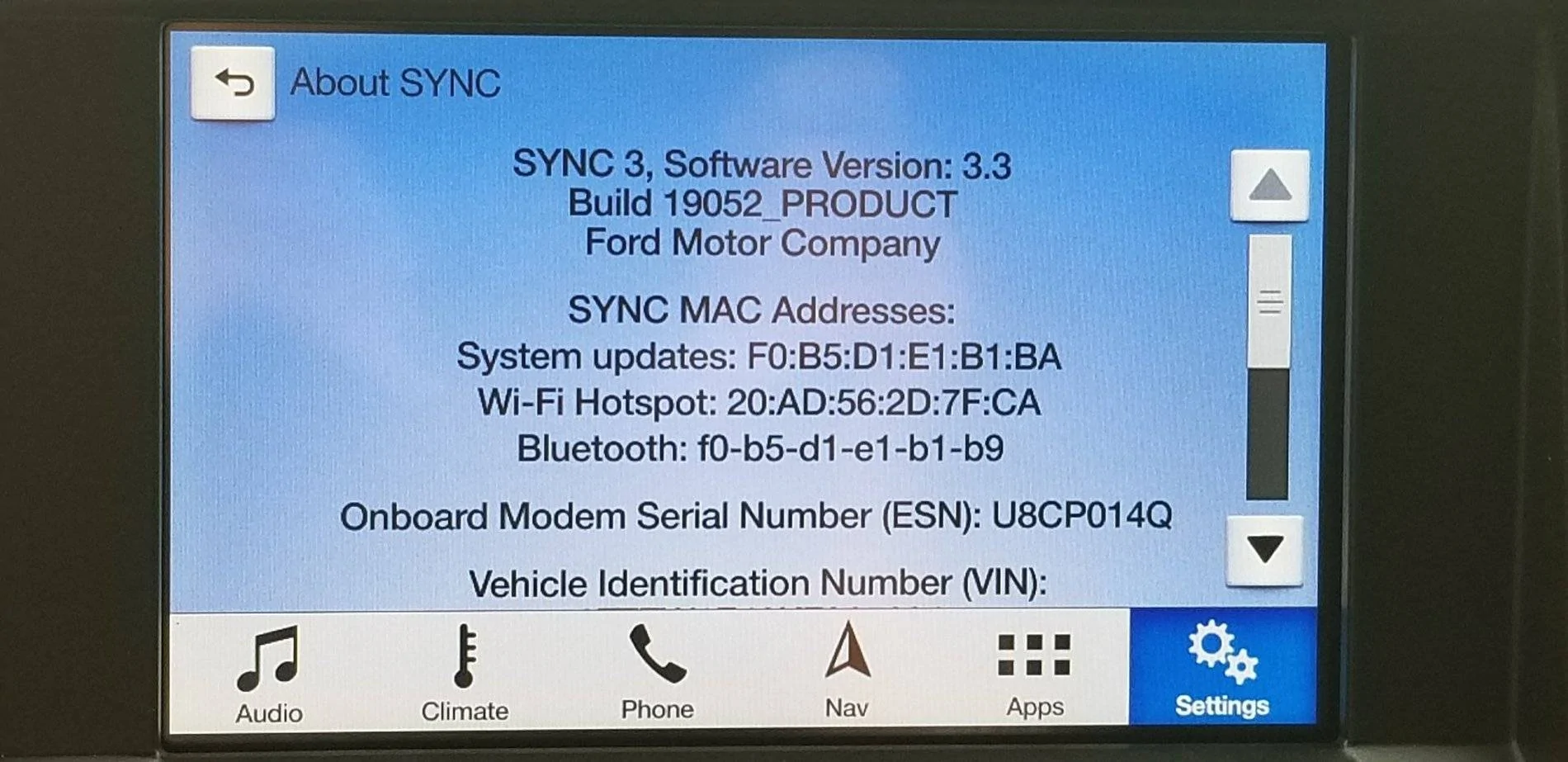
I just took a picture of my screen, mine is SYNC 3.3, build 18351.
I logged into the map thing and got the free map update, but now it says in my download bar "Sync32.zip." I hope I didn't burn my free download on a 3.2 SYNC if I already have 3.3? Or is this just the map stuff? My maps are NA 1 17...
 

Bikeman315

Well-Known Member
Joined
Apr 12, 2015
Threads
581
Messages
16,183
Reaction score
21,909
Location
Myrtle Beach, SC
First Name
Ira
Vehicle(s)
2019 Mustang GT/CS, 2021 Volvo XC60
Yeah, the warranty piece just scares me. I've had some bugs on my Bullitt recently where all buttons and screen are unresponsive, except for the volume knob (all other buttons including steering wheel don't work).
I just took a picture of my screen, mine is SYNC 3.3, build 18351.
I logged into the map thing and got the free map update, but now it says in my download bar "Sync32.zip." I hope I didn't burn my free download on a 3.2 SYNC if I already have 3.3? Or is this just the map stuff? My maps are NA 1 17...
Don't worry it's a map file.

But you do need to update your Sync 3 build. Current build # is 19052. Get it on Ford Owner. These updates are all free.

20190409_090525_d9a7333e012623db4bfed114616fbf3310fa38cc.webp
 

Bit_the_Bullitt

Well-Known Member
Joined
Apr 22, 2020
Threads
12
Messages
1,270
Reaction score
1,281
Location
Ohio, US
First Name
Richard
Vehicle(s)
2019 Bullitt
Don't worry it's a map file.

But you do need to update your Sync 3 build. Current build # is 19052. Get it on Ford Owner. These updates are all free.

20190409_090525_d9a7333e012623db4bfed114616fbf3310fa38cc.webp
I figured it's a map file, but you know how it is, you start reading forums and get overwhelmed with info. :)
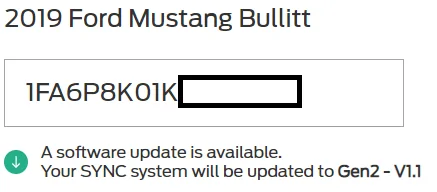
Is this an okay file? That's what came up for my VIN, but not sure why it says "gen2" or "v1.1" when the version I have is 3.3. So many versions and builds and generations...
2020_06_30_16_36_20_Ford_Support_Update_Your_SYNC_System.webp
 

Bikeman315

Well-Known Member
Joined
Apr 12, 2015
Threads
581
Messages
16,183
Reaction score
21,909
Location
Myrtle Beach, SC
First Name
Ira
Vehicle(s)
2019 Mustang GT/CS, 2021 Volvo XC60
I figured it's a map file, but you know how it is, you start reading forums and get overwhelmed with info. :)
Is this an okay file? That's what came up for my VIN, but not sure why it says "gen2" or "v1.1" when the version I have is 3.3. So many versions and builds and generations...
2020_06_30_16_36_20_Ford_Support_Update_Your_SYNC_System.webp
OK, I’m not sure what this is so let’s see if someone else knows. If not call Ford.
Sponsored


Top