Official Ford Sync3 3.4 Release

Bit_the_Bullitt

Well-Known Member
Joined
Apr 22, 2020
Threads
12
Messages
1,270
Reaction score
1,281
Location
Ohio, US
First Name
Richard
Vehicle(s)
2019 Bullitt
I've tried wi-fi updates before but always had issues; for the last couple I've just downloaded to a thumb drive and gone for a drive. Has the wi-fi update process been upgraded, or do you still have to have the car running in the driveway for the duration?

I don't do my updates over wifi anyway, but correct me if I'm wrong, the USB-drive update still requires the car to be running anyway? It usually takes 30-60min.
 

Vlad Soare

Well-Known Member
Joined
Jan 21, 2020
Threads
67
Messages
3,643
Reaction score
4,464
Location
Bucharest, Romania
First Name
Vlad
Vehicle(s)
2020 Mustang GT 6MT
I don't do my updates over wifi anyway, but correct me if I'm wrong, the USB-drive update still requires the car to be running anyway? It usually takes 30-60min.
Technically speaking, it only requires accessory power. But, given the small, barely adequate battery of a Mustang, I wouldn't do it like that. Besides, I could always use an excuse to drive it more. "Honey, I must go for a drive now, to update the maps. I'm sorry, but that's how it works, it's not my fault". 😁
 
Last edited:

RagmopInKona

Banned
Banned
Banned
Joined
May 4, 2022
Threads
39
Messages
1,939
Reaction score
1,716
Location
CEO
Vehicle(s)
2020 Mustang HHP
How does one do the flash drive/ thumb drive thing.
Please reply in the context of updating for dummies if there was a book form.
dummy.jpg


I have a '19 and '21 truck and mu Stang that need maps/everything updated. All are as delivered. And many exit numbers and locations are wrong.
 

Bullitt0819

Well-Known Member
Joined
Jan 15, 2019
Threads
28
Messages
569
Reaction score
262
Location
Modesto, CA
First Name
Bob
Vehicle(s)
2019 Bullitt Mustang
I don't do my updates over wifi anyway, but correct me if I'm wrong, the USB-drive update still requires the car to be running anyway? It usually takes 30-60min.
I believe that is correct. However, I prefer to not let my car idle in wi-fi range for 45min or so; I can usually think of someplace to drive to.

Wi-fi does take a bit of juice, but why a 600cranking amp--or so; don't know the Ah offhand--battery can't handle the upgrade baffles me (prob. more things powered-up in acc. mode than just wi-fi).
 

Bit_the_Bullitt

Well-Known Member
Joined
Apr 22, 2020
Threads
12
Messages
1,270
Reaction score
1,281
Location
Ohio, US
First Name
Richard
Vehicle(s)
2019 Bullitt
Technically speaking, it only requires accessory power. But, given the small, barely adequate battery of a Mustang, I wouldn't do it like that. Besides, I could always use an excuse to drive it more. "Honey, I must go for a drive now, to update the maps. I'm sorry, but that's how it works, it's not my fault". 😁
"B*tch please, we both know you use Android Auto exclusively." :crackup:
 

Vlad Soare

Well-Known Member
Joined
Jan 21, 2020
Threads
67
Messages
3,643
Reaction score
4,464
Location
Bucharest, Romania
First Name
Vlad
Vehicle(s)
2020 Mustang GT 6MT
How does one do the flash drive/ thumb drive thing.
Please reply in the context of updating for dummies if there was a book form.

dummy.webp


I have a '19 and '21 truck and mu Stang that need maps/everything updated. All are as delivered. And many exit numbers and locations are wrong.
1. First you need the update package, which is a ZIP file you download either from the Ford web site, or from another internet source.
2. Connect the thumb drive to the computer.
3. If it's a new thumb drive, never used before, then you need to format it as exFAT. Depending on your operating system, the exact instructions on how to do this can vary, but a quick Google search will suffice.
4. If the thumb drive was used before, and it's already formatted as exFAT, then you just need to make sure there's enough free space on it to accommodate the unpacked update package. Typically a software update needs about 2.5 GB, give or take. Maps are bigger, like 25 GB or so.
5. Unpack the aforementioned ZIP file directly into the root folder of the thumb drive. There will be one folder called SyncMyRide, containing one or more (usually more) TAR.GZ files. In the root folder, beside the SyncMyRide subfolder, you will have one file called autoinstall.lst, plus optionally one completely empty one called DONTINDX.MSA.
6. Insert the thumb drive into one of the USB ports in the car, whichever is more convenient to you. Either one will work. Start the car. After a short amount of time, which can range from a couple of seconds to a few minutes (sometimes even as much as ten), the update will start. Keep driving until it's complete, then follow the instructions. Sometimes it will say it's done and you can remove the USB stick, otherwise it will instruct you to leave the stick there and restart the car for the second part of the update to start. This depends on the update package; not all are the same.
7. If all is well, after the update you'll have a new XML file on the thumb drive, inside the SyncMyRide folder. Go back to the Ford web site and upload this XML file. This will tell Ford that your system is now up to date.

Wi-fi does take a bit of juice, but why a 600cranking amp--or so; don't know the Ah offhand--battery can't handle the upgrade baffles me (prob. more things powered-up in acc. mode than just wi-fi).
Maybe it wouldn't actually deplete the battery. In fact, I'm sure it wouldn't (provided it's full to begin with, and in good shape). But why would you push your luck instead of just using a free excuse to drive the car more? It's much more fun like that. 😁
 
Last edited:

Bullitt0819

Well-Known Member
Joined
Jan 15, 2019
Threads
28
Messages
569
Reaction score
262
Location
Modesto, CA
First Name
Bob
Vehicle(s)
2019 Bullitt Mustang
How does one do the flash drive/ thumb drive thing.
Please reply in the context of updating for dummies if there was a book form.
dummy.webp


I have a '19 and '21 truck and mu Stang that need maps/everything updated. All are as delivered. And many exit numbers and locations are wrong.
Don't feel bad, I was a programmer for over 35 years and still don't always get this right (Ford isn't a software company, regardless of what they say).

Go to: https://www.ford.com/support/how-tos/sync/sync-updates/how-do-i-install-sync-updates-using-a-usb/

One potential gotcha (ask me how I know): They want you to download directly to the thumb drive; i.e. not to your hard drive.

Be sure to follow instructions to the end; an .xml file is created--unique to your car I think--and it has to be uploaded back to Ford so they can keep your update history (nothing nefarious AFAIK, but who knows).
 

Bikeman315

Well-Known Member
Joined
Apr 12, 2015
Threads
581
Messages
16,183
Reaction score
21,909
Location
Myrtle Beach, SC
First Name
Ira
Vehicle(s)
2019 Mustang GT/CS, 2021 Volvo XC60
Don't feel bad, I was a programmer for over 35 years and still don't always get this right (Ford isn't a software company, regardless of what they say).

Go to: https://www.ford.com/support/how-tos/sync/sync-updates/how-do-i-install-sync-updates-using-a-usb/

One potential gotcha (ask me how I know): They want you to download directly to the thumb drive; i.e. not to your hard drive.

Be sure to follow instructions to the end; an .xml file is created--unique to your car I think--and it has to be uploaded back to Ford so they can keep your update history (nothing nefarious AFAIK, but who knows).
There is also a difference in the process for Windows and for a Mac and the downloads for Sync and Nav. Just make sure you are using the right directions. Ask me how I know.

Just FYI here are the latest Sync directions for a Mac.
 

Attachments

StangTime

Well-Known Member
Joined
Apr 16, 2019
Threads
81
Messages
3,594
Reaction score
4,091
Location
Ontario 🇨🇦
First Name
Todd
Vehicle(s)
19' GT PP1 Manual
I've tried wi-fi updates before but always had issues; for the last couple I've just downloaded to a thumb drive and gone for a drive. Has the wi-fi update process been upgraded, or do you still have to have the car running in the driveway for the duration?
You don't need the car running. If you're inside, turn the headlight switch to off. Put the car on a battery tender if you have one. Then tap the start button without starting. Repeat as necessary until the update is done.
 

Bullitt0819

Well-Known Member
Joined
Jan 15, 2019
Threads
28
Messages
569
Reaction score
262
Location
Modesto, CA
First Name
Bob
Vehicle(s)
2019 Bullitt Mustang
You don't need the car running. If you're inside, turn the headlight switch to off. Put the car on a battery tender if you have one. Then tap the start button without starting. Repeat as necessary until the update is done.
Good to know. Thanks.
 

Bikeman315

Well-Known Member
Joined
Apr 12, 2015
Threads
581
Messages
16,183
Reaction score
21,909
Location
Myrtle Beach, SC
First Name
Ira
Vehicle(s)
2019 Mustang GT/CS, 2021 Volvo XC60
You don't need the car running. If you're inside, turn the headlight switch to off. Put the car on a battery tender if you have one. Then tap the start button without starting. Repeat as necessary until the update is done.
Don’t forget this.

0F76F7CE-F1CA-473A-AF50-0B6D926B8F11.webp
 

m3incorp

Well-Known Member
Joined
Feb 6, 2020
Threads
22
Messages
4,603
Reaction score
3,125
Location
Georgia/Colorado
First Name
James
Vehicle(s)
2019 Mustang GT Premium with Roush Phase 2, 2023 Audi A5
To clarify, I allow the sync updates to happen why on WiFi and parked in the garage. The sync updates are much smaller than the Map Updates....also if the sync doesn't complete updating and you need to use the car, it will resume where you left off, when back within WiFi range. I put the car on the battery tender and have it set for a constant 12-volt supply when doing the updates.
For map updates, I only use the USB and let it happen while I am out on a long drive.
 

Bikeman315

Well-Known Member
Joined
Apr 12, 2015
Threads
581
Messages
16,183
Reaction score
21,909
Location
Myrtle Beach, SC
First Name
Ira
Vehicle(s)
2019 Mustang GT/CS, 2021 Volvo XC60
To clarify, I allow the sync updates to happen why on WiFi and parked in the garage. The sync updates are much smaller than the Map Updates....also if the sync doesn't complete updating and you need to use the car, it will resume where you left off, when back within WiFi range. I put the car on the battery tender and have it set for a constant 12-volt supply when doing the updates.
For map updates, I only use the USB and let it happen while I am out on a long drive.
I was always under the impression that the car need not be powered to do a WiFi update. There is nothing in the setup of auto updates that indicates that it does. Can you pease confirm?
 

m3incorp

Well-Known Member
Joined
Feb 6, 2020
Threads
22
Messages
4,603
Reaction score
3,125
Location
Georgia/Colorado
First Name
James
Vehicle(s)
2019 Mustang GT Premium with Roush Phase 2, 2023 Audi A5
The crazy thing is the last two sync updates happened automatically and this, I had to force. I started last night and went to bed after turning the accessory off and disconnecting from the charger, I guess I can walk out and check if it is finished.

I was always under the impression that the car need not be powered to do a WiFi update. There is nothing in the setup of auto updates that indicates that it does. Can you pease confirm?
 

m3incorp

Well-Known Member
Joined
Feb 6, 2020
Threads
22
Messages
4,603
Reaction score
3,125
Location
Georgia/Colorado
First Name
James
Vehicle(s)
2019 Mustang GT Premium with Roush Phase 2, 2023 Audi A5
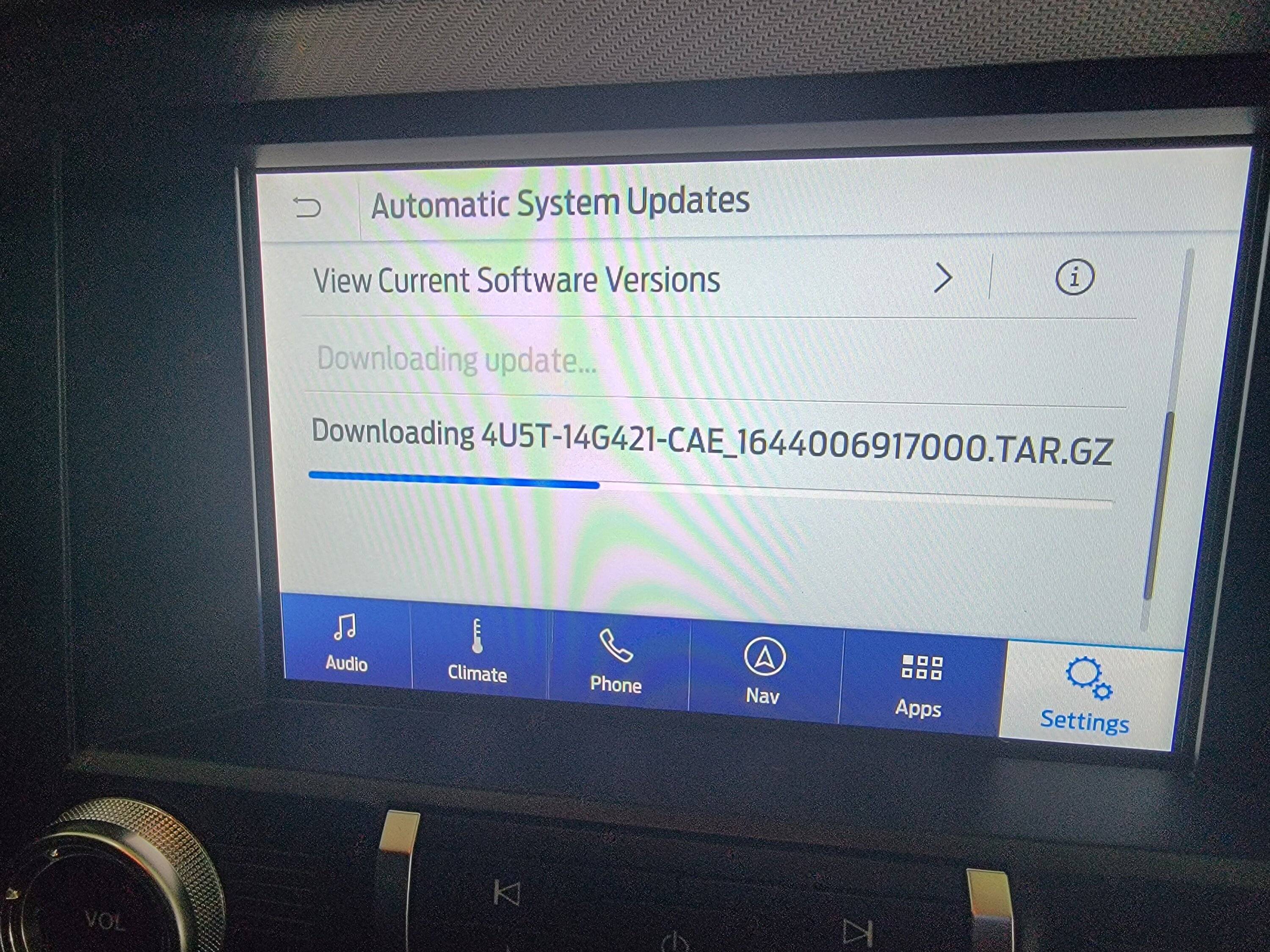
Ok, I just went to the garage to check and after turning on power, this is what I see.... So no it didn't complete the upgrade on it's own via WiFi. This is interesting since the last two sync updates happened automatically over WiFi.

20221107_124622.jpg
 
 
Top