Official Ford Sync3 3.4 Release

Bikeman315

Well-Known Member
Joined
Apr 12, 2015
Threads
581
Messages
16,183
Reaction score
21,909
Location
Myrtle Beach, SC
First Name
Ira
Vehicle(s)
2019 Mustang GT/CS, 2021 Volvo XC60
Maybe not, as it is a Google produced system used in many different vehicles so it may be a lot better (along the lines of Carplay and Android Auto)
Volvo went Google this year. My wife has a 21’ which is fairly decent. My dealer told me that they have had numerous issues with the new system. But it’s new so hopefully they, and Ford, get things straightened away.
 

Buldawg76

Well-Known Member
Joined
Jan 11, 2022
Threads
3
Messages
1,312
Reaction score
1,174
Location
Alabama,USA
First Name
Mike
Vehicle(s)
2020 Ecoboost Premium, 76 FXE shovel, 77 KZ1000
So not only will ford be watching you every move with their telematics system but with sync 4 Google will also be watching you as well.

I do not Google in any way shape or form, it's been removed from all my electronic devices completely. No android at all either since its Google based.

Duckduckgo is the way.

BD
 

StangTime

Well-Known Member
Joined
Apr 16, 2019
Threads
81
Messages
3,594
Reaction score
4,091
Location
Ontario 🇨🇦
First Name
Todd
Vehicle(s)
19' GT PP1 Manual
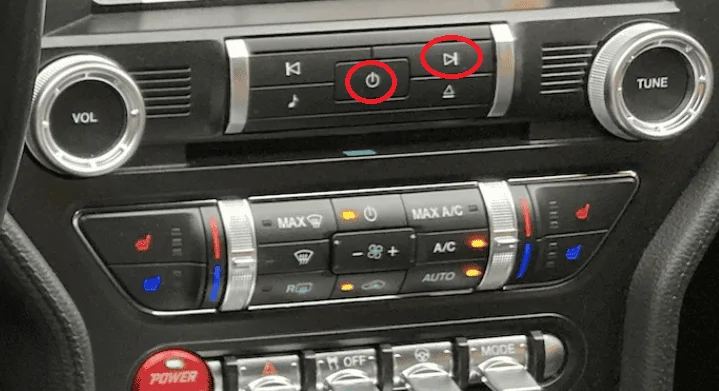
Next time this happens, press the "audio on/off" and "next" buttons at the same time, and hold them down for a few seconds, until Sync restarts. Once it restarts, Android Auto will be back to normal. You can do this on the fly, no need to stop the car or to disconnect the phone.

Untitled.webp
That restarts the system but unfortunately it doesn't fix the issue. Music source stays on radio and Android Auto continues to carry on as if the music is still playing from the phone. I'm at the point where I am not even using AA anymore. I hate this bug.
 

Vlad Soare

Well-Known Member
Joined
Jan 21, 2020
Threads
67
Messages
3,643
Reaction score
4,464
Location
Bucharest, Romania
First Name
Vlad
Vehicle(s)
2020 Mustang GT 6MT
That restarts the system but unfortunately it doesn't fix the issue. Music source stays on radio and Android Auto continues to carry on as if the music is still playing from the phone. I'm at the point where I am not even using AA anymore. I hate this bug.
Oh. I'm sorry to hear that. It works with CarPlay, so I assumed it would work with Android Auto as well. :frown:
 

StangTime

Well-Known Member
Joined
Apr 16, 2019
Threads
81
Messages
3,594
Reaction score
4,091
Location
Ontario 🇨🇦
First Name
Todd
Vehicle(s)
19' GT PP1 Manual
Oh. I'm sorry to hear that. It works with CarPlay, so I assumed it would work with Android Auto as well. :frown:
Thank you. I appreciate the help. 😊
 

wynand32

Well-Known Member
Joined
Oct 3, 2022
Threads
30
Messages
649
Reaction score
693
Location
Los Angeles
First Name
Mark
Vehicle(s)
2022 Mustang GT California Special
So, I updated my Sync and Navi today via USB, and it appears to have worked. However, I don't have an XML file on my USB drive to update the Ford system so it won't keep telling me I have updates available.

Is this something that will eventually resolve or will I need to do something else with the USB drive?
 

Bikeman315

Well-Known Member
Joined
Apr 12, 2015
Threads
581
Messages
16,183
Reaction score
21,909
Location
Myrtle Beach, SC
First Name
Ira
Vehicle(s)
2019 Mustang GT/CS, 2021 Volvo XC60
So, I updated my Sync and Navi today via USB, and it appears to have worked. However, I don't have an XML file on my USB drive to update the Ford system so it won't keep telling me I have updates available.

Is this something that will eventually resolve or will I need to do something else with the USB drive?
Sometimes it’s there, sometimes it’s not. I did mine a couple of weeks and do not remember if I had it or not. The only time it could be a problem is when the next update comes out. If it is a call to Ford will resolve it.
 

wynand32

Well-Known Member
Joined
Oct 3, 2022
Threads
30
Messages
649
Reaction score
693
Location
Los Angeles
First Name
Mark
Vehicle(s)
2022 Mustang GT California Special
Sometimes it’s there, sometimes it’s not. I did mine a couple of weeks and do not remember if I had it or not. The only time it could be a problem is when the next update comes out. If it is a call to Ford will resolve it.
Alrighty, I'll hang tight then. Thanks!
 

Wingnutzz

Well-Known Member
Joined
Mar 6, 2022
Threads
8
Messages
681
Reaction score
1,783
Location
Woodland Park, CO
First Name
David
Vehicle(s)
2022 Mustang EB
I updated Sync3 first a few weeks ago (Nav was not yet allowed for my VIN). The file showing update was there on the USB and I uploaded to Ford Pass web site, but it still has not updated anything on my account.

Sunday the Nav web site accepted my VIN so I downloaded the new maps etc and updated my car. No file written to the USB, so nothing to upload. I’ll give them a yell sometime if my account does not update to reflect that I am current on Sync3 and Nav.
So, I updated my Sync and Navi today via USB, and it appears to have worked. However, I don't have an XML file on my USB drive to update the Ford system so it won't keep telling me I have updates available.

Is this something that will eventually resolve or will I need to do something else with the USB drive?
 

wynand32

Well-Known Member
Joined
Oct 3, 2022
Threads
30
Messages
649
Reaction score
693
Location
Los Angeles
First Name
Mark
Vehicle(s)
2022 Mustang GT California Special
I updated Sync3 first a few weeks ago (Nav was not yet allowed for my VIN). The file showing update was there on the USB and I uploaded to Ford Pass web site, but it still has not updated anything on my account.

Sunday the Nav web site accepted my VIN so I downloaded the new maps etc and updated my car. No file written to the USB, so nothing to upload. I’ll give them a yell sometime if my account does not update to reflect that I am current on Sync3 and Nav.
Actually, that's exactly my scenario. First updated Sync, the uploaded the file (which was there), no change on the web site. Then updated Navi, no file, and still no change.
 

Wingnutzz

Well-Known Member
Joined
Mar 6, 2022
Threads
8
Messages
681
Reaction score
1,783
Location
Woodland Park, CO
First Name
David
Vehicle(s)
2022 Mustang EB
I hope the programmers who design the cars and the machinery to build them are MUCH BETTER AT THEIR JOB than those who build and update Ford’s web sites! 🤞🤞🤞🤣🤣🤣😥😥😥
Actually, that's exactly my scenario. First updated Sync, the uploaded the file (which was there), no change on the web site. Then updated Navi, no file, and still no change.
 

Pero

Well-Known Member
Joined
Sep 30, 2018
Threads
2
Messages
259
Reaction score
183
Location
Slovenia, EU
First Name
Pero
Vehicle(s)
2019 Mustang GT Fastback Ingot Silver MT82 MagneRide B&O
Is this something that will eventually resolve or will I need to do something else with the USB drive?
Do something else with USB drive:
on the bottom of Ford SYNC & Maps Updates web page press Troubleshooting and download small SW package called Interrogation.
Install it on empty USB drive like you used to do with the Updates and plug it into USB socket of your car. Installation will start and finish in few seconds. Hopefully the xml file will be generated and stored on USB drive.
Good luck.
 

wynand32

Well-Known Member
Joined
Oct 3, 2022
Threads
30
Messages
649
Reaction score
693
Location
Los Angeles
First Name
Mark
Vehicle(s)
2022 Mustang GT California Special
Do something else with USB drive:
on the bottom of Ford SYNC & Maps Updates web page press Troubleshooting and download small SW package called Interrogation.
Install it on empty USB drive like you used to do with the Updates and plug it into USB socket of your car. Installation will start and finish in few seconds. Hopefully the xml file will be generated and stored on USB drive.
Good luck.
Cool, thanks, I'll give that a try.
 

wynand32

Well-Known Member
Joined
Oct 3, 2022
Threads
30
Messages
649
Reaction score
693
Location
Los Angeles
First Name
Mark
Vehicle(s)
2022 Mustang GT California Special
Do something else with USB drive:
on the bottom of Ford SYNC & Maps Updates web page press Troubleshooting and download small SW package called Interrogation.
Install it on empty USB drive like you used to do with the Updates and plug it into USB socket of your car. Installation will start and finish in few seconds. Hopefully the xml file will be generated and stored on USB drive.
Good luck.
Hmmm... Not finding that option anywhere.
 
 
Top