Rash
Well-Known Member
My 2018 GT doesn’t have a menu button, How do I get to the second screen? Is this in the manual?Click the Menu button to access page 2
Sponsored

My 2018 GT doesn’t have a menu button, How do I get to the second screen? Is this in the manual?Click the Menu button to access page 2

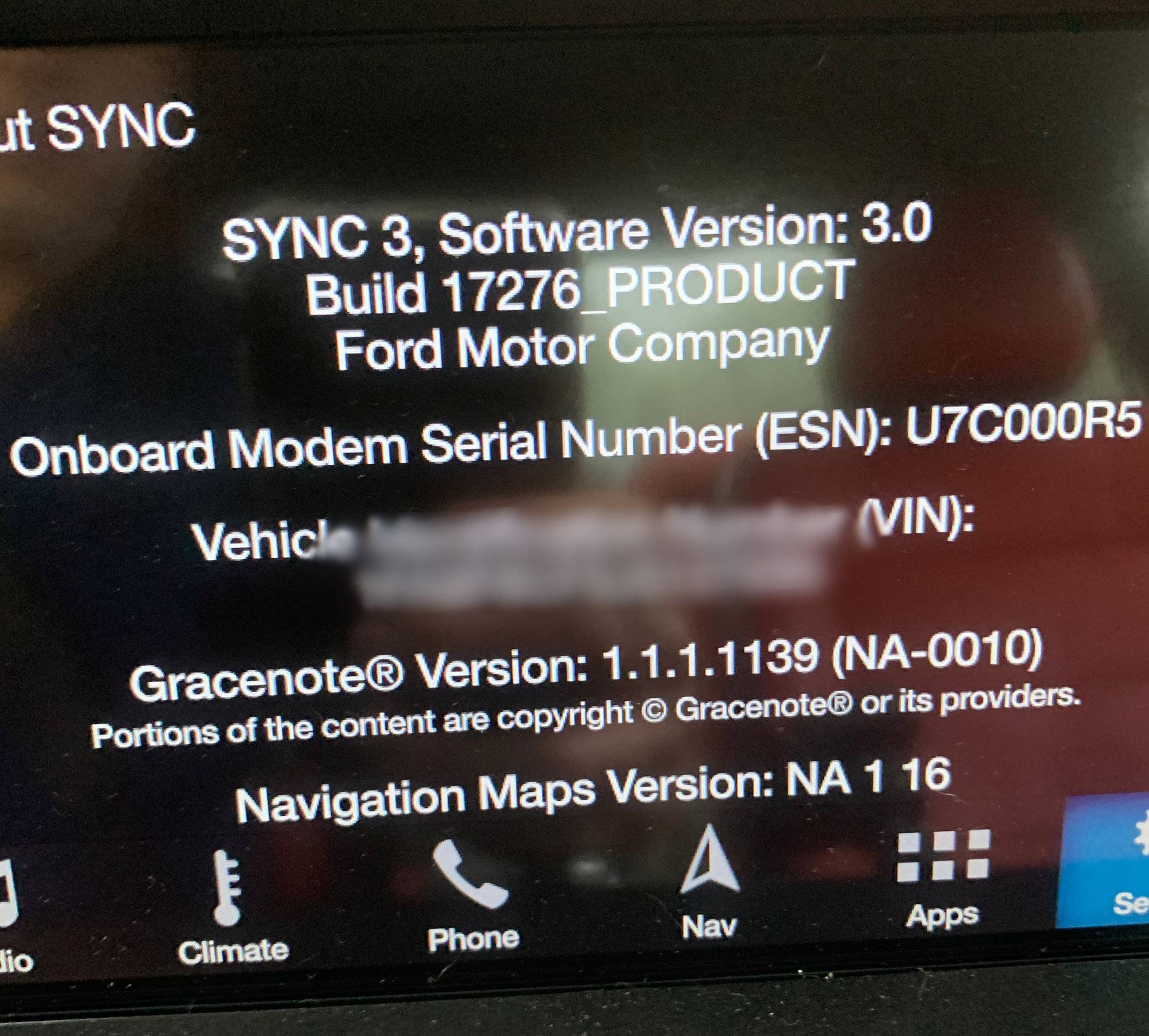
What Sync3 version you have?My 2018 GT doesn’t have a menu button, How do I get to the second screen? Is this in the manual?

It might have something to do with the setting to display the soft buttons on the home screen. Get on forscan and check APIM 7D0-01-01 xxxx xxxx x?xx The options are: Change ? To: 0-Disable (off), 1-Seat Cooling, 2-Seat Heating/Cooling, 3-Seat Heating, 4-Heated Steering Wheel, 6-All. I had 6 on 3.3 Did not make any changes after updating to 3.4. See what you have.So this is interesting. I have heated and cooled seats but they do not appear on the second menu screen. Any ideas as to why? I have Sync 3.4
That feature is on v3.4. Thats why your 18 GT does not have it

Which menu button? I tried the climate button twice already, and no dice either. There's no 'menu' soft or hard button except in navigation mode, and don't think that'd do it. Manual doesn't say anything, or at least I couldn't find where. A picture would be greatClick the Menu button to access page 2
 . By the way, which is your APIM 7D0-01-01 10th digit? I set it from 4 to 6. And are you in the US? Maybe a different market car would explain the difference. Thx.
Yep, and start-up chimes too, which are quite annoying as well. Change IPC 720-01-02 to xx0x x2xx. The '0' is for the door chimes, and the '2' for the start-up chimes. Hope this helps.Is there a code to disable door open chimes? it is terribly annoying.
Thank you el. Didn’t even realize this was the Forscan thread. I do not use Forscan so I think I’ll just leave it as is. Honestly never use the soft buttons for climate so do not know what it looked like in 3.3.It might have something to do with the setting to display the soft buttons on the home screen. Get on forscan and check APIM 7D0-01-01 xxxx xxxx x?xx The options are: Change ? To: 0-Disable (off), 1-Seat Cooling, 2-Seat Heating/Cooling, 3-Seat Heating, 4-Heated Steering Wheel, 6-All. I had 6 on 3.3 Did not make any changes after updating to 3.4. See what you have.
How did you do this? I have a 2015 Edge Sport that I upgraded to Sync 3, and then updated to Sync 3.4 recently. I hate the blue, how did you change it and what does it look like now? I thought about just using the Lincoln setup...By the way, was able to fix today the awful blue screen on Sync 3.4, while keeping the pony animation, so it was a great day. Ha ha. Also added calm screen, which looks great in gray.
Forscan codes to change the theme: https://www.mustang6g.com/forums/threads/official-ford-sync3-3-4-release.145436/page-32#post-2997296How did you do this? I have a 2015 Edge Sport that I upgraded to Sync 3, and then updated to Sync 3.4 recently. I hate the blue, how did you change it and what does it look like now? I thought about just using the Lincoln setup...
Gotcha, thanks! I keep seeing a referenced spreadsheet with forscan values... is that in there as well?Forscan codes to change the theme: https://www.mustang6g.com/forums/threads/official-ford-sync3-3-4-release.145436/page-32#post-2997296
Don't change the animation code 7D0-02-01 xxxx xXxx xxxx 6 is for Mustang. Leave yours as is.
This is the spreadsheet we use. It's for F-150 but a lot of codes are the same. Just have to make sure you are using valid codes for your particular car.Gotcha, thanks! I keep seeing a referenced spreadsheet with forscan values... is that in there as well?
That spreadsheet is wrong on the themes (7D0-03-01), so don't even bother with it. The only Lincoln there is #2, and it's not the one listed there, which is brown. That is the 'Lincoln MY20' (gray) theme, which you can confirm with the 'secret' testing menu. The #5 which says on the spreadsheet that is a Lincoln xxx, it's actually Ford MY20, so many folks assume the change didn't work. And same thing with the others. I didn't try #2 until the end because I knew that name was a brown theme, and didn't want brown.Gotcha, thanks! I keep seeing a referenced spreadsheet with forscan values
. That way, it'd be 100% factory . Hope this helps.