Sponsored

Upgrading to Sync 3.4

JAJ

Well-Known Member
Joined
Apr 9, 2016
Threads
4
Messages
2,221
Reaction score
1,976
Location
Vancouver BC
Vehicle(s)
2016 GT350 Track Pack
Yep; called again and advised that initial advice did not work; got a case logged on and escalated to Sync map support team... Wohoo; feels like progress now :)
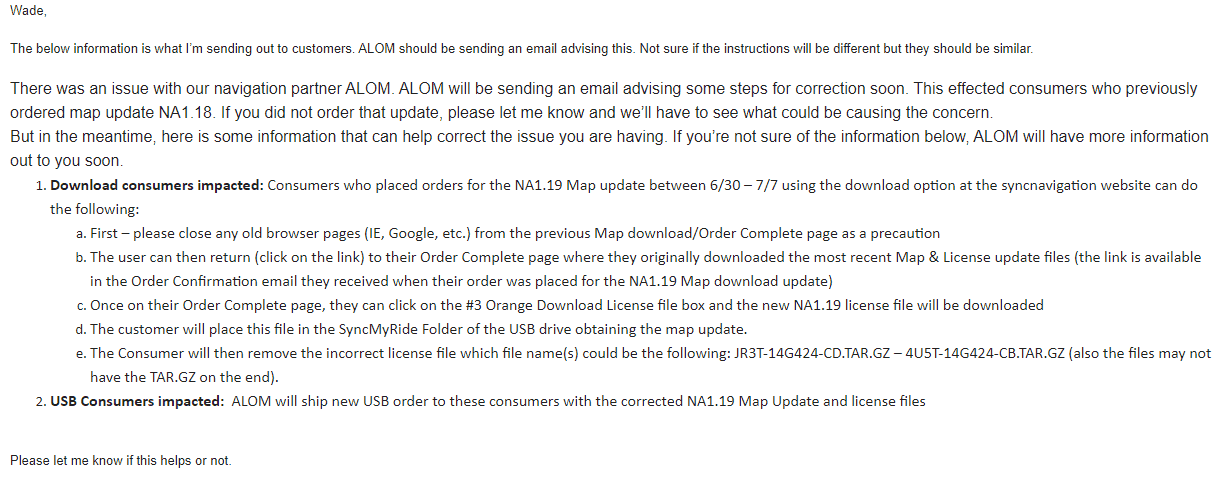
Something must have worked... I clicked on the link in the confirmation email just now, the one that allows you to download a second time. I downloaded the license file again, and this time I got a file with the catchy name of JR3T-14G424-CE.TAR.GZ. Note that "CD" has become "CE". I bunged it into the USB stick and plugged it into the car and the update started just like it's supposed to. I cancelled out because I didn't have an hour to wait, but I'll run it tomorrow.

So, if you have a confirming email for the 1.19 map update, download the license file again and if you get JR3T-14G424-CE.TAR.GZ, then you'll be able to complete the install. The map file didn't change - it's just that the license is the right one this time.
 

torque124

Torque
Joined
Aug 13, 2016
Threads
66
Messages
1,500
Reaction score
778
Location
MA
Vehicle(s)
Shelby GT350R
Vehicle Showcase
1
Something must have worked... I clicked on the link in the confirmation email just now, the one that allows you to download a second time. I downloaded the license file again, and this time I got a file with the catchy name of JR3T-14G424-CE.TAR.GZ. Note that "CD" has become "CE". I bunged it into the USB stick and plugged it into the car and the update started just like it's supposed to. I cancelled out because I didn't have an hour to wait, but I'll run it tomorrow.

So, if you have a confirming email for the 1.19 map update, download the license file again and if you get JR3T-14G424-CE.TAR.GZ, then you'll be able to complete the install. The map file didn't change - it's just that the license is the right one this time.
You are right! It did change to -CE instead of CD... Will try later again.
 

wade001

Well-Known Member
Joined
Mar 1, 2020
Threads
12
Messages
366
Reaction score
231
Location
Central Florida
First Name
Wade
Vehicle(s)
2019 GT Prem. 10r80, PP1, 401A, Active Exhaust
WHA? that crazy, good eye and great catch @JAJ

hopefully this gets you guys sorted
 

Sponsored

torque124

Torque
Joined
Aug 13, 2016
Threads
66
Messages
1,500
Reaction score
778
Location
MA
Vehicle(s)
Shelby GT350R
Vehicle Showcase
1
It is happening now... stand by.
 

torque124

Torque
Joined
Aug 13, 2016
Threads
66
Messages
1,500
Reaction score
778
Location
MA
Vehicle(s)
Shelby GT350R
Vehicle Showcase
1
About 50 min later, done. All good. I left the car with ignition on and a Ctek charger attached; came back in the office to work, and about 50 min later went back to check it.

It was all off, so I wondered a bit what happened... but turning ignition on, Sync had that little arrow which said it has been updated, and maps are showing 1 19.
 

wade001

Well-Known Member
Joined
Mar 1, 2020
Threads
12
Messages
366
Reaction score
231
Location
Central Florida
First Name
Wade
Vehicle(s)
2019 GT Prem. 10r80, PP1, 401A, Active Exhaust
About 50 min later, done. All good. I left the car with ignition on and a Ctek charger attached; came back in the office to work, and about 50 min later went back to check it.

It was all off, so I wondered a bit what happened... but turning ignition on, Sync had that little arrow which said it has been updated, and maps are showing 1 19.
so weird..

glad you finally got sorted!
 

Bikeman315

Well-Known Member
Joined
Apr 12, 2015
Threads
581
Messages
16,183
Reaction score
21,909
Location
Myrtle Beach, SC
First Name
Ira
Vehicle(s)
2019 Mustang GT/CS, 2021 Volvo XC60
About 50 min later, done. All good. I left the car with ignition on and a Ctek charger attached; came back in the office to work, and about 50 min later went back to check it.

It was all off, so I wondered a bit what happened... but turning ignition on, Sync had that little arrow which said it has been updated, and maps are showing 1 19.
Sorry, can you please remind us again what version/build # of SYNC3 are you running.
 

torque124

Torque
Joined
Aug 13, 2016
Threads
66
Messages
1,500
Reaction score
778
Location
MA
Vehicle(s)
Shelby GT350R
Vehicle Showcase
1

Sponsored

wade001

Well-Known Member
Joined
Mar 1, 2020
Threads
12
Messages
366
Reaction score
231
Location
Central Florida
First Name
Wade
Vehicle(s)
2019 GT Prem. 10r80, PP1, 401A, Active Exhaust
well damn, i was under the impression that this particular maps wouldnt even go on a pre 3.3 system considering the instructions say you must be at least 3.3 or later, the zip file says "post 3.2" etc etc.. (again with the instructions LOL :crazy: )

so perhaps, these guys who are seeing the 1.19NA in their sync info are all on sync 3.0? i see what you were getting out now @Bikeman315

in anycase, i reached out to the support person who helped me originally, inquiring about why after the update my system still says 1.18, while others are reporting 1.19, and how could i verify that i did indeed have 1.19.

hopefully i get some info, and they dont tell me to open another ticket...

we will see
 

torque124

Torque
Joined
Aug 13, 2016
Threads
66
Messages
1,500
Reaction score
778
Location
MA
Vehicle(s)
Shelby GT350R
Vehicle Showcase
1
For what it's worth, on my file downloads, the name was "SyncPre32", so for systems prior to 3.2.
 

JAJ

Well-Known Member
Joined
Apr 9, 2016
Threads
4
Messages
2,221
Reaction score
1,976
Location
Vancouver BC
Vehicle(s)
2016 GT350 Track Pack
well damn, i was under the impression that this particular maps wouldnt even go on a pre 3.3 system considering the instructions say you must be at least 3.3 or later, the zip file says "post 3.2" etc etc.. (again with the instructions LOL :crazy: )

so perhaps, these guys who are seeing the 1.19NA in their sync info are all on sync 3.0? i see what you were getting out now @Bikeman315

in anycase, i reached out to the support person who helped me originally, inquiring about why after the update my system still says 1.18, while others are reporting 1.19, and how could i verify that i did indeed have 1.19.

hopefully i get some info, and they dont tell me to open another ticket...

we will see
I expect your system is saying 1.18 because the 1.19 maps didn't install. Do the following three steps and try it again:

1. Open the Order Confirmation email from [email protected], click on the "if you need to download again" link and download just the license file again. No need to download the maps. Check that the new file is JR3T-14G424-CE.TAR.GZ with "CE" where the previous license file had "CD".

2. Open the USB stick that has the maps on it in your file explorer, open the SyncMyRide folder and delete the previous JR3T-14G424-CD.TAR.GZ file.

3. Copy the new JR3T-14G424-CE.TAR.GZ license file to the SyncMyRide folder.

You're ready to head back out to your car and try again.
 

wade001

Well-Known Member
Joined
Mar 1, 2020
Threads
12
Messages
366
Reaction score
231
Location
Central Florida
First Name
Wade
Vehicle(s)
2019 GT Prem. 10r80, PP1, 401A, Active Exhaust
I expect your system is saying 1.18 because the 1.19 maps didn't install. Do the following three steps and try it again:

1. Open the Order Confirmation email from [email protected], click on the "if you need to download again" link and download just the license file again. No need to download the maps. Check that the new file is JR3T-14G424-CE.TAR.GZ with "CE" where the previous license file had "CD".

2. Open the USB stick that has the maps on it in your file explorer, open the SyncMyRide folder and delete the previous JR3T-14G424-CD.TAR.GZ file.

3. Copy the new JR3T-14G424-CE.TAR.GZ license file to the SyncMyRide folder.

You're ready to head back out to your car and try again.
ive actually tried to download the license file a few times now, and its still only letting me download CC license file..

i am in contact with support though, through email, and they gave me a nice little bit of info, which coincides with what you're saying.. see the image below i clipped from my email to support..

upload_2020-7-8_12-35-15.png


EDIT: so i have had some email conversation with support. after some back and forth i sent a reply back with the filenames of each and every file in my map update (syn32.zip) and listed the file name of my license file.. all of which can be found in the screenshot in this post: https://www.mustang6g.com/forums/th...-update-june-29th.143298/page-21#post-2954499

the support agent i spoke with assured me that those files are indeed the 1.19 files, and that my license file is also correct (4U5T-14G424-CC.tar.gz), and that if i were to install those files, i would be running the 1.19 version of maps.

when i responded and said that is the version i installed but the version number in the "About SYNC" screen had not changed, the agent then mentioned the bug that @Bikeman315 has been talking about. in SYNC 3 3.3 (and only 3.3) there is a bug where it will not list the map version OR gracenote version correctly. however it will be fixed in the next version of SYNC.

they didnt tell me what the next version number was (assuming 3.4), however they did say that they are currently working on it, and COVID-19 has held up the release because all the engineers are still working remotely.

so there is still hope out there for a 3.4 release... soon™️
Sponsored

 
Last edited:


Top