Sponsored

Upgrading to Sync 3.4

Bikeman315

Well-Known Member
Joined
Apr 12, 2015
Threads
581
Messages
16,183
Reaction score
21,909
Location
Myrtle Beach, SC
First Name
Ira
Vehicle(s)
2019 Mustang GT/CS, 2021 Volvo XC60
I expect your system is saying 1.18 because the 1.19 maps didn't install. Do the following three steps and try it again:

1. Open the Order Confirmation email from [email protected], click on the "if you need to download again" link and download just the license file again. No need to download the maps. Check that the new file is JR3T-14G424-CE.TAR.GZ with "CE" where the previous license file had "CD".

2. Open the USB stick that has the maps on it in your file explorer, open the SyncMyRide folder and delete the previous JR3T-14G424-CD.TAR.GZ file.

3. Copy the new JR3T-14G424-CE.TAR.GZ license file to the SyncMyRide folder.

You're ready to head back out to your car and try again.
JAJ, You Have 3.O. We have 3.3. Different files Our license file is 4U5T-14G424-CB.TAR.GZ. Would bet this is our issue as well but we need the new license file for 3.3.
Sponsored


Bikeman315

Well-Known Member
Joined
Apr 12, 2015
Threads
581
Messages
16,183
Reaction score
21,909
Location
Myrtle Beach, SC
First Name
Ira
Vehicle(s)
2019 Mustang GT/CS, 2021 Volvo XC60
ive actually tried to download the license file a few times now, and its still only letting me download CC license file..

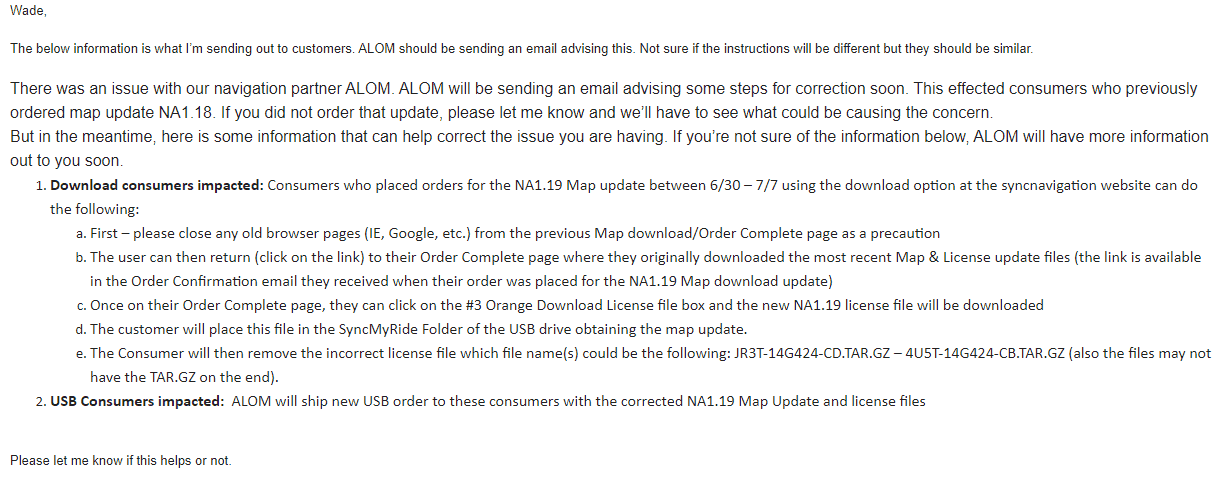
i am in contact with support though, through email, and they gave me a nice little bit of info, which coincides with what you're saying.. see the image below i clipped from my email to support..

upload_2020-7-8_12-35-15.png
upload_2020-7-8_12-42-29.jpeg
 

JAJ

Well-Known Member
Joined
Apr 9, 2016
Threads
4
Messages
2,221
Reaction score
1,976
Location
Vancouver BC
Vehicle(s)
2016 GT350 Track Pack
JAJ, You Have 3.O. We have 3.3. Different files Our license file is 4U5T-14G424-CB.TAR.GZ. Would bet this is our issue as well but we need the new license file for 3.3.
Aha! Sorry I didn't catch that version point earlier. That said, don't be surprised if the file you actually need is 4U5T-14G424-CC.TAR.GZ. That's what comes with Cyanlabs 3.4 update with 1.19 maps.
 

Bikeman315

Well-Known Member
Joined
Apr 12, 2015
Threads
581
Messages
16,183
Reaction score
21,909
Location
Myrtle Beach, SC
First Name
Ira
Vehicle(s)
2019 Mustang GT/CS, 2021 Volvo XC60
Aha! Sorry I didn't catch that version point earlier. That said, don't be surprised if the file you actually need is 4U5T-14G424-CC.TAR.GZ. That's what comes with Cyanlabs 3.4 update with 1.19 maps.
It's just crazy the hoops we need to jump thought for this update. It's hard to keep track who has what.

So for me I just downloaded the files and license (Version 3.3 Build 19052). The SyncMyRide files were identical, only the license file changed from "CB" to "CC" (thank you JAJ). My USB is ready to go. Will try to upload in the AM.
 

lenFeb

Well-Known Member
Joined
Dec 31, 2019
Threads
30
Messages
956
Reaction score
846
Location
USofA
First Name
Len
Vehicle(s)
2019 Shelby GT350 #K0110
It's just crazy the hoops we need to jump thought for this update. It's hard to keep track who has what.

So for me I just downloaded the files and license (Version 3.3 Build 19052). The SyncMyRide files were identical, only the license file changed from "CB" to "CC" (thank you JAJ). My USB is ready to go. Will try to upload in the AM.
My update with 4U5T-14G424-CC.TAR.GZ went through. But nav maps version is still the same as before 1 17. As Wade mentioned, there is a bug in 3.3 version, which they working on to resolve.
 

Sponsored

Bikeman315

Well-Known Member
Joined
Apr 12, 2015
Threads
581
Messages
16,183
Reaction score
21,909
Location
Myrtle Beach, SC
First Name
Ira
Vehicle(s)
2019 Mustang GT/CS, 2021 Volvo XC60
My update with 4U5T-14G424-CC.TAR.GZ went through. But nav maps version is still the same as before 1 17. As Wade mentioned, there is a bug in 3.3 version, which they working on to resolve.
So they never fixed the original bug. How surprising. I was told back in January that it would be fixed in 3.4. Yeah, I'm not holding my breath. Are there any roads on your current maps that weren't there before the update?
 

lenFeb

Well-Known Member
Joined
Dec 31, 2019
Threads
30
Messages
956
Reaction score
846
Location
USofA
First Name
Len
Vehicle(s)
2019 Shelby GT350 #K0110
So they never fixed the original bug. How surprising. I was told back in January that it would be fixed in 3.4. Yeah, I'm not holding my breath. Are there any roads on your current maps that weren't there before the update?
I didn't notice absence of the roads before upgrade, so hard to say if any difference before and after. I didn't have a reason to upgrade in the first place. I think you may wait for working version.
 

lenFeb

Well-Known Member
Joined
Dec 31, 2019
Threads
30
Messages
956
Reaction score
846
Location
USofA
First Name
Len
Vehicle(s)
2019 Shelby GT350 #K0110
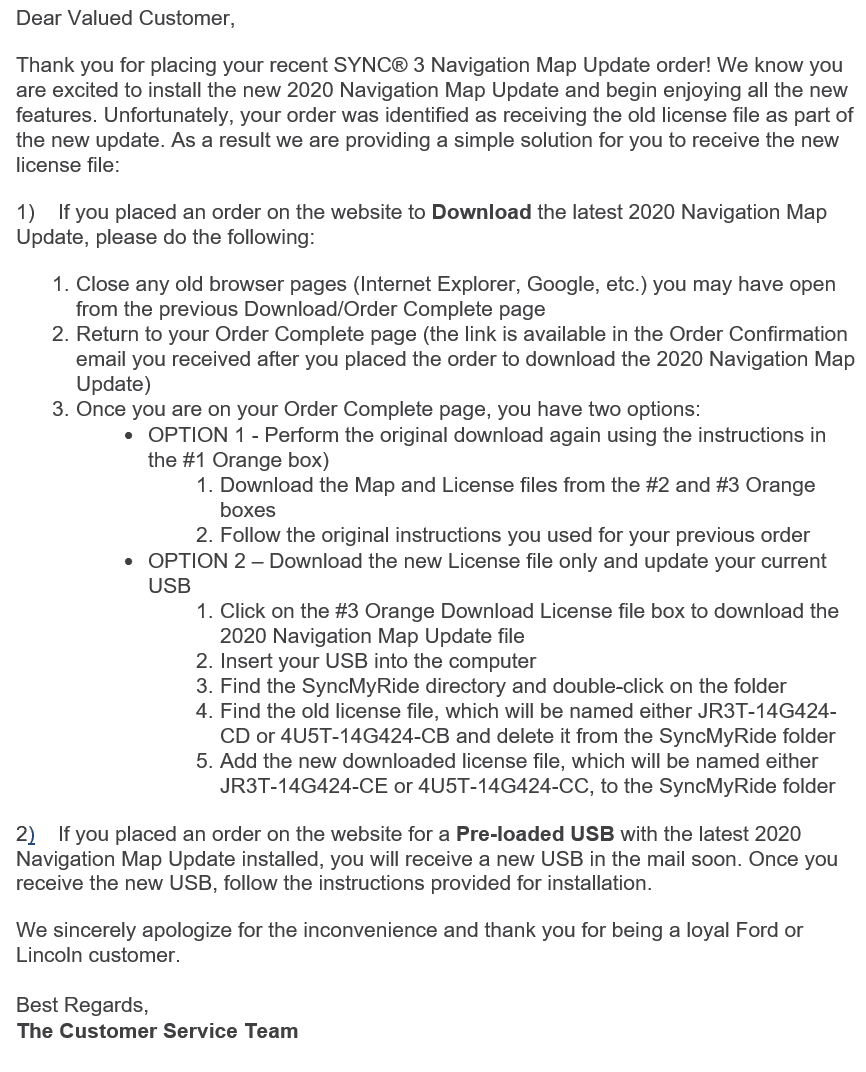
Look what just showed up in my email inbox from ALOM:

upload_2020-7-9_13-45-2.png
I have 4U5T-14G424-CC license file and update went through. However, there still a bug for sync 3 v3.3 that after update it's still show the previous(old) version of navigation maps, which in my case 1 17. So, ford's poor QC is not only on they cars but on the software as well.
 

Bit_the_Bullitt

Well-Known Member
Joined
Apr 22, 2020
Threads
12
Messages
1,270
Reaction score
1,281
Location
Ohio, US
First Name
Richard
Vehicle(s)
2019 Bullitt
I have 4U5T-14G424-CC license file and update went through. However, there still a bug for sync 3 v3.3 that after update it's still show the previous(old) version of navigation maps, which in my case 1 17. So, ford's poor QC is not only on they cars but on the software as well.
I've recently done a SYNC update, was on 3.3 build 18xxx, now I'm on 19xxx, went through fine.
Did the same procedure for maps.

First time around, the USB was recognized, said new maps will be installed, but an hour later it still said 1 17. Contacted customer support, they said "give it a couple of days before calling, it'll need a few days to update." I'm think what the heck, the update is on the USB flash drive, not OTA, so shouldn't be any lag, but whatever.
Second and third time around, same procedure (with different 32GB flash drive each time), the system wouldn't even recognize the USB or that there are updates, despite me following the same exact procedure from the time the car did recognize it (but didn't upgrade to 1 19 from 1 17).
I do know the USB is fine, because Android Auto works fine.

Got a first oil change coming up Monday (4800 miles), so will tell the dealer to put the new one on. Am also gonna ask about official 3.4.
Customer rep told me official 3.4 for Mustangs can be expected Q4 2020, take that for what it's worth.
 

Sponsored

lenFeb

Well-Known Member
Joined
Dec 31, 2019
Threads
30
Messages
956
Reaction score
846
Location
USofA
First Name
Len
Vehicle(s)
2019 Shelby GT350 #K0110
I've recently done a SYNC update, was on 3.3 build 18xxx, now I'm on Contacted customer support, they said "give it a couple of days before calling, it'll need a few days to update."
I updated almost two weeks ago, still 1 17. So, the customer support is full of BS.
 

southwestheat

Member
Joined
Feb 11, 2020
Threads
5
Messages
23
Reaction score
2
Location
Phoenix, AZ
Vehicle(s)
2019 Mustang GT Premium Coupe 10A 401A 19" 3.55 B&O
Just adding my two cents/experience here.

I've read many, but not every, post in this thread and one of the main themes are people with pre-2020 Mustangs wanting Sync 3.4.

I have a 2019 GT and logged into the Ford site today and lo and behold, a 3.4 update is available for me

I previously bought the map update USB drive from Ford. At the time I thought it was the full 3.4 + maps update, but it was just maps. (Oh well, I don't care.)

Anyway, if you haven't checked very recently on the website (not the app) you might find a 3.4 update waiting for you. I'll be installing mine later.

(Maybe you need to update the maps first to become eligible? Even though there's no good reason for that, who knows. Or maybe it was sheer coincidence that I updated the maps and the 3.4 update became available. Who knows!)
 

Bit_the_Bullitt

Well-Known Member
Joined
Apr 22, 2020
Threads
12
Messages
1,270
Reaction score
1,281
Location
Ohio, US
First Name
Richard
Vehicle(s)
2019 Bullitt
Just adding my two cents/experience here.

I've read many, but not every, post in this thread and one of the main themes are people with pre-2020 Mustangs wanting Sync 3.4.

I have a 2019 GT and logged into the Ford site today and lo and behold, a 3.4 update is available for me

I previously bought the map update USB drive from Ford. At the time I thought it was the full 3.4 + maps update, but it was just maps. (Oh well, I don't care.)

Anyway, if you haven't checked very recently on the website (not the app) you might find a 3.4 update waiting for you. I'll be installing mine later.
Yes it's been out for 2019s for a couple of weeks now, I got it on my '19 Bullitt for a month now, looks better.
I was wrong though, even though you get 18 pre-sets for radio, and you can scroll through them (rather than toggle with button), you still can't skip through all 18, just the 6, whether you use the steering wheel controls or the buttons on the stereo.
That seems really half-a**ed. Defeats the purpose a little, I don't get how hard it is to have that go through all 18 instead of 6, then toggle over, then 6, then toggle over.... SHEESH :)
 

lenFeb

Well-Known Member
Joined
Dec 31, 2019
Threads
30
Messages
956
Reaction score
846
Location
USofA
First Name
Len
Vehicle(s)
2019 Shelby GT350 #K0110
So, updated from Sync 3.3 to 3.4 from Ford owners side. Reinstall maps and have now 1 19 maps version. All sorted out now.
Sponsored


Top