Official Ford Sync3 3.4 Release

Vlad Soare

Well-Known Member
Joined
Jan 21, 2020
Threads
67
Messages
3,643
Reaction score
4,464
Location
Bucharest, Romania
First Name
Vlad
Vehicle(s)
2020 Mustang GT 6MT
If they were a tech company, they would at least be able to make a properly functional update system. How hard can that be? :giggle:
 

StangTime

Well-Known Member
Joined
Apr 16, 2019
Threads
81
Messages
3,594
Reaction score
4,091
Location
Ontario 🇨🇦
First Name
Todd
Vehicle(s)
19' GT PP1 Manual
I wish they concentrated more on things that really matter - i.e. bug fixing. The music skipping on USB and BT has been around for two years already, and it's still not fixed. I also have an occasional CarPlay-related bug (which is definitely in Sync, not in CarPlay), which the latest update doesn't fix. It's beyond me how six years after the launch of this system they're still utterly unable to make it work properly. Not to mention the update process, which is still buggy and unreliable.
I have eliminated 99.99% of the USB skipping. I'm saying 99.99 because I think I'm imagining it after being tormented for so long by this problem, or I have a few bad rips that still glitch out for a nearly imperceptible millisecond. I believe I sent you a private message on this in the past. I reformatted all my digital audio tracks to restrict the cover art size to 500 x 500 pixels. I only get detectable, occasional skipping when playing music through Android Auto now. Skips appear only during the first few minutes after starting the car. It could just be originating on the phone side or just Android Auto being stupid.
 

Vlad Soare

Well-Known Member
Joined
Jan 21, 2020
Threads
67
Messages
3,643
Reaction score
4,464
Location
Bucharest, Romania
First Name
Vlad
Vehicle(s)
2020 Mustang GT 6MT
I have eliminated 99.99% of the USB skipping. I'm saying 99.99 because I think I'm imagining it after being tormented for so long by this problem, or I have a few bad rips that still glitch out for a nearly imperceptible millisecond. I believe I sent you a private message on this in the past. I reformatted all my digital audio tracks to restrict the cover art size to 500 x 500 pixels. I only get detectable, occasional skipping when playing music through Android Auto now. Skips appear only during the first few minutes after starting the car. It could just be originating on the phone side or just Android Auto being stupid.
Indeed, you told me about the artwork, but I never got around to doing something about it, mostly because about that time I started using CarPlay and haven't been using the USB since. I know the bug isn't solved yet because somebody on the Romanian Ford forum told me he still has it with the latest Sync build.
CarPlay doesn't have this skipping issue, though it has others. If I turn off the car for a very short period of time, no more than, say, three minutes, then turn it on again, in 50% of the cases Sync will fail to display the CarPlay screen properly. Music will start playing normally from the phone, but the screen will either display the Ford interface (and no amount of touching anywhere will make it switch to the CarPlay screen), or it will be completely black, or it will display the CarPlay main screen but will black out as soon as you select an app, etc.
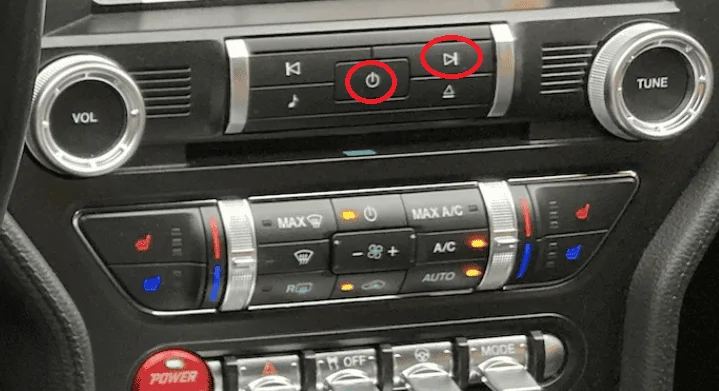
And the issue is definitely in Sync, not in iOS, because everything goes back to normal with a Sync reset (holding down the Off and Next buttons simultaneously).

Six years down the line, Sync 3 is still buggy. But boy, am I glad they're working on enhancing those useless voice commands. :cwl:
 
Last edited:

Bikeman315

Well-Known Member
Joined
Apr 12, 2015
Threads
581
Messages
16,183
Reaction score
21,909
Location
Myrtle Beach, SC
First Name
Ira
Vehicle(s)
2019 Mustang GT/CS, 2021 Volvo XC60
Indeed, you told me about the artwork, but I never got around to doing something about it, mostly because about that time I started using CarPlay and haven't been using the USB since. I know the bug isn't solved yet because somebody on the Romanian Ford forum told me he still has it with the latest Sync build.
CarPlay doesn't have this skipping issue, though it has others. If I turn off the car for a very short period of time, no more than, say, three minutes, then turn it on again, in 50% of the cases Sync will fail to display the CarPlay screen properly. Music will start playing normally from the phone, but the screen will either display the Ford interface (and no amount of touching anywhere will make it switch to the CarPlay screen), or it will be completely black, or it will display the CarPlay main screen but will black out as soon as you select an app, etc.
And the issue is definitely in Sync, not in iOS, because everything goes back to normal with a Sync reset (holding down the Off and Next buttons simultaneously).

Six years down the line, Sync 3 is still buggy. But boy, am I glad they're working on enhancing those useless voice commands. :cwl:
Someone is really grumpy today. :cwl: Kidding, of course.:like:

Electronic gremlins suck, period. But sometimes glitch’s in code never get resolved. The good news is next year you can get a S650 with Sync 4.
 

Vlad Soare

Well-Known Member
Joined
Jan 21, 2020
Threads
67
Messages
3,643
Reaction score
4,464
Location
Bucharest, Romania
First Name
Vlad
Vehicle(s)
2020 Mustang GT 6MT
Someone is really grumpy today. :cwl: Kidding, of course.:like:
Nah, quite the contrary, I'm in an excellent mood today, because my Bigboi Buddy has just arrived, and I gave it a try. I gave my wheels a quick wash, and it dried them perfectly in no time, with no effort at all, leaving them as clean and shiny and streak-free as one could ever hope. :inlove:
I'm happy. Drying the car won't be a chore anymore. :party::dance:
Who cares about Sync? 😁
 

StangTime

Well-Known Member
Joined
Apr 16, 2019
Threads
81
Messages
3,594
Reaction score
4,091
Location
Ontario 🇨🇦
First Name
Todd
Vehicle(s)
19' GT PP1 Manual
Indeed, you told me about the artwork, but I never got around to doing something about it, mostly because about that time I started using CarPlay and haven't been using the USB since. I know the bug isn't solved yet because somebody on the Romanian Ford forum told me he still has it with the latest Sync build.
CarPlay doesn't have this skipping issue, though it has others. If I turn off the car for a very short period of time, no more than, say, three minutes, then turn it on again, in 50% of the cases Sync will fail to display the CarPlay screen properly. Music will start playing normally from the phone, but the screen will either display the Ford interface (and no amount of touching anywhere will make it switch to the CarPlay screen), or it will be completely black, or it will display the CarPlay main screen but will black out as soon as you select an app, etc.
And the issue is definitely in Sync, not in iOS, because everything goes back to normal with a Sync reset (holding down the Off and Next buttons simultaneously).

Six years down the line, Sync 3 is still buggy. But boy, am I glad they're working on enhancing those useless voice commands. :cwl:
I have a similar problem with Android Auto. If I shut off the car and leave my phone connected, get out and come back later, re-start the car, AA resumes, shows music is playing from my phone, but I don't hear anything, then the infotainment unit switches to the radio source. AA continues to think the music app is playing but it's only showing that it is on the screen. Nothing I can do to switch it back. Unplugging the phone and re-inserting the cable doesn't reset AA back to the phone music app audio. Toggling AA off and on doesn't restore functionality either. I have to unplug the phone, shut off the car, open the door and start all over. Really bloody annoying.
If it weren't for Waze police locations and google assistant hands free text dictation I would ditch Android Auto all together.
 

StangTime

Well-Known Member
Joined
Apr 16, 2019
Threads
81
Messages
3,594
Reaction score
4,091
Location
Ontario 🇨🇦
First Name
Todd
Vehicle(s)
19' GT PP1 Manual
Someone is really grumpy today. :cwl: Kidding, of course.:like:

Electronic gremlins suck, period. But sometimes glitch’s in code never get resolved. The good news is next year you can get a S650 with Sync 4.
You think Sync4 won't have any bugs? :crackup::crackup::crackup::crackup::crackup:
 

Vlad Soare

Well-Known Member
Joined
Jan 21, 2020
Threads
67
Messages
3,643
Reaction score
4,464
Location
Bucharest, Romania
First Name
Vlad
Vehicle(s)
2020 Mustang GT 6MT
I have a similar problem with Android Auto. If I shut off the car and leave my phone connected, get out and come back later, re-start the car, AA resumes, shows music is playing from my phone, but I don't hear anything, then the infotainment unit switches to the radio source. AA continues to think the music app is playing but it's only showing that it is on the screen. Nothing I can do to switch it back. Unplugging the phone and re-inserting the cable doesn't reset AA back to the phone music app audio. Toggling AA off and on doesn't restore functionality either. I have to unplug the phone, shut off the car, open the door and start all over. Really bloody annoying.
If it weren't for Waze police locations and google assistant hands free texting I would ditch Android Auto all together.
Next time this happens, press the "audio on/off" and "next" buttons at the same time, and hold them down for a few seconds, until Sync restarts. Once it restarts, Android Auto will be back to normal. You can do this on the fly, no need to stop the car or to disconnect the phone.

Untitled.png
 

StangTime

Well-Known Member
Joined
Apr 16, 2019
Threads
81
Messages
3,594
Reaction score
4,091
Location
Ontario 🇨🇦
First Name
Todd
Vehicle(s)
19' GT PP1 Manual
Next time this happens, press the "audio on/off" and the "next" buttons at the same time, and hold them down for a few seconds, until Sync restarts. Once it restarts, Android Auto will be back to normal. You can do this on the fly, no need to stop the car, or to disconnect the phone, or anything else.

Untitled.png
Thanks! I forgot you could do this! :facepalm:
 

Vlad Soare

Well-Known Member
Joined
Jan 21, 2020
Threads
67
Messages
3,643
Reaction score
4,464
Location
Bucharest, Romania
First Name
Vlad
Vehicle(s)
2020 Mustang GT 6MT
This reset procedure also comes in handy during Sync updates. Some of the software/map updates have two parts. After the first part is done, you get a message like "please do not remove the USB stick; the update will continue when you restart the car", or something to that effect. Normally you have to stop the car, get out, lock the doors, wait at least two minutes, then unlock and restart it, and the update will continue. But simply doing a forced restart with those two buttons will achieve the same thing, and you won't even have to stop driving.
Same when the update is complete. The new version (or the new maps) will be loaded the next time you start the car, after it has been parked for at least two minutes. Or, you can force-restart Sync and start enjoying the new version right away. :)
 
 
Top