Official Ford Sync3 3.4 Release

z1huggy

Member
Joined
Jan 25, 2018
Threads
2
Messages
23
Reaction score
8
Location
NY
Vehicle(s)
Mustang
Hi All,

I have
SYNC3 S/W Ver 3.4 Build 20136 and Wifi update from car says no update available.

I'm trying to DL the latest Sync 3.4 version from a PC and MAC but it will not DL from:

https://help.ford.com/update-sync/usb/

After correct VIN entered it Says:

"Click here if your download has not started: 5U5T-14G381-ET.zip
Your SYNC system will be updated to SYNC3 v3.4.21194"

The DL does not start automatically so I click it to DL, or try to "Save as"

Then I get:
"Loading complete."

But I don't get the proper zip file DL'ed. I get an .xml file that has errors (see below) and it won't let me DL the proper .zip file.

5U5T-14G381-ET.zip.xml


<?xml version="1.0" encoding="utf-8"?><Error><Code>PublicAccessNotPermitted</Code><Message>Public access is not permitted on this storage account.
RequestId:dc61d9fa-f01e-008b-6323-ef5f3a000000
Time:2021-12-12T06:43:33.2294857Z</Message></Error>


I've tried both Mac and PC, both with Firefox, Chrome and Safari on the Mac. Still no joy.

Any ideas? (TIA)
I got the same yesterday.

It is up now though. Just DL'd it.
 

Gnatsum21

Well-Known Member
Joined
Oct 31, 2021
Threads
12
Messages
1,078
Reaction score
2,099
Location
Fort Lauderdale FL
Vehicle(s)
Former: GT 21 Roush Twister Orange RIP | ECO 2016
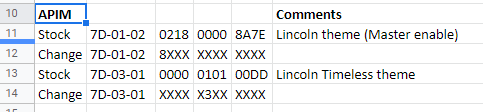
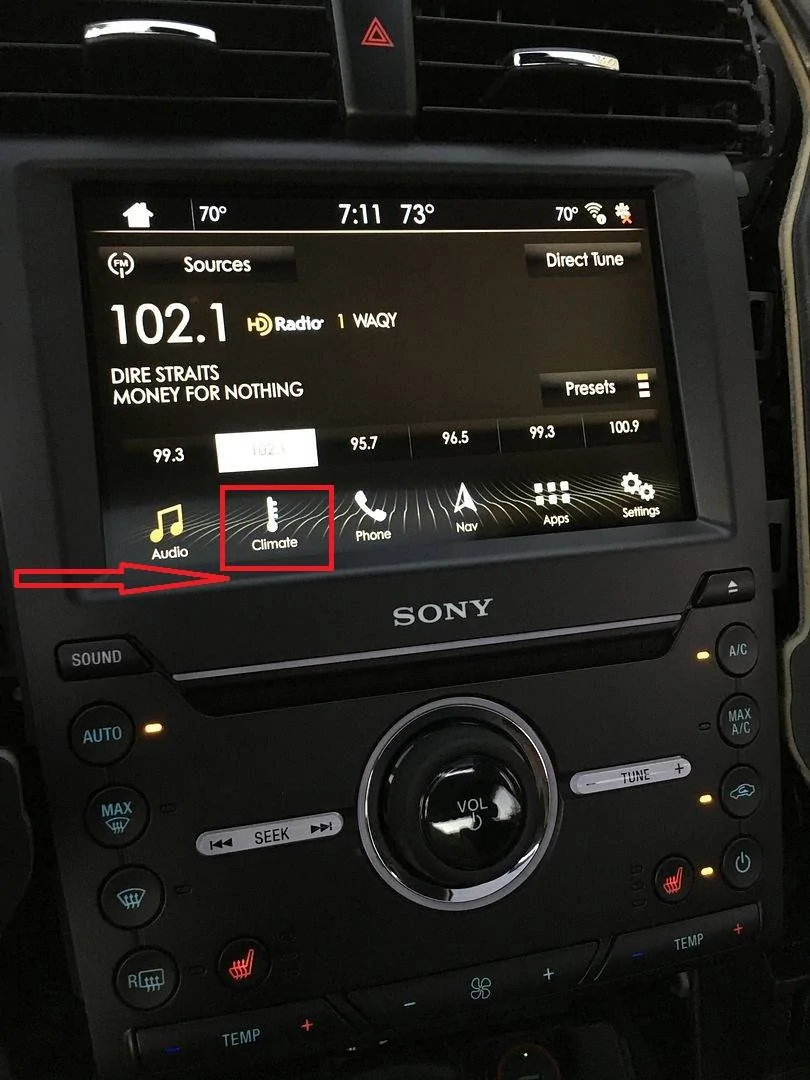
So, I was able to change from "Blue screen" to "Lincoln Timeless (Gold Theme, Black Icons)". Does anyone know how to make your buttons "wavy" like the picture below?

Forscan codes used (Ford Mustang 2021 GT)
1639424725018.png


IMG_3297_zps4xg8eqzs.webp
 

StangTime

Well-Known Member
Joined
Apr 16, 2019
Threads
81
Messages
3,594
Reaction score
4,091
Location
Ontario 🇨🇦
First Name
Todd
Vehicle(s)
19' GT PP1 Manual
So, I was able to change from "Blue screen" to "Lincoln Timeless (Gold Theme, Black Icons)". Does anyone know how to make your buttons "wavy" like the picture below?

Forscan codes used (Ford Mustang 2021 GT)
1639424725018.png


IMG_3297_zps4xg8eqzs.jpg
I believe that is the "Ford Lincoln Nautilus" theme in Night Mode. The wavy graphic is part of the background image.
 

Soulja4187

Well-Known Member
Joined
Apr 1, 2020
Threads
52
Messages
1,633
Reaction score
900
Location
Greenacres, FL
First Name
David
Vehicle(s)
2021 Mustang GT Premium & 2025 Explorer ST
So, I was able to change from "Blue screen" to "Lincoln Timeless (Gold Theme, Black Icons)". Does anyone know how to make your buttons "wavy" like the picture below?

Forscan codes used (Ford Mustang 2021 GT)
1639424725018.png


IMG_3297_zps4xg8eqzs.jpg
Do you happen to have a list of what APIM changes we can make for the 2021? Thanks
 

Gnatsum21

Well-Known Member
Joined
Oct 31, 2021
Threads
12
Messages
1,078
Reaction score
2,099
Location
Fort Lauderdale FL
Vehicle(s)
Former: GT 21 Roush Twister Orange RIP | ECO 2016
Do you happen to have a list of what APIM changes we can make for the 2021? Thanks
Unfortunately not. I am doing trial and error based on existing Forscan examples. The other one that worked for a 2021 is the disabling of the double honk (when car is still running but you exit the car with your keys on you. I tried another one before with no success, but this one did it:
1639428128565.png


Here is a list I found online (no 2021 models listed):
Forscan codes - S550
 

Gnatsum21

Well-Known Member
Joined
Oct 31, 2021
Threads
12
Messages
1,078
Reaction score
2,099
Location
Fort Lauderdale FL
Vehicle(s)
Former: GT 21 Roush Twister Orange RIP | ECO 2016
I believe that is the "Ford Lincoln Nautilus" theme in Night Mode. The wavy graphic is part of the background image.
Thank you!
 

geep81

Well-Known Member
Joined
Sep 29, 2018
Threads
57
Messages
1,390
Reaction score
1,414
Location
Cleveland OH
Vehicle(s)
2020 GT Premium
I can't get the sync download to complete today. Seems like they are having some issues.
 

19gtaz

Well-Known Member
Joined
Oct 23, 2020
Threads
39
Messages
599
Reaction score
484
Location
Arizona & South Dakota
Vehicle(s)
2021 Mach 1 and 2013 Boss 302
Just did the sync update over air and the nav update on usb.
A couple of questions if I may.

What should I see as far as Sync Info?

I see:
Sync 3, Software Version 3.4
Build 21194
Gracenote Version1.1.1.23.23
Nav Maps version NA 220

It told me system updated and to shutoff and back on again, which I did. I've waited 15 minutes or more and turned the key on to look at the sync Infor and it told me system updated.

2nd question is:

Is it alright to start the usb Nav update and just drive the car normally with multiple starts and stops, (leaving the usb in obviously)? Or with more starts and stops am I asking for trouble?

Total time for the USB update was 1 hr and 23 minutes.
 

Bikeman315

Well-Known Member
Joined
Apr 12, 2015
Threads
581
Messages
16,183
Reaction score
21,909
Location
Myrtle Beach, SC
First Name
Ira
Vehicle(s)
2019 Mustang GT/CS, 2021 Volvo XC60
Just did the sync update over air and the nav update on usb.
A couple of questions if I may.

What should I see as far as Sync Info?

I see:
Sync 3, Software Version 3.4
Build 21194
Gracenote Version1.1.1.23.23
Nav Maps version NA 220

It told me system updated and to shutoff and back on again, which I did. I've waited 15 minutes or more and turned the key on to look at the sync Infor and it told me system updated.

2nd question is:

Is it alright to start the usb Nav update and just drive the car normally with multiple starts and stops, (leaving the usb in obviously)? Or with more starts and stops am I asking for trouble?

Total time for the USB update was 1 hr and 23 minutes.
Your golden. All versions and builds are up to date

The more stops and starts the more likely you are to have a bad load. I just get in the car, load the USB and go for a nice drive until its done.
 

19gtaz

Well-Known Member
Joined
Oct 23, 2020
Threads
39
Messages
599
Reaction score
484
Location
Arizona & South Dakota
Vehicle(s)
2021 Mach 1 and 2013 Boss 302
Your golden. All versions and builds are up to date

The more stops and starts the more likely you are to have a bad load. I just get in the car, load the USB and go for a nice drive until its done.
Thanks so much! That's what I did this time idle and drive.
Last time I did the USB update with a charger directly on the battery and it shut down every 5 minutes and I had to hit the start/ign buton twice every 5 minutes. This time I connected so the BMS supposedly could sense it and it still shut down every 5 minutes even with good voltage, so I just kept it running. For some reason my digital dash voltmeter reads slightly below 12 volts even with much higher measured battery voltage. I wonder if a reset of the BMS would correct it.
I don't get any low voltage error messages on the dash.
 

Bikeman315

Well-Known Member
Joined
Apr 12, 2015
Threads
581
Messages
16,183
Reaction score
21,909
Location
Myrtle Beach, SC
First Name
Ira
Vehicle(s)
2019 Mustang GT/CS, 2021 Volvo XC60
Thanks so much! That's what I did this time idle and drive.
Last time I did the USB update with a charger directly on the battery and it shut down every 5 minutes and I had to hit the start/ign buton twice every 5 minutes. This time I connected so the BMS supposedly could sense it and it still shut down every 5 minutes even with good voltage, so I just kept it running. For some reason my digital dash voltmeter reads slightly below 12 volts even with much higher measured battery voltage. I wonder if a reset of the BMS would correct it.
I don't get any low voltage error messages on the dash.
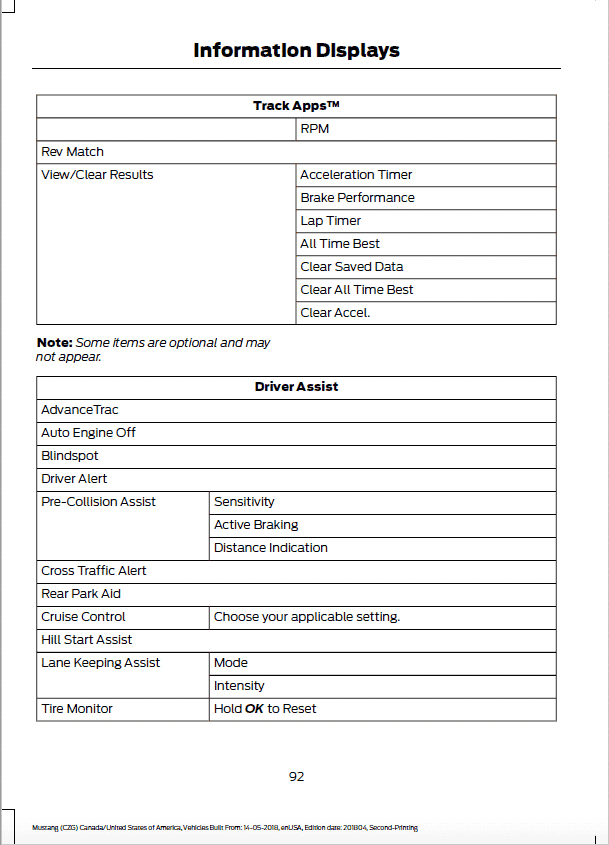
Not sure about the voltage reading but if you are going to use a charger the auto engine off needs to be changed.

Screen Shot 2022-01-19 at 5.32.16 PM.png
 

19gtaz

Well-Known Member
Joined
Oct 23, 2020
Threads
39
Messages
599
Reaction score
484
Location
Arizona & South Dakota
Vehicle(s)
2021 Mach 1 and 2013 Boss 302
Not sure about the voltage reading but if you are going to use a charger the auto engine off needs to be changed.

Screen Shot 2022-01-19 at 5.32.16 PM.png
I just checked the voltage at battery was 12.6, meter read 12.0. I do seem to recall Auto Engine Off feature last time but I will go out and check it to see if it helps and report back. Thanks!
 

19gtaz

Well-Known Member
Joined
Oct 23, 2020
Threads
39
Messages
599
Reaction score
484
Location
Arizona & South Dakota
Vehicle(s)
2021 Mach 1 and 2013 Boss 302
I just checked the voltage at battery was 12.6, meter read 12.0. I do seem to recall Auto Engine Off feature last time but I will go out and check it to see if it helps and report back. Thanks!
Okay, here's what I know, every time I've done the USB update (with Auto Engine Off checked on) the car gives me a warning message it's going to shut off every 5 minutes, even with a battery charger on it, pushing the start button twice cancels it. I can do the Sync over the air update, which takes a long time and no message. (Auto Engine Off) checked on or off, doesn't matter the car doesn't warn me it's going to shut off. So something is different about the USB download, it seems to care about the voltage, which is fine when measured, but maybe it's going off the voltmeter reading which is low compared to actual. Funny thing is the factory digital oil pressure meter matches exactly my factory oil pressure meter,. I have no reason to believe I have a bad battery either.
 
Last edited:

Cobra Jet

Well-Known Member
Joined
Feb 12, 2015
Threads
771
Messages
17,562
Reaction score
19,993
Location
NJ
Vehicle(s)
2018 EB Prem. w/PP and 94 Mustang Cobra
Does anyone know if there is a limitation of SYNC to model year updates?

Meaning, I have not updated my 2018’s SYNC since it was new… So is there a SYNC version cap as far as what version will or will not work after a certain amount of years? Should I be concerned with trying to download the most recent SYNC version or will I run into problems?
 
 
Top