
Bit_the_Bullitt
Well-Known Member
Says the same thing for me, that it's ready for 3.4, but doesn't download. I'm guessing that's the same issue just about everyone is having, server could be down if ton of people are trying to download?2019 GT Premium with Nav, says will update to SYNC3 v3.4.43
But fails to download to USB :(
GP70
Well-Known Member
Same thing with my 19.2019 GT Premium with Nav, says will update to SYNC3 v3.4.43
But fails to download to USB :(

el-guapin
Well-Known Member
- Joined
- Oct 30, 2018
- Threads
- 33
- Messages
- 913
- Reaction score
- 381
- Location
- LSU - Geaux Tigers!
- Website
- www.tesla.com
- Vehicle(s)
- 1949 UFO
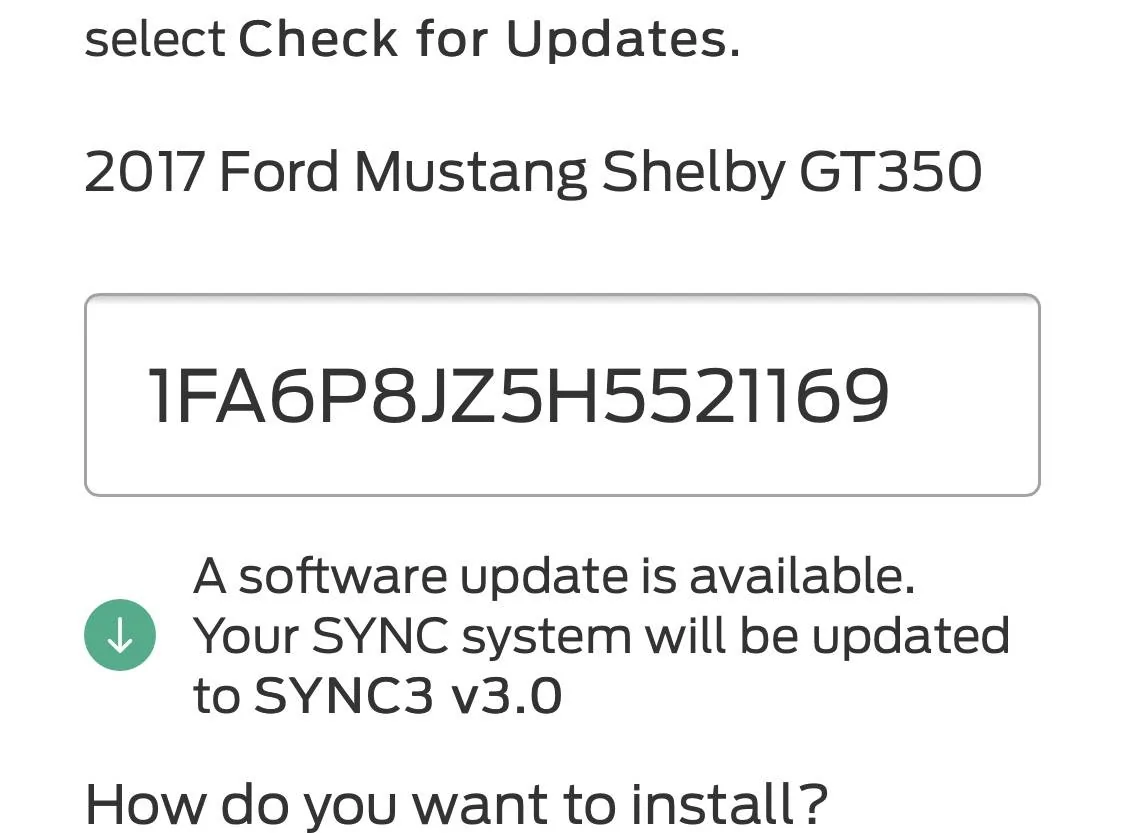
v3.0 is the latest for you unless you update via Cyanlabs.I guess mine maxes at 3.0 since it’s a 2017 or am I missing something?

Bikeman315
Well-Known Member
- Joined
- Apr 12, 2015
- Threads
- 583
- Messages
- 16,195
- Reaction score
- 21,918
- Location
- Myrtle Beach, SC
- First Name
- Ira
- Vehicle(s)
- 2019 Mustang GT/CS, 2021 Volvo XC60
Just reread your post. Are you having an issue getting the new files to download from Ford, like everyone else right now?2019 GT Premium with Nav, says will update to SYNC3 v3.4.43
But fails to download to USB :(
Or do you already have the DL from Ford?
----------------------------------------------------------
Original response
Nathan, just to be clear, nothing get directly downloaded to the USB. The download from Ford goes to your computer. You then unzip the file, again onto your computer. Once down you just copy and past the required files from your computer onto your USB. Is this what you have done?
Last edited:
Bikeman315
Well-Known Member
- Joined
- Apr 12, 2015
- Threads
- 583
- Messages
- 16,195
- Reaction score
- 21,918
- Location
- Myrtle Beach, SC
- First Name
- Ira
- Vehicle(s)
- 2019 Mustang GT/CS, 2021 Volvo XC60
I guess mine maxes at 3.0 since it’s a 2017 or am I missing something?
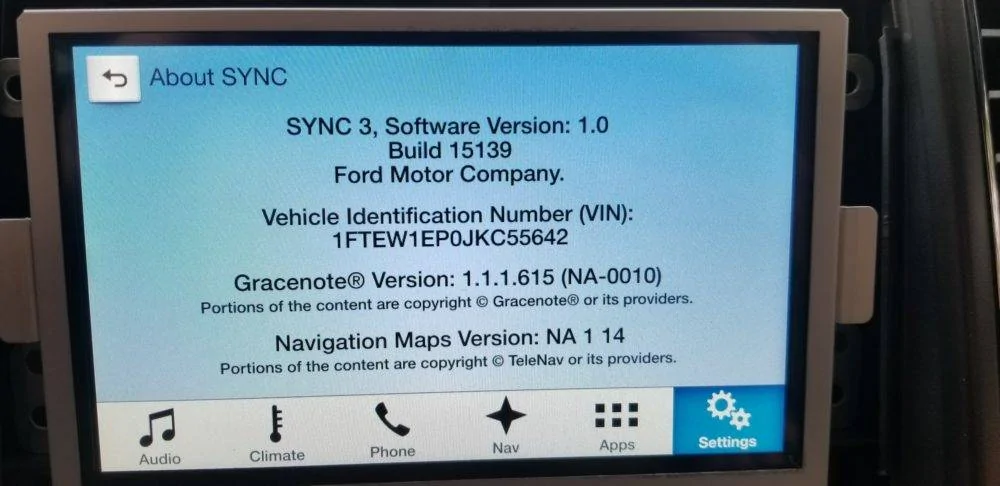
Just make sure you have the latest build #. You should have 19025.v3.0 is the latest for you unless you update via Cyanlabs.
robtee
Member
Got it. Haven't even thought to look for updates until this thread popped up in my email!v3.0 is the latest for you unless you update via Cyanlabs.
robtee
Member
I can confirm that in the vehicle, correct?Just make sure you have the latest build #. You should have 19025.
Bikeman315
Well-Known Member
- Joined
- Apr 12, 2015
- Threads
- 583
- Messages
- 16,195
- Reaction score
- 21,918
- Location
- Myrtle Beach, SC
- First Name
- Ira
- Vehicle(s)
- 2019 Mustang GT/CS, 2021 Volvo XC60
Yes, Go to settings, general, sync. You will find all of your version numbers on the about sync page.I can confirm that in the vehicle, correct?
UofMEngineer
Well-Known Member
Yes, site is still down. Check back tomorrow.

See prior post, but super short answer is no.That is an awesome list! Would you be able to make a list of all the items outside of the voice commands?

jimharrell
Well-Known Member
- Joined
- Jul 31, 2020
- Threads
- 10
- Messages
- 58
- Reaction score
- 31
- Location
- Oviedo, FL
- First Name
- Jim
- Vehicle(s)
- 2023 Mustang Mach 1 HP
Ok haha is it just the new look and marginally faster?Yes, site is still down. Check back tomorrow.
See prior post, but super short answer is no.
UofMEngineer
Well-Known Member
There’s probably quite a bit there, you just have to go hunting for it. Some new items may not apply to older MYs as well. Lot of new UI items for sure.Ok haha is it just the new look and marginally faster?
Fasteddiec
Well-Known Member
- Joined
- Jun 6, 2019
- Threads
- 4
- Messages
- 162
- Reaction score
- 77
- Location
- South Florida
- First Name
- Ed
- Vehicle(s)
- 2019 Mustang GT Premium convertible
Excellent comeback!!Yes, site is still down. Check back tomorrow.
See prior post, but super short answer is no.

Evenmetal
Well-Known Member
- Joined
- Jun 11, 2020
- Threads
- 1
- Messages
- 115
- Reaction score
- 115
- Location
- Bay Area, CA
- First Name
- Steven
- Vehicle(s)
- 2017 Shelby GT350
I typed in my VIN for my 17 and it said there is an update available. Haven't done it yet. Will report back.

Pero
Well-Known Member
- Joined
- Sep 30, 2018
- Threads
- 2
- Messages
- 259
- Reaction score
- 183
- Location
- Slovenia, EU
- First Name
- Pero
- Vehicle(s)
- 2019 Mustang GT Fastback Ingot Silver MT82 MagneRide B&O
Same here.I have completed the update without any issues on a UK spec car.
Used a newish USB3 drive, although Ford only supports USB2 the read rate of even USB3 drives is only just exceeding USB bus speeds so best to use the newest drive possible. Formatted to exFAT as Ford suggest which is not the default on a PC
Update took around 25 minutes. I edited the autoinstall.lst file to include the ,Delay which prevents the automatic reboot loop. When complete I had a message to remove the USB drive and that the update would happen next time I restarted.
Upon restart it displayed the 'Ford' logo on first boot and then took a bit longer than normal to start, maybe an extra 30 seconds.
Some of the settings were not retained such as the Applink settings. The Nav could not connect to the GPS but this maybe because of the slower than normal boot during update.
A further reboot after a complete car shutdown and lock restored the Mustang logo and GPS came back to life.
The removed USB had the xml file generated correctly which uploaded to the Ford site correctly
All in all completely painless.
USB update went smooth and finished fast (22 minutes).
Xml file generated by SYNC 3 and uploaded to Ford.
Now Ford site showing me the message "Your SYNC system (SYNC v3.4.43) is up to date"
Mission accomplished.
I need updated maps now.
Does someone knows, where/how can I officially get them for European countries?
Similar threads


- Replies
- 20
- Views
- 4,445


- Replies
- 2
- Views
- 4,103

- Replies
- 79
- Views
- 28,324
