Official Ford Sync3 3.4 Release

UofMEngineer

Well-Known Member
Joined
Oct 14, 2015
Threads
2
Messages
233
Reaction score
124
Location
Michigan
Vehicle(s)
22' FE, 20' FE
Yep, differences in feature vary. Most of mine are more "quality of life" type changes. So, expanded flexibility of commands, some new features like direct tune to a particular game broadcast on SXM ("Turn on the Lions game"), browsing USB media doesn't require it to be the active source, easier to search outside your local area for nav, etc. I can toss together a high level list if it helps anyone that uses the built in voice commands.

 

el-guapin

Well-Known Member
Joined
Oct 30, 2018
Threads
33
Messages
913
Reaction score
381
Location
LSU - Geaux Tigers!
Website
www.tesla.com
Vehicle(s)
1949 UFO
Yep, differences in feature vary. Most of mine are more "quality of life" type changes. So, expanded flexibility of commands, some new features like direct tune to a particular game broadcast on SXM ("Turn on the Lions game"), browsing USB media doesn't require it to be the active source, easier to search outside your local area for nav, etc. I can toss together a high level list if it helps anyone that uses the built in voice commands.

Please Do!.. And TY for your all your help!!
 

wade001

Well-Known Member
Joined
Mar 1, 2020
Threads
12
Messages
366
Reaction score
231
Location
Central Florida
First Name
Wade
Vehicle(s)
2019 GT Prem. 10r80, PP1, 401A, Active Exhaust
Yep, differences in feature vary. Most of mine are more "quality of life" type changes. So, expanded flexibility of commands, some new features like direct tune to a particular game broadcast on SXM ("Turn on the Lions game"), browsing USB media doesn't require it to be the active source, easier to search outside your local area for nav, etc. I can toss together a high level list if it helps anyone that uses the built in voice commands.

yes i think that would come in quite handy!

thank you very much for your continued interaction, its very appreciated
 

Flimflamman

Well-Known Member
Joined
Mar 25, 2020
Threads
5
Messages
400
Reaction score
287
Location
Kennesaw, Georgia
First Name
Mike
Vehicle(s)
2019 GT A10 & 301A
Vehicle Showcase
1
Just put it on a USB drive and will do the install on the way to work tomorrow.
 

UofMEngineer

Well-Known Member
Joined
Oct 14, 2015
Threads
2
Messages
233
Reaction score
124
Location
Michigan
Vehicle(s)
22' FE, 20' FE
Please Do!.. And TY for your all your help!!
yes i think that would come in quite handy!

thank you very much for your continued interaction, its very appreciated
Here you go. This is relative to v3.3, and mainly hits the more "visible" items if you know they're there...

General
- "Please say a command." prompt is now removed. Quicker to speak, but still wait for the beep after the chime as the mic isn't hot until after it plays.
- Error messages have been cut down, drastically so for the primary ones. You get a mulligan first time of "Please try again", then it'll prompt with more real work examples.
- The prompt drop outs from v3.3 are almost totally eliminated. They can still happen in specific scenarios but it's night and day difference.

Audio
- When games (NCAA, MLB, NFL, NBA, NHL) are broadcasting on SXM, and SYNC is notified, users can now say "Turn on the Detroit Lions Game" to switch to the broadcast channel. If you're sourced to SXM, a sample command will display on screen when the game broadcast data has started to roll in.
- USB media can now be browsed at any time, so long as a Bluetooth device isn't the active source. If you do try to with Bluetooth, you should now get an error prompt telling you that it won't work for Bluetooth devices.
- USB media browsing can now be generic requests, e.g. "Browse The Eagles" vs "Browse Artist <X>".
- Numerous added commands phrases for all sources, e.g. "Listen to 88.7", "Switch to The Highway", "Change the Radio to SXM 2", "Source USB", "Show Music by The Beatles", "Turn on some Rock Music", etc.

Phone
- You can now reply to a specific message number, "Reply to Message <#>", or using the name of the contact (only for the more recent message), "Reply to Tom".

Navigation
- Response to "Find a Place/POI" is now faster after the initial search in a particular city. You should notice faster response to the command in all subsequent searches for that city.
- "Find the nearest <Brand Name>" auto selects the nearest one. Categories still provide a list as they can be more generic requests.
- When searching for a POI, if the user says "Change Search Area", you can now say a city and state like "Detroit, Michigan". In English this covers US and Canadian cities. Requires 19Q1 nav voice data.
- Added ability to search for a POI or address in any city from the main menu. "Find a Place/an Address in Detroit, Michigan". Not required to stay the state/province, but it'll pull the result that's in state if there is one. Same as above, in English it covers US and Canadian cities.

Climate
- Temperature commands now will not prompt yes/no to confirm if the system has high confidence in what was said.
- You can just say the temp now, "74 Degrees", for examples.

Analytics / Diagnostics
- Now that v3.4 has this capability, you can have it submit mis-recognitions (the "Please try again" type error prompts) automatically to Ford. You need to enable the Diagnostics option, along with Send failed voice commands option to enable the recordings to go in. I use those to add command variants, etc. as needed.
 
OP
OP

Nexus

Well-Known Member
Joined
Mar 20, 2018
Threads
3
Messages
140
Reaction score
104
Location
Canada
Vehicle(s)
2019 Mustang
Here you go. This is relative to v3.3, and mainly hits the more "visible" items if you know they're there...
.
Great list and thanks for that.

Is there any work on a future 3.5+ or is 3.4.x going to be as far as it goes with a lot of resources going into Sync4?
 

Gregs24

Well-Known Member
Joined
Aug 31, 2018
Threads
23
Messages
4,759
Reaction score
3,038
Location
Wiltshire UK & Charente FR
First Name
Greg
Vehicle(s)
Mustang V8 GT, Ford Kuga PHEV
I have completed the update without any issues on a UK spec car.

Used a newish USB3 drive, although Ford only supports USB2 the read rate of even USB3 drives is only just exceeding USB bus speeds so best to use the newest drive possible. Formatted to exFAT as Ford suggest which is not the default on a PC

Update took around 25 minutes. I edited the autoinstall.lst file to include the ,Delay which prevents the automatic reboot loop. When complete I had a message to remove the USB drive and that the update would happen next time I restarted.

Upon restart it displayed the 'Ford' logo on first boot and then took a bit longer than normal to start, maybe an extra 30 seconds.

Some of the settings were not retained such as the Applink settings. The Nav could not connect to the GPS but this maybe because of the slower than normal boot during update.

A further reboot after a complete car shutdown and lock restored the Mustang logo and GPS came back to life.

The removed USB had the xml file generated correctly which uploaded to the Ford site correctly

All in all completely painless.
 

Gregs24

Well-Known Member
Joined
Aug 31, 2018
Threads
23
Messages
4,759
Reaction score
3,038
Location
Wiltshire UK & Charente FR
First Name
Greg
Vehicle(s)
Mustang V8 GT, Ford Kuga PHEV
Here you go. This is relative to v3.3, and mainly hits the more "visible" items if you know they're there...

General
- "Please say a command." prompt is now removed. Quicker to speak, but still wait for the beep after the chime as the mic isn't hot until after it plays.
- Error messages have been cut down, drastically so for the primary ones. You get a mulligan first time of "Please try again", then it'll prompt with more real work examples.
- The prompt drop outs from v3.3 are almost totally eliminated. They can still happen in specific scenarios but it's night and day difference.

Audio
- When games (NCAA, MLB, NFL, NBA, NHL) are broadcasting on SXM, and SYNC is notified, users can now say "Turn on the Detroit Lions Game" to switch to the broadcast channel. If you're sourced to SXM, a sample command will display on screen when the game broadcast data has started to roll in.
- USB media can now be browsed at any time, so long as a Bluetooth device isn't the active source. If you do try to with Bluetooth, you should now get an error prompt telling you that it won't work for Bluetooth devices.
- USB media browsing can now be generic requests, e.g. "Browse The Eagles" vs "Browse Artist <X>".
- Numerous added commands phrases for all sources, e.g. "Listen to 88.7", "Switch to The Highway", "Change the Radio to SXM 2", "Source USB", "Show Music by The Beatles", "Turn on some Rock Music", etc.

Phone
- You can now reply to a specific message number, "Reply to Message <#>", or using the name of the contact (only for the more recent message), "Reply to Tom".

Navigation
- Response to "Find a Place/POI" is now faster after the initial search in a particular city. You should notice faster response to the command in all subsequent searches for that city.
- "Find the nearest <Brand Name>" auto selects the nearest one. Categories still provide a list as they can be more generic requests.
- When searching for a POI, if the user says "Change Search Area", you can now say a city and state like "Detroit, Michigan". In English this covers US and Canadian cities. Requires 19Q1 nav voice data.
- Added ability to search for a POI or address in any city from the main menu. "Find a Place/an Address in Detroit, Michigan". Not required to stay the state/province, but it'll pull the result that's in state if there is one. Same as above, in English it covers US and Canadian cities.

Climate
- Temperature commands now will not prompt yes/no to confirm if the system has high confidence in what was said.
- You can just say the temp now, "74 Degrees", for examples.

Analytics / Diagnostics
- Now that v3.4 has this capability, you can have it submit mis-recognitions (the "Please try again" type error prompts) automatically to Ford. You need to enable the Diagnostics option, along with Send failed voice commands option to enable the recordings to go in. I use those to add command variants, etc. as needed.
Do you have access to a changelog for other features by any chance.
 

UofMEngineer

Well-Known Member
Joined
Oct 14, 2015
Threads
2
Messages
233
Reaction score
124
Location
Michigan
Vehicle(s)
22' FE, 20' FE
Great list and thanks for that.

Is there any work on a future 3.5+ or is 3.4.x going to be as far as it goes with a lot of resources going into Sync4?
There’s still work ongoing for SYNC 3. I’d guess they’ll just keep it as 3.4.x unless someone decides to bump the number in the future.

Do you have access to a changelog for other features by any chance.
Nothing that I could generally makes heads or tails of without having been involved in the work.
 

MaskedRacerX

Driver
Joined
Sep 20, 2015
Threads
73
Messages
5,611
Reaction score
4,688
Location
Vilano Beach, FL
First Name
DT
Vehicle(s)
'21_JWS4XE / '21_TM3P
I believe one of the new features is specific to Car Play, and that is, allowing 3rd party nav apps to send their direction info to the dash (assuming this only works for the 12" LCD).

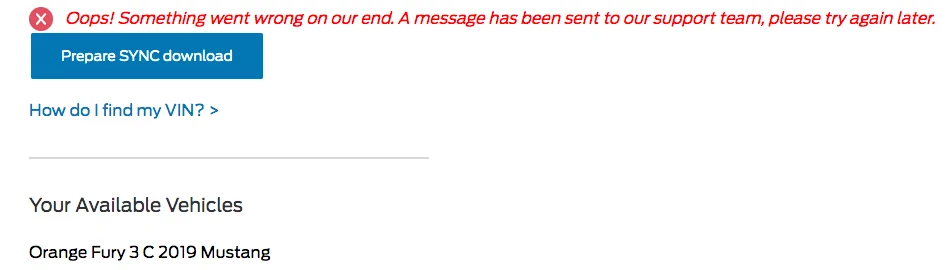
I'm still not able to download at the moment, getting this generic error message:


upload_2020-8-3_7-42-19.webp


I'll try again a little later, no rush :)
 

Flimflamman

Well-Known Member
Joined
Mar 25, 2020
Threads
5
Messages
400
Reaction score
287
Location
Kennesaw, Georgia
First Name
Mike
Vehicle(s)
2019 GT A10 & 301A
Vehicle Showcase
1
Update successful on the way to the office this morning. Took 13 minutes, rebooted, and noticed the change in graphics. I like what I see so far, but didn't get a chance to fiddle around with it yet.
 

Spork3245

Well-Known Member
Joined
Dec 21, 2017
Threads
41
Messages
1,514
Reaction score
704
Location
NJ
Vehicle(s)
2019 GT Premium PP1 w/Magneride
I believe one of the new features is specific to Car Play, and that is, allowing 3rd party nav apps to send their direction info to the dash (assuming this only works for the 12" LCD).
I mentioned this a few pages ago and was told it isn’t true. Unless the capability has been added but it’s not functional yet (ie: the carplay apps need to update?) :brokenheart:
 

Bikeman315

Well-Known Member
Joined
Apr 12, 2015
Threads
581
Messages
16,183
Reaction score
21,909
Location
Myrtle Beach, SC
First Name
Ira
Vehicle(s)
2019 Mustang GT/CS, 2021 Volvo XC60
Update successful on the way to the office this morning. Took 13 minutes, rebooted, and noticed the change in graphics. I like what I see so far, but didn't get a chance to fiddle around with it yet.
That's good news. Same here, 15 and done. By the way forgot if you had nav. If yes are you going to reload the maps to show 1.19 on your about screen?
 

MaskedRacerX

Driver
Joined
Sep 20, 2015
Threads
73
Messages
5,611
Reaction score
4,688
Location
Vilano Beach, FL
First Name
DT
Vehicle(s)
'21_JWS4XE / '21_TM3P
I mentioned this a few pages ago and was told it isn’t true. Unless the capability has been added but it’s not functional yet (ie: the carplay apps need to update?) :brokenheart:
Oh yeah, I went back and re-read through the thread just now, saw that discussion, well, that's poop. I'd love to confirm on my own, but of course, I can't D/L the update ... :crazy:
 
 
Top