Official Ford Sync3 3.4 Release

WD Pro

Well-Known Member
Joined
Jan 18, 2018
Threads
132
Messages
6,763
Reaction score
13,550
Location
United Kingdom
Vehicle(s)
Lime GT
Vehicle Showcase
1
The XML is just to update for Ford backend with what is installed. You should be able to update to the latest maps without issue I would think, as if it shipped with F8 the system should still contain that information. A way around the XML is, assuming you can hook up to Wi-Fi, run an update check. The current installed package information should then get updated on the Ford end.
Thanks again :like:

Ford U.K. will only allow an official download of map version F9 once 3.4 has been installed and the xml (successfully) uploaded.

Multiple downloads of 20136 gave me the xml but after upload, Fords system would tell me I still wasn’t up to date (I was at the time).

The first download of 20282 did exactly the above, later attempts don’t give me the xml.

I would like to have the latest F9 maps but I’m beginning to think I should give up and just live with F8 ... lol

WD :like:

 

UofMEngineer

Well-Known Member
Joined
Oct 14, 2015
Threads
2
Messages
233
Reaction score
124
Location
Michigan
Vehicle(s)
22' FE, 20' FE
Thanks again :like:

Ford U.K. will only allow an official download of map version F9 once 3.4 has been installed and the xml (successfully) uploaded.

Multiple downloads of 20136 gave me the xml but after upload, Fords system would tell me I still wasn’t up to date (I was at the time).

The first download of 20282 did exactly the above, later attempts don’t give me the xml.

I would like to have the latest F9 maps but I’m beginning to think I should give up and just live with F8 ... lol

WD :like:
Try the Wi-Fi method if you can. Should get you what you need.
 

Pero

Well-Known Member
Joined
Sep 30, 2018
Threads
2
Messages
259
Reaction score
183
Location
Slovenia, EU
First Name
Pero
Vehicle(s)
2019 Mustang GT Fastback Ingot Silver MT82 MagneRide B&O
Is there a way to force the creation of the xml file... ?
From original "USB update instructions for SYNC 3":

The update in the vehicle was successful but I cannot find the log file that I shall upload back to the Ford server?

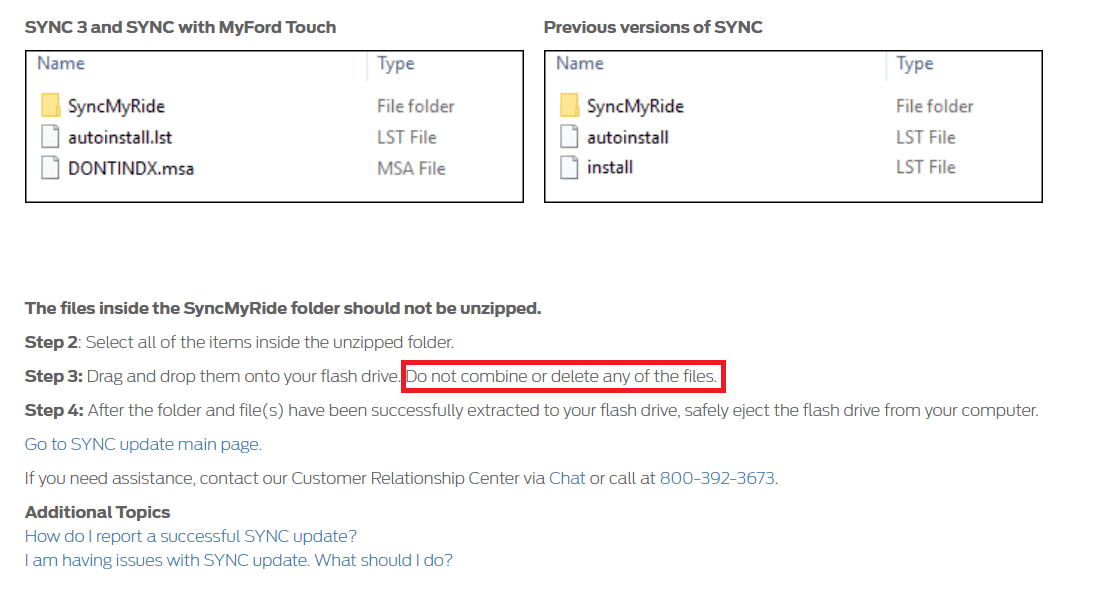
The update information is stored in the SyncMyRide folder on the USB Flash Drive.
The filename includes SYNC + serial number + VIN and has the extension .xml.
If the file was deleted by mistake, please plug-in the USB Stick into your vehicle’s USB Port again and start the Update Process again according to the instructions.

If this file was not created after a successful update, the USB Flash Drive was probably not in the expected format.
Please format the USB Flash Drive to exFat (all data on the USB stick will be deleted) and start the Update Process again according to the instructions.

In both cases, the SYNC 3 system recognizes that the update is already stored and will interrupt the update after a few minutes with writing back the feedback file onto the USB flash drive.


I hope this can help you.
 

Elp_jc

Well-Known Member
Joined
May 2, 2020
Threads
48
Messages
3,527
Reaction score
805
Location
USA
Vehicle(s)
None
Just make sure you have the 381, 391 and 423.
Okay; thanks for the warning. What was the 'secret' trick to check files on the current software? Forgot about that. My USB had the Ford file, and it was accepted, so hope all was well. Thank you.

EDIT: Drove my car today, and voice commands work (told it 'show maps', and it did), so guess all is well with my update. Still want to know where to check the files, to write it down this time :). Thx.
 
Last edited:

Bit_the_Bullitt

Well-Known Member
Joined
Apr 22, 2020
Threads
12
Messages
1,270
Reaction score
1,281
Location
Ohio, US
First Name
Richard
Vehicle(s)
2019 Bullitt
It was around 25 minutes, if memory serves me right. The maps also took around 1hr 10 min for me... but had to do it twice, because did it before the Sync3.4 update, and correct map version didn't show.

Hey gang, so what is the reported HVAC improvement on this version? And can I download it on a 8Gb USB stick?

Finally, the new Tesla I just bought for my wife has no freaking USB (the regular one) ports; WTF? Only 4 tiny ones. Geez.
Congrats on the Tesla and what is probably the most "first world problem" I've ever heard of with the USBs. :)
 

Bit_the_Bullitt

Well-Known Member
Joined
Apr 22, 2020
Threads
12
Messages
1,270
Reaction score
1,281
Location
Ohio, US
First Name
Richard
Vehicle(s)
2019 Bullitt
It looks like this time around there's no "activation" file or anything like that, right? I know for the 3.3 to 3.4 update there was a starting file or whatever to put from a folder to folder.

Has anyone seen the issue of "--km" for distance remaining (despite everything being in miles) in the digital cluster when in Android Auto (whether Waze or Maps) at all? I had that after the 3.4 update and seems nobody else reported this issue.

2021_01_08_13_32_18_Ask_Ford_USA.png
 

UofMEngineer

Well-Known Member
Joined
Oct 14, 2015
Threads
2
Messages
233
Reaction score
124
Location
Michigan
Vehicle(s)
22' FE, 20' FE
Okay; thanks for the warning. What was the 'secret' trick to check files on the current software? Forgot about that. My USB had the Ford file, and it was accepted, so hope all was well. Thank you.

EDIT: Drove my car today, and voice commands work (told it 'show maps', and it did), so guess all is well with my update. Still want to know where to check the files, to write it down this time :). Thx.
Yeah, it looked like you were fine. The easy voice giveaway is that it's just the beep tone now to talk. No chime, or chime + please say a command if you're going from really old software.
 

Bit_the_Bullitt

Well-Known Member
Joined
Apr 22, 2020
Threads
12
Messages
1,270
Reaction score
1,281
Location
Ohio, US
First Name
Richard
Vehicle(s)
2019 Bullitt
Yeah, it looked like you were fine. The easy voice giveaway is that it's just the beep tone now to talk. No chime, or chime + please say a command if you're going from really old software.
I think the "please say a command" is gone in the 3.3 > 3.4 switch, I believe. Plus in the setting I think you can change this.
 

UofMEngineer

Well-Known Member
Joined
Oct 14, 2015
Threads
2
Messages
233
Reaction score
124
Location
Michigan
Vehicle(s)
22' FE, 20' FE
I think the "please say a command" is gone in the 3.3 > 3.4 switch, I believe. Plus in the setting I think you can change this.
That was removed in the second 3.4 prod build, and now the chime sound prior to the beep has been removed as well for the MY21+ builds.
 

Bowdy

Member
Joined
Aug 31, 2019
Threads
1
Messages
16
Reaction score
9
Location
PA, USA
First Name
Marcus
Vehicle(s)
2019 PP2, 401a
It looks like this time around there's no "activation" file or anything like that, right? I know for the 3.3 to 3.4 update there was a starting file or whatever to put from a folder to folder.

Has anyone seen the issue of "--km" for distance remaining (despite everything being in miles) in the digital cluster when in Android Auto (whether Waze or Maps) at all? I had that after the 3.4 update and seems nobody else reported this issue.

2021_01_08_13_32_18_Ask_Ford_USA.png
This is the exact problem I've been having "--km"

I installed the 3.4 update, followed by the maps update and it still happens. If anyone knows anything please help, it's driving me nuts.
 

Vlad Soare

Well-Known Member
Joined
Jan 21, 2020
Threads
67
Messages
3,644
Reaction score
4,466
Location
Bucharest, Romania
First Name
Vlad
Vehicle(s)
2020 Mustang GT 6MT
I did the update. I'm now on 20282.
Gracenote version is 1.1.1.2211 (EU-0020), maps version F9.
Everything went smoothly, except the instructions weren't completely correct. It told me that the first part was finished, and that the second part will start after a key cycle. But it restarted by itself and did the second part right away.

I'm glad they got rid of that voice command chime. It was superflous. Two seconds wasted for no good reason.
 

Spork3245

Well-Known Member
Joined
Dec 21, 2017
Threads
41
Messages
1,514
Reaction score
704
Location
NJ
Vehicle(s)
2019 GT Premium PP1 w/Magneride
I'm glad they got rid of that voice command chime. It was superflous. Two seconds wasted for no good reason.
I think you could always turn that off by putting the voice commands into “advanced” mode, iirc.
 

UofMEngineer

Well-Known Member
Joined
Oct 14, 2015
Threads
2
Messages
233
Reaction score
124
Location
Michigan
Vehicle(s)
22' FE, 20' FE
Advanced mode essentially just cuts down on some prompts. For the most part, there isn’t much difference anymore though. The initial chime+please say a command+beep was the same regardless. 3.4.19200 is where the please say a command was dropped leaving only chime+beep, and now the MY21 builds like 3.4.20282 dropped the chime and are beep only, among some other changes.
 
 
Top