Sponsored

10.2" Horizontal display Android 4.4.2 touch screen radio

VikingJoe

Well-Known Member
Joined
Dec 29, 2017
Threads
20
Messages
133
Reaction score
53
Location
DFW
Vehicle(s)
2017 Mustang GT
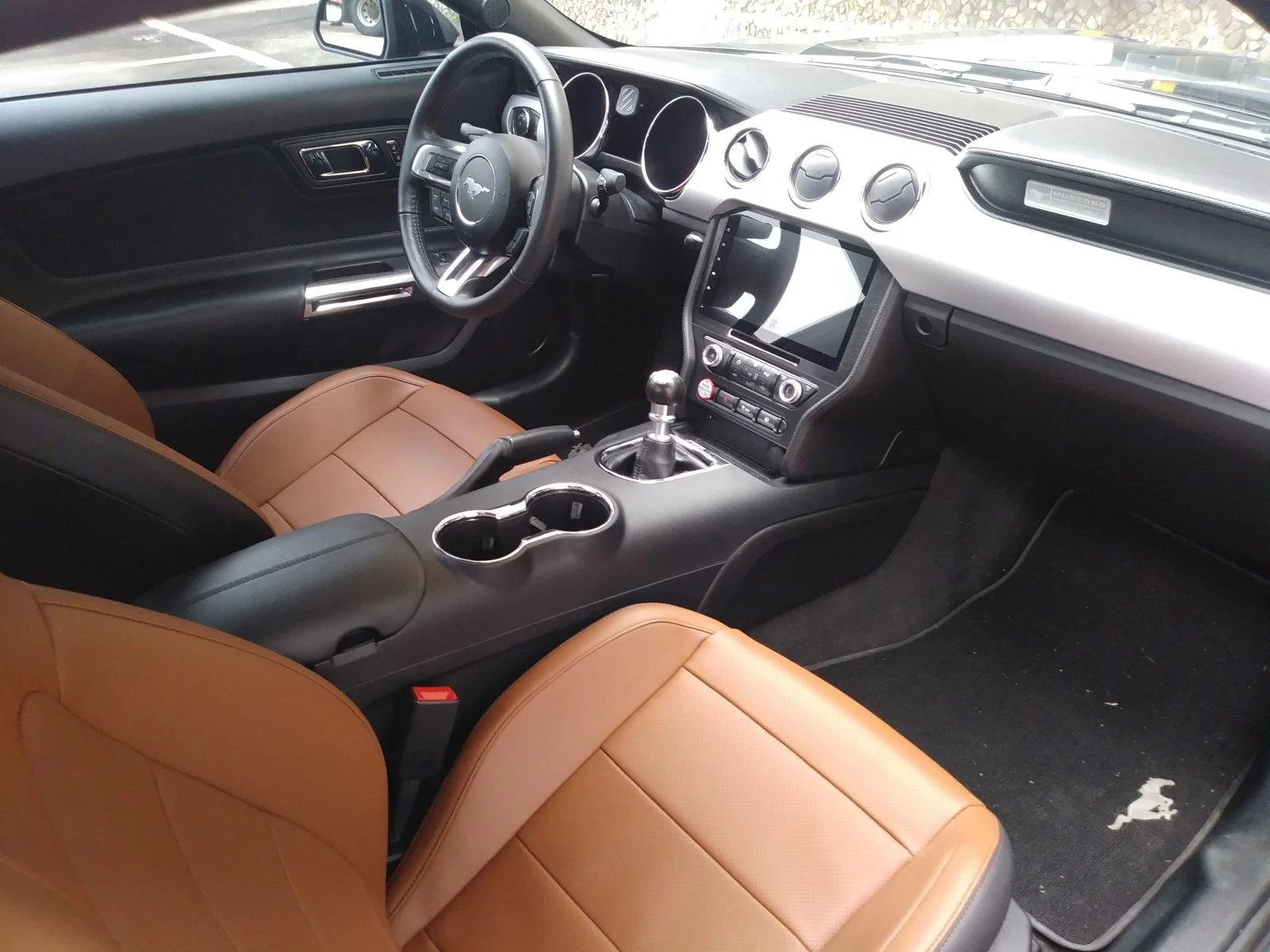
So I got my unit last night and got it installed.

The install was intimidating when you look at all of the harnesses but it was surprisingly simple. I would imagine if you are installing with aftermarket amps, cameras etc. it would be a little more involved, but just hooking it up to my base system was literally connecting the factory harness to the head unit harness and can-bus translator. You also need to run your mic wire and gps antenna but that took me 5 minutes. There is also an extra harness that has a ground wire, power wire and acc wire which was extremely confusing but it turns out it was not needed at all.

I have two gripes currently:
1. I cannot figure out how to get the voice button on the steering wheel to work. When I press it it changes the various modes on the tablet. There is an app on the tablet that looks like it is to program the steering wheel buttons but it doesn't seem to do anything. Hopefully someone figures this one out.

2. Not a major one but it does not auto dim.

If it wasn't for the voice button not working as it should, this unit would be flawless. It completely changed the look of my interior to something more modern. All in all I am very happy and in my opinion it is worth way more than what I paid for it if it holds up to the test of time.

20181113_094910.webp
Sponsored


Condor1970

Well-Known Member
Joined
Oct 4, 2018
Threads
95
Messages
1,567
Reaction score
582
Location
Port Orchard WA
Vehicle(s)
2018 Mustang GT
The voice activation button is the big one for me. I seriously want that feature along with SYNCH functions. I don't want to have to go through some crazy procedure only to have it not properly working in the end.

VikingJoe, please let me know as soon as you figure out how to get the voice activation working, because that's the one big issue for me. Also, are you sure those extra leads (especially the ACC lead you didn't use,), isn't related to the voice activation somehow?
 

Nagare

Well-Known Member
Joined
Feb 1, 2017
Threads
58
Messages
4,037
Reaction score
2,256
Location
Ft Lauderdale
Vehicle(s)
2017 Lightning Blue V6
Vehicle Showcase
1
I hate your interior if only because I don't have it. I'd love to have the Saddle but never see anything pop up with it for sale :(

Have you tried configuring any other steering wheel buttons to see if those have the intended effect? Could be that you need to mess around with all of them to find the right key to change.
 

VikingJoe

Well-Known Member
Joined
Dec 29, 2017
Threads
20
Messages
133
Reaction score
53
Location
DFW
Vehicle(s)
2017 Mustang GT
The voice activation button is the big one for me. I seriously want that feature along with SYNCH functions. I don't want to have to go through some crazy procedure only to have it not properly working in the end.

VikingJoe, please let me know as soon as you figure out how to get the voice activation working, because that's the one big issue for me. Also, are you sure those extra leads (especially the ACC lead you didn't use,), isn't related to the voice activation somehow?
It is a major issue for me as well and I will definitely be trying to figure it out.

As for the extra leads, I have no clue what they are for because the harness literally does not mate with anything on the head unit nor the factory harness. Maybe someone else will chime in on what it is used for but I cannot see it being anything related to the voice button.
 

VikingJoe

Well-Known Member
Joined
Dec 29, 2017
Threads
20
Messages
133
Reaction score
53
Location
DFW
Vehicle(s)
2017 Mustang GT
I hate your interior if only because I don't have it. I'd love to have the Saddle but never see anything pop up with it for sale :(

Have you tried configuring any other steering wheel buttons to see if those have the intended effect? Could be that you need to mess around with all of them to find the right key to change.
LOL you are really going to hate me when I tell you I found them on craigslist and paid $500 total including installation. The guy who sold them to me worked at an interior shop and apparently the owner had them taken off his car right after he bought it to have black covers installed...

I have not had the time to play with the settings extensively. Hopefully I will get to mess around with it tonight.
 

Sponsored

VikingJoe

Well-Known Member
Joined
Dec 29, 2017
Threads
20
Messages
133
Reaction score
53
Location
DFW
Vehicle(s)
2017 Mustang GT
A little update and not a good one regarding the voice sync:

I found a post a few pages back about hooking up two rca output connections from the sync harness to two of the aux inputs on the rca harness on the head unit. I pulled everything back out and sure enough I did not have them connected. I went ahead and connected them and tested it out. Needless to say it did not work.

I don't believe this issue, at least in my case, to be related to the wiring. I feel like this is a software issue or a hardware issue inside of the sync translator box. Both the M (mode) button and the voice button on my steering wheel do the same function on the tablet - they both change the tablet modes. I tried messing around with the key mapping app again and it seems utterly useless. I cannot change a single thing in it.

No clue what to do at this point. Sorry guys.
 

randy_tho

Well-Known Member
Joined
Sep 14, 2017
Threads
2
Messages
394
Reaction score
120
Location
Tennessee
Vehicle(s)
2017
I don't think anyone has gotten the button map working. The RCA plugs was probably my post. If you plug a USB flash drive in the console box can you play music through the sync app?

It does sound like something is up with the config on yours though.
 

randy_tho

Well-Known Member
Joined
Sep 14, 2017
Threads
2
Messages
394
Reaction score
120
Location
Tennessee
Vehicle(s)
2017
I've been using carwebguru as the launcher and pulsar as the MP3 player for music on UFD.
Works pretty good that way. I got sick of the way the built in player kept losing track of the media list and required lots of scrolling to find stuff. At first I tried to use the Sync app but found it annoying too. It's UI doesn't take advantage of the screen size. It's too bad that no one has written a better one.
 

Whittey

Member
Joined
Oct 7, 2015
Threads
0
Messages
18
Reaction score
3
Location
Mentor, OH
Vehicle(s)
2016 Guard EB PP
I've had mine for about 3 months now and here's some things from my perspective:
The shiny edges (mostly on the dvd player) are annoying when it reflects sunlight in flashes.
Left/Right on the steering control scans on the radio instead of going through your presets like the factory did. I listen to a lot of radio and this is annoying as all hell.
The FM tuner seems better than factory. I get better reception farther out, and the scan only picks up clear stations like it should. Good stuff there.
Mine doesn't seem particularly rigid. It seems to flex a lot and doesn't inspire much confidence.
Someone said theirs reads text, but mine does not. Nor does it show caller ID like the factory did (so when someone calls, it's just their number). I don't know about you all, but I don't remember anyone's number anymore.
Calling out is done via the phone, the radio is useless for this as far as I can work out.
The boot time is annoying as hell. I'll have to dig in and find that setting someone mentioned above about a sleep time.
 

randy_tho

Well-Known Member
Joined
Sep 14, 2017
Threads
2
Messages
394
Reaction score
120
Location
Tennessee
Vehicle(s)
2017
On the radio preset scanning is there a toggle on screen to change that behavior? I only have like two local stations I like listening to so haven't noticed this.

On the phone, make sure it is paired with permission for contacts access. If I drive mine tomorrow I may check this. I'm pretty sure I get contact name listed.
 

Sponsored

firestarter2

Well-Known Member
Joined
Jun 16, 2016
Threads
69
Messages
3,207
Reaction score
1,163
Location
NYC
Vehicle(s)
RR G350 Track
The radio app sucks mouse clock. I don't listen to much radio though. How is your Google map speed?
I've had mine for about 3 months now and here's some things from my perspective:
The shiny edges (mostly on the dvd player) are annoying when it reflects sunlight in flashes.
Left/Right on the steering control scans on the radio instead of going through your presets like the factory did. I listen to a lot of radio and this is annoying as all hell.
The FM tuner seems better than factory. I get better reception farther out, and the scan only picks up clear stations like it should. Good stuff there.
Mine doesn't seem particularly rigid. It seems to flex a lot and doesn't inspire much confidence.
Someone said theirs reads text, but mine does not. Nor does it show caller ID like the factory did (so when someone calls, it's just their number). I don't know about you all, but I don't remember anyone's number anymore.
Calling out is done via the phone, the radio is useless for this as far as I can work out.
The boot time is annoying as hell. I'll have to dig in and find that setting someone mentioned above about a sleep time.
 

Nagare

Well-Known Member
Joined
Feb 1, 2017
Threads
58
Messages
4,037
Reaction score
2,256
Location
Ft Lauderdale
Vehicle(s)
2017 Lightning Blue V6
Vehicle Showcase
1
Todd you can always buy my 8" unit if you want, I'll give you a deal on it :D

I've got a local friend with the Tesla for about a year now and he just says it's slow but it works okay.
 

randy_tho

Well-Known Member
Joined
Sep 14, 2017
Threads
2
Messages
394
Reaction score
120
Location
Tennessee
Vehicle(s)
2017
I do until a better option comes along.

IMO:
  1. A double DIN conversion is not a great option. The QC is debatable on the Metra and Scoshe. The end result is not that clean looking. Both them and the tesla take away too many of the controls and the screens on aftermarket double din are generally not that great. (Smaller and resistive touch) And the overall cost is too high.
  2. The sync 3 conversion is generally too expensive for the end result. It is not ideal for aftermarket amps although line level amps or DSPs are out there but again look at your cost vs benefit
  3. The Tesla is too extreme when it comes to the controls for me. Too much reliance on the touch interface.
  4. The sync knock off units while cheaper seem to be way too buggy and unreliable.
  5. There is a newer 8" model floating around that may be a good option but it seems to have the same hardware and software pretty much. Basically just a trade off of a smaller screen to keep the AC knobs and have a reversible install.

For those who have this unit installed, would you recommend it to others? TIA.
 
Last edited:

firestarter2

Well-Known Member
Joined
Jun 16, 2016
Threads
69
Messages
3,207
Reaction score
1,163
Location
NYC
Vehicle(s)
RR G350 Track
I do until a better option comes along.

IMO:
  1. A double DIN conversion is not a great option. The QC is debatable on the Metra and Scoshe. The end result is not that clean looking. Both them and the tesla take away too many of the controls and the screens on aftermarket double din are generally not that great. (Smaller and resistive touch) And the overall cost is too high.
  2. The sync 3 conversion is generally too expensive for the end result. It is not ideal for aftermarket amps although line level amps or DSPs are out there but again look at your cost vs benefit
  3. The Tesla is too extreme when it comes to the controls for me. Too much reliance on the touch interface.
  4. The sync knock off units while cheaper seen to be way too buggy and unreliable.
  5. There is a newer 8" model floating around that may be a good option but it seems to have the same hardware and software pretty much. Basically just a trade off of a smaller screen to keep the AC knobs and have a reversible install.
I'd agree with this. I'm debating getting the 2GB version though. I had the Tesla and it's a weird implementation of android so some apps did not work.
Sponsored


Top