Sponsored

The "how to disable the data link to Ford" thread

Venomous Pony

Well-Known Member
Joined
Nov 13, 2019
Threads
0
Messages
165
Reaction score
189
Location
Florida
First Name
Robert
Vehicle(s)
2020 GT500/2019 F-350 / 2021 Bronco First Edition
Its in the SYNC setup menus. I agree with Earl, just because you toggle it off in SYNC, doesn't mean the modem and data collection is still active. I agree with him, all the toggles are probably just associated with the FordPass account.

Just sharing my 2 cents, not trying to detract from the thread. I have to wonder if well even be able to fully unplug. I’ll know when insurance renewal comes in a couple months, if the info is available to my insurance it’s going up no matter what do at this point. My wife took delivery of her Rapid Red Explorer ST (She wanted to match) today and I’ve never seen this chick drive this way, she’s a maniac! So I guess I may have more than one issue here. No, Ford pass has not been activated on this one yet, salesman delivered it to the house and took off without saying a word.
Sponsored
 

Big John

Well-Known Member
Joined
Aug 27, 2019
Threads
7
Messages
307
Reaction score
407
Location
Tulsa Oklahoma
First Name
John
Vehicle(s)
2020 GT500 CFTP
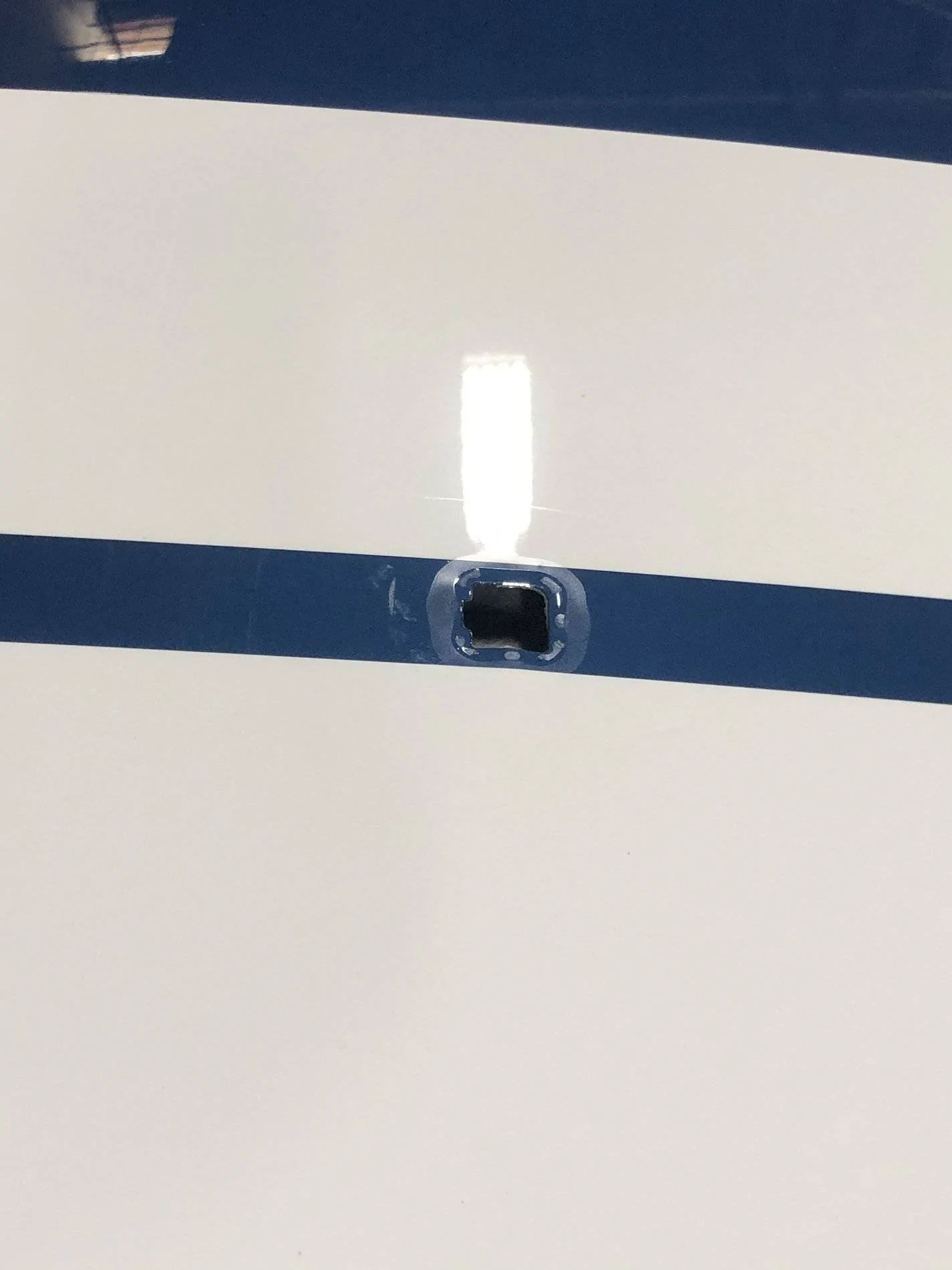
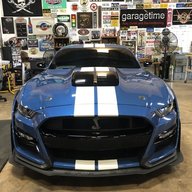
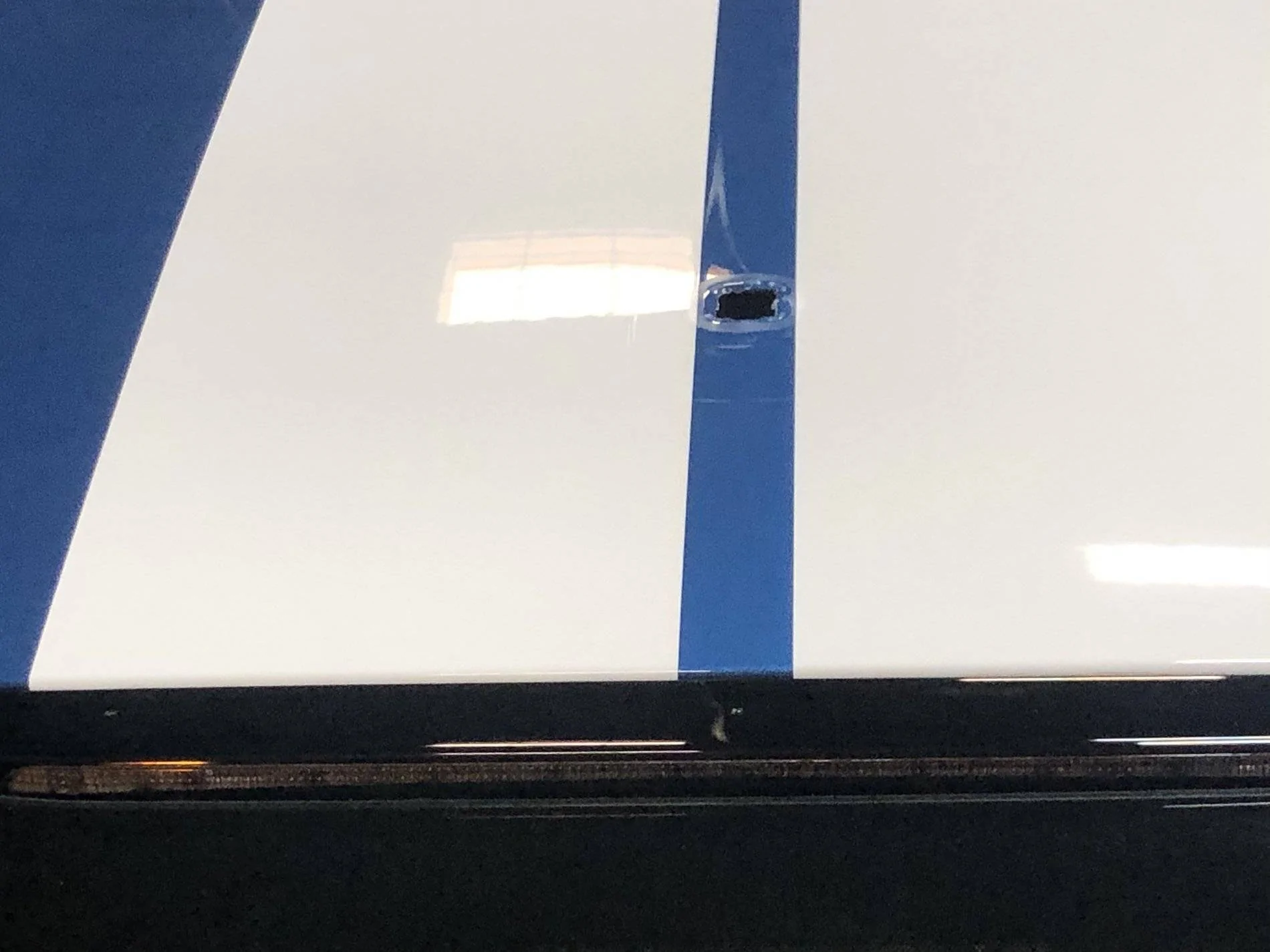
For those interested in the antenna swap. It appears Penske removes the antenna when painting the stripes. It also appears to create similar paint issues like the wing mounts.

06A5762C-7D7A-4865-AF97-DB90BA803B83.webp


150DFDE8-E695-470E-92D0-101EE9553BBC.webp
 

ice445

Well-Known Member
Joined
Apr 13, 2020
Threads
40
Messages
6,798
Reaction score
8,249
Location
Salt Lake City, UT
First Name
Ryan
Vehicle(s)
2020 Mustang GT 6MT
Just sharing my 2 cents, not trying to detract from the thread. I have to wonder if well even be able to fully unplug. I’ll know when insurance renewal comes in a couple months, if the info is available to my insurance it’s going up no matter what do at this point. My wife took delivery of her Rapid Red Explorer ST (She wanted to match) today and I’ve never seen this chick drive this way, she’s a maniac! So I guess I may have more than one issue here. No, Ford pass has not been activated on this one yet, salesman delivered it to the house and took off without saying a word.
If you think about it, its pretty silly for manufacturers to give you all this power and performance, and then turn around and sell you out to your insurance company for using it. But I'm sure the insurance companies are willing to pay big money for that data, so of course the OEM's are gonna go for it. They already got your money, lol.
 
OP
OP
Tomster

Tomster

Beware of idiots
Joined
Feb 20, 2016
Threads
288
Messages
16,074
Reaction score
17,113
Location
FL
First Name
Tom
Vehicle(s)
'20 RR GT500R(CFTP), 18 OW GT350R Base, '17 AG GT350R Electronics Pack, '97 PG Cobra Convertible
For those interested in the antenna swap. It appears Penske removes the antenna when painting the stripes. It also appears to create similar paint issues like the wing mounts.

06A5762C-7D7A-4865-AF97-DB90BA803B83.jpeg


150DFDE8-E695-470E-92D0-101EE9553BBC.jpeg
a slight paint correction around that area would make it like it never happened. Are you going to go back to the shark antenna or going to go for the low profile?
 

Big John

Well-Known Member
Joined
Aug 27, 2019
Threads
7
Messages
307
Reaction score
407
Location
Tulsa Oklahoma
First Name
John
Vehicle(s)
2020 GT500 CFTP
a slight paint correction around that area would make it like it never happened. Are you going to go back to the shark antenna or going to go for the low profile?
I will likely make the switch in the near future. Probably during the off season. Don’t want to wait much longer to drive her.
 

Sponsored

OP
OP
Tomster

Tomster

Beware of idiots
Joined
Feb 20, 2016
Threads
288
Messages
16,074
Reaction score
17,113
Location
FL
First Name
Tom
Vehicle(s)
'20 RR GT500R(CFTP), 18 OW GT350R Base, '17 AG GT350R Electronics Pack, '97 PG Cobra Convertible
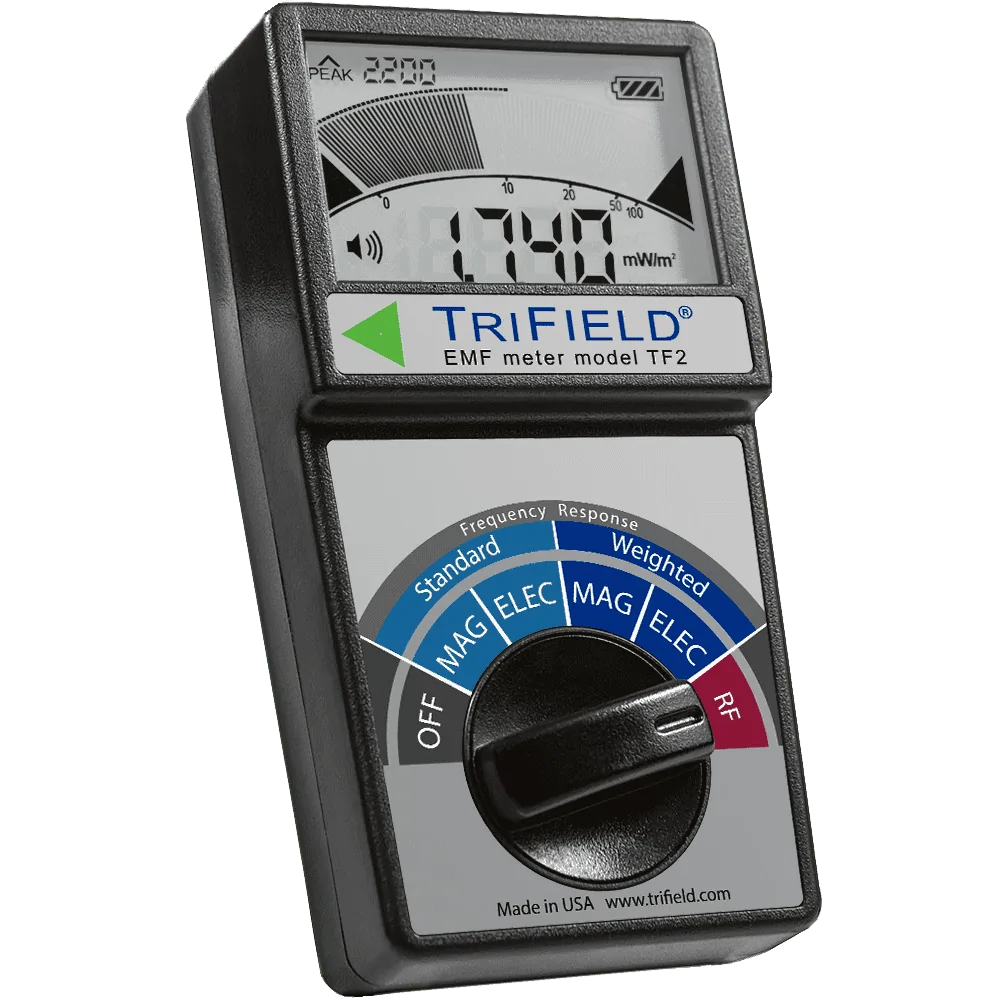
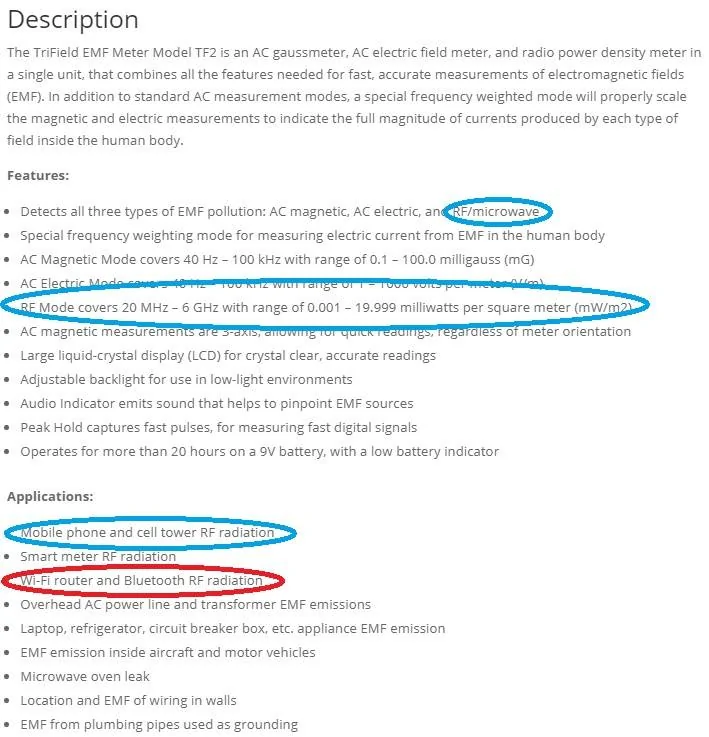
I ordered a Trifield TF2 to measure all three major types of EMF radiation, including Magnetic, Electric, and Radio Frequency/Microwave radiation. This device will measure the strength and presence of cellular data bands as well as Wi-Fi. When I get my car back, I will go over the entire car and report my findings. Its not the $400 meter that @drummerboy recommended, but it got excellent reviews and I think this will certainly do the job. If it doesn't then it can be returned, but if it works, I'm going to keep it.

tf2_angled_catalog.webp
 

drummerboy

Well-Known Member
Joined
Mar 15, 2019
Threads
21
Messages
478
Reaction score
431
Location
SoCal
Vehicle(s)
'19 GT350
Awesome! That should work just fine.

When you receive it, I'm extremely interested to hear if you also triangulate the Wi-Fi antenna to near the USB port as well. Take note of where the sensor is on top of the unit and try to get it as close as possible to various locations in the dash there. Should notice the sound and the peak strength much stronger right there than anywhere else.

I repeatedly pressed the scan for Wi-Fi networks button on the infotainment screen. It's not constant, it will scan in short bursts every 5 sec or so if I recall correctly. I was getting peaks of 3000-9000 scanning all around that center dash area, and 50000-70000 when butted right up to that USB port.
 

drummerboy

Well-Known Member
Joined
Mar 15, 2019
Threads
21
Messages
478
Reaction score
431
Location
SoCal
Vehicle(s)
'19 GT350
Hmm... I saw a review where the TriField does not register narrow pulse widths such as BlueTooth, please do first test yours on your Wi-Fi router at home, I don't know how narrow Wi-Fi pulses are, but most digital communication is very narrow. You should see greater than 90,000 in close proximity to your router, and your phone in excess of 2,500,000 when transmitting data (texting pics, LTE phone calls, etc)
 
OP
OP
Tomster

Tomster

Beware of idiots
Joined
Feb 20, 2016
Threads
288
Messages
16,074
Reaction score
17,113
Location
FL
First Name
Tom
Vehicle(s)
'20 RR GT500R(CFTP), 18 OW GT350R Base, '17 AG GT350R Electronics Pack, '97 PG Cobra Convertible
Awesome! That should work just fine.

When you receive it, I'm extremely interested to hear if you also triangulate the Wi-Fi antenna to near the USB port as well. Take note of where the sensor is on top of the unit and try to get it as close as possible to various locations in the dash there. Should notice the sound and the peak strength much stronger right there than anywhere else.

I repeatedly pressed the scan for Wi-Fi networks button on the infotainment screen. It's not constant, it will scan in short bursts every 5 sec or so if I recall correctly. I was getting peaks of 3000-9000 scanning all around that center dash area, and 50000-70000 when butted right up to that USB port.
I will call a tech I know and discuss this. I will tell him you located the approximate location of the wifi signal and ask if there is an antenna or if it is built into the sync system. I'll have something later on.

Edited to add:

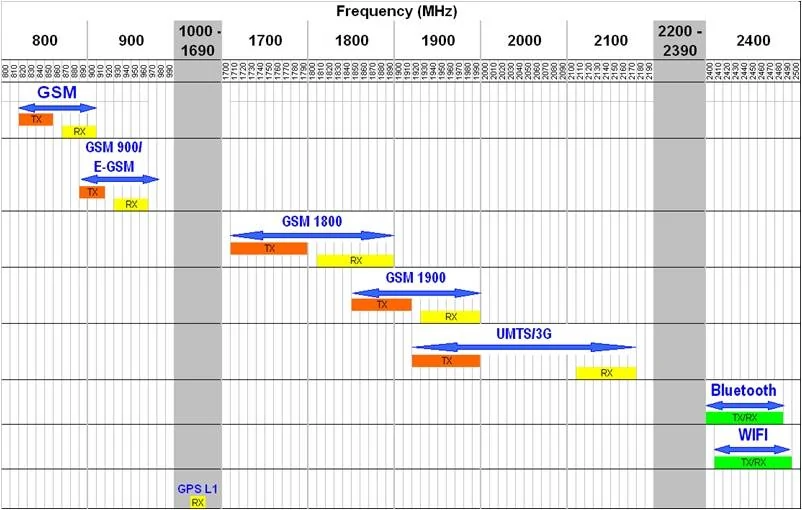
@drummerboy He said that you were measuring the Bluetooth antenna. That is the exact location of the Bluetooth. He was insistent that the wifi antenna is part of the TCU. His solution is to disconnect all leads to the TCU and if it made me feel better, go ahead and pull the fuse, but he says physically disconnecting the TCU module from all leads, (power, communication, antennas) will not allow the vehicle to use wifi or cellular data. A quick look at the frequency ranges and it certainly looks plausible that you were measuring the bluetooth antenna output.

frequency-range-gsm-umts-wifi-gps-bluetooth.jpg
 
Last edited:
OP
OP
Tomster

Tomster

Beware of idiots
Joined
Feb 20, 2016
Threads
288
Messages
16,074
Reaction score
17,113
Location
FL
First Name
Tom
Vehicle(s)
'20 RR GT500R(CFTP), 18 OW GT350R Base, '17 AG GT350R Electronics Pack, '97 PG Cobra Convertible
Hmm... I saw a review where the TriField does not register narrow pulse widths such as BlueTooth, please do first test yours on your Wi-Fi router at home, I don't know how narrow Wi-Fi pulses are, but most digital communication is very narrow. You should see greater than 90,000 in close proximity to your router, and your phone in excess of 2,500,000 when transmitting data (texting pics, LTE phone calls, etc)
I went to the manufacturers website and it says it works on wifi and Bluetooth as well as cellular, so this meter should get the job done.

Trifield2.jpg
 

Sponsored

drummerboy

Well-Known Member
Joined
Mar 15, 2019
Threads
21
Messages
478
Reaction score
431
Location
SoCal
Vehicle(s)
'19 GT350
I will call a tech I know and discuss this. I will tell him you located the approximate location of the wifi signal and ask if there is an antenna or if it is built into the sync system. I'll have something later on.

Edited to add:

@drummerboy He said that you were measuring the Bluetooth antenna. That is the exact location of the Bluetooth. He was insistent that the wifi antenna is part of the TCU. His solution is to disconnect all leads to the TCU and if it made me feel better, go ahead and pull the fuse, but he says physically disconnecting the TCU module from all leads, (power, communication, antennas) will not allow the vehicle to use wifi or cellular data. A quick look at the frequency ranges and it certainly looks plausible that you were measuring the bluetooth antenna output.
So my numbers above aren't the RF frequency, they are the RF strength in microwatts per square meter (I think your meter reads in milliwatts). Neither of our meters show the frequency (I don't know how yours sounds, but in mine you can sort hear the frequency and interpret it) I think BT and Wi-Fi use the same frequency, that may explain if I did indeed identify the BT antenna.

It makes perfect sense for that to be the BT antenna location rather than the Wi-Fi that I located, but it would just have to mean that the unit scans for BT simultaneously when you press to scan for Wi-Fi. I did not look around any further after pinpointing the obvious antenna location, and it seemed a bit high powered to me to be BT.

I'll go poke around some more and have a kid mash the scan button while I look around.
 
OP
OP
Tomster

Tomster

Beware of idiots
Joined
Feb 20, 2016
Threads
288
Messages
16,074
Reaction score
17,113
Location
FL
First Name
Tom
Vehicle(s)
'20 RR GT500R(CFTP), 18 OW GT350R Base, '17 AG GT350R Electronics Pack, '97 PG Cobra Convertible
So my numbers above aren't the RF frequency, they are the RF strength in microwatts per square meter (I think your meter reads in milliwatts). Neither of our meters show the frequency (I don't know how yours sounds, but in mine you can sort hear the frequency and interpret it) I think BT and Wi-Fi use the same frequency, that may explain if I did indeed identify the BT antenna.

It makes perfect sense for that to be the BT antenna location rather than the Wi-Fi that I located, but it would just have to mean that the unit scans for BT simultaneously when you press to scan for Wi-Fi. I did not look around any further after pinpointing the obvious antenna location, and it seemed a bit high powered to me to be BT.

I'll go poke around some more and have a kid mash the scan button while I look around.
Right, my only point is that BT and wifi share very similar frequencies. My plan of attack is to do a full system analysis when I get my car back and document/pinpoint every sensor.

I'll keep you advised.
 
OP
OP
Tomster

Tomster

Beware of idiots
Joined
Feb 20, 2016
Threads
288
Messages
16,074
Reaction score
17,113
Location
FL
First Name
Tom
Vehicle(s)
'20 RR GT500R(CFTP), 18 OW GT350R Base, '17 AG GT350R Electronics Pack, '97 PG Cobra Convertible
That would be handy to find the optimum locations for the multiple routers/access points around here, Tom. I'll have to check that one out.
I'll loan you mine. Text me when you get a chance.
 

drummerboy

Well-Known Member
Joined
Mar 15, 2019
Threads
21
Messages
478
Reaction score
431
Location
SoCal
Vehicle(s)
'19 GT350
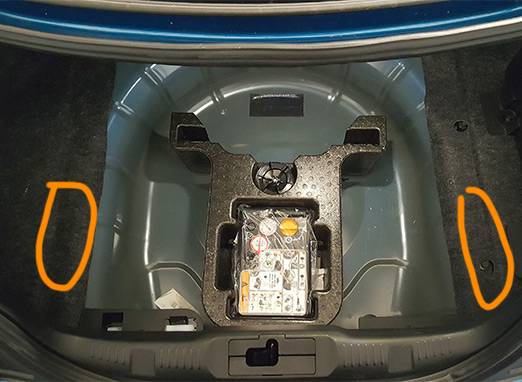
Thanks to previous diagrams, I was quickly able to locate very strong signal from two antennas (circled). They are below the sheetmetal, so access would be from below the car:

4.jpg


When vehicle hotspot is turned on, these two above are pulsing to beat the band. I do not know what purpose they serve other than creating the in-car Wi-Fi hotspot network, if any. I was unable to detect any RF from these locations except when hotspot was on.

______________________________________________________


2.jpg


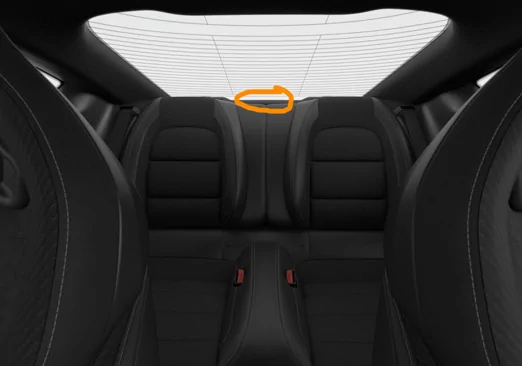
In the rear package tray is clearly the 4G antenna. When refreshing FordPass data or locking/unlocking doors, it sounds exactly like a mobile phone sending/receiving a text.

It phones home precisely every 2min 5sec with a packet of data that sounds to be the size of a large quantity of text or small photograph. I can't really tell the quantity of data, but it isn't terribly difficult to discern small amounts such as text and large amounts such as many pictures or a video.

I pulled the fuse during one of these transactions and the signal stopped immediately. It is at this time that I'd again like to assert that pulling the fuse is the easiest way to kill the 4G communication (presuming your car has the TCU on its own circuit like my 2019 GT350).

______________________________________________________


1.jpg


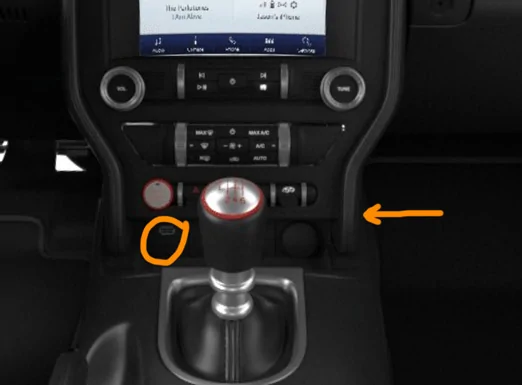
Disregard the arrow for now (more on that at the very bottom of this post).

Circled is the location of possibly two antennas, one almost certainly being the bluetooth antenna and the other one communicating with the key fob. There is chatter coming from this location that I previously interpreted as Wi-Fi scans, which is in fact the key fob comms.

The arrow points to another possible location where different chatter is heard, but I am not 100% confident, it's a little confusing. Here it is circled:

3.jpg


______________________________________________________


I will be happy to do any further testing, though I can't think of anything else at this time other that the Wi-Fi antenna location. I would need to connect to Wi-Fi and attempt to update the unit to identify the location of the Wi-Fi antenna, which is something I'm not going to dive into at this time.
Sponsored

 
Last edited:


Top