
Sponsored
Colleton
Mustang Fan
- Joined
- Dec 4, 2013
- Threads
- 48
- Messages
- 1,397
- Reaction score
- 509
- Location
- NW Florida
- Vehicle(s)
- 2020 GT500, 2017 Edge Sport, 2013 Focus ST
Damn. Everything here has to be negative.

Tomster
Beware of idiots
I'd like to know more about it before I update...... I did a quick google and found nothing pertaining to the differences.

EF300
Well-Known Member
- Joined
- Aug 24, 2015
- Threads
- 73
- Messages
- 2,587
- Reaction score
- 1,378
- Location
- The Swamp, Central FL
- Vehicle(s)
- 2017 GT350, 2020 GT500 CFTP
Did not fix my sagging bumper!
But what did it do? Anyone knows? Don’t see any update notes anywhere..
I have been driving a loaner 2017 edge with sync 2.3. Seems to be Identical infotainment as far as I can tell to my shelby but the system seems overall slightly faster to inputs. Not sure if thats related tp 2.3 or not.
Ninjak
Posting from the Shadows
- Joined
- Aug 19, 2013
- Threads
- 14
- Messages
- 1,612
- Reaction score
- 960
- Location
- The Shadows
- First Name
- David
- Vehicle(s)
- 2024 Dark Horse Supercharged 2024 Bronco Raptor 1968 GTA Mustang
Go to the infotainment section. I think they cover it there.
Sponsored

Tank
9/11 - Never Forget
- Joined
- Feb 19, 2016
- Threads
- 36
- Messages
- 3,065
- Reaction score
- 1,795
- Location
- Above the Notches
- Vehicle(s)
- G0853
http://www.mustang6g.com/forums/showthread.php?t=41251
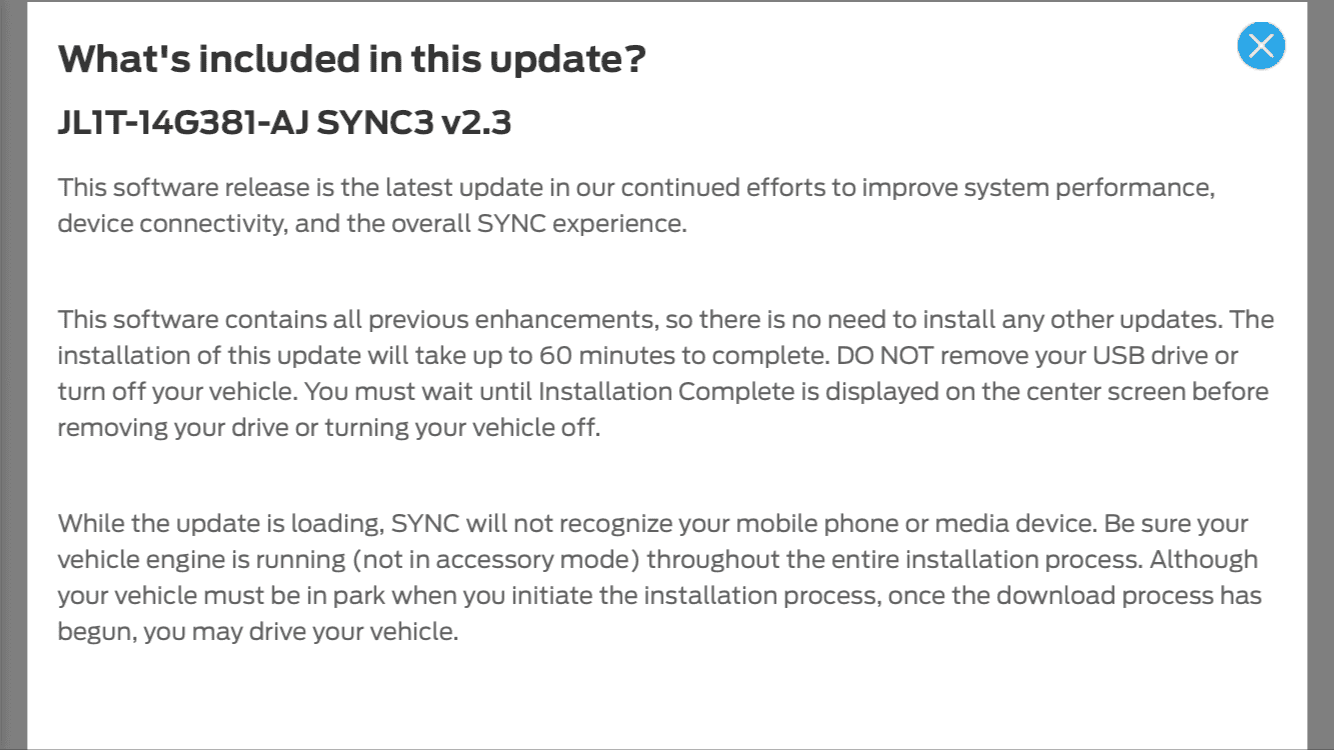
From my Ford Owner page, the notes about 2.3- nothing earth shattering...but you do have to keep your car running for
at least an hour..

From my Ford Owner page, the notes about 2.3- nothing earth shattering...but you do have to keep your car running for
at least an hour..
Last edited:

Colleton
Mustang Fan
- Joined
- Dec 4, 2013
- Threads
- 48
- Messages
- 1,397
- Reaction score
- 509
- Location
- NW Florida
- Vehicle(s)
- 2020 GT500, 2017 Edge Sport, 2013 Focus ST
Same for me. Both the GT350 and the Fusion were done on my morning commute. ~ 30-40 minutes.Took all of my cars (Fusion, F150, Shelby) less than 30 min each

- Joined
- Nov 24, 2017
- Threads
- 10
- Messages
- 226
- Reaction score
- 101
- Location
- Texas, MFer
- Vehicle(s)
- GT350
Hey, new here...I downloaded the update and got like 6 zipped files with no clarity on which one to use. Anyone have the straight dope on what needs to be on the thumb drive?
Edit: I was using a Mac to download the files. Didn't think it would matter. I downloaded from an IBM compatible and formatted the thumb drive to exfat. When I went to plug the thumb into the GT350, this time it didn't give me any window asking if I wanted to install, or anything like that, but when I looked at the top of the screen it said something like "software updating". Then I did get a pop-up confirming successful update. Then I turned off the car for 5 minutes (as directed), then checked for the version and it took.
Edit: I was using a Mac to download the files. Didn't think it would matter. I downloaded from an IBM compatible and formatted the thumb drive to exfat. When I went to plug the thumb into the GT350, this time it didn't give me any window asking if I wanted to install, or anything like that, but when I looked at the top of the screen it said something like "software updating". Then I did get a pop-up confirming successful update. Then I turned off the car for 5 minutes (as directed), then checked for the version and it took.
Last edited:
Wine dude
Well-Known Member
I guess I am just stupid
When I connect to WiFi says I am up to date
But still shows version 1
Ask it to update mobile apps and it says updating but also says up to date
Left car running only to come back and had car turn off
Very stupid
When I connect to WiFi says I am up to date
But still shows version 1
Ask it to update mobile apps and it says updating but also says up to date
Left car running only to come back and had car turn off
Very stupid
Sponsored
Colleton
Mustang Fan
- Joined
- Dec 4, 2013
- Threads
- 48
- Messages
- 1,397
- Reaction score
- 509
- Location
- NW Florida
- Vehicle(s)
- 2020 GT500, 2017 Edge Sport, 2013 Focus ST
The update is pretty large, 1.6GB for nav and over 2GB for non-nav cars. No one is getting the update via wifi automatic updates at this time.I guess I am just stupid
When I connect to WiFi says I am up to date
But still shows version 1
Ask it to update mobile apps and it says updating but also says up to date
Left car running only to come back and had car turn off
Very stupid
Go to the Ford Owner website. If necessary, create an account and enter the info for your sync equipped vehicles. Select the "Sync and Vehicle Features" tab, then select "Check for software updates". You should get an "updates available" message and a button to start the download.
Download the update, follow the directions on the website, and you shouldn't have any problems. Use at least a 32GB thumb drive. Expect to leave the car running for ~30-45 minutes to complete the process. I did it on my morning commute.
https://owner.ford.com
-------------------------------------
If you have nav and are feeling adventurous, download links for the 2.3 update for nav equipped cars are posted in the root post of this thread. This is the same update you would get from the Ford Owner website. I would stick with the official 2.3 release and avoid the leaked 3.0 release that is also listed.
*OFFICIAL UPDATE v2.3.10 --> OWNER.FORD.COM*
**CAUTION:There are FOUR versions to this update, MY 16 Nav/Non-Nav, and MY 17 Nav/Non-Nav, a single file will not work for both years! Even if they appear identical, use the one for your model year! You risk damaging APIM and/or Gracenotes and possibly other things**
***FOR INSTALLATION TO GO FLAWLESSLY THE FIRST TIME, USE MIN. 32GB USB DRIVE WITH 3.0 SPEED FOR BEST RESULTS.***
Mirror links:North America: (Follow pdf attachments at the bottom for instructions)
Official link to MY 16 w/Nav: http://ivsu.binaries.ford.com/owner-...-14G381-AJ.zip
Official link to MY 17 w/Nav: http://ivsu.binaries.ford.com/owner-...-14G381-AJ.zip
-------------------------------------
If you don't like either of these options, take the car to the dealership and they'll update it for you. Personally, I would go with the Ford Owner site. YMMV.
Official link to MY 16 w/Nav: http://ivsu.binaries.ford.com/owner-...-14G381-AJ.zip
Official link to MY 17 w/Nav: http://ivsu.binaries.ford.com/owner-...-14G381-AJ.zip
-------------------------------------
If you don't like either of these options, take the car to the dealership and they'll update it for you. Personally, I would go with the Ford Owner site. YMMV.

Krogen
Well-Known Member
- Joined
- Jul 28, 2016
- Threads
- 2
- Messages
- 160
- Reaction score
- 83
- Location
- Puget Sound
- Vehicle(s)
- 2017 GT350 Oxford White & Blue Stripes
Also be sure you thumb drive is formatted for exfat. The site has a little blurb to that effect. You may get away with fat, but no guarantee. My update to 2.3 was painless. It does take a while, so don't be impatient. Start the car, insert the thumb drive and go for a drive. Partway through, it gives a message and looks like it's done, but don't be fooled, it will tell you when it's finally complete.The update is pretty large, 1.6GB for nav and over 2GB for non-nav cars. No one is getting the update via wifi automatic updates at this time.
Go to the Ford Owner website. If necessary, create an account and enter the info for your sync equipped vehicles. Select the "Sync and Vehicle Features" tab, then select "Check for software updates". You should get an "updates available" message and a button to start the download.
Download the update, follow the directions on the website, and you shouldn't have any problems. Use at least a 32GB thumb drive. Expect to leave the car running for ~30-45 minutes to complete the process. I did it on my morning commute.
https://owner.ford.com
- Joined
- Nov 24, 2017
- Threads
- 10
- Messages
- 226
- Reaction score
- 101
- Location
- Texas, MFer
- Vehicle(s)
- GT350
I tried fat32 (or something). Wasn't having luck. Erase the thumb drive and format for exfat. Don't use a Mac OS. The interface is clunky, so when ready to install, start up car first, then insert thumb. You may or may not get a "do you want to install" type of screen. I didn't get one, but the screen did say it was updating on the top left of screen. Don't turn off car until done, and when done you shut down the car and wait 5 minutes. Then it should be installed.

Krogen
Well-Known Member
- Joined
- Jul 28, 2016
- Threads
- 2
- Messages
- 160
- Reaction score
- 83
- Location
- Puget Sound
- Vehicle(s)
- 2017 GT350 Oxford White & Blue Stripes
Should be a small .xml file. I tried to report too and the site came back with an error. However, a while later I went to check on owner.ford.com and found it showed the correct update.I just did the 2.3 update and went to report it to ford but the file that it wants isnt on my usb drive.
Sponsored
Similar threads


- Replies
- 31
- Views
- 4,326


- Replies
- 22
- Views
- 6,989

