Official Ford Sync3 3.4 Release

m3incorp

Well-Known Member
Joined
Feb 6, 2020
Threads
22
Messages
4,603
Reaction score
3,125
Location
Georgia/Colorado
First Name
James
Vehicle(s)
2019 Mustang GT Premium with Roush Phase 2, 2023 Audi A5
Don't waste your time trying to do the update over wifi.

Will the WiFi update not work ? I tried to update mine via WiFi and it will not commence the update.

I chose the scan for updates, but it never does, it does the scan but nada....

Will I have to do it via usb? Can you guys please point me to the map update thread?
Thanks!

 

Vegas5OH

Well-Known Member
Joined
Aug 19, 2016
Threads
2
Messages
372
Reaction score
299
Location
Las Vegas
Vehicle(s)
2016 5.0 PP
I have an apim out of a 2019 with nav I just updated it, worked perfect. used the vin from the car i got the apin out of. Gonna try to update maps now.
 

mqu02

Well-Known Member
Joined
Sep 7, 2017
Threads
1
Messages
58
Reaction score
31
Location
Nebraska
First Name
Scott
Vehicle(s)
'19 Kona Blue GT350
Haven't checked today if 3.4 is finally ready for my car, but looks like the endless loop error was fixed, correct? That'd be great, since I don't feel like messing with that file to add a delay. Will check right now.

EDIT: Just tried, and same crap: Your 3.3Sync-19052 is up to date. Oh well. Will keep trying.
I've got the same problem here, and just called into Ford to ask about it. The person on the phone said I have the latest version, and couldn't/wouldn't give me any specific details. I explained that there are a lot of 2019 Mustangs getting updates to 3.4, but all he said was that you have the latest version.

If someone was able to call in to get help with this, what key words did you say to get them to fix something in Ford's system? I even asked about escalating the case, but he said he wouldn't be able to do that.
 

Jklaz

Active Member
Joined
Feb 7, 2019
Threads
5
Messages
27
Reaction score
8
Location
Upstate SC
First Name
Jo
Vehicle(s)
'17 Ingot Silver Ecoboost Premium w/Pony Package
If im on an older update, and haven't updated in a while, will I need to update to the earlier versions first?

Ford website doesnt bring up sync 3.4 as a download for me, but instead brings up an older version
 

el-guapin

Well-Known Member
Joined
Oct 30, 2018
Threads
33
Messages
913
Reaction score
381
Location
LSU - Geaux Tigers!
Website
www.tesla.com
Vehicle(s)
1949 UFO
If im on an older update, and haven't updated in a while, will I need to update to the earlier versions first?

Ford website doesnt bring up sync 3.4 as a download for me, but instead brings up an older version
Looks like you have 17MY Mustang. Sync3 v3.0 is the latest version Ford will allow for your vehicle.
 

el-guapin

Well-Known Member
Joined
Oct 30, 2018
Threads
33
Messages
913
Reaction score
381
Location
LSU - Geaux Tigers!
Website
www.tesla.com
Vehicle(s)
1949 UFO
...... Just tried, and same crap: Your 3.3Sync-19052 is up to date. Oh well. Will keep trying.
I've got the same problem here, and just called into Ford to ask about it. The person on the phone said I have the latest version, and couldn't/wouldn't give me any specific details. I explained that there are a lot of 2019 Mustangs getting updates to 3.4, but all he said was that you have the latest version.

If someone was able to call in to get help with this, what key words did you say to get them to fix something in Ford's system? I even asked about escalating the case, but he said he wouldn't be able to do that.
Unless something changes, you are not gonna be able to get a Ford direct update.
 

mqu02

Well-Known Member
Joined
Sep 7, 2017
Threads
1
Messages
58
Reaction score
31
Location
Nebraska
First Name
Scott
Vehicle(s)
'19 Kona Blue GT350
Unless something changes, you are not gonna be able to get a Ford direct update.
Just curious, because of Ford's system locking me out, or the hardware I have? If hardware, why are some 2019 systems working and others aren't?
 

Jklaz

Active Member
Joined
Feb 7, 2019
Threads
5
Messages
27
Reaction score
8
Location
Upstate SC
First Name
Jo
Vehicle(s)
'17 Ingot Silver Ecoboost Premium w/Pony Package
Looks like you have 17MY Mustang. Sync3 v3.0 is the latest version Ford will allow for your vehicle.
OOOF. Thanks lol. Atleast i updated from 2.2 to 3.0
 

el-guapin

Well-Known Member
Joined
Oct 30, 2018
Threads
33
Messages
913
Reaction score
381
Location
LSU - Geaux Tigers!
Website
www.tesla.com
Vehicle(s)
1949 UFO
Just curious, because of Ford's system locking me out, or the hardware I have? If hardware, why are some 2019 systems working and others aren't?
Don’t think is your hardware. Most like a reporting or other silly issue on Ford’s side. But if nothing else works, you can get both the system and NAV updates from Ford using Cyanlabs.
 

m3incorp

Well-Known Member
Joined
Feb 6, 2020
Threads
22
Messages
4,603
Reaction score
3,125
Location
Georgia/Colorado
First Name
James
Vehicle(s)
2019 Mustang GT Premium with Roush Phase 2, 2023 Audi A5
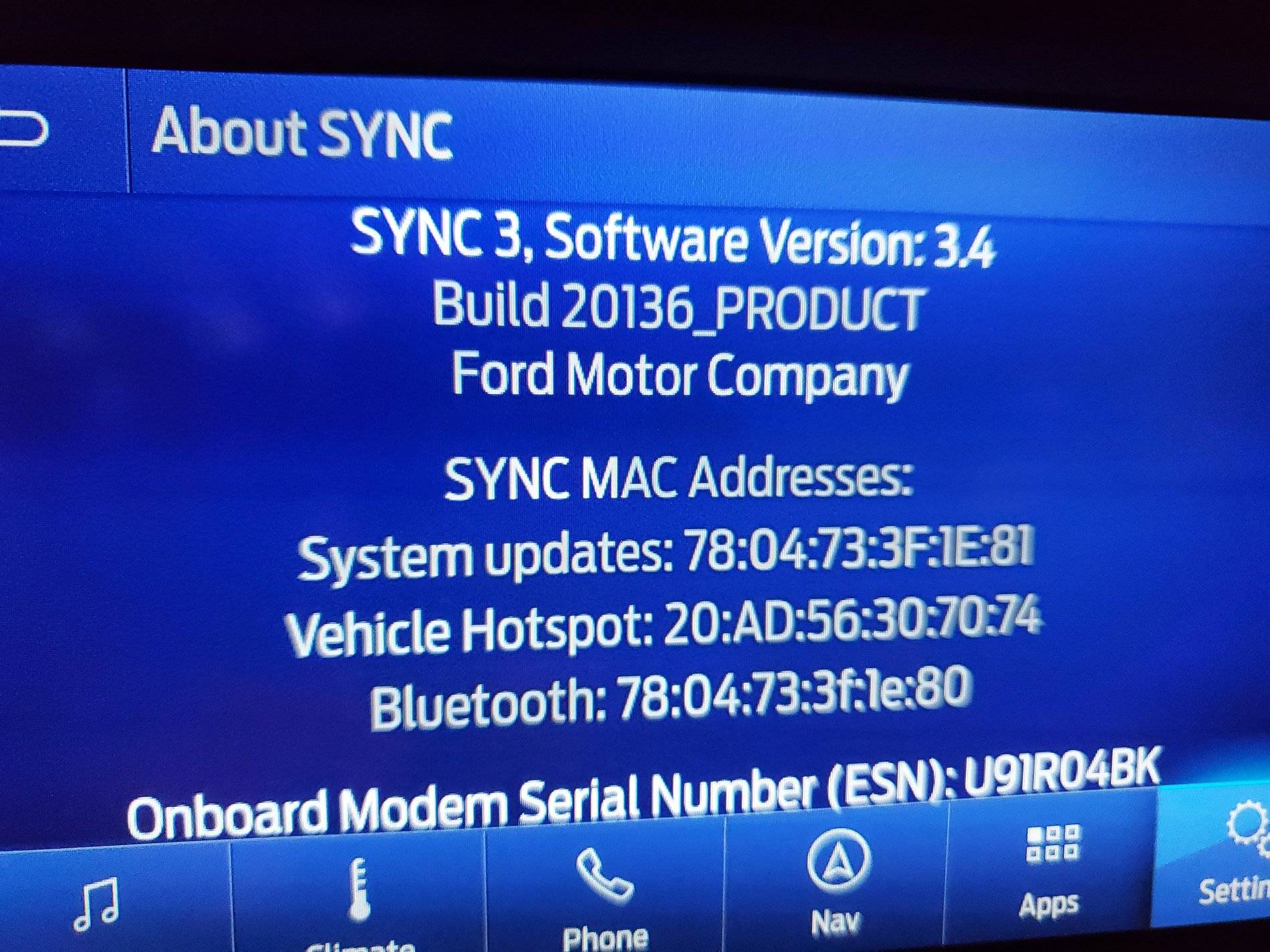
This morning my visitors flew home, so went into the garage to rectify my "no navigation voice command" issue. I used the download the software person sent me to erase the maps....it actually deletes your navigation from the system. After using the tool and confirming that the screen now said Navigation failed; I installed the Sync 3.4 update. It took about 15 minutes (I stood in the garage and had a beer so I could catch it before it began looping). After it said update complete, I got out of the car and locked doors for about 5 minutes. On startup, it showed I have Sync 3.4. I have the new USB with the updated map files they resent me, so I will upload them tomorrow or the next day. Instead of driving around for almost 2 hours, I'll probably put in on the charger this time. If the maps install and show correct version, I will consider this saga completed.
Sync 3.4.jpg
 

UofMEngineer

Well-Known Member
Joined
Oct 14, 2015
Threads
2
Messages
233
Reaction score
124
Location
Michigan
Vehicle(s)
22' FE, 20' FE
Haven't checked today if 3.4 is finally ready for my car, but looks like the endless loop error was fixed, correct? That'd be great, since I don't feel like messing with that file to add a delay. Will check right now.

EDIT: Just tried, and same crap: Your 3.3Sync-19052 is up to date. Oh well. Will keep trying.
Try now.
 
 
Top