Sponsored

New Navigation map update June 29th

m3incorp

Well-Known Member
Joined
Feb 6, 2020
Threads
22
Messages
4,603
Reaction score
3,125
Location
Georgia/Colorado
First Name
James
Vehicle(s)
2019 Mustang GT Premium with Roush Phase 2, 2023 Audi A5
For those doing the download; when I get home today, I'll screenshot how the files should be placed on the USB. Mine updated very first try with no issues. I pity the person who is using a slow internet connection when trying to download them. :)
Sponsored


raptor17GT

Well-Known Member
Joined
Aug 9, 2019
Threads
23
Messages
1,928
Reaction score
1,503
Location
Scotland
Vehicle(s)
Mustang GT Manual 2017 - now sold ☹
i know when i've updated mine, its been really fussy about the actual USB stick, doesn't always run the same one two updates in a row. That and exFat formatting lol
 

Bikeman315

Well-Known Member
Joined
Apr 12, 2015
Threads
581
Messages
16,183
Reaction score
21,909
Location
Myrtle Beach, SC
First Name
Ira
Vehicle(s)
2019 Mustang GT/CS, 2021 Volvo XC60
i know when i've updated mine, its been really fussy about the actual USB stick, doesn't always run the same one two updates in a row. That and exFat formatting lol
You are so right. A high speed USB 3 is virtually required.
 

Zooks527

Well-Known Member
Joined
Aug 24, 2018
Threads
67
Messages
1,727
Reaction score
1,395
Location
02048
Vehicle(s)
2019 KB GT, 401A, 6MT, PP1, S&S, MR, AE, B&O / 2018 Jeep Grand Cherokee Summit
I was spoiled by my M235. BMW gave me 5 years of free map updates and they downloaded in the background and installed automatically while I driving.
 

Järn

Well-Known Member
Joined
Aug 26, 2015
Threads
20
Messages
256
Reaction score
443
Location
The Motor City
First Name
Tony
Vehicle(s)
2019 Mustang GT Premium, Ruby Red, A10, B&O, AE
For all those having problems with the upgrade...
Here is something to double-check. A normal/default format is FAT32.
"USB Requirement: The application requires a USB formatted (exFAT32)"
 

Sponsored

m3incorp

Well-Known Member
Joined
Feb 6, 2020
Threads
22
Messages
4,603
Reaction score
3,125
Location
Georgia/Colorado
First Name
James
Vehicle(s)
2019 Mustang GT Premium with Roush Phase 2, 2023 Audi A5
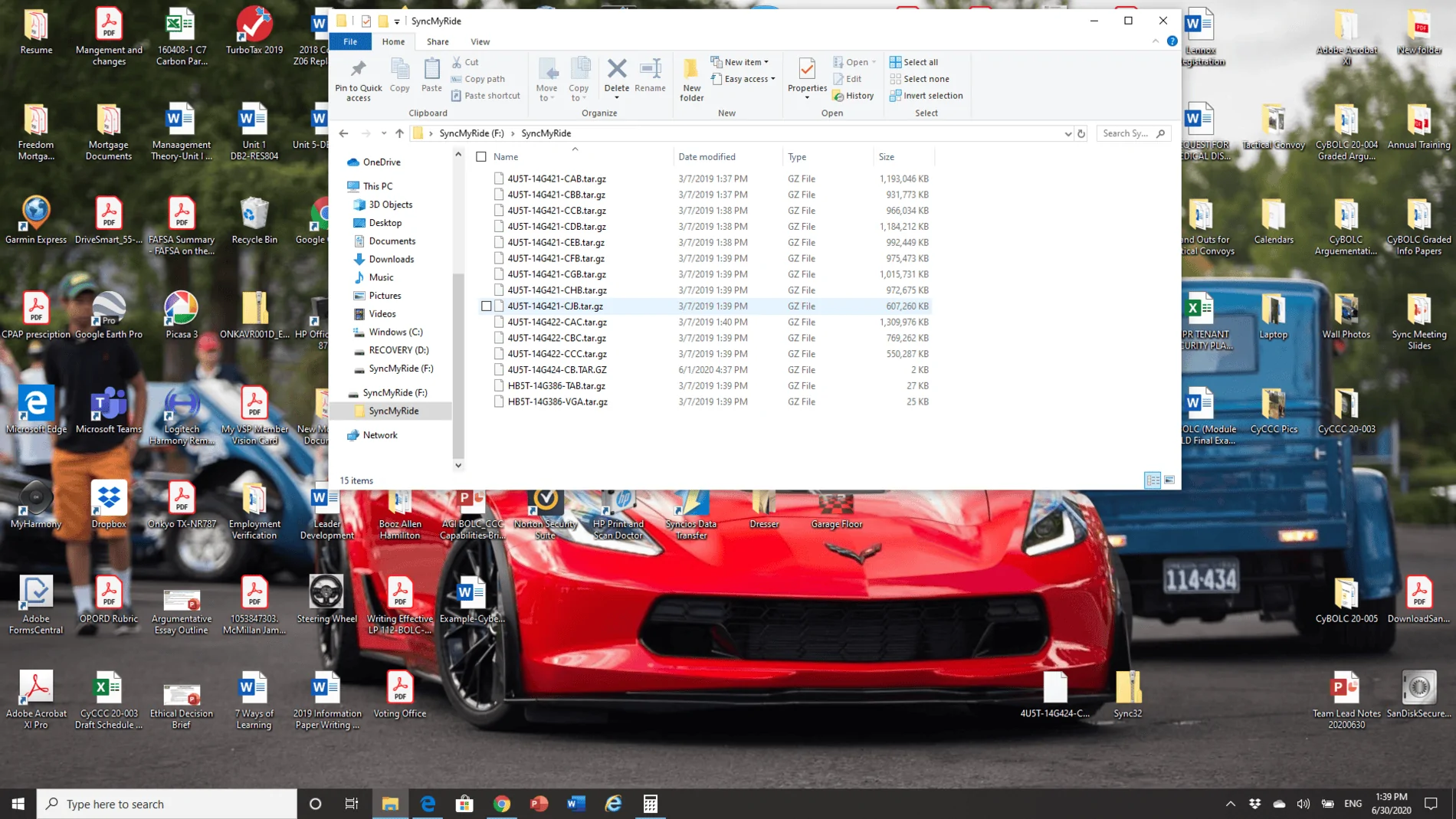
Here is a screenshot of how the files look on the USB that I had no problem installing with the 1.18 maps.

As stated a couple of times, ensure the USB is formatted with exFAT32. I only have the update on the USB and nothing els.

Map Update 1.18 Screen Shot.webp
 

psu2008

New Member
Joined
Jun 30, 2020
Threads
1
Messages
3
Reaction score
0
Location
MD
Vehicle(s)
2019 Metallic Mustang GT PP1, 2019 Leadfoot Harley F-150, 2019 Billard Blue Street Glide Special
Just updated — or tried to — my 2019 Mustang GT and 2019 F-150 via free download and my own USB. I already had the latest Sync 3.3 19052 build.

Had no issues and got all the expected update prompts and successful notifications on both. However, when I check to see what version of the Navigation Maps are, it didn’t change. The F150 is still NA 1 17 and the Mustang is NA 1 18.

isn’t it supposed to be 1 19? Anyone else having this issue?
 

m3incorp

Well-Known Member
Joined
Feb 6, 2020
Threads
22
Messages
4,603
Reaction score
3,125
Location
Georgia/Colorado
First Name
James
Vehicle(s)
2019 Mustang GT Premium with Roush Phase 2, 2023 Audi A5
It may be a Sync 3.3 issue. I updated to 1.18 two weeks ago; showed update complete but the screen still showed 1.17. Some on here has said, it is a known issue with Sync 3.3 not showing the new updated map number after updating. I understand it is actually a third party that does the maps and I have to say they are doing a very poor job in comparison to other map updates for different manufacture vehicles.

Just updated — or tried to — my 2019 Mustang GT and 2019 F-150 via free download and my own USB. I already had the latest Sync 3.3 19052 build.

Had no issues and got all the expected update prompts and successful notifications on both. However, when I check to see what version of the Navigation Maps are, it didn’t change. The F150 is still NA 1 17 and the Mustang is NA 1 18.

isn’t it supposed to be 1 19? Anyone else having this issue?
 

Bikeman315

Well-Known Member
Joined
Apr 12, 2015
Threads
581
Messages
16,183
Reaction score
21,909
Location
Myrtle Beach, SC
First Name
Ira
Vehicle(s)
2019 Mustang GT/CS, 2021 Volvo XC60
It may be a Sync 3.3 issue. I updated to 1.18 two weeks ago; showed update complete but the screen still showed 1.17. Some on here has said, it is a known issue with Sync 3.3 not showing the new updated map number after updating. I understand it is actually a third party that does the maps and I have to say they are doing a very poor job in comparison to other map updates for different manufacture vehicles.
I looked up some old e-mails regarding my failures with 1.18. You might find them of interest.

Here was my first to Ford. I had that same error. What I didn't know at the time is that you were supposed to leave the USB drive in even after it said complete.

Hello, I am having difficulty uploading new map version 1-18 on my 19 Mustang GT/CS. I have Sync 3.3. I downloaded all of the files and loaded them on my flash drive. Put drive in Sync and all started well. After 20 minutes Sync reloaded and told me the update was complete. When I pulled the drive out I received an error message that the upload failed with a PKG-ERR03 code. I then tried again the Sync went into "Updating System Files”. Drove around for another 15-20 minutes and the exact same thing happened. Got a screen telling me the download was complete and to restart my car. No luck Maps still say 1-17. Tried one more time. This time the upload lasted almost 30 minutes and I thought it was going to be good. Sync screen showed the upload was done and I could remove the card. I did and shut down the car for 10 minutes. On restart I checked my "About Sync" screen. Still 1-17. Reloaded all files onto a new 64Gb 3.0 drive and tried one more time. Now Sync is not even reading the card. HELP!!!!!

OK, so it seems I had 1.18 but didn't know it. Your going to love this one.

Good Afternoon,
I just spoke to Noelle in regards to cancelling my map drive order (84771) as it is not needed. I have not yet taken delivery of the map stick as it to be delivered tomorrow.
I reason I will not be needing it is after a chat with Ford Sync Support it turns out my free download worked fine. There is a known issue with Sync 3.3. The Sync Info screen shows that I still have maps 1.17 put in fact the update did install properly. Therefore the drive that I ordered is not necessary.


Here are some comments from Ford on my chat……
"Thanks, Ira. I located an update from our In-Vehicle Research team stating that this is a known issue affecting SYNC 3 vehicles running version 3.3. The good news is that they are working on a fix and it will be released in the next SYNC software update."

"If you currently have SYNC® software 3.3 in your navigation system, once you’ve completed the Map Update installation in your vehicle, your Navigation system may still reflect the previous Map version (you can go to Settings-->General-->About Sync-->Navigation Maps Version: NA 1 xx to check.)
If the previous version is displayed, as long as your Map update completed you have the latest version of Navigation Maps. The next software release (3.4) will resolve this item."


So i did get the drive and they told me to keep it no charge.

By the way, still cannot get 1.19 as Ford continues to say I already have it. :lipssealed::curse::angry::headbang::computerrage:

Your SYNC 3 Navigation Map is up to date with the latest version.
Maps Version: NA 1 19.
If you feel this information is not correct, please contact customer service at
(800) 900-8458


Sponsored

m3incorp

Well-Known Member
Joined
Feb 6, 2020
Threads
22
Messages
4,603
Reaction score
3,125
Location
Georgia/Colorado
First Name
James
Vehicle(s)
2019 Mustang GT Premium with Roush Phase 2, 2023 Audi A5

Elp_jc

Well-Known Member
Joined
May 2, 2020
Threads
48
Messages
3,527
Reaction score
805
Location
USA
Vehicle(s)
None
When I did the F-150 from 1.17 to 1.18, it showed 1.18 after turning ignition off, exiting the truck, closing it. Then opening it again, and turning ignition on, and checking version. Did you do that? It needs that to finalize. But if it doesn't show 1.19, it probably hasn't finalized the update yet. Check again after you drive both vehicles.

My stupid computer took forever to download the files from Ford. I'd say like 3 freaking hours. And I supposedly have the fastest download speed. Yeah, right! Will start the USB downloading now, which should go much quicker, I hope. Will post how it goes. By the way, with the miniature battery we have, I'm probably going for a drive, rather than doing it with the ignition on and charger connected. Even though it can charge at 5A, I think it can't charge the battery quick enough, so don't want to risk aborting the update due to low voltage.
 

Breee

Active Member
Joined
Jan 13, 2020
Threads
1
Messages
28
Reaction score
6
Location
Texas
Vehicle(s)
2019 Mustang GT PP1 A10
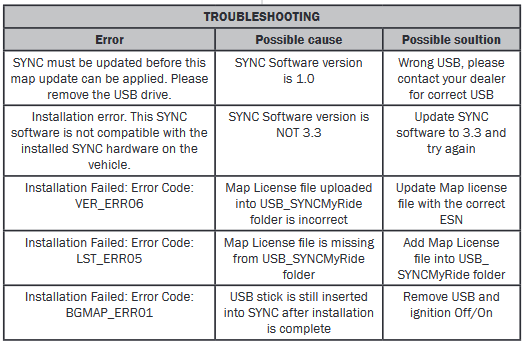
in the installation directions i posted they have this..
upload_2020-6-30_8-43-1.png

looks like you got license file issues..
Thanks for sharing the error codes! I couldn't find them anywhere. Strange that I get that error even when I have the license file in the right spot.
 

Elp_jc

Well-Known Member
Joined
May 2, 2020
Threads
48
Messages
3,527
Reaction score
805
Location
USA
Vehicle(s)
None
Another possible error is opening the zip file in the USB. I did that initially with the F-150, and didn't work. After just transferring the zip file, it finally did. Will read the instructions again, and hope I remember what I did. Ha ha.
Sponsored


Top