Sponsored

SYNC 3 swap, It's all in here

Status
Not open for further replies.

Chris@HBH

Active Member
Joined
Nov 14, 2018
Threads
1
Messages
32
Reaction score
18
Location
Dublin, OH
First Name
Chris
Vehicle(s)
13 GT500
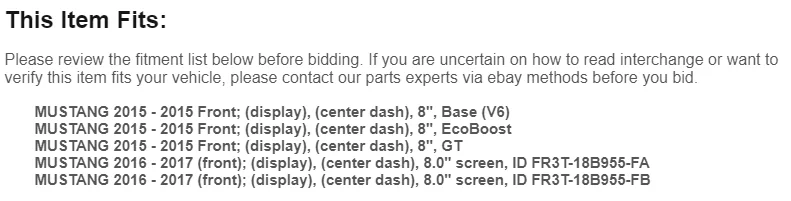
I'm hoping someone can clear something up for me here. I'm watching ebay for parts and found the following part numbers

fr3t-18b955-fa
fr3t-18b955-fb

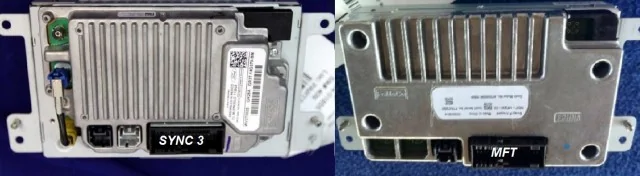
Is this the right touchscreen for car play? I don't want to buy the MFT touchscreen but I read this in the listing ( I have a 2017 GT) . Can anyone tell me the difference between the two parts?

upload_2018-12-10_10-22-15.webp
FR3T is 2015 Mustang (MFT) you want GXXT
Sponsored


Nagare

Well-Known Member
Joined
Feb 1, 2017
Threads
58
Messages
4,037
Reaction score
2,255
Location
Ft Lauderdale
Vehicle(s)
2017 Lightning Blue V6
Vehicle Showcase
1
I know you're probably working on it already, but I'd say it couldn't hurt to add a logo or signature to spell out the HBH because it kinda took my a half second to realize what it meant. Glad you guys are making enough out of this to justify the continued support of the platform and forum, I know my harness was really well made and I've recommended it to quite a few looking to do a Sync 3 upgrade.
 

Chris@HBH

Active Member
Joined
Nov 14, 2018
Threads
1
Messages
32
Reaction score
18
Location
Dublin, OH
First Name
Chris
Vehicle(s)
13 GT500
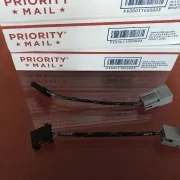
Yes, all of our stuff now ships with our logo . I’ve got you on the wait list for a 2018 Recaro bezel. We’ll have them first.
 

hcappie

Well-Known Member
Joined
Dec 10, 2014
Threads
5
Messages
74
Reaction score
19
Location
Poconos, PA
Vehicle(s)
2015 Mustang GT Premium
Now that I have Sync3 in my car I’ll probably list my MFT (Sync 2) apim/screen in the near future. It is a non-nav unit with nav enabled on it using FORScan. If anyone reading this is interested you can PM me directly before I do post it in the marketplace section
 

Sponsored

louierg

Well-Known Member
Joined
Nov 6, 2015
Threads
3
Messages
73
Reaction score
5
Location
Louisiana
First Name
Louie
Vehicle(s)
2015 50th Anniversary Limited Edition #1897
** UPDATED 12/14/2017** New graphics

So I'd like to have one all encompassing post for those that want to swap to Sync 3. The original thread has great information but it's long and cluttered and we really need to start something that answers your questions plus add the information that we have collectively found.
HUGE thank you to everyone who contributed on Mustang6G! @HizliBullet @zackmd1 @mustangmike86 @Spart @sv9999 @fordsvtparts @RedFireV8 @mgrey

DONE.webp


*UPDATED*

The Basics

This modification will require you to program certain modules. You will need FORScan software:
http://www.forscan.org/

Follow the directions to sign up for their board, you must have a membership to receive an extended license, only an extended license can make the as built data mods that are required.

AngelDeath has an excellent How To for the basics:
http://www.mustang6g.com/forums/showpost.php?p=1437662&postcount=1

FORScan programming requires a J2534 device, I use the Ford VCM-II because its what I have, most people use:
https://www.amazon.com/ScanTool-426101-OBDLink-Bluetooth-Professional/dp/B006NZTZLQ

2015-2017 cars with 4.2" non touchscreen are base cars
2015 cars with a touchscreen are My Ford Touch aka MFT (NOT Sync 2)
2016-2017 cars with a touchscreen are Sync 3
The touchscreen and APIM; Accessory Protocol Interface Module (for you "engineering types with 3 friends") aka Sync module are basically one unit. The cars with the non-touch screen have the 4.2" screen and a separate Sync module.
The ACM is the Audio Control Module. It is housed below the APIM, it contains the CD player, a 4 channel amplifier and the tuners for FM/AM/SAT/HD
Premium cars have SDARS aka SAT aka SiriusXM already, some have HD Radio as well, base cars will need an ACM if they want SAT or SAT/HD.
The Hub is the USB connection inside of your console.
If you have a base car or MFT and want CarPlay or Android Auto you need a new hub.

What do I need?

1. APIM/Touchscreen aka Sync Module Accessory Protocol Interface Module for short, LOL
Application: Base to Sync 3 and MFT to Sync 3
-How much? $349.99 for Non-NAV or $499.99 for NAV from us.

compare.webp


2. ACM - Audio Control Module
Application
: If you have a base car and want to add Sirius or Sirus and HD radio you will need the proper ACM.
If you have MFT and want to add HD Radio you will need the proper ACM
If you have a base car and do not want Sirius or Sirius/HD you can use your stock ACM
-How much? The SAT ready ACM are usually $100-125 but the SAT/HD are Have shot up in price to $175 to $200.
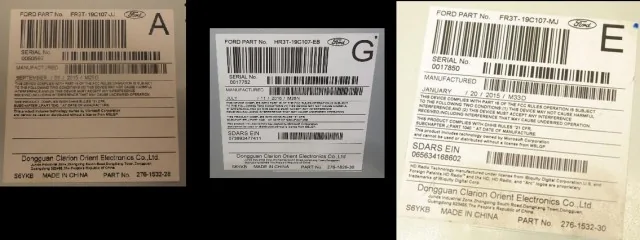
-It's actually pretty easy to tell the difference between the three kinds
--Base cars had on black Fakra connector on the back
--SAT cars had a black as well as a curry Fakra connector on back and the SDARS ID printed on the label
--SAT/HD have a black and curry Fakra connector on the rear, the SDARS ID and a disclaimer about HD printed on the label
-- Your ACM has nothing to do with your capability to add NAV. I see eBay sellers who will try and tell you that it does, it does not.
-Part Numbers: (Engineering number) FR3T-19C107-XX (< SUFFIX)
Most of the modules with SAT have a suffix that begins with T i.e FR3T-19C107-TE i.e FR3T-19C107-TA
SAT/HD begin with M, or C, i.e FR3T-19C107-MJ or i.e FR3T-19C107-CA
Base cars mainly have J and S suffixes.
My advice is not to purchase anything without pictures.

Comparo.webp


HU5_Z_19_A387_A_1.webp

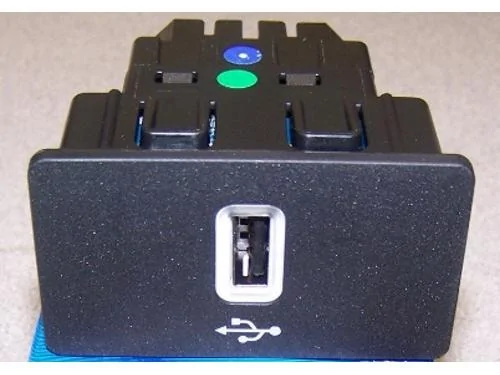
3. HU5Z-19A387-A Media Hub
Application
: Base to Sync 3 or MFT to Sync 3 REQUIRED for CarPlay AND Android Auto

If you have MFT and don't want to build an adapter harness Harness By Hextall makes them. Just PM

MFT Hubs are NOT compatible with Sync 3 APIMs! Do not attempt to use the MFT hub with Sync 3.
The base hub is different than MFT or Sync 3. It's not really a hub, just a bezel with a female USB connected to it.

You will have to add terminals to the base APIM connector for the Premium hubs. The Sync 3 hubs are simply power and ground. Pin 1 on the hub goes to Pin 8 on the APIM and Pin 4 on the hub goes to Pin 38 on the APIM. (Yes, there is a pin currently in 38 simply remove the existing pin and tape it back) this is part of our plug n play harness.

If you have MFT and want to add a HU5Z without splicing wires we do those too.

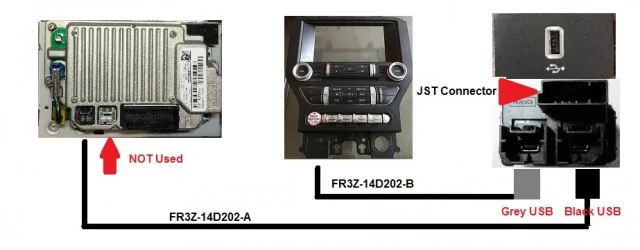
4. Bezel to Hub USB Cable FR3Z-14D202-B
APIM to Hub cable FR3Z-14D202-A

Application:
Base to Sync 3. if you want Apple Car Play or Android Auto you have to upgrade to the HU5Z hub and the Ford USB cables. The USB cables on the HU5Z hub are different and have a different routing compared to base cars. The black cable, FR3Z-14D202-A connects the APIM to the hub and the grey cable FR3Z-14D202-B connects the hub to your bezel for full functionality of the system. Cables are less than $19 each at ANF White Bear Lake with our da pint code. See below for routing
You have to understand that in order for things to work as Ford intended you must install them as Ford intended. The last thing you want is a cheap USB cable to have an issue during a system update. That is why I recommend the new Ford cables vs. trying to cobble something together. You should also be aware that you cannot update properly to Sync 2.2 or higher without this hub. If the $50 they cost is really going to break you, it's time to stop modding cars. Jumping over nickles to get to pennies is how GM does things.

USB.webp


5. Premium bezel You only need a bezel if you have a base car. Premium bezels now command a premium price because Ford is routing bezel manufacturing to production instead of service.

6.SAT antenna
Application: Base to Sync 3

Sirius has a newer antenna listed under part # NGVA3. I can confirm that this is the best Sirius antenna currently on the market and it is cheap. You will need to change the connector from SMB to a curry Fakra or purchase a curry Fakra to SMB adapter. I have seen them on Amazon for under $10

https://www.amazon.com/gp/product/B01HRCTD0G/ref=ox_sc_sfl_title_1?ie=UTF8&psc=1&smid=ATVPDKIKX0DER
https://www.amazon.com/Eightwood-Fe...id=1496321475&sr=1-2&keywords=curry+fakra+smb

7. GPS antenna
Application: Base to Sync 3 and MFT to Sync 3

The GPS antenna is needed because the Sync 3 APIM doesn't use the GPSM anymore. Base cars and MFT do. The Fakra connector on the rear of the APIM is for GPS whether you have NAV or not. We no longer recommend the cheap Chinese antennas and now now manufacture our own from OE quality parts.

8. Trim Panel Clips
If you follow the instructions posted below for the Ford GT350 starter button install and you use a proper set of plastic trim removal tools you wll avoid broken clips. However, it is inevitable that shit happens when disassembling your car. Therefore you may want to have some of the trim panel clips on hand:
W717661-S300 - Yellow clips
w714972s300 - Blue clips

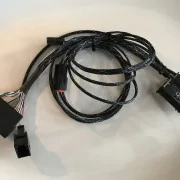
Base cars ONLY: Follow the instructions below for pin changes. Custom built plug n play harnesses are also available. See picture below for finished harness.

6_E028_A0_E_4974_4_CDA_8781_F192_EE3238_B0.webp


MFT Cars: you only need to purchase or make the hub adapter above

Be aware that the instructions below may not make any sense until you take your car apart. Unhook your battery first! I take no responsibility for the modifications listed here, you are on your own if you fuck something up.

The best guide for disassembling your dash and center column is the instructions provided by Ford Performance for the GT350 starter button. Using these and the proper tools will make it much easier as you will know where to pry and what to remove:
DISASSEMBLY

1. After disassembly remove the four screws holding in the 4.2" screen, it will obvoiusly no longer be used. Then remove the 3 or 4 screws holding in the base sync module. This is the black box located behind the 4.2" screen. This module will no longer be used. Now, remove the ACM by removing the four screws holding it in.

2.Begin by disassembling the 54 pin latch connector that was connected to the base APIM. Disassemble the APIM connector, by removing the outer shield. You will be left with two terminal carriers that slide together to form one piece. Label the wires that are to be removed or take a picture BEFORE you start and note what you removed by color on a piece of paper Following the chart below remove pins 5, 6, 16, 17, 23, 24, 25, 26 and 29

View attachment 241088
View attachment 241089

3. Following the included schematic remove the pins noted in yellow as "Pin changes" and carefully label each in any manner that will allow you to remember which wire is which.

4. Now, insert the wires that were removed in step 3 into their correct position, again, use the schematic below.

5. Next, you will need to cut four 22 gauge primary wires approximately 16" long, use different colors and install the Tyco 1924955-3 terminals that you purchased.
Then cut two more lengths of 22 ga. primary wire approximately 24 inches long and add the same Tyco 1924955-3 terminals to these.
Finally, cut two more pieces of 22 ga. primary wire the same length as the Ford USB cable with the black USB connector and add the same Tyco 1924955-3 terminals to these. Label all 6 of these wires based on the schematic below so that you know which wire to insert into which cavity of the APIM connector.
For a visual use the infographic pictured here:


6.Take the two wires that you labeled as MS-CAN + and MS-CAN - and carefully run them along the length of the factory wiring to the rear of the dash. There is a large junction here with several leads of wire, find the wires that lead to the factory GPSM that is attached on top of the dash. Remove the connector from the factory GPS module and peel back the cloth tape approximately 6 inches. CAREFULLY strip the insulation from only one grey wire and only one violet wire. Do NOT cut these or remove them. They are part of the CAN network and are redundant, cutting them means breaking the chain. Cut the primary wires that you made to length in order to attach them via the twist and solder method and then insulate them with a quality electrical tape such as 3M Super 33+.

7. Follow the same procedure for the 4.2" screen connector. These wires are used for the back up camera.

8. Follow the same procedure for the ACM, however, once you cut the wires to the appropriate length and a Tyco 2035334-1 terminal to each wire. The factory ACM connectors are 26 pin and 24 pin. You need the smaller 24 pin, look at the side of the connector, you will 2 clear/white tabs, carefully push these forward using a small flat blade screwdriver, do this for both sides to release the white terminal position assurance tab. After you release the tab insert the proper terminal into position 6 for (+) and position 19, directly below it for (-). Now, push the terminal position assurance back into the connector.

9. Now take the two pieces of wire that you made the same length as the USB cable. These are the power and ground for your new HU5Z hub. Carefully route these wires and the Ford black USB cable from the dash to the center console. Attach Tyco APIM terminals to these and insert into the APIM connector. On the right hand side of the dash cavity is the factory routing position for these. Use this as a guide to route the harness. Insulate these two wires with Tech Flex, Tesa tape or some other durable insulation, the dash is sharp and could pierce the wires.

10. Once these wires are routed to the center console, remove the base USB header panel by pushing it toward the rear of the car from the rear of the panel itself.

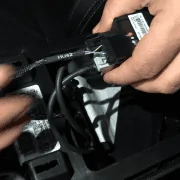
11. You can now cut the wires to the appropriate length and install the JST SAIT-A03T-M064 terminals for the JST connector. Plug the New JST connector harness into the hub along with the black USB cable form the dash as well as the grey USB cable that will run to the bezel. Simply snap the HU5Z hub into place and then route your grey USB wire to the approximate position of the old bezel USB connector.

IMG_1851.webp


12. Using a wide flat blade screwdriver carefully pry the old GPS module from it metal mounting bracket, If you are careful and take your time the adhesive will stay with the bracket. Attach your GPS antenna to this. Failure to attach the antenna to metal during installation may cause the compass to read in the reverse direction intermittently. Clip the bracket with the new GPS antenna back into it's factory position. Attach the Sirius antenna next to the GPS antenna and route the wire for the antennas. The blue Fakra on the GPS will connect to the back of the APIM/Touchscreen and the curry Fakra on the Sirius antenna will connect to the curry connector on the Sirius or Sirius/HD ACM.

13. You're now ready to begin the install, reassemble the APIM's 54 pin terminal carriers into the shield with the grey latch. Now, plug in the 26 and 24 pin connectors to the ACM, the black Fakra for the analog antenna and the curry fakra for the Sirius antenna, next, attach the ACM with the four screws removed earlier.

View attachment 241091
View attachment 241092

14. Install the APIM/Touchscreen by inserting the 54 pin connector and then attaching it to the car with the four screws removed earlier.

15. Finish reinstalling your trim panels and center console by reverting to the Ford Performance GT350 starter button directions above.
 

louierg

Well-Known Member
Joined
Nov 6, 2015
Threads
3
Messages
73
Reaction score
5
Location
Louisiana
First Name
Louie
Vehicle(s)
2015 50th Anniversary Limited Edition #1897
** UPDATED 12/14/2017** New graphics

So I'd like to have one all encompassing post for those that want to swap to Sync 3. The original thread has great information but it's long and cluttered and we really need to start something that answers your questions plus add the information that we have collectively found.
HUGE thank you to everyone who contributed on Mustang6G! @HizliBullet @zackmd1 @mustangmike86 @Spart @sv9999 @fordsvtparts @RedFireV8 @mgrey

DONE.webp


*UPDATED*

The Basics

This modification will require you to program certain modules. You will need FORScan software:
http://www.forscan.org/

Follow the directions to sign up for their board, you must have a membership to receive an extended license, only an extended license can make the as built data mods that are required.

AngelDeath has an excellent How To for the basics:
http://www.mustang6g.com/forums/showpost.php?p=1437662&postcount=1

FORScan programming requires a J2534 device, I use the Ford VCM-II because its what I have, most people use:
https://www.amazon.com/ScanTool-426101-OBDLink-Bluetooth-Professional/dp/B006NZTZLQ

2015-2017 cars with 4.2" non touchscreen are base cars
2015 cars with a touchscreen are My Ford Touch aka MFT (NOT Sync 2)
2016-2017 cars with a touchscreen are Sync 3
The touchscreen and APIM; Accessory Protocol Interface Module (for you "engineering types with 3 friends") aka Sync module are basically one unit. The cars with the non-touch screen have the 4.2" screen and a separate Sync module.
The ACM is the Audio Control Module. It is housed below the APIM, it contains the CD player, a 4 channel amplifier and the tuners for FM/AM/SAT/HD
Premium cars have SDARS aka SAT aka SiriusXM already, some have HD Radio as well, base cars will need an ACM if they want SAT or SAT/HD.
The Hub is the USB connection inside of your console.
If you have a base car or MFT and want CarPlay or Android Auto you need a new hub.

What do I need?

1. APIM/Touchscreen aka Sync Module Accessory Protocol Interface Module for short, LOL
Application: Base to Sync 3 and MFT to Sync 3
-How much? $349.99 for Non-NAV or $499.99 for NAV from us.

compare.webp


2. ACM - Audio Control Module
Application
: If you have a base car and want to add Sirius or Sirus and HD radio you will need the proper ACM.
If you have MFT and want to add HD Radio you will need the proper ACM
If you have a base car and do not want Sirius or Sirius/HD you can use your stock ACM
-How much? The SAT ready ACM are usually $100-125 but the SAT/HD are Have shot up in price to $175 to $200.
-It's actually pretty easy to tell the difference between the three kinds
--Base cars had on black Fakra connector on the back
--SAT cars had a black as well as a curry Fakra connector on back and the SDARS ID printed on the label
--SAT/HD have a black and curry Fakra connector on the rear, the SDARS ID and a disclaimer about HD printed on the label
-- Your ACM has nothing to do with your capability to add NAV. I see eBay sellers who will try and tell you that it does, it does not.
-Part Numbers: (Engineering number) FR3T-19C107-XX (< SUFFIX)
Most of the modules with SAT have a suffix that begins with T i.e FR3T-19C107-TE i.e FR3T-19C107-TA
SAT/HD begin with M, or C, i.e FR3T-19C107-MJ or i.e FR3T-19C107-CA
Base cars mainly have J and S suffixes.
My advice is not to purchase anything without pictures.

Comparo.webp


HU5_Z_19_A387_A_1.webp

3. HU5Z-19A387-A Media Hub
Application
: Base to Sync 3 or MFT to Sync 3 REQUIRED for CarPlay AND Android Auto

If you have MFT and don't want to build an adapter harness Harness By Hextall makes them. Just PM

MFT Hubs are NOT compatible with Sync 3 APIMs! Do not attempt to use the MFT hub with Sync 3.
The base hub is different than MFT or Sync 3. It's not really a hub, just a bezel with a female USB connected to it.

You will have to add terminals to the base APIM connector for the Premium hubs. The Sync 3 hubs are simply power and ground. Pin 1 on the hub goes to Pin 8 on the APIM and Pin 4 on the hub goes to Pin 38 on the APIM. (Yes, there is a pin currently in 38 simply remove the existing pin and tape it back) this is part of our plug n play harness.

If you have MFT and want to add a HU5Z without splicing wires we do those too.

4. Bezel to Hub USB Cable FR3Z-14D202-B
APIM to Hub cable FR3Z-14D202-A

Application:
Base to Sync 3. if you want Apple Car Play or Android Auto you have to upgrade to the HU5Z hub and the Ford USB cables. The USB cables on the HU5Z hub are different and have a different routing compared to base cars. The black cable, FR3Z-14D202-A connects the APIM to the hub and the grey cable FR3Z-14D202-B connects the hub to your bezel for full functionality of the system. Cables are less than $19 each at ANF White Bear Lake with our da pint code. See below for routing
You have to understand that in order for things to work as Ford intended you must install them as Ford intended. The last thing you want is a cheap USB cable to have an issue during a system update. That is why I recommend the new Ford cables vs. trying to cobble something together. You should also be aware that you cannot update properly to Sync 2.2 or higher without this hub. If the $50 they cost is really going to break you, it's time to stop modding cars. Jumping over nickles to get to pennies is how GM does things.

USB.webp


5. Premium bezel You only need a bezel if you have a base car. Premium bezels now command a premium price because Ford is routing bezel manufacturing to production instead of service.

6.SAT antenna
Application: Base to Sync 3

Sirius has a newer antenna listed under part # NGVA3. I can confirm that this is the best Sirius antenna currently on the market and it is cheap. You will need to change the connector from SMB to a curry Fakra or purchase a curry Fakra to SMB adapter. I have seen them on Amazon for under $10

https://www.amazon.com/gp/product/B01HRCTD0G/ref=ox_sc_sfl_title_1?ie=UTF8&psc=1&smid=ATVPDKIKX0DER
https://www.amazon.com/Eightwood-Fe...id=1496321475&sr=1-2&keywords=curry+fakra+smb

7. GPS antenna
Application: Base to Sync 3 and MFT to Sync 3

The GPS antenna is needed because the Sync 3 APIM doesn't use the GPSM anymore. Base cars and MFT do. The Fakra connector on the rear of the APIM is for GPS whether you have NAV or not. We no longer recommend the cheap Chinese antennas and now now manufacture our own from OE quality parts.

8. Trim Panel Clips
If you follow the instructions posted below for the Ford GT350 starter button install and you use a proper set of plastic trim removal tools you wll avoid broken clips. However, it is inevitable that shit happens when disassembling your car. Therefore you may want to have some of the trim panel clips on hand:
W717661-S300 - Yellow clips
w714972s300 - Blue clips

Base cars ONLY: Follow the instructions below for pin changes. Custom built plug n play harnesses are also available. See picture below for finished harness.

6_E028_A0_E_4974_4_CDA_8781_F192_EE3238_B0.webp


MFT Cars: you only need to purchase or make the hub adapter above

Be aware that the instructions below may not make any sense until you take your car apart. Unhook your battery first! I take no responsibility for the modifications listed here, you are on your own if you fuck something up.

The best guide for disassembling your dash and center column is the instructions provided by Ford Performance for the GT350 starter button. Using these and the proper tools will make it much easier as you will know where to pry and what to remove:
DISASSEMBLY

1. After disassembly remove the four screws holding in the 4.2" screen, it will obvoiusly no longer be used. Then remove the 3 or 4 screws holding in the base sync module. This is the black box located behind the 4.2" screen. This module will no longer be used. Now, remove the ACM by removing the four screws holding it in.

2.Begin by disassembling the 54 pin latch connector that was connected to the base APIM. Disassemble the APIM connector, by removing the outer shield. You will be left with two terminal carriers that slide together to form one piece. Label the wires that are to be removed or take a picture BEFORE you start and note what you removed by color on a piece of paper Following the chart below remove pins 5, 6, 16, 17, 23, 24, 25, 26 and 29

View attachment 241088
View attachment 241089

3. Following the included schematic remove the pins noted in yellow as "Pin changes" and carefully label each in any manner that will allow you to remember which wire is which.

4. Now, insert the wires that were removed in step 3 into their correct position, again, use the schematic below.

5. Next, you will need to cut four 22 gauge primary wires approximately 16" long, use different colors and install the Tyco 1924955-3 terminals that you purchased.
Then cut two more lengths of 22 ga. primary wire approximately 24 inches long and add the same Tyco 1924955-3 terminals to these.
Finally, cut two more pieces of 22 ga. primary wire the same length as the Ford USB cable with the black USB connector and add the same Tyco 1924955-3 terminals to these. Label all 6 of these wires based on the schematic below so that you know which wire to insert into which cavity of the APIM connector.
For a visual use the infographic pictured here:


6.Take the two wires that you labeled as MS-CAN + and MS-CAN - and carefully run them along the length of the factory wiring to the rear of the dash. There is a large junction here with several leads of wire, find the wires that lead to the factory GPSM that is attached on top of the dash. Remove the connector from the factory GPS module and peel back the cloth tape approximately 6 inches. CAREFULLY strip the insulation from only one grey wire and only one violet wire. Do NOT cut these or remove them. They are part of the CAN network and are redundant, cutting them means breaking the chain. Cut the primary wires that you made to length in order to attach them via the twist and solder method and then insulate them with a quality electrical tape such as 3M Super 33+.

7. Follow the same procedure for the 4.2" screen connector. These wires are used for the back up camera.

8. Follow the same procedure for the ACM, however, once you cut the wires to the appropriate length and a Tyco 2035334-1 terminal to each wire. The factory ACM connectors are 26 pin and 24 pin. You need the smaller 24 pin, look at the side of the connector, you will 2 clear/white tabs, carefully push these forward using a small flat blade screwdriver, do this for both sides to release the white terminal position assurance tab. After you release the tab insert the proper terminal into position 6 for (+) and position 19, directly below it for (-). Now, push the terminal position assurance back into the connector.

9. Now take the two pieces of wire that you made the same length as the USB cable. These are the power and ground for your new HU5Z hub. Carefully route these wires and the Ford black USB cable from the dash to the center console. Attach Tyco APIM terminals to these and insert into the APIM connector. On the right hand side of the dash cavity is the factory routing position for these. Use this as a guide to route the harness. Insulate these two wires with Tech Flex, Tesa tape or some other durable insulation, the dash is sharp and could pierce the wires.

10. Once these wires are routed to the center console, remove the base USB header panel by pushing it toward the rear of the car from the rear of the panel itself.

11. You can now cut the wires to the appropriate length and install the JST SAIT-A03T-M064 terminals for the JST connector. Plug the New JST connector harness into the hub along with the black USB cable form the dash as well as the grey USB cable that will run to the bezel. Simply snap the HU5Z hub into place and then route your grey USB wire to the approximate position of the old bezel USB connector.

IMG_1851.webp


12. Using a wide flat blade screwdriver carefully pry the old GPS module from it metal mounting bracket, If you are careful and take your time the adhesive will stay with the bracket. Attach your GPS antenna to this. Failure to attach the antenna to metal during installation may cause the compass to read in the reverse direction intermittently. Clip the bracket with the new GPS antenna back into it's factory position. Attach the Sirius antenna next to the GPS antenna and route the wire for the antennas. The blue Fakra on the GPS will connect to the back of the APIM/Touchscreen and the curry Fakra on the Sirius antenna will connect to the curry connector on the Sirius or Sirius/HD ACM.

13. You're now ready to begin the install, reassemble the APIM's 54 pin terminal carriers into the shield with the grey latch. Now, plug in the 26 and 24 pin connectors to the ACM, the black Fakra for the analog antenna and the curry fakra for the Sirius antenna, next, attach the ACM with the four screws removed earlier.

View attachment 241091
View attachment 241092

14. Install the APIM/Touchscreen by inserting the 54 pin connector and then attaching it to the car with the four screws removed earlier.

15. Finish reinstalling your trim panels and center console by reverting to the Ford Performance GT350 starter button directions above.
** UPDATED 12/14/2017** New graphics

So I'd like to have one all encompassing post for those that want to swap to Sync 3. The original thread has great information but it's long and cluttered and we really need to start something that answers your questions plus add the information that we have collectively found.
HUGE thank you to everyone who contributed on Mustang6G! @HizliBullet @zackmd1 @mustangmike86 @Spart @sv9999 @fordsvtparts @RedFireV8 @mgrey

DONE.webp


*UPDATED*

The Basics

This modification will require you to program certain modules. You will need FORScan software:
http://www.forscan.org/

Follow the directions to sign up for their board, you must have a membership to receive an extended license, only an extended license can make the as built data mods that are required.

AngelDeath has an excellent How To for the basics:
http://www.mustang6g.com/forums/showpost.php?p=1437662&postcount=1

FORScan programming requires a J2534 device, I use the Ford VCM-II because its what I have, most people use:
https://www.amazon.com/ScanTool-426101-OBDLink-Bluetooth-Professional/dp/B006NZTZLQ

2015-2017 cars with 4.2" non touchscreen are base cars
2015 cars with a touchscreen are My Ford Touch aka MFT (NOT Sync 2)
2016-2017 cars with a touchscreen are Sync 3
The touchscreen and APIM; Accessory Protocol Interface Module (for you "engineering types with 3 friends") aka Sync module are basically one unit. The cars with the non-touch screen have the 4.2" screen and a separate Sync module.
The ACM is the Audio Control Module. It is housed below the APIM, it contains the CD player, a 4 channel amplifier and the tuners for FM/AM/SAT/HD
Premium cars have SDARS aka SAT aka SiriusXM already, some have HD Radio as well, base cars will need an ACM if they want SAT or SAT/HD.
The Hub is the USB connection inside of your console.
If you have a base car or MFT and want CarPlay or Android Auto you need a new hub.

What do I need?

1. APIM/Touchscreen aka Sync Module Accessory Protocol Interface Module for short, LOL
Application: Base to Sync 3 and MFT to Sync 3
-How much? $349.99 for Non-NAV or $499.99 for NAV from us.

compare.webp


2. ACM - Audio Control Module
Application
: If you have a base car and want to add Sirius or Sirus and HD radio you will need the proper ACM.
If you have MFT and want to add HD Radio you will need the proper ACM
If you have a base car and do not want Sirius or Sirius/HD you can use your stock ACM
-How much? The SAT ready ACM are usually $100-125 but the SAT/HD are Have shot up in price to $175 to $200.
-It's actually pretty easy to tell the difference between the three kinds
--Base cars had on black Fakra connector on the back
--SAT cars had a black as well as a curry Fakra connector on back and the SDARS ID printed on the label
--SAT/HD have a black and curry Fakra connector on the rear, the SDARS ID and a disclaimer about HD printed on the label
-- Your ACM has nothing to do with your capability to add NAV. I see eBay sellers who will try and tell you that it does, it does not.
-Part Numbers: (Engineering number) FR3T-19C107-XX (< SUFFIX)
Most of the modules with SAT have a suffix that begins with T i.e FR3T-19C107-TE i.e FR3T-19C107-TA
SAT/HD begin with M, or C, i.e FR3T-19C107-MJ or i.e FR3T-19C107-CA
Base cars mainly have J and S suffixes.
My advice is not to purchase anything without pictures.

Comparo.webp


HU5_Z_19_A387_A_1.webp

3. HU5Z-19A387-A Media Hub
Application
: Base to Sync 3 or MFT to Sync 3 REQUIRED for CarPlay AND Android Auto

If you have MFT and don't want to build an adapter harness Harness By Hextall makes them. Just PM

MFT Hubs are NOT compatible with Sync 3 APIMs! Do not attempt to use the MFT hub with Sync 3.
The base hub is different than MFT or Sync 3. It's not really a hub, just a bezel with a female USB connected to it.

You will have to add terminals to the base APIM connector for the Premium hubs. The Sync 3 hubs are simply power and ground. Pin 1 on the hub goes to Pin 8 on the APIM and Pin 4 on the hub goes to Pin 38 on the APIM. (Yes, there is a pin currently in 38 simply remove the existing pin and tape it back) this is part of our plug n play harness.

If you have MFT and want to add a HU5Z without splicing wires we do those too.

4. Bezel to Hub USB Cable FR3Z-14D202-B
APIM to Hub cable FR3Z-14D202-A

Application:
Base to Sync 3. if you want Apple Car Play or Android Auto you have to upgrade to the HU5Z hub and the Ford USB cables. The USB cables on the HU5Z hub are different and have a different routing compared to base cars. The black cable, FR3Z-14D202-A connects the APIM to the hub and the grey cable FR3Z-14D202-B connects the hub to your bezel for full functionality of the system. Cables are less than $19 each at ANF White Bear Lake with our da pint code. See below for routing
You have to understand that in order for things to work as Ford intended you must install them as Ford intended. The last thing you want is a cheap USB cable to have an issue during a system update. That is why I recommend the new Ford cables vs. trying to cobble something together. You should also be aware that you cannot update properly to Sync 2.2 or higher without this hub. If the $50 they cost is really going to break you, it's time to stop modding cars. Jumping over nickles to get to pennies is how GM does things.

USB.webp


5. Premium bezel You only need a bezel if you have a base car. Premium bezels now command a premium price because Ford is routing bezel manufacturing to production instead of service.

6.SAT antenna
Application: Base to Sync 3

Sirius has a newer antenna listed under part # NGVA3. I can confirm that this is the best Sirius antenna currently on the market and it is cheap. You will need to change the connector from SMB to a curry Fakra or purchase a curry Fakra to SMB adapter. I have seen them on Amazon for under $10

https://www.amazon.com/gp/product/B01HRCTD0G/ref=ox_sc_sfl_title_1?ie=UTF8&psc=1&smid=ATVPDKIKX0DER
https://www.amazon.com/Eightwood-Fe...id=1496321475&sr=1-2&keywords=curry+fakra+smb

7. GPS antenna
Application: Base to Sync 3 and MFT to Sync 3

The GPS antenna is needed because the Sync 3 APIM doesn't use the GPSM anymore. Base cars and MFT do. The Fakra connector on the rear of the APIM is for GPS whether you have NAV or not. We no longer recommend the cheap Chinese antennas and now now manufacture our own from OE quality parts.

8. Trim Panel Clips
If you follow the instructions posted below for the Ford GT350 starter button install and you use a proper set of plastic trim removal tools you wll avoid broken clips. However, it is inevitable that shit happens when disassembling your car. Therefore you may want to have some of the trim panel clips on hand:
W717661-S300 - Yellow clips
w714972s300 - Blue clips

Base cars ONLY: Follow the instructions below for pin changes. Custom built plug n play harnesses are also available. See picture below for finished harness.

6_E028_A0_E_4974_4_CDA_8781_F192_EE3238_B0.webp


MFT Cars: you only need to purchase or make the hub adapter above

Be aware that the instructions below may not make any sense until you take your car apart. Unhook your battery first! I take no responsibility for the modifications listed here, you are on your own if you fuck something up.

The best guide for disassembling your dash and center column is the instructions provided by Ford Performance for the GT350 starter button. Using these and the proper tools will make it much easier as you will know where to pry and what to remove:
DISASSEMBLY

1. After disassembly remove the four screws holding in the 4.2" screen, it will obvoiusly no longer be used. Then remove the 3 or 4 screws holding in the base sync module. This is the black box located behind the 4.2" screen. This module will no longer be used. Now, remove the ACM by removing the four screws holding it in.

2.Begin by disassembling the 54 pin latch connector that was connected to the base APIM. Disassemble the APIM connector, by removing the outer shield. You will be left with two terminal carriers that slide together to form one piece. Label the wires that are to be removed or take a picture BEFORE you start and note what you removed by color on a piece of paper Following the chart below remove pins 5, 6, 16, 17, 23, 24, 25, 26 and 29

View attachment 241088
View attachment 241089

3. Following the included schematic remove the pins noted in yellow as "Pin changes" and carefully label each in any manner that will allow you to remember which wire is which.

4. Now, insert the wires that were removed in step 3 into their correct position, again, use the schematic below.

5. Next, you will need to cut four 22 gauge primary wires approximately 16" long, use different colors and install the Tyco 1924955-3 terminals that you purchased.
Then cut two more lengths of 22 ga. primary wire approximately 24 inches long and add the same Tyco 1924955-3 terminals to these.
Finally, cut two more pieces of 22 ga. primary wire the same length as the Ford USB cable with the black USB connector and add the same Tyco 1924955-3 terminals to these. Label all 6 of these wires based on the schematic below so that you know which wire to insert into which cavity of the APIM connector.
For a visual use the infographic pictured here:


6.Take the two wires that you labeled as MS-CAN + and MS-CAN - and carefully run them along the length of the factory wiring to the rear of the dash. There is a large junction here with several leads of wire, find the wires that lead to the factory GPSM that is attached on top of the dash. Remove the connector from the factory GPS module and peel back the cloth tape approximately 6 inches. CAREFULLY strip the insulation from only one grey wire and only one violet wire. Do NOT cut these or remove them. They are part of the CAN network and are redundant, cutting them means breaking the chain. Cut the primary wires that you made to length in order to attach them via the twist and solder method and then insulate them with a quality electrical tape such as 3M Super 33+.

7. Follow the same procedure for the 4.2" screen connector. These wires are used for the back up camera.

8. Follow the same procedure for the ACM, however, once you cut the wires to the appropriate length and a Tyco 2035334-1 terminal to each wire. The factory ACM connectors are 26 pin and 24 pin. You need the smaller 24 pin, look at the side of the connector, you will 2 clear/white tabs, carefully push these forward using a small flat blade screwdriver, do this for both sides to release the white terminal position assurance tab. After you release the tab insert the proper terminal into position 6 for (+) and position 19, directly below it for (-). Now, push the terminal position assurance back into the connector.

9. Now take the two pieces of wire that you made the same length as the USB cable. These are the power and ground for your new HU5Z hub. Carefully route these wires and the Ford black USB cable from the dash to the center console. Attach Tyco APIM terminals to these and insert into the APIM connector. On the right hand side of the dash cavity is the factory routing position for these. Use this as a guide to route the harness. Insulate these two wires with Tech Flex, Tesa tape or some other durable insulation, the dash is sharp and could pierce the wires.

10. Once these wires are routed to the center console, remove the base USB header panel by pushing it toward the rear of the car from the rear of the panel itself.

11. You can now cut the wires to the appropriate length and install the JST SAIT-A03T-M064 terminals for the JST connector. Plug the New JST connector harness into the hub along with the black USB cable form the dash as well as the grey USB cable that will run to the bezel. Simply snap the HU5Z hub into place and then route your grey USB wire to the approximate position of the old bezel USB connector.

IMG_1851.webp


12. Using a wide flat blade screwdriver carefully pry the old GPS module from it metal mounting bracket, If you are careful and take your time the adhesive will stay with the bracket. Attach your GPS antenna to this. Failure to attach the antenna to metal during installation may cause the compass to read in the reverse direction intermittently. Clip the bracket with the new GPS antenna back into it's factory position. Attach the Sirius antenna next to the GPS antenna and route the wire for the antennas. The blue Fakra on the GPS will connect to the back of the APIM/Touchscreen and the curry Fakra on the Sirius antenna will connect to the curry connector on the Sirius or Sirius/HD ACM.

13. You're now ready to begin the install, reassemble the APIM's 54 pin terminal carriers into the shield with the grey latch. Now, plug in the 26 and 24 pin connectors to the ACM, the black Fakra for the analog antenna and the curry fakra for the Sirius antenna, next, attach the ACM with the four screws removed earlier.

View attachment 241091
View attachment 241092

14. Install the APIM/Touchscreen by inserting the 54 pin connector and then attaching it to the car with the four screws removed earlier.

15. Finish reinstalling your trim panels and center console by reverting to the Ford Performance GT350 starter button directions above.

PINOUT
View attachment 241093
IMG_1780.webp
Updated 2015 with nav to 2017 unit. Nav update 2.1. How to get to 3.0
 

louierg

Well-Known Member
Joined
Nov 6, 2015
Threads
3
Messages
73
Reaction score
5
Location
Louisiana
First Name
Louie
Vehicle(s)
2015 50th Anniversary Limited Edition #1897
Not sure if my question was posted. Updated my sync to sync 3 with nav using 2.1. How to I update to 3.0?
 

Sponsored

CrashOverride

Well-Known Member
Joined
Aug 18, 2018
Threads
45
Messages
680
Reaction score
376
Location
Under a hood
Vehicle(s)
2015 Mustang GT
I had some time today to go through my collection of AB files and find which options trigger which changes in the APIM as-built.

Also these could stand to have some confirmation, since I'm just looking at AB files and not actually trying any of this in a car.


Nav vs. Non-Nav

7D0-01-02 x0xx xxxx x0xx - Non-Nav
7D0-01-02 x2xx xxxx xAxx - Nav


Shaker vs. Shaker Pro

7D0-01-01 xxxx xxx2 xxxx - Shaker
7D0-01-01 xxxx xxx3 xxxx - Shaker Pro

As far as the APIM is concerned, 2 vs 3 in this position is the difference between HD Radio being available or not.


RPA vs. Non-RPA
(Reverse Park Assist aka Reverse Sensing System RSS)

7D0-01-01 xAxx xxxx xxxx - RPA
7D0-01-01 x2xx xxxx xxxx - Non-RPA

7D0-04-02 xxx1 xx - RPA
7D0-04-02 xxx0 xx - Non-RPA


Manual vs. Auto Trans

7D0-01-02 xx9x xxxx xxxx - Manual Master Race
7D0-01-02 xx8x xxxx xxxx - Autotragic

Tire Size

7D0-07-03 xxxx xxXX xxxx

Values I found here included 73, 6F, 6D, 68. According to the F150 spreadsheet, this relates to the tire circumference. It's in an area that has other settings for the backup camera, not sure if it affects the Reverse Sensing System.

I could take the time to probably decode what the value means exactly, but I'd bet on it not being super important. But if you'd like to figure it out, this thread where I decoded the method Ford uses to program tire size in the BCM might get you thinking in the right direction.

Options I found no differences for

Enhanced Security Package, Recaros, Adaptive Cruise, Vert vs. Coupe, EB vs. GT vs. GT350***

***I do not have many files for EB/GT350 cars, and virtually all of the files I looked at were coupes. That said, I do have a couple EB/Vert/GT350, and found no real differences aside from the already-known GT350 startup animations.
Thanks Spart for these. Somehow I didn't find these in my swap and was looking into my compass issue. Bringing this to the top for people that have the "backwards compass" problem which is apparently (I haven't tested it yet) solved by setting the Transmission type to what's actually in your car. My donor had the "Autotragic" and my car has the "Manual Master Race" :)
 

Spart

Well-Known Member
Joined
Jul 29, 2016
Threads
18
Messages
1,247
Reaction score
626
Location
Midwest
Vehicle(s)
17 GT350
Thanks Spart for these. Somehow I didn't find these in my swap and was looking into my compass issue. Bringing this to the top for people that have the "backwards compass" problem which is apparently (I haven't tested it yet) solved by setting the Transmission type to what's actually in your car. My donor had the "Autotragic" and my car has the "Manual Master Race" :)
No problem. I'm wondering if the 2018+ cars need to have the same deep dive done, or is the APIM as-built the same?
 

louierg

Well-Known Member
Joined
Nov 6, 2015
Threads
3
Messages
73
Reaction score
5
Location
Louisiana
First Name
Louie
Vehicle(s)
2015 50th Anniversary Limited Edition #1897
Great description of what to do. Took me a good while to get my act together. I was fortunate. Premium GT with My Touch changed to Sync 3 system. Bought the screen apim, and the (radio) for $600 from junkyard on line. Bought the antenna, and other incidentals also on line. Had the apim programmed almost overnight. Installation took about an hour. A smart hungry tech one half that. BE SURE TO HAVE THE VIN FOR YOUR DONOR apim such that you may update using a My Ford account. My apim was from a '17 using the 2.1 software. This is the only way i can figure to get software updates. If there are other ways then point it out.

Thanks
louieg,
 

Spart

Well-Known Member
Joined
Jul 29, 2016
Threads
18
Messages
1,247
Reaction score
626
Location
Midwest
Vehicle(s)
17 GT350
BE SURE TO HAVE THE VIN FOR YOUR DONOR apim such that you may update using a My Ford account. My apim was from a '17 using the 2.1 software. This is the only way i can figure to get software updates. If there are other ways then point it out.

Thanks
louieg,
Eh, having that particular VIN doesn't matter in the grand scheme of things. You can always find the VIN of a wrecked car off Copart and plug that in to the owner.ford.com website and get updates that way.
 

Chris@HBH

Active Member
Joined
Nov 14, 2018
Threads
1
Messages
32
Reaction score
18
Location
Dublin, OH
First Name
Chris
Vehicle(s)
13 GT500
Harness By Hextall customers, we provide access to the latest official version of Sync 3 whether it be NAV or Non_NAV.

No problem. I'm wondering if the 2018+ cars need to have the same deep dive done, or is the APIM as-built the same?
For the most part it's the same, however the 2018+ cars have a new APIM with more processing power, memory and expansion capability. We are no longer using the 15-17 in our swap kits on 2018s to prepare for future upgrades. Same thing with the bezel, now that we can get 201-19 Recaro bezels with the upgraded firmware these are the only ones we will sell.
Sponsored

 
Status
Not open for further replies.


Top