Sponsored

New Navigation map update June 29th

wade001

Well-Known Member
Joined
Mar 1, 2020
Threads
12
Messages
366
Reaction score
231
Location
Central Florida
First Name
Wade
Vehicle(s)
2019 GT Prem. 10r80, PP1, 401A, Active Exhaust
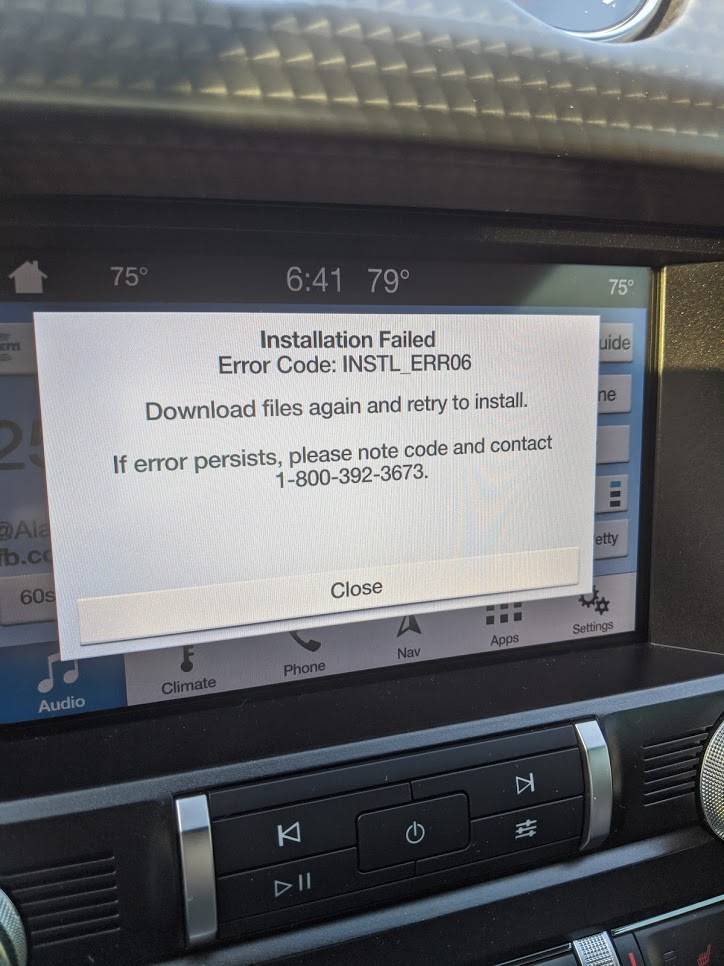
so i woke up a little extra early, got ready and before leaving for work, i did a sync master reset, waited a couple min and inserted the USB drive.. it started updating! thought i was home free... until about 10 minutes into it, and now i get a new error.. LOL

PESQ6kCN6oxHyDOmxyz_87C8GPCyb6XH99d6qLU6miPJRV4JL1Ih77fvHQ74h8p-c6Buo2UR=w725-h966-no?authuser=0.jpg


on the bright side, sync master reset didnt reset my XM stations..so, i guess there's that :cwl:
 

wade001

Well-Known Member
Joined
Mar 1, 2020
Threads
12
Messages
366
Reaction score
231
Location
Central Florida
First Name
Wade
Vehicle(s)
2019 GT Prem. 10r80, PP1, 401A, Active Exhaust
YAY, so i heard back from the support guys, they sent me over a file that i was to unzip to a separate flash drive, which when inserted would auto run and REMOVE maps from the sync system. admittedly a little worried on removing it, but hey, they know what their doing right?.. i cross my fingers and ran it.. sure enough just as the directions stated, when restarting the vehicle it throws an error about no navigate installed..

then ran the update and it went successfully.. so they got me all fixed up and i didnt even have to visit the dealer.

so, for anyone else reading learn from my mistake.. turn off the auto engine shut off option, save yourself a lot of headaches.. its under driver aids in options (not pony button) in dash.

oh, and be patient..
 

Bikeman315

Well-Known Member
Joined
Apr 12, 2015
Threads
581
Messages
16,183
Reaction score
21,909
Location
Myrtle Beach, SC
First Name
Ira
Vehicle(s)
2019 Mustang GT/CS, 2021 Volvo XC60
YAY, so i heard back from the support guys, they sent me over a file that i was to unzip to a separate flash drive, which when inserted would auto run and REMOVE maps from the sync system. admittedly a little worried on removing it, but hey, they know what their doing right?.. i cross my fingers and ran it.. sure enough just as the directions stated, when restarting the vehicle it throws an error about no navigate installed..

then ran the update and it went successfully.. so they got me all fixed up and i didnt even have to visit the dealer.

so, for anyone else reading learn from my mistake.. turn off the auto engine shut off option, save yourself a lot of headaches.. its under driver aids in options (not pony button) in dash.

oh, and be patient..
Good news. Glad you’re all straightened out. Thanks for sharing. I’m sure other will appreciate it.
 

dconfer

Well-Known Member
Joined
Dec 30, 2014
Threads
0
Messages
140
Reaction score
15
Location
PA
Vehicle(s)
2019 Mustang GT
I wonder if that would work to fix my problem that no voice commands for nav since I updated to version 18.
After running that then reload 18 which I still have.
 

Sponsored

Elp_jc

Well-Known Member
Joined
May 2, 2020
Threads
48
Messages
3,527
Reaction score
805
Location
USA
Vehicle(s)
None
ran the update and it went successfully.
COOL! Hey, did you check your version? Still 1.18, like the rest of us, correct? We just need to hear from somebody using the Ford stick. Oh, and good call to check voice commands; need to do that too.
 

wade001

Well-Known Member
Joined
Mar 1, 2020
Threads
12
Messages
366
Reaction score
231
Location
Central Florida
First Name
Wade
Vehicle(s)
2019 GT Prem. 10r80, PP1, 401A, Active Exhaust
COOL! Hey, did you check your version? Still 1.18, like the rest of us, correct? We just need to hear from somebody using the Ford stick. Oh, and good call to check voice commands; need to do that too.
checked, it does indeed still say 1.18 for me still..

I wonder if that would work to fix my problem that no voice commands for nav since I updated to version 18.
After running that then reload 18 which I still have.
i have absolutely no idea if they sent me a generic file, or something specific to my version/vin/esn.. sounds risky imo
 

Bikeman315

Well-Known Member
Joined
Apr 12, 2015
Threads
581
Messages
16,183
Reaction score
21,909
Location
Myrtle Beach, SC
First Name
Ira
Vehicle(s)
2019 Mustang GT/CS, 2021 Volvo XC60
checked, it does indeed still say 1.18 for me still..
i have absolutely no idea if they sent me a generic file, or something specific to my version/vin/esn.. sounds risky imo
OK, we have concurrent threads running regarding the 1.19 maps.

Check posts 139/140. Seems like updates to 3.0 show 1.19. Maybe with the 3.3 error of not showing 1.18 when upgrading from 1.17, 3.3 is now showing 1.18 instead of 1.19. You're going to need the file names and check the Bezel Diagnostics screen.

https://www.mustang6g.com/forums/threads/upgrading-to-sync-3-4.137460/page-10#post-2948404
 

Bikeman315

Well-Known Member
Joined
Apr 12, 2015
Threads
581
Messages
16,183
Reaction score
21,909
Location
Myrtle Beach, SC
First Name
Ira
Vehicle(s)
2019 Mustang GT/CS, 2021 Volvo XC60
I wonder if that would work to fix my problem that no voice commands for nav since I updated to version 18.
After running that then reload 18 which I still have.
Have you called Ford? Do that before trying anything else on your own.
 

m3incorp

Well-Known Member
Joined
Feb 6, 2020
Threads
22
Messages
4,603
Reaction score
3,125
Location
Georgia/Colorado
First Name
James
Vehicle(s)
2019 Mustang GT Premium with Roush Phase 2, 2023 Audi A5
Very glad to hear that.

YAY, so i heard back from the support guys, they sent me over a file that i was to unzip to a separate flash drive, which when inserted would auto run and REMOVE maps from the sync system. admittedly a little worried on removing it, but hey, they know what their doing right?.. i cross my fingers and ran it.. sure enough just as the directions stated, when restarting the vehicle it throws an error about no navigate installed..

then ran the update and it went successfully.. so they got me all fixed up and i didnt even have to visit the dealer.

so, for anyone else reading learn from my mistake.. turn off the auto engine shut off option, save yourself a lot of headaches.. its under driver aids in options (not pony button) in dash.

oh, and be patient..
 

Sponsored

Breee

Active Member
Joined
Jan 13, 2020
Threads
1
Messages
28
Reaction score
6
Location
Texas
Vehicle(s)
2019 Mustang GT PP1 A10
YAY, so i heard back from the support guys, they sent me over a file that i was to unzip to a separate flash drive, which when inserted would auto run and REMOVE maps from the sync system. admittedly a little worried on removing it, but hey, they know what their doing right?.. i cross my fingers and ran it.. sure enough just as the directions stated, when restarting the vehicle it throws an error about no navigate installed..

then ran the update and it went successfully.. so they got me all fixed up and i didnt even have to visit the dealer.

so, for anyone else reading learn from my mistake.. turn off the auto engine shut off option, save yourself a lot of headaches.. its under driver aids in options (not pony button) in dash.

oh, and be patient..
Any chance you can share the file? I'd love to try it on my car.
 

wade001

Well-Known Member
Joined
Mar 1, 2020
Threads
12
Messages
366
Reaction score
231
Location
Central Florida
First Name
Wade
Vehicle(s)
2019 GT Prem. 10r80, PP1, 401A, Active Exhaust
i was actually going to send you it.. had a PM typed out.. then noticed that my ESN is in the file name when i went to attach it.. so i started looking through the zip file, which is a tarball inside.. and a linux shell script file full of hashes and again, my ESN throughout..

i bet this is specific to my vehicle.. and has identifying information which could come back to me. im not sure legally would be a good idea. sorry :(

call support and tell them your problems, you're still under warranty.. im sure they'll work through getting you working and updated..
 

m3incorp

Well-Known Member
Joined
Feb 6, 2020
Threads
22
Messages
4,603
Reaction score
3,125
Location
Georgia/Colorado
First Name
James
Vehicle(s)
2019 Mustang GT Premium with Roush Phase 2, 2023 Audi A5
The files are indeed tied to the individual ESN.
 

rancid

Well-Known Member
Joined
May 14, 2020
Threads
4
Messages
137
Reaction score
70
Location
ATL
First Name
Jonathan
Vehicle(s)
2019 Mustang GT Convertible
I got my USB stick from Ford today with latest update, will give it a go tomorrow while I mow the yard. :)
 

Elp_jc

Well-Known Member
Joined
May 2, 2020
Threads
48
Messages
3,527
Reaction score
805
Location
USA
Vehicle(s)
None
All right! Curious if your Sync updates to 1.19 or not. Keep us posted.
Sponsored


Top