Sponsored

New Navigation map update June 29th

m3incorp

Well-Known Member
Joined
Feb 6, 2020
Threads
22
Messages
4,603
Reaction score
3,125
Location
Georgia/Colorado
First Name
James
Vehicle(s)
2019 Mustang GT Premium with Roush Phase 2, 2023 Audi A5
You will be able to hear the stereo while it updates. Everything will continue to work fine, as it does its update. Mine did restart the sync system once during the update. If you haven't done any updates, yours should show as a free complimentary download with the option of purchasing the USB for $40. I called today and they told me I have Map Care, guessing all new 2019-2020 have it and the cost would be $40 for the USB to upgrade to 1.19...I ordered it, even though I typically use Waze. .keep in mind, I used my complimentary update two weeks ago lol.

Hey Guapin, as previously mentioned, that's just a 'recommendation'. I had to look hard for the free download when I did it for my 2018 F-150. Stupid Ford obviously wants to charge us 40 bucks. It was a PITA, but even though it was a couple of years back, hope to avoid that fiasco. I already have the USB, so I can do it without any extra costs. Need to see if it actually shows 'free'; it might not, at which point I'd leave it alone. The other day checked for Sync updates, and apparently mine is up to date, so only the map update would be needed. I did it with the ignition on and a charger, and was successful, but was scared when the battery saver feature cut off the ignition at 45 minutes, only 3 short of finishing. Fortunately, I was there, and immediately turned ignition back on, and it finished without any issues. This time would probably just drive it. Hope you can hear the stereo, but I think the entire Sync system is is not operational when updating. We'll see :D.
Sponsored


rancid

Well-Known Member
Joined
May 14, 2020
Threads
4
Messages
137
Reaction score
70
Location
ATL
First Name
Jonathan
Vehicle(s)
2019 Mustang GT Convertible
You will be able to hear the stereo while it updates. Everything will continue to work fine, as it does its update. Mine did restart the sync system once during the update. If you haven't done any updates, yours should show as a free complimentary download with the option of purchasing the USB for $40. I called today and they told me I have Map Care, guessing all new 2019-2020 have it and the cost would be $40 for the USB to upgrade to 1.19...I ordered it, even though I typically use Waze. .keep in mind, I used my complimentary update two weeks ago lol.
Did the EXACT same thing and downloaded an update two weeks ago. I was never able to get mine to update, hoping the one provided from Ford works this go-around.
 

IronG

Well-Known Member
Joined
Aug 6, 2018
Threads
1
Messages
1,266
Reaction score
613
Location
NJ
Vehicle(s)
2019 Mustang GT PP2
Checked mine...Sync in car states ver 1.17 for the Maps version....as Ira mentioned, it is a bug. The website says I have the latest version and will charge $40 to send a USB with the "same" version I have. It does not say what version I have nor what the latest version is. Not too worried about it as i think I have only used it once. Use AA 95% of the time for Google Maps or Waze.
 

rancid

Well-Known Member
Joined
May 14, 2020
Threads
4
Messages
137
Reaction score
70
Location
ATL
First Name
Jonathan
Vehicle(s)
2019 Mustang GT Convertible
What went wrong with your update?
Update would take around 45 min and then fail with an err03 code every time. Tried two USB sticks, three different unzip programs, and a bunch of other "tips" from the forums and nothing worked. I went ahead and bought the USB stick from Ford tonight so it better work!
 

Sponsored

Bikeman315

Well-Known Member
Joined
Apr 12, 2015
Threads
581
Messages
16,183
Reaction score
21,909
Location
Myrtle Beach, SC
First Name
Ira
Vehicle(s)
2019 Mustang GT/CS, 2021 Volvo XC60
Update would take around 45 min and then fail with an err03 code every time. Tried two USB sticks, three different unzip programs, and a bunch of other "tips" from the forums and nothing worked. I went ahead and bought the USB stick from Ford tonight so it better work!
I feel your pain. I went through much of the same crap. Good luck with the USB.
 

wade001

Well-Known Member
Joined
Mar 1, 2020
Threads
12
Messages
366
Reaction score
231
Location
Central Florida
First Name
Wade
Vehicle(s)
2019 GT Prem. 10r80, PP1, 401A, Active Exhaust
for anyone able to download this, make sure you disable any "protections" temporarily, as the website auto downloads your license file when you click on the button to "download map files".

my browser didnt tell me about any blocked files, actions, or popups.. and the website wouldnt let me initiate the download for the license file again. a message popped up along the top of the website saying that the license file was already downloaded to the download directory. and it literally wouldnt download again.

kind of makes it useless to have the data without a license file to install it. after i realized what was going on, i disabled browser security stuff, and only after i refreshed the page and clicked the button to download the maps again, would it then auto initiate the license file download.

i have attached the download instructions ("DownloadInstructions.pdf") that i was provided by the website, i think they were linked previously in this thread as well, but couldnt find it off hand.

i made the USB stick and ready for install but havent actually installed it yet, the instructions (also attached "FordInstructionsSyncPost Sync3.2.pdf") say this could take upto an hour, and i dont have time to do it any longer this evening. so i will attempt this tomorrow sometime. maybe at lunch or something.
 

Attachments

Breee

Active Member
Joined
Jan 13, 2020
Threads
1
Messages
28
Reaction score
6
Location
Texas
Vehicle(s)
2019 Mustang GT PP1 A10
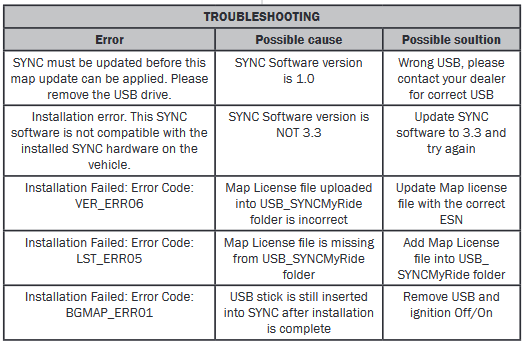
I went to the site today and the only option is to get the $40 USB stick mailed. I highly doubt that we only get 1 free upgrade because it doesn't say that anywhere. So I pulled up my email from "[email protected]" and opened the link to my original download order on syncnavigation.com. My email date is back from January, 2020. I assume that the download would have been updated. Inspecting the files downloaded, the latest modified file is "autoinstall.lst" on 3-12-2020. Almost all of the tar.gz files were last modified on 12-10-2019, the latest tar.gz file is from 3-3-20. So something has changed since I last downloaded the nav update. I'm struggling to get my car to not error out with my USB drive though. I keep getting "LST_ERR05" when I plug it in. Going to keep playing around with it though and I'll let you guys know. Side note: I have 20 years of IT / programming experience, and I've let Ford know their updates are a disgrace.
 

Elp_jc

Well-Known Member
Joined
May 2, 2020
Threads
48
Messages
3,527
Reaction score
805
Location
USA
Vehicle(s)
None
All of the failures are due to those stupid license files. They need to be at exactly the right place, and that was my problem as well with the F-150. It doesn't help that the instructions are not clear either. Initially, I opened the zip file and downloaded the programs individually. NOPE. You need to transfer the entire file to the USB (the car will open it). And the map file has to be transferred to the correct folder, which if I remember correctly is the 'MySync.....'. I finally got it right, and it successfully updated in exactly 48 minutes. My car cut off the ignition at exactly 45, but since I was there, and super quickly hit the ignition button again, it finished successfully.

Hope it gives me less of a hard time on this car. I also kept the instructions from the truck, so they should help if needed. We'll see.

EDIT: Just checked the Ford site (after about 5 redirects), and my car is eligible for a free download, so will do it tomorrow, since it supposedly takes 1.5 hours, and my computer will cut off before that if I'm not using it. And no, don't remember where to change all that crap. Ha ha. My Sync3 software version 3.3 has the latest build, which is 19052, so it's current. No need to update that, thankfully... although it only took 3 minutes after I figured out the license file issue.
 

Mr. Brutus

Mr. Brutus
Joined
Aug 21, 2014
Threads
7
Messages
123
Reaction score
118
Location
Columbus, Ohio
First Name
Brutus
Vehicle(s)
2016 GT Premium PP Ruby
I typed in my VIN and ESN for my 2016 GT premium, I got two options: download for $109 or buy the flash drive for $149. After reading all of the above issues with downloads, I bought the drive for $152.95 with shipping. I went in again to do a screen capture for this post showing the options, and it showed I was now up to date with "Map version NA 1 19". So I guess it updated my records right after the purchase, but before the actual download. We will see how it goes. It is supposed to arrive in 2 days.
 

Sponsored

wade001

Well-Known Member
Joined
Mar 1, 2020
Threads
12
Messages
366
Reaction score
231
Location
Central Florida
First Name
Wade
Vehicle(s)
2019 GT Prem. 10r80, PP1, 401A, Active Exhaust
I went to the site today and the only option is to get the $40 USB stick mailed. I highly doubt that we only get 1 free upgrade because it doesn't say that anywhere. So I pulled up my email from "[email protected]" and opened the link to my original download order on syncnavigation.com. My email date is back from January, 2020. I assume that the download would have been updated. Inspecting the files downloaded, the latest modified file is "autoinstall.lst" on 3-12-2020. Almost all of the tar.gz files were last modified on 12-10-2019, the latest tar.gz file is from 3-3-20. So something has changed since I last downloaded the nav update. I'm struggling to get my car to not error out with my USB drive though. I keep getting "LST_ERR05" when I plug it in. Going to keep playing around with it though and I'll let you guys know. Side note: I have 20 years of IT / programming experience, and I've let Ford know their updates are a disgrace.
in the installation directions i posted they have this..
upload_2020-6-30_8-43-1.png

looks like you got license file issues..
 

dconfer

Well-Known Member
Joined
Dec 30, 2014
Threads
0
Messages
140
Reaction score
15
Location
PA
Vehicle(s)
2019 Mustang GT
When somebody gets the usb drive could you confirm the version number on it?
 

m3incorp

Well-Known Member
Joined
Feb 6, 2020
Threads
22
Messages
4,603
Reaction score
3,125
Location
Georgia/Colorado
First Name
James
Vehicle(s)
2019 Mustang GT Premium with Roush Phase 2, 2023 Audi A5
The system is very finicky at where you place the files in the download folder; the "rights/permissions" file has to definitely be in a specific place.

Did the EXACT same thing and downloaded an update two weeks ago. I was never able to get mine to update, hoping the one provided from Ford works this go-around.
 

m3incorp

Well-Known Member
Joined
Feb 6, 2020
Threads
22
Messages
4,603
Reaction score
3,125
Location
Georgia/Colorado
First Name
James
Vehicle(s)
2019 Mustang GT Premium with Roush Phase 2, 2023 Audi A5
Same here... but I did call and was told the $40 USB would contain the 1.19 update. We shall see in a couple of days if some unknown customer care person really spoke the truth :)

Checked mine...Sync in car states ver 1.17 for the Maps version....as Ira mentioned, it is a bug. The website says I have the latest version and will charge $40 to send a USB with the "same" version I have. It does not say what version I have nor what the latest version is. Not too worried about it as i think I have only used it once. Use AA 95% of the time for Google Maps or Waze.
Sponsored


Top