

Bikeman315
Well-Known Member
- Joined
- Apr 12, 2015
- Threads
- 583
- Messages
- 16,195
- Reaction score
- 21,917
- Location
- Myrtle Beach, SC
- First Name
- Ira
- Vehicle(s)
- 2019 Mustang GT/CS, 2021 Volvo XC60
You used Cyanlabs, right?Upgraded my wife’s ‘17 EB premium ragtop w/ nav. 3.0 to 3.4 and 2020 maps. Works great.
ctandc72
Well-Known Member
Yup. Same process I used the other day on my ‘19 (I did a sync 3 swap on it back in 2019. ‘16 APIM. That APIM went from 2.0 to 3.0 and is now 3.4)You used Cyanlabs, right?
Bikeman315
Well-Known Member
- Joined
- Apr 12, 2015
- Threads
- 583
- Messages
- 16,195
- Reaction score
- 21,917
- Location
- Myrtle Beach, SC
- First Name
- Ira
- Vehicle(s)
- 2019 Mustang GT/CS, 2021 Volvo XC60
Thank you. Just wanted to clarify for others who mIght have thought you got them from Ford.Yup. Same process I used the other day on my ‘19 (I did a sync 3 swap on it back in 2019. ‘16 APIM. That APIM went from 2.0 to 3.0 and is now 3.4)
Järn
Well-Known Member
- Joined
- Aug 26, 2015
- Threads
- 20
- Messages
- 257
- Reaction score
- 457
- Location
- The Motor City
- First Name
- Tony
- Vehicle(s)
- 2019 Mustang GT Premium, Ruby Red, A10, B&O, AE
I take back the double face palm meme. Ford grabbed the wifi by the horns and isrunningwith it.
Ford grabbed wifi by the horns and is crawling with it.
This process is so annoying. I have to go out to the garage every 30 minutes to restart the process. I think I completed 5 or 6 WiFi downloads/installs yesterday and I had my CTEK charger connected (MXS 5, 4.3 amp). This morning I started downloading again, and after 1 file I received the message in the Ford Pass app that the car has entered "sleep mode". (Foolish me I did not have the battery charger connected all night.) So now I have to wait for the battery to recharge before continuing. 13 total files, I am maybe 1/2 done.

Bikeman315
Well-Known Member
- Joined
- Apr 12, 2015
- Threads
- 583
- Messages
- 16,195
- Reaction score
- 21,917
- Location
- Myrtle Beach, SC
- First Name
- Ira
- Vehicle(s)
- 2019 Mustang GT/CS, 2021 Volvo XC60
Tony, Ford gives you two options. You choose this method. This is the way it works. Next time use a USB drive.Ford grabbed wifi by the horns and is crawling with it.
This process is so annoying. I have to go out to the garage every 30 minutes to restart the process. I think I completed 5 or 6 WiFi downloads/installs yesterday and I had my CTEK charger connected (MXS 5, 4.3 amp). This morning I started downloading again, and after 1 file I received the message in the Ford Pass app that the car has entered "sleep mode". (Foolish me I did not have the battery charger connected all night.) So now I have to wait for the battery to recharge before continuing. 13 total files, I am maybe 1/2 done.

Järn
Well-Known Member
- Joined
- Aug 26, 2015
- Threads
- 20
- Messages
- 257
- Reaction score
- 457
- Location
- The Motor City
- First Name
- Tony
- Vehicle(s)
- 2019 Mustang GT Premium, Ruby Red, A10, B&O, AE
Ira, I tried the download USB. This option is not available for me (not yet) The USB download gave me the NA 19.1 version, which I already have. I am going on a vacation (driving) and I wanted the new maps for that trip. I did use the download/USB to upgrade SYNC3 to v3.4.21020.Tony, Ford gives you two options. You choose this method. This is the way it works. Next time use a USB drive.
StangTime
Well-Known Member
- Joined
- Apr 16, 2019
- Threads
- 81
- Messages
- 3,594
- Reaction score
- 4,094
- Location
- Ontario 🇨🇦
- First Name
- Todd
- Vehicle(s)
- 19' GT PP1 Manual
I wasn't referring to the speed at which the downloads occur. I was referring to the fact that wifi updates never worked in the past and now every time I park the car in the garage I am getting one. I agree though the wireless update process can be a pain unless you just let it happen naturally.Ford grabbed wifi by the horns and is crawling with it.
This process is so annoying. I have to go out to the garage every 30 minutes to restart the process. I think I completed 5 or 6 WiFi downloads/installs yesterday and I had my CTEK charger connected (MXS 5, 4.3 amp). This morning I started downloading again, and after 1 file I received the message in the Ford Pass app that the car has entered "sleep mode". (Foolish me I did not have the battery charger connected all night.) So now I have to wait for the battery to recharge before continuing. 13 total files, I am maybe 1/2 done.
Bikeman315
Well-Known Member
- Joined
- Apr 12, 2015
- Threads
- 583
- Messages
- 16,195
- Reaction score
- 21,917
- Location
- Myrtle Beach, SC
- First Name
- Ira
- Vehicle(s)
- 2019 Mustang GT/CS, 2021 Volvo XC60
Yep, you’re right. My bad.Ira, I tried the download USB. This option is not available for me (not yet) The USB download gave me the NA 19.1 version, which I already have. I am going on a vacation (driving) and I wanted the new maps for that trip. I did use the download/USB to upgrade SYNC3 to v3.4.21020.
I’m staying home for now so will wait for the web download. If I recall that was also a major pain when doing 1.19 last year.
Fasteddiec
Well-Known Member
- Joined
- Jun 6, 2019
- Threads
- 4
- Messages
- 162
- Reaction score
- 77
- Location
- South Florida
- First Name
- Ed
- Vehicle(s)
- 2019 Mustang GT Premium convertible
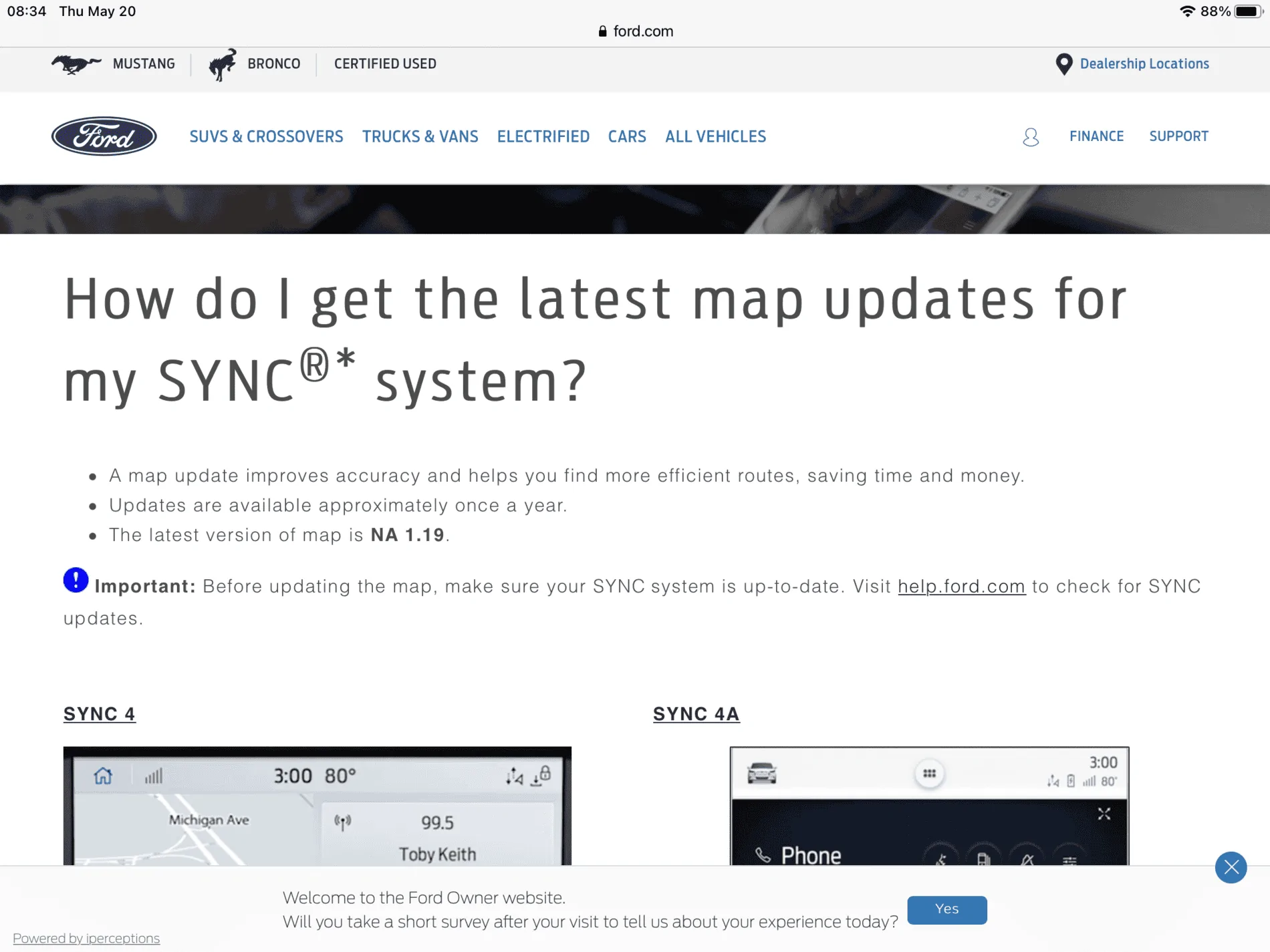
My car also started updating the other day OTA via WiFi for the first time ever. I believe it is in the slow process of loading the 20 maps plus other stuff. The Ford site has nothing for download and states the latest map is 19. Only way yo get the 20 maps is OTA, not USB.Tony, Ford gives you two options. You choose this method. This is the way it works. Next time use a USB drive.
Bikeman315
Well-Known Member
- Joined
- Apr 12, 2015
- Threads
- 583
- Messages
- 16,195
- Reaction score
- 21,917
- Location
- Myrtle Beach, SC
- First Name
- Ira
- Vehicle(s)
- 2019 Mustang GT/CS, 2021 Volvo XC60
Yes, for now. Ford will eventually put it on the website for download since not everyone has the ability to do OTA.Only way yo get the 20 maps is OTA, not USB.
I do find it interesting that this is just "happening" with no word from Ford about it. Imagine the average Joe Blow who has no clue as to what is happening.
Matthewstorm
Well-Known Member
Website still shows NA119 as latest and greatest.
groove93
Well-Known Member
- Joined
- Mar 29, 2021
- Threads
- 2
- Messages
- 80
- Reaction score
- 157
- Location
- Statesboro, Georgia
- First Name
- Jay Brown
- Vehicle(s)
- 2019 Ford Mustang GT Premium
Successfully updated my system to the latest version via USB. The system immediately recognized I had a Flash Drive inserted into the front USB port, then proceeded to update. My commute lasts from 45 minutes to an hour, and the update finished within 25 minutes.
Like the first update I performed a couple of weeks ago, I had to turn off the car in order for Android Auto to be configured. I had to stop by the store for a quick visit, and when I got back in the and started the car, I had to choose a few options directly on my phone in order for Android Auto to work on the screen. Pretty uneventful update, which is a good thing!
Like the first update I performed a couple of weeks ago, I had to turn off the car in order for Android Auto to be configured. I had to stop by the store for a quick visit, and when I got back in the and started the car, I had to choose a few options directly on my phone in order for Android Auto to work on the screen. Pretty uneventful update, which is a good thing!
Bikeman315
Well-Known Member
- Joined
- Apr 12, 2015
- Threads
- 583
- Messages
- 16,195
- Reaction score
- 21,917
- Location
- Myrtle Beach, SC
- First Name
- Ira
- Vehicle(s)
- 2019 Mustang GT/CS, 2021 Volvo XC60
Glad it all worked out for you. This is the way it is supposed to work.Successfully updated my system to the latest version via USB. The system immediately recognized I had a Flash Drive inserted into the front USB port, then proceeded to update. My commute lasts from 45 minutes to an hour, and the update finished within 25 minutes.
Like the first update I performed a couple of weeks ago, I had to turn off the car in order for Android Auto to be configured. I had to stop by the store for a quick visit, and when I got back in the and started the car, I had to choose a few options directly on my phone in order for Android Auto to work on the screen. Pretty uneventful update, which is a good thing!
So are you now going to try doing the maps using Wi-Fi?
groove93
Well-Known Member
- Joined
- Mar 29, 2021
- Threads
- 2
- Messages
- 80
- Reaction score
- 157
- Location
- Statesboro, Georgia
- First Name
- Jay Brown
- Vehicle(s)
- 2019 Ford Mustang GT Premium
I primarily use Android Auto, so at the moment, I'm not really concerned about the updated maps.
Similar threads


- Replies
- 20
- Views
- 4,404


- Replies
- 2
- Views
- 4,072

- Replies
- 79
- Views
- 28,155
