Sponsored

Modifying As-Built Data Guide

Thestangb

Well-Known Member
Joined
May 8, 2017
Threads
6
Messages
182
Reaction score
61
Location
UAE
First Name
Ayham Kutit
Vehicle(s)
Black S550
Here ya go, these are the modules installed into my 2018 EB Premium w/PP (and the analog cluster). The info is based directly off my VIN and from the Ford ETIS site under the software tab.
Thank you...as I mentioned before, the bytes are different :( so there's nothing we can do unless we flash a whole dump of the MCU which I'm guessing requires a direct hardware access
Sponsored


Thestangb

Well-Known Member
Joined
May 8, 2017
Threads
6
Messages
182
Reaction score
61
Location
UAE
First Name
Ayham Kutit
Vehicle(s)
Black S550
[MENTION=13960]Cobra Jet[/MENTION] Could you please do us a favour and change one thing in your IPC and see if the digital speedometer will disappear?


720-07-01: XXX0 XXXX XX

yours should like look this : XXX1 XXXX XX


Thanks!
 

Cobra Jet

Well-Known Member
Joined
Feb 12, 2015
Threads
771
Messages
17,554
Reaction score
19,982
Location
NJ
Vehicle(s)
2018 EB Prem. w/PP and 94 Mustang Cobra
[MENTION=13960]Cobra Jet[/MENTION] Could you please do us a favour and change one thing in your IPC and see if the digital speedometer will disappear?


720-07-01: XXX0 XXXX XX

yours should like look this : XXX1 XXXX XX


Thanks!
Hi Thestangb,

Unfortunately I don’t have anyway of making the changes. I don’t have Forscan or the tool to use with Forscan (yet). I have just been reading up on this thread on how you all make the changes and what progress has been made with the updates.

I also only have a MacBook Pro - so I’m not even sure if I can use Forscan (or the tool)?

I posted my 2018 module info in the event someone needed any of those part numbers. I also posted my previous questions about what I was seeing on the As Built site once my VIN was input, because I thought I’m also to see codes under the “PCM” section?
 

breeves002

Well-Known Member
Gold Sponsor
Joined
Mar 15, 2017
Threads
18
Messages
604
Reaction score
335
Location
St. Louis, MO
First Name
Sam
Vehicle(s)
2016 GT Premium PP
Hi Thestangb,

Unfortunately I don’t have anyway of making the changes. I don’t have Forscan or the tool to use with Forscan (yet). I have just been reading up on this thread on how you all make the changes and what progress has been made with the updates.

I also only have a MacBook Pro - so I’m not even sure if I can use Forscan (or the tool)?

I posted my 2018 module info in the event someone needed any of those part numbers. I also posted my previous questions about what I was seeing on the As Built site once my VIN was input, because I thought I’m also to see codes under the “PCM” section?
Buy this: https://www.amazon.com/NuVision-Tou...=UTF8&qid=1520622145&sr=8-1&keywords=nuvision

It's on sale right now. Slow, but works well for FORScan.

Buy an OBDLink MX too or you can buy a modified ELM327 BT from me for 40% the price of the MX. PM if interested.

You can use your MBP if you install windows on it (bootcamp or parallels, etc).

They may not have released your PCM strategy as built yet. I don't even think its helpful to anyone at this point. Whats your exact question about as built?
 

hlh1

Well-Known Member
Joined
Jul 10, 2017
Threads
11
Messages
694
Reaction score
197
Location
Central VA
Vehicle(s)
2019 GT PP1 A10

Sponsored

smdandb2

ManBearPig
Joined
Oct 14, 2014
Threads
24
Messages
726
Reaction score
405
Location
Uranus
Vehicle(s)
2017 Toyota Corolla SE
Good question.
I enabled nav on a buddies 2015 GT as well as a 2015 Fiesta.

Followed the instructions, worked great.
 

hlh1

Well-Known Member
Joined
Jul 10, 2017
Threads
11
Messages
694
Reaction score
197
Location
Central VA
Vehicle(s)
2019 GT PP1 A10
I enabled nav on a buddies 2015 GT as well as a 2015 Fiesta.

Followed the instructions, worked great.
I'm betting this won't work on my 17.
 

papinist

The Italian Pony
Joined
Nov 30, 2014
Threads
47
Messages
3,188
Reaction score
781
Location
Tuscany, Italy
First Name
Stefano
Vehicle(s)
Mustang EcoBoost MT Race Red EURO - NO MORE

hlh1

Well-Known Member
Joined
Jul 10, 2017
Threads
11
Messages
694
Reaction score
197
Location
Central VA
Vehicle(s)
2019 GT PP1 A10

AdrianMAK

Well-Known Member
Diamond Sponsor
Joined
Oct 16, 2014
Threads
50
Messages
1,216
Reaction score
326
Location
Miami, FL
Website
www.makperformance.com
Vehicle(s)
2015 TY Mustang GT Premium
Sorry if this has been covered,

has anyone figured this out on 2018MY, interested in Gear Ratio change for BCM.
 

Sponsored

cyberdude47

Member
Joined
Jan 4, 2018
Threads
6
Messages
24
Reaction score
3
Location
BC Canada
Vehicle(s)
15 vert
Is there an option that’s accessible in forscan to enable the nav system while moving? Mine locks out as soon as I start driving
 
OP
OP
AngelDeath

AngelDeath

Well-Known Member
Joined
May 5, 2016
Threads
58
Messages
1,528
Reaction score
1,272
Location
CH, New Jersey
First Name
Mike
Vehicle(s)
'20 Shelby GT500 Rapid Red / '01 Metallic Red C5 / '17 White Overland
Is there an option that’s accessible in forscan to enable the nav system while moving? Mine locks out as soon as I start driving
[MENTION=33296]cyberdude47[/MENTION]
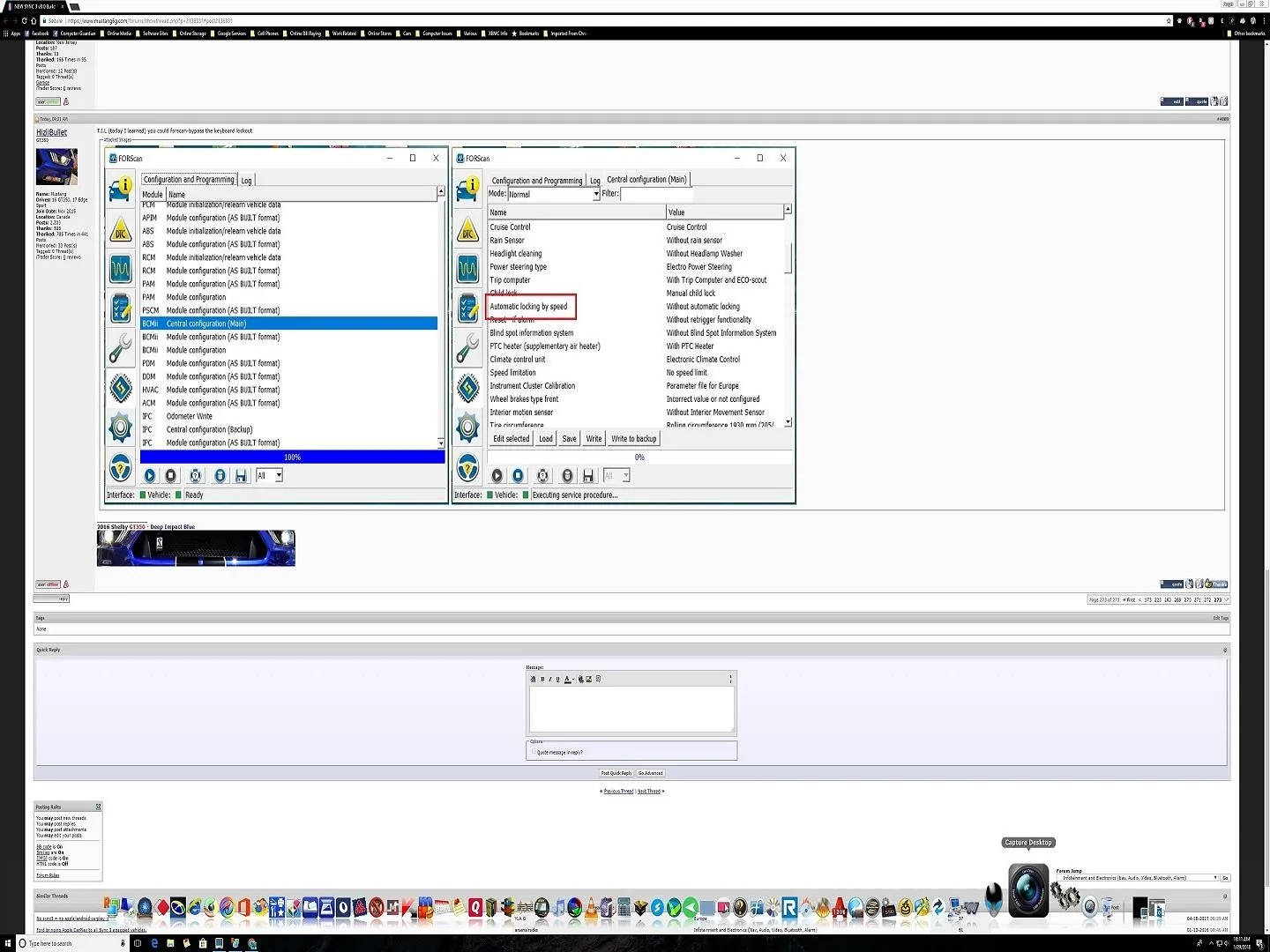
If your talking about the keyboard graying out while moving, then Hizlibullet posted this but I couldnt find it, but I had a screenshot of it:
Screenshot.webp
 
OP
OP
AngelDeath

AngelDeath

Well-Known Member
Joined
May 5, 2016
Threads
58
Messages
1,528
Reaction score
1,272
Location
CH, New Jersey
First Name
Mike
Vehicle(s)
'20 Shelby GT500 Rapid Red / '01 Metallic Red C5 / '17 White Overland
Also if anyone is interested or possibly doesnt know, My step-daughter just leased a 2018 eco-boost and in the cluster it has the speedometer thats been posted a few pages back as a viewing option, dont know if the cluster on the ecoboost changed (has the analog dials), thought I'd mention it in case anyone wanted to compare coding.
 

buzz-dee

Well-Known Member
Joined
Jul 26, 2016
Threads
2
Messages
116
Reaction score
37
Location
Germany
Vehicle(s)
15 GT Premium PP
[MENTION=33296]cyberdude47[/MENTION]
If your talking about the keyboard graying out while moving, then Hizlibullet posted this but I couldnt find it, but I had a screenshot of it:
I’m not sure but I think you’re screenshot shows the the option for automatic locking doors when you start moving. The setting for the keyboard being accessible while moving is in the APIM:

7D0-02-01 **** xxxx xxxx

It’s actually the Country Code: 5553=U.S., 4341=CANADA;

If you use 5753 (which translates to WS whatever that means) it will allow NAV in motion on Sync2, but Sirius Travel Link no longer works.
 
OP
OP
AngelDeath

AngelDeath

Well-Known Member
Joined
May 5, 2016
Threads
58
Messages
1,528
Reaction score
1,272
Location
CH, New Jersey
First Name
Mike
Vehicle(s)
'20 Shelby GT500 Rapid Red / '01 Metallic Red C5 / '17 White Overland
I’m not sure but I think you’re screenshot shows the the option for automatic locking doors when you start moving. The setting for the keyboard being accessible while moving is in the APIM:

7D0-02-01 **** xxxx xxxx

It’s actually the Country Code: 5553=U.S., 4341=CANADA;

If you use 5753 (which translates to WS whatever that means) it will allow NAV in motion on Sync2, but Sirius Travel Link no longer works.
Read above the top of the screen shot, clearly says keyboard, this is the common section where you dont have to play with bits. I just cant find the actual post, maybe [MENTION=19817]HizliBullet[/MENTION] can answer where that post was.

*EDIT*

Found it!

https://www.mustang6g.com/forums/showpost.php?p=2136331&postcount=4089
Sponsored


Top