Sponsored

SYNC 3 swap, It's all in here

Status
Not open for further replies.

doubledeee

Active Member
Joined
Nov 20, 2018
Threads
0
Messages
25
Reaction score
35
Location
Lakeland, Tennessee
First Name
Dan
Vehicle(s)
2015 Mustang GT, 2017 F150 XLT, 2012 HD Road Glide
Sorry, I'm sure this has been answered in the prior 147 pages but...

New user and potential 550 buyer. I'm looking at buying a used 2015 GT Premium that has the basic Sync and 8" screen. I was going to walk-away from the car because I want (need) CarPlay but then I did some research on possibility of adding it , and landed here.

A few quick questions. Can I 100% upgrade this car to Sync 3 w CarPlay easy enough? If so, what's the approximate cost? Not interested in built-in NAV.

I owned a 16 Ford Edge that I ungraded (simple job) but it's my understanding the 16 upgrade is different than a 15?

Thanks so much in advance!
I also have a 2015 GT Premium that had SYNC 2/My Ford Touch that I swapped to SYNC 3 with CarPlay a couple years ago. I bought a non nav APIM and screen off eBay, also need a GPS antenna, CarPlay capable USB/media hub that goes in the center console (under armrest) which requires an adapter cable. After installation I used Forscan to program the APIM to the equipment in my car. Cost me around $350 for everything. Installation is easy, plug and play. I'll find where I sourced the parts and post here, it's in this thread but it's so big it can be hard to find!
I also installed the 2018+ digital gauge cluster but that's a whole other thread.
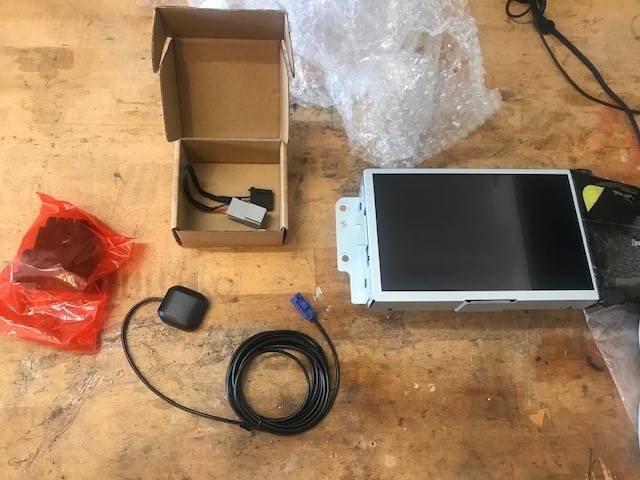
SYNC3.jpg


Digital_gauges.webp
Sponsored


doubledeee

Active Member
Joined
Nov 20, 2018
Threads
0
Messages
25
Reaction score
35
Location
Lakeland, Tennessee
First Name
Dan
Vehicle(s)
2015 Mustang GT, 2017 F150 XLT, 2012 HD Road Glide
I also have a 2015 GT Premium that had SYNC 2/My Ford Touch that I swapped to SYNC 3 with CarPlay a couple years ago. I bought a non nav APIM and screen off eBay, also need a GPS antenna, CarPlay capable USB/media hub that goes in the center console (under armrest) which requires an adapter cable. After installation I used Forscan to program the APIM to the equipment in my car. Cost me around $350 for everything. Installation is easy, plug and play. I'll find where I sourced the parts and post here, it's in this thread but it's so big it can be hard to find!
I also installed the 2018+ digital gauge cluster but that's a whole other thread.
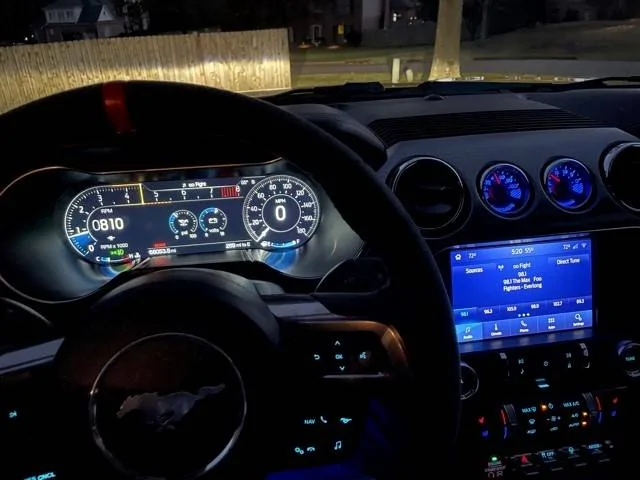
SYNC3.jpg


Digital_gauges.jpg
I got lucky and found a new non-nav APIM and screen for $229 on eBay, that source is no longer available.

GPS antenna:
https://www.amazon.com/gp/product/B07R6NL5G6/ref=ppx_yo_dt_b_asin_title_o04_s00?ie=UTF8&psc=1

USB hub adapter cable:
https://www.amazon.com/gp/product/B07S2H471Q/ref=ppx_yo_dt_b_asin_title_o04_s00?ie=UTF8&psc=1

CarPlay USB terminal:
https://www.ebay.com/itm/-/192549395442
 

Iconic1

New Member
Joined
Feb 28, 2022
Threads
0
Messages
4
Reaction score
3
Location
SEC PA
First Name
Chris Kone
Vehicle(s)
15 GT

Iconic1

New Member
Joined
Feb 28, 2022
Threads
0
Messages
4
Reaction score
3
Location
SEC PA
First Name
Chris Kone
Vehicle(s)
15 GT
Can someone please confirm that the 16 Mustang (GT Premium) w Sync 2 only needs the Sync 3 update and the newer usb hub like most other 16 Fords?
 

Bikeman315

Well-Known Member
Joined
Apr 12, 2015
Threads
581
Messages
16,183
Reaction score
21,909
Location
Myrtle Beach, SC
First Name
Ira
Vehicle(s)
2019 Mustang GT/CS, 2021 Volvo XC60
Can someone please confirm that the 16 Mustang (GT Premium) w Sync 2 only needs the Sync 3 update and the newer usb hub like most other 16 Fords?
The 2016 Mustang comes with Sync 3 if it has the 8” screen. If it is an early build you will need the updated hub. Later builds had this update.
 

Sponsored

Iconic1

New Member
Joined
Feb 28, 2022
Threads
0
Messages
4
Reaction score
3
Location
SEC PA
First Name
Chris Kone
Vehicle(s)
15 GT
The 2016 Mustang comes with Sync 3 if it has the 8” screen. If it is an early build you will need the updated hub. Later builds had this update.
Good info. Guess I'll take along a data cable on any test drives and try it. CP dialog screen should pop-up right away if ready.
 

analogman

Well-Known Member
Joined
Oct 26, 2014
Threads
31
Messages
259
Reaction score
290
Location
Massachusetts
Vehicle(s)
2015 Mustang GT PP
As you've probably noticed in this thread, there are suppliers of all the parts you'll need in a complete kit. If you're tech-savvy you could probably find the individual components separately and maybe save a couple of hundred dollars buying them piecemeal. But for many people (myself included), it can save a lot of both money and headaches by buying everything you need compiled by someone else.

Thomas, who started this thread, username HextallS550, can sell you everything you need in one bundle (Hellhorse Performance is another supplier, though at a higher price). There seem to be some important details to make sure everything is compatible with everything else, including the new GPS antenna, as well as the programming of the MFD itself.

I did the same thing with my 2015 GT Premium. I bought the complete package from HextallS550. It was plug and play. Both the factory navigation system, and Apple CarPlay, work fine and just as intended. It's a world of difference compared with the awful 2015 MyFordTouch abomination.

Good luck!

Sorry, I'm sure this has been answered in the prior 147 pages but...

New user and potential 550 buyer. I'm looking at buying a used 2015 GT Premium that has the basic Sync and 8" screen. I was going to walk-away from the car because I want (need) CarPlay but then I did some research on possibility of adding it , and landed here.

A few quick questions. Can I 100% upgrade this car to Sync 3 w CarPlay easy enough? If so, what's the approximate cost? Not interested in built-in NAV.

I owned a 16 Ford Edge that I ungraded (simple job) but it's my understanding the 16 upgrade is different than a 15?

Thanks so much in advance!
 

Brian_S550

Well-Known Member
Joined
Mar 1, 2018
Threads
7
Messages
529
Reaction score
703
Location
Chicago suburbs, IL
First Name
See username
Vehicle(s)
2015 Mustang 3.7L, 2016 Explorer 3.5L
Just finished remote programming with Hextall this morning, my Sync 3 works perfectly.
 

Leosegura155

Well-Known Member
Joined
May 10, 2021
Threads
2
Messages
55
Reaction score
3
Location
Eagle pass
First Name
Leonardo
Vehicle(s)
2019 Mustang GT
Wondering if someone can help me out, I already installed my sync 3 and enabled the modes with forscan, my sync 3 does not have my Current VIN it still has the doners I believe. Is there a way to change the VIN, will FordPass still let me use it with a sync 3 conversion or would I need to update the sync 3 VIN? I saw FordPass has remote start, will it work on my 2019 mustang GT Base?
My sync 3 doesn’t have NAV
 

JECM

Member
Joined
Jan 17, 2022
Threads
3
Messages
18
Reaction score
20
Location
Nebraska
First Name
Eduardo
Vehicle(s)
2016 Ford Mustang GT
I have an multiple issue with my upgrade 4" to 8",

1) My cluster compass is spazzing out and giving me the wrong direction. Driving around helped but kept going to the same issue when I didn't drive. Giving me the constant North/South when I am facing south.

2) My GPS/NAV is way off, I tried Apple Carplay assuming it would work but doesn't, gives me directions that are 25/50 and sometimes 100 feet off. I tired turning my car on/off a couple of times and seems to work but it's much of a hassle to get the GPS/Nav to work. So, I had to buy a $300 3rd party wireless Apple Carplay (MMB 11 Plus Multimedia Box) and for the time being to stream my Carplay wirelessly and navigation because I was getting annoyed with my car's GPS not giving me the right directions.

Any ways to fix these issues?
 
Last edited:

Sponsored

Redraven571

Well-Known Member
Joined
Apr 21, 2016
Threads
9
Messages
583
Reaction score
135
Location
South East PA
First Name
Joe
Vehicle(s)
2015 Mustang V6 Convertible Triple Yellow
I have an multiple issue with my upgrade 4" to 8",

1) My cluster compass is spazzing out and giving me the wrong direction. Driving around helped but kept going to the same issue when I didn't drive. Giving me the constant North/South when I am facing south.

2) My GPS/NAV is way off, I tried Apple Carplay assuming it would work but doesn't, gives me directions that are 25/50 and sometimes 100 feet off. I tired turning my car on/off a couple of times and seems to work but it's much of a hassle to get the GPS/Nav to work. So, I had to buy a $300 3rd party wireless Apple Carplay (MMB 11 Plus Multimedia Box) and for the time being to stream my Carplay wirelessly and navigation because I was getting annoyed with my car's GPS not giving me the right directions.

Any ways to fix these issues?
For #1, when I did my swap (from Hextall), I received a new GPS antenna; reason given was, without the new one, compass would always point north. I'm guessing a new antenna would fix the issue.

For #2, the GPS/NAV issue likely stems from the same root cause as #1. As far as CarPlay, if you are using your phone's map system, that should work OK, because your phone is using it's own location as the guidance vs the sync GPS antenna.
 

JECM

Member
Joined
Jan 17, 2022
Threads
3
Messages
18
Reaction score
20
Location
Nebraska
First Name
Eduardo
Vehicle(s)
2016 Ford Mustang GT
For #1, when I did my swap (from Hextall), I received a new GPS antenna; reason given was, without the new one, compass would always point north. I'm guessing a new antenna would fix the issue.

For #2, the GPS/NAV issue likely stems from the same root cause as #1. As far as CarPlay, if you are using your phone's map system, that should work OK, because your phone is using it's own location as the guidance vs the sync GPS antenna.
Yeah, I try to do that, I bought the kit off eBay, didn't know that might be the issue.

As for my carplay connected via usb, even though I had it casting off my phone with the GPS it still gave me the wrong direction. So, I was able to temp fix it when I had to plug it in 5 differnt times and set the destination where I want to go and it work but until I got in the more complicated area then it was having issue navigating.

So, I hope this antenna will fix the issue.
 

Redraven571

Well-Known Member
Joined
Apr 21, 2016
Threads
9
Messages
583
Reaction score
135
Location
South East PA
First Name
Joe
Vehicle(s)
2015 Mustang V6 Convertible Triple Yellow
Yeah, I try to do that, I bought the kit off eBay, didn't know that might be the issue.

As for my carplay connected via usb, even though I had it casting off my phone with the GPS it still gave me the wrong direction. So, I was able to temp fix it when I had to plug it in 5 differnt times and set the destination where I want to go and it work but until I got in the more complicated area then it was having issue navigating.

So, I hope this antenna will fix the issue.
I've had my upgrade for a few months now and (not to jinx myself) everything working great; hope an updated antenna does the trick for you.
 

JECM

Member
Joined
Jan 17, 2022
Threads
3
Messages
18
Reaction score
20
Location
Nebraska
First Name
Eduardo
Vehicle(s)
2016 Ford Mustang GT
I've had my upgrade for a few months now and (not to jinx myself) everything working great; hope an updated antenna does the trick for you.
Thanks for the info, I've been fighting with this for almost a year.
 

Ferrcad

Well-Known Member
Joined
Sep 13, 2015
Threads
2
Messages
202
Reaction score
102
Location
Western PA
First Name
Brian
Vehicle(s)
2015 Mustang GT Convertible
Last edited:
Status
Not open for further replies.


Top