Sponsored

Need Nguage help - PLEASE

kbreeze72

Well-Known Member
Joined
Oct 23, 2021
Threads
15
Messages
138
Reaction score
119
Location
Eastern Long Island, NY
Vehicle(s)
2018 F150 5.0 & 2021 C8 Z51
I am trying to return my 2018 F150 5.0 back to the stock tune but the Nguage isn't showing any stock tune available.

I am pressing tuning, and then load tune, and it ONLY lists my custom Omega/OZ tune, and even says at the top "Select Tune to Load (1 of 1)." Also I tried it twice, on 2 different days, and it's the same thing, it's showing my custom tune as the only one available to load. There is no "Load stock" available.

When I connect the nguage to my PC, the USB SD card shows the following folders: configs, custom files, logs, stock files, and transfer. In the "custom files" folder there is only one file: "Oz-Tuning-Omega-V1.enc". (My custom tune). In the "stock files" folder there is 2 files: One which has my trucks VIN # ending in .stk and the other says "Stockfile.stk" (Both have exactly the same date, time and file size, just a different name). Is the fact that there is 2 of these files a problem? Or maybe the problem is that they end in .stk instead of .enc??

Please advise. Thanks!
Sponsored
 

Cory S

Well-Known Member
Joined
Dec 10, 2019
Threads
47
Messages
3,355
Reaction score
3,751
Location
Bradford, NH
First Name
Cory
Vehicle(s)
2016 Mustang GT Premium
LOTS of nGauge users are reporting bricked units now, or units that have stopped responding......... Interesting...
 

Shelbeast

Well-Known Member
Joined
Nov 12, 2021
Threads
15
Messages
267
Reaction score
153
Location
Virginia (DMV)
First Name
RAJ
Vehicle(s)
GT500, MME-GT, BMW X-1, Panny 4S
I am trying to return my 2018 F150 5.0 back to the stock tune but the Nguage isn't showing any stock tune available.

I am pressing tuning, and then load tune, and it ONLY lists my custom Omega/OZ tune, and even says at the top "Select Tune to Load (1 of 1)." Also I tried it twice, on 2 different days, and it's the same thing, it's showing my custom tune as the only one available to load. There is no "Load stock" available.

When I connect the nguage to my PC, the USB SD card shows the following folders: configs, custom files, logs, stock files, and transfer. In the "custom files" folder there is only one file: "Oz-Tuning-Omega-V1.enc". (My custom tune). In the "stock files" folder there is 2 files: One which has my trucks VIN # ending in .stk and the other says "Stockfile.stk" (Both have exactly the same date, time and file size, just a different name). Is the fact that there is 2 of these files a problem? Or maybe the problem is that they end in .stk instead of .enc??

Please advise. Thanks!
Contact Palm Beach and they should send you a stock tune.
 
OP
OP
kbreeze72

kbreeze72

Well-Known Member
Joined
Oct 23, 2021
Threads
15
Messages
138
Reaction score
119
Location
Eastern Long Island, NY
Vehicle(s)
2018 F150 5.0 & 2021 C8 Z51
Contact Palm Beach and they should send you a stock tune.
Well, as I described above, I have my stock tune file on my PC and on the SD card which is in the nguage. It’s just a matter of getting the nguage to recognize it as an available tune to load.

One thing I was thinking to try, is to move the stock file from the stock files folder into the “custom tunes” folder. Maybe with doing that it would then present as an available tune to load, since it’s recognizing the custom OZ tune in that folder. Or is that a no-no to do that? Not sure if the stock tune needs to load from the stock files folder for some reason?

If nothing works with the nguage though, I’m guessing my only option is to purchase a new/different tuner, as the owners of nguage are now out of business so there is no customer service or support. However, if I do purchase a new/different tuner, I am not sure if that .stk stock file I have will work in it, since it was created by the nguage, is it possible it would be incompatible with a different tuner?
 

Shelbeast

Well-Known Member
Joined
Nov 12, 2021
Threads
15
Messages
267
Reaction score
153
Location
Virginia (DMV)
First Name
RAJ
Vehicle(s)
GT500, MME-GT, BMW X-1, Panny 4S
I have thoughts on this, but not a pro. I don't think putting the stock tune in custom is good idea. But, I might be wrong. I emailed PB on several questions and they were very helpful.
The new tune folks would need your current tune folder. Same as when the last tuners needed your stock tune folder.

I would get with whoever is doing your new tune and ask for advice since they probably know this situation.
 

Sponsored

OP
OP
kbreeze72

kbreeze72

Well-Known Member
Joined
Oct 23, 2021
Threads
15
Messages
138
Reaction score
119
Location
Eastern Long Island, NY
Vehicle(s)
2018 F150 5.0 & 2021 C8 Z51
Actually I wasn’t going to go with a new tune. The reason I am returning to stock is because my 10-sp transmission failed. It slipped out of gear while driving and wouldn’t go back in while in drive, and the engine and wrench lights are on. Manually using the + and – buttons for the transmission will not engage for gears 1 thru 6. Only gears 7-10 work.

Anyhow, I contacted OZ tuning (Who I purchased my current “Omega” aftermarket tune from, which is the only tune I’ve ever had on the truck besides stock) about the problem with the nguage and they basically told me nguage is out of business and there is nothing that can be done and offered no suggestions or solutions. : /
 

WildHorse

N/A or GO HOME
Joined
Jun 28, 2017
Threads
270
Messages
10,297
Reaction score
8,350
Location
Home World: CLASSIFIED
First Name
Puddintane
Vehicle(s)
'17 S550
Vehicle Showcase
1
Oz said that ? They must be a special kind of dumb.

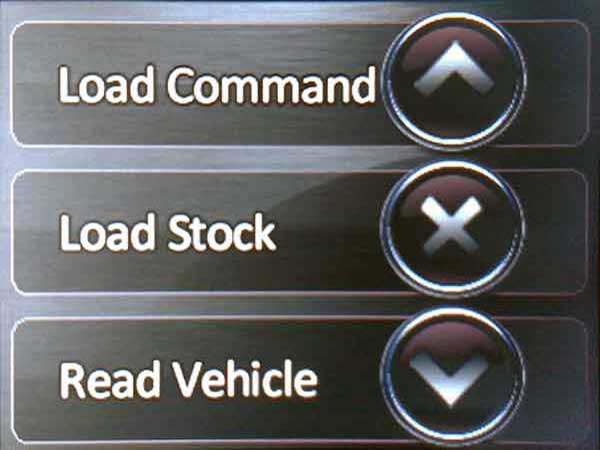
In the “Tuning” menu, scroll down then select “Load Stock”. Its in there.
 
OP
OP
kbreeze72

kbreeze72

Well-Known Member
Joined
Oct 23, 2021
Threads
15
Messages
138
Reaction score
119
Location
Eastern Long Island, NY
Vehicle(s)
2018 F150 5.0 & 2021 C8 Z51
Oz said that ? They must be a special kind of dumb.

In the “Tuning” menu, scroll down then select “Load Stock”. Its in there.
Did you read my first post? To quote myself: " I am pressing tuning, and then load tune, and it ONLY lists my custom Omega/OZ tune, and even says at the top "Select Tune to Load (1 of 1)."

If I try to scroll nothing happens but a quick green circle and then still displaying only the omega tune. That's why it says 1 of 1 because that's all its giving me as available to load, just that 1 tune.
There is no "Load" Stock" option. That's the whole problem.

After I told OZ this, they basically said the unit is defective and there's nothing they can do because nguage out of business, and offered no solution.
 
Last edited:

WildHorse

N/A or GO HOME
Joined
Jun 28, 2017
Threads
270
Messages
10,297
Reaction score
8,350
Location
Home World: CLASSIFIED
First Name
Puddintane
Vehicle(s)
'17 S550
Vehicle Showcase
1
So you pressed tuning -> down arrow -> load stock and didn't see this:
ngauge-1-loadstock-600.jpg
 

kluke15

Well-Known Member
Joined
Aug 17, 2016
Threads
45
Messages
803
Reaction score
372
Location
Reno, NV
First Name
Kenny
Vehicle(s)
2017 Mustang GTPP
as said above your stock tune is in a different location. "load tune" should have all the modified tune files. should have another option to "return to stock" or "load stock".
 

Sponsored
OP
OP
kbreeze72

kbreeze72

Well-Known Member
Joined
Oct 23, 2021
Threads
15
Messages
138
Reaction score
119
Location
Eastern Long Island, NY
Vehicle(s)
2018 F150 5.0 & 2021 C8 Z51
Guys, I'll double check when I get home but I think my menu's might be a little different. The Nguage I have I bought back in 2012 I believe. I'm guessing you have newer versions.
 
OP
OP
kbreeze72

kbreeze72

Well-Known Member
Joined
Oct 23, 2021
Threads
15
Messages
138
Reaction score
119
Location
Eastern Long Island, NY
Vehicle(s)
2018 F150 5.0 & 2021 C8 Z51
SUCCESS! Thank you Wildhorse! Unfortunately, OZ tuning gave me the wrong directions 2x by two different people.

First Steven and then Ken. And I quote them " It should be under "Tuning", then "Load Tune". It should say "Load Stock""

This is NOT correct, at least not for my nGuage.

Here is the actual steps:

1.) Press "Tuning"
2.) Scroll down to "Load Stock"

BINGO!

Their error was telling me to press "Load tune" after pressing tuning. That's incorrect and only leads you to the custom tunes available.

I just emailed them:


Finally resolved!! FYI: You guys gave me the wrong directions. Steve said, and to quote him: " It should be under "Tuning", then "Load Tune". It should say "Load Stock"


That is not correct, at least not for my nGuage, and apparently neither you or Ken picked up on that. After pressing "Tuning" you then have to scroll down to "Load Stock." It is NOT in the "Load Tune" menu.


If you press "Tuning" and then "Load Tune" as he instructed, that only leads you to whatever custom tunes are on the nGuage.


I'm letting you guys know in case anyone else has this problem, you can advise them properly.
 
Last edited:


Top