Official Ford Sync3 3.4 Release

Wingnutzz

Well-Known Member
Joined
Mar 6, 2022
Threads
8
Messages
681
Reaction score
1,783
Location
Woodland Park, CO
First Name
David
Vehicle(s)
2022 Mustang EB
I use the app and website. Having it acknowledged by Ford makes the notification that an update is available go away. Now, new notification = new info or update. If you don’t use these, it makes no difference.

Ok so if you do the updates to sync whether via USB or over Wi-Fi, what is the benefit of making sure that the ford website shows it being updated. Why should we care if ford knows it was updated.

BD
 

Buldawg76

Well-Known Member
Joined
Jan 11, 2022
Threads
3
Messages
1,312
Reaction score
1,174
Location
Alabama,USA
First Name
Mike
Vehicle(s)
2020 Ecoboost Premium, 76 FXE shovel, 77 KZ1000
I use the app and website. Having it acknowledged by Ford makes the notification that an update is available go away. Now, new notification = new info or update. If you don’t use these, it makes no difference.
I use the ford pass app and navigation but not the website. My sync shows no updates available and is on 3.4.22251 the last I checked, probably 5-6 months ago. I have yet to plug in USB to vehicle and drive to upload the nav maps as of yet. Car is connected to my Wi-Fi when at home, but no modem subscriptions paid.

BD
 

Wingnutzz

Well-Known Member
Joined
Mar 6, 2022
Threads
8
Messages
681
Reaction score
1,783
Location
Woodland Park, CO
First Name
David
Vehicle(s)
2022 Mustang EB
Ford programming leaves much to be desired! Months ago I got the Sync update notification on my app (messages) but I deleted it and never got another update notification. But when I logged into the MyMustang web site (which I do aperiodically) it always had the notification that I needed to update. In fact, it still had the version installed at the factory on July-27-2022 even though I had updated many mo the ago. So, I used USB and installed the latest, but uploading the XML file did not work. But having my car attached to my WiFi and searching for updated it recognized that I had the most recent version and it updated Ford successfully.
No, I don’t have any kind of a FordConnect where you give them more money!

I use the ford pass app and navigation but not the website. My sync shows no updates available and is on 3.4.22251 the last I checked, probably 5-6 months ago. I have yet to plug in USB to vehicle and drive to upload the nav maps as of yet. Car is connected to my Wi-Fi when at home, but no modem subscriptions paid.

BD
 

BlkMach10510

Well-Known Member
Joined
Mar 9, 2023
Threads
40
Messages
1,257
Reaction score
2,288
Location
Texas
Vehicle(s)
2023 Mach 1 10R80
Ok so if you do the updates to sync whether via USB or over Wi-Fi, what is the benefit of making sure that the ford website shows it being updated. Why should we care if ford knows it was updated.

BD

It just helps to keep you alerted if a new update comes out.
 

Buldawg76

Well-Known Member
Joined
Jan 11, 2022
Threads
3
Messages
1,312
Reaction score
1,174
Location
Alabama,USA
First Name
Mike
Vehicle(s)
2020 Ecoboost Premium, 76 FXE shovel, 77 KZ1000
Ford programming leaves much to be desired! Months ago I got the Sync update notification on my app (messages) but I deleted it and never got another update notification. But when I logged into the MyMustang web site (which I do aperiodically) it always had the notification that I needed to update. In fact, it still had the version installed at the factory on July-27-2022 even though I had updated many mo the ago. So, I used USB and installed the latest, but uploading the XML file did not work. But having my car attached to my WiFi and searching for updated it recognized that I had the most recent version and it updated Ford successfully.
No, I don’t have any kind of a FordConnect where you give them more money!
Agreed on ford programming for sure. I don't have ford connect either but what I was referring to in terms of paid modem subscription was where you can pay AT&T for them to enable the vehicle modem to have a mobile hot spot using the modem in the car, at least that is what shows up in my cars system when looking at the modem activation. AT&T will never get any of my money ever again since they jacked me around on cell phone bill over 20 years ago.

BD
 

sunhorntortoise

Active Member
Joined
Apr 22, 2022
Threads
1
Messages
30
Reaction score
27
Location
Spain
First Name
Daniel
Vehicle(s)
EU S550 GT 10R80 Carbonized Gray, Magneride
Just wanted to chime in: I've been suffering with the Sync update not showing up on the Ford website after I installed it. Finally with this latest update (3.4.23188) it seems they fixed the issues with the update reporting.

Connecting the car to wifi did not report it back to them correctly, however I downloaded the Interrogator.zip file that someone posted here a few weeks ago, that instantly generated the XML file, I uploaded it to Ford and voilá, now they are aware that I am on the latest Sync version. ^^

Now I'm downloading the Maps update, apparently it's more than 22 GBs 💀 I bet it's gonna take a very long road trip to get it installed. (Not like I use the built-in nav anyway, but hurts my OCD not to have it fully updated in every component. 😅)
 

BlkMach10510

Well-Known Member
Joined
Mar 9, 2023
Threads
40
Messages
1,257
Reaction score
2,288
Location
Texas
Vehicle(s)
2023 Mach 1 10R80
Just wanted to chime in: I've been suffering with the Sync update not showing up on the Ford website after I installed it. Finally with this latest update (3.4.23188) it seems they fixed the issues with the update reporting.

Connecting the car to wifi did not report it back to them correctly, however I downloaded the Interrogator.zip file that someone posted here a few weeks ago, that instantly generated the XML file, I uploaded it to Ford and voilá, now they are aware that I am on the latest Sync version. ^^

Now I'm downloading the Maps update, apparently it's more than 22 GBs 💀 I bet it's gonna take a very long road trip to get it installed. (Not like I use the built-in nav anyway, but hurts my OCD not to have it fully updated in every component. 😅)
It took my car 39 minutes for the map update.
 

EZ-GT

Well-Known Member
Joined
Aug 8, 2020
Threads
7
Messages
98
Reaction score
105
Location
NJ
First Name
Eliam
Vehicle(s)
Whipple charged 2019 Mustang GT Convertible
Vehicle Showcase
1
I have 2019, and when I went to fetch my map update for 3.4, after entering my VIN, it saying that it’s no longer free and I have to pay for updates going forward.

In the past the updates were always included. And I did not see any info about a subscription prior to today.

Any one know how that works, as I do have the Ford extended warranty and about 40k miles on the car?
 

Bikeman315

Well-Known Member
Joined
Apr 12, 2015
Threads
581
Messages
16,183
Reaction score
21,909
Location
Myrtle Beach, SC
First Name
Ira
Vehicle(s)
2019 Mustang GT/CS, 2021 Volvo XC60
I have 2019, and when I went to fetch my map update for 3.4, after entering my VIN, it saying that it’s no longer free and I have to pay for updates going forward.

In the past the updates were always included. And I did not see any info about a subscription prior to today.

Any one know how that works, as I do have the Ford extended warranty and about 40k miles on the car?
You‘ve received all the free ones you are going to get. I’m in the same boat. Now we pay if we want them. ESP has no impact on maps.

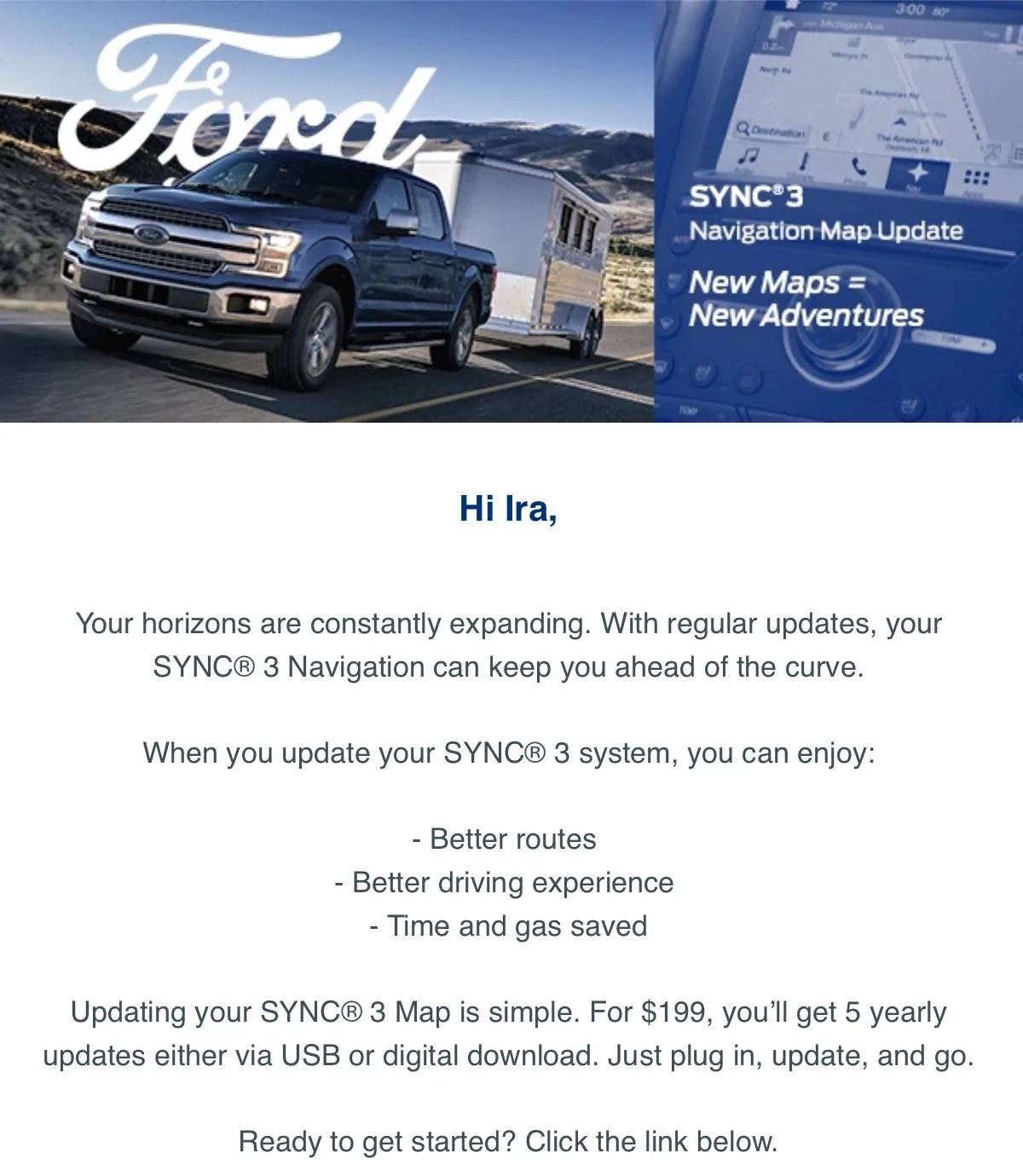
Here is part of the email I received the other day from Ford.

IMG_3721.jpeg
 
Last edited:

sunhorntortoise

Active Member
Joined
Apr 22, 2022
Threads
1
Messages
30
Reaction score
27
Location
Spain
First Name
Daniel
Vehicle(s)
EU S550 GT 10R80 Carbonized Gray, Magneride
It took my car 39 minutes for the map update.
It took me 34 minutes, then I got a message that a key off, key on restart is needed and it will continue with the second part of the update. It restarted the whole Sync system regardless at that moment, on its own, a message popped up that system update successful and immediately started the same thing all over again. I wasn't sure if it's the second part or just the same thing, so I let it do it anyway.
It took again 34 minutes, system update complete. It started the update again, for the third time🤦‍♂️ So I removed the pendrive immediately.

A few hours later when I got back to the car, there was a tiny download icon in the upper right corner that didn't want to go away, it's the typical update in progress icon. I inserted the pendrive out of curiosity and in about 5 seconds it popped up the system update completed AND this time the "you can remove your USB drive" message as well. Now the Sync version page in Settings shows the correct maps version.

This whole update experience of Ford is super weird for me... but eventually it works somehow.
 

BlkMach10510

Well-Known Member
Joined
Mar 9, 2023
Threads
40
Messages
1,257
Reaction score
2,288
Location
Texas
Vehicle(s)
2023 Mach 1 10R80
That doesn’t sound right. I’ve never had a map update that quickly. Try and enter an address and see if it takes. I did this once only to find out I had an incomplete upload.
My screen says I have the NA 2.20 map version.
 

BlkMach10510

Well-Known Member
Joined
Mar 9, 2023
Threads
40
Messages
1,257
Reaction score
2,288
Location
Texas
Vehicle(s)
2023 Mach 1 10R80
It took me 34 minutes, then I got a message that a key off, key on restart is needed and it will continue with the second part of the update. It restarted the whole Sync system regardless at that moment, on its own, a message popped up that system update successful and immediately started the same thing all over again. I wasn't sure if it's the second part or just the same thing, so I let it do it anyway.
It took again 34 minutes, system update complete. It started the update again, for the third time🤦‍♂️ So I removed the pendrive immediately.

A few hours later when I got back to the car, there was a tiny download icon in the upper right corner that didn't want to go away, it's the typical update in progress icon. I inserted the pendrive out of curiosity and in about 5 seconds it popped up the system update completed AND this time the "you can remove your USB drive" message as well. Now the Sync version page in Settings shows the correct maps version.

This whole update experience of Ford is super weird for me... but eventually it works somehow.
Yea it is weird how they have it set up. I waited until I was sure the update was done, even a few minutes after. I then turned off my car, opened the door to make sure it is off and shut the door. I got back in started my car up again, had it search for an update with wi-fi and then checked my current version and it was updated.
 

EZ-GT

Well-Known Member
Joined
Aug 8, 2020
Threads
7
Messages
98
Reaction score
105
Location
NJ
First Name
Eliam
Vehicle(s)
Whipple charged 2019 Mustang GT Convertible
Vehicle Showcase
1
You‘ve received all the free ones you are going to get. I’m in the same boat. Now we pay if we want them. ESP has no impact on maps.

Here is part of the email I received the other day from Ford.

IMG_3721.jpeg
Ouch, thanks for the update
 

Gregs24

Well-Known Member
Joined
Aug 31, 2018
Threads
23
Messages
4,759
Reaction score
3,038
Location
Wiltshire UK & Charente FR
First Name
Greg
Vehicle(s)
Mustang V8 GT, Ford Kuga PHEV
It took me 34 minutes, then I got a message that a key off, key on restart is needed and it will continue with the second part of the update. It restarted the whole Sync system regardless at that moment, on its own, a message popped up that system update successful and immediately started the same thing all over again. I wasn't sure if it's the second part or just the same thing, so I let it do it anyway.
It took again 34 minutes, system update complete. It started the update again, for the third time🤦‍♂️ So I removed the pendrive immediately.

A few hours later when I got back to the car, there was a tiny download icon in the upper right corner that didn't want to go away, it's the typical update in progress icon. I inserted the pendrive out of curiosity and in about 5 seconds it popped up the system update completed AND this time the "you can remove your USB drive" message as well. Now the Sync version page in Settings shows the correct maps version.

This whole update experience of Ford is super weird for me... but eventually it works somehow.
It is a 3 part update for maps.

It does a reboot between maps and voice files, then a small clean up event at the end. Unfortunately it doesn't tell you what it is doing.
 
 
Top