Sponsored

Shelby Styled Shift Light

OP
OP

Mastodon2k

Active Member
Joined
Apr 12, 2020
Threads
2
Messages
31
Reaction score
39
Location
Nevada
First Name
Jacob
Vehicle(s)
2016 Mustang GT
We need a dislike button!
Is the GT350 cluster plug & play, besides needing the correct mileage added?
It’d probably be similar to the same process as the digital gauge swap. Not sure though. I didn’t look into it. Didn’t seem worth it to me just to get a shift light and a digital speedometer.
  • Compressing the speedometer sweep to add the 160-200 range didn't make sense for me going around town in a daily driver.
  • An 8500RPM tach on a car that’s 6500 seemed weird.
  • I’d lose the MyColor, which while minor, I like all my interior lights being the same color (like on cars of yesteryear)and since the buttons and controls are ice blue, MyColor lets me set my gauges to match.
  • And there’s cost. I didn’t want to spend $400 on a used gauge cluster, AND pay someone to change the odometer, especially after just paying $500 to add the performance pack gauges to my car (it’s a non-PP model.)
Spending $50-100 to hack this together seemed better for me. Plus, I get multi-colored shift lights; the GT350’s are a single color. Win-win!

Look around on the forum or on YouTube. I’m sure there’s someone who swapped in the GT350 cluster and described how to do it.
Sponsored

 

cnsysn2

New Member
Joined
Jul 7, 2020
Threads
0
Messages
1
Reaction score
0
Location
China
First Name
bocai sports
Vehicle(s)
mustang
如果可以在最左边 占用一些空间 显示当前档位、车速。那么更加完美
 
OP
OP

Mastodon2k

Active Member
Joined
Apr 12, 2020
Threads
2
Messages
31
Reaction score
39
Location
Nevada
First Name
Jacob
Vehicle(s)
2016 Mustang GT
So, I know I said that this is for cars with the Adaptive Cruise Control, but...that's only because it includes the HUD. If you don't have that already, you can buy the new defroster grille and HUD module for less than $200. Don't think there's anything else needed, but I've been wrong before.

Defroster Grille
HR3Z-63044E82-AA

HUD Module
FR3Z-19G468-A

Also, and probably more importantly, I've uploaded the Arduino code to GitHub. https://github.com/JMPhotos/OBDII-HUD/tree/master/1. Arduino
I'm traveling for the rest of this month, so it'll be sometime afterwards before I can get the code for the app up there, since it's on a computer I don't have with me. However, I provided an alternative option that works too. It's just not as gucci as mine.

The initial posts have been updated to reflect.
 

vincentjm

Well-Known Member
Joined
Mar 23, 2019
Threads
41
Messages
123
Reaction score
32
Location
Switzerland
First Name
Vincent
Vehicle(s)
'15 Mustang GT PP
This is awesome! Finally someone that took on the challenge. Unfortunately I'm way too lazy to do it lol.
 

Cobra Jet

Well-Known Member
Joined
Feb 12, 2015
Threads
771
Messages
17,557
Reaction score
19,988
Location
NJ
Vehicle(s)
2018 EB Prem. w/PP and 94 Mustang Cobra
如果可以在最左边 占用一些空间 显示当前档位、车速。那么更加完美

嗨,欢迎来到论坛。您觉得野马怎么样,并对其进行了修改?
 

Sponsored

dougal19

Member
Joined
Feb 13, 2019
Threads
4
Messages
21
Reaction score
5
Location
Indianapolis
First Name
Doug
Vehicle(s)
2016 Mustang GT - Competition Orange
So, I know I said that this is for cars with the Adaptive Cruise Control, but...that's only because it includes the HUD. If you don't have that already, you can buy the new defroster grille and HUD module for less than $200. Don't think there's anything else needed, but I've been wrong before.

Defroster Grille
HR3Z-63044E82-AA

HUD Module
FR3Z-19G468-A

Also, and probably more importantly, I've uploaded the Arduino code to GitHub. https://github.com/JMPhotos/OBDII-HUD/tree/master/1. Arduino
I'm traveling for the rest of this month, so it'll be sometime afterwards before I can get the code for the app up there, since it's on a computer I don't have with me. However, I provided an alternative option that works too. It's just not as gucci as mine.

The initial posts have been updated to reflect.
Great project and write up! I'm a little confused though, does this use the HUD module or did you make your own with new LED's? If I wanted to recreate this can I just buy the grille, HUD module and arduino and wire it up?
 

Mustang_Lou

Well-Known Member
Joined
May 1, 2016
Threads
13
Messages
1,843
Reaction score
822
Location
Toronto, Canada
Vehicle(s)
2020 Mustang Bullitt
And he says "I’m not great when it comes to electrical engineering," :)

Excellent idea. My Bullitt has the shift warning on the dash with the tone but you can't hear that at all over the exhaust so it's pretty useless for avoiding the rev limiter and keeping your eyes on the road.
 

Kona5.0h

Active Member
Joined
Jun 18, 2021
Threads
1
Messages
26
Reaction score
41
Location
Illinois
First Name
Nicholas
Vehicle(s)
2020 Mustang Gt
For, anyone looking back at this thread wondering if it can still be done. I was able to get it up an working made some minor adjustments to the OPs code. I noticed he had 18 LEDs from what I counted in the video. But the code reads 23. I meant to cut my strip to 23 but miscounted and cut on 21.

Which in the end still works out because, you can only cut every 3 LEDs with this strip. If you cut 23 only 21 would light. If you want 23 you have to cut 24 then program not to light the last LED.

That was pretty straightforward just tinkering with that and finding the correct positioning. Having 21 LEDs you may rack your brain a little on how its supposed to meet at the center. Because, if you divide it it comes out to 10.5. OP addressed this already. I came up with for me counting 2 on both sides as the strip. Then counting up on both sides outside in.Eventually you come up with 11 being the middle LED. Odd numbers will have 1 LED as the middle and even numbers will meet between 2.

After waiting nearly a month for the OBD ll adapter to come from international shipping. I finally got it. Buttoned everything together. Not permanently yet as I still needed to established it even can work. Anyway I uploaded the code ran no error messages. Plugged it in and…

It did not work I was sitting there revving my car that I just spent $100 on nothing. After reading countless forums on this Freematics guy I found that he doesn’t email anyone back anymore. So I had thought id just been scammed.

Read countless forums on other people not getting the the OBD to initialize properly. Nobody got an answer on what was going on.

In true programmer fashion. Instead of spending all night banging my head against the wall. I slept on it. I woke up, thinking that I must not have the data ports correctly plugged in. I unplug and untwist the wires. Do it again paying more attention. Green to Rx and White to Tx.

Re-upload the code. Low and behold I get a getsync error message. Which means the computer chip on the Arduino is failing to connect to the IDE program on the computer. I double and triple checked my USB connection and it was fine.

I go on an Arduino forum and found someone who mentioned the chips need Tx and Rx default ports free for programming.

Okay so I unplug. Upload and it doesn’t bleed anymore. Plug it back in in the correct orientation. Back to the car I go fingers crossed.

Plugged into the OBD. Fired up the car, then I had a working RPM light.

If you really want to avoid unplugging the data ports for the OBD ll when programing you can assign it to different ports. But the defaults still work.

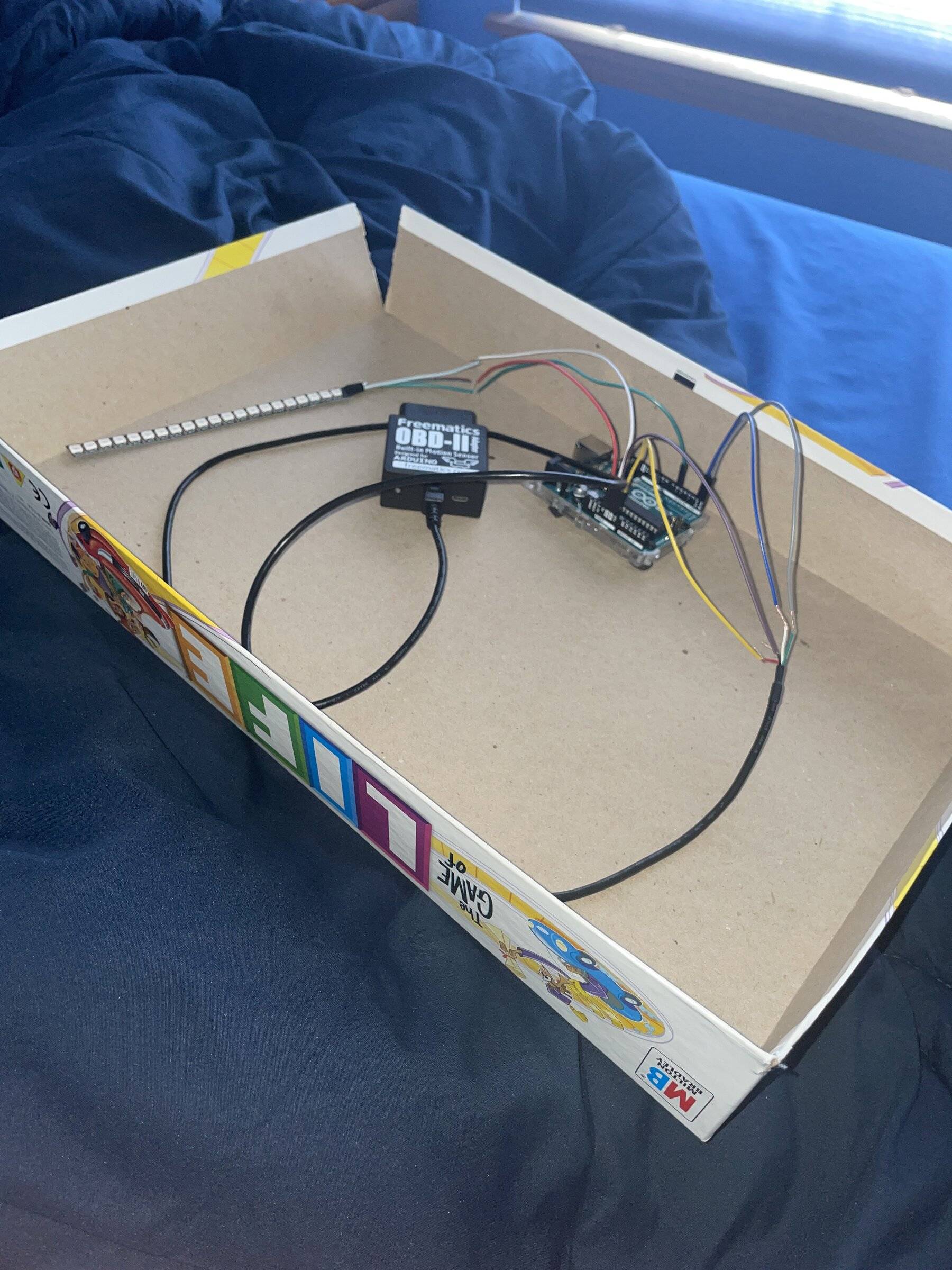
Attached is my setup. Mind you… not the final setup to make it look pretty. But the setup to make sure everything works. The board game box is just easier for me to carry it over to the car all together.
image.jpg

Thanks for the write-up on this OP😎.
 

Cobra Jet

Well-Known Member
Joined
Feb 12, 2015
Threads
771
Messages
17,557
Reaction score
19,988
Location
NJ
Vehicle(s)
2018 EB Prem. w/PP and 94 Mustang Cobra
For, anyone looking back at this thread wondering if it can still be done. I was able to get it up an working made some minor adjustments to the OPs code. I noticed he had 18 LEDs from what I counted in the video. But the code reads 23. I meant to cut my strip to 23 but miscounted and cut on 21.

Which in the end still works out because, you can only cut every 3 LEDs with this strip. If you cut 23 only 21 would light. If you want 23 you have to cut 24 then program not to light the last LED.

That was pretty straightforward just tinkering with that and finding the correct positioning. Having 21 LEDs you may rack your brain a little on how its supposed to meet at the center. Because, if you divide it it comes out to 10.5. OP addressed this already. I came up with for me counting 2 on both sides as the strip. Then counting up on both sides outside in.Eventually you come up with 11 being the middle LED. Odd numbers will have 1 LED as the middle and even numbers will meet between 2.

After waiting nearly a month for the OBD ll adapter to come from international shipping. I finally got it. Buttoned everything together. Not permanently yet as I still needed to established it even can work. Anyway I uploaded the code ran no error messages. Plugged it in and…

It did not work I was sitting there revving my car that I just spent $100 on nothing. After reading countless forums on this Freematics guy I found that he doesn’t email anyone back anymore. So I had thought id just been scammed.

Read countless forums on other people not getting the the OBD to initialize properly. Nobody got an answer on what was going on.

In true programmer fashion. Instead of spending all night banging my head against the wall. I slept on it. I woke up, thinking that I must not have the data ports correctly plugged in. I unplug and untwist the wires. Do it again paying more attention. Green to Rx and White to Tx.

Re-upload the code. Low and behold I get a getsync error message. Which means the computer chip on the Arduino is failing to connect to the IDE program on the computer. I double and triple checked my USB connection and it was fine.

I go on an Arduino forum and found someone who mentioned the chips need Tx and Rx default ports free for programming.

Okay so I unplug. Upload and it doesn’t bleed anymore. Plug it back in in the correct orientation. Back to the car I go fingers crossed.

Plugged into the OBD. Fired up the car, then I had a working RPM light.

If you really want to avoid unplugging the data ports for the OBD ll when programing you can assign it to different ports. But the defaults still work.

Attached is my setup. Mind you… not the final setup to make it look pretty. But the setup to make sure everything works. The board game box is just easier for me to carry it over to the car all together.
image.jpg

Thanks for the write-up on this OP😎.
@Kona5.0h
Have you since installed it and if so, how is it functioning?
 

Kona5.0h

Active Member
Joined
Jun 18, 2021
Threads
1
Messages
26
Reaction score
41
Location
Illinois
First Name
Nicholas
Vehicle(s)
2020 Mustang Gt
@Kona5.0h
Have you since installed it and if so, how is it functioning?
Has been installed and functions as expected. Ran into some hiccups because with the OBD device that connects to the port, in that it drained the battery. At first I had an in line switch however the switch was after the device so it still drained the battery. I since purchased an OBD extension cable that has a switch.

as far at the program I still have to do some tinkering possibly with the rpm shift point. But that is a very straightforward alteration.

before getting it installed in its final position I made sure it worked as expected. By lowering down that shift point. Plugged in and I just put it in the board game box and put it on the passenger seat. Drove around the block and it was good. I can add a video of the startup animation.
 

Sponsored

Kona5.0h

Active Member
Joined
Jun 18, 2021
Threads
1
Messages
26
Reaction score
41
Location
Illinois
First Name
Nicholas
Vehicle(s)
2020 Mustang Gt
Has been installed and functions as expected. Ran into some hiccups because with the OBD device that connects to the port, in that it drained the battery. At first I had an in line switch however the switch was after the device so it still drained the battery. I since purchased an OBD extension cable that has a switch.

as far at the program I still have to do some tinkering possibly with the rpm shift point. But that is a very straightforward alteration.

before getting it installed in its final position I made sure it worked as expected. By lowering down that shift point. Plugged in and I just put it in the board game box and put it on the passenger seat. Drove around the block and it was good. I can add a video of the startup animation.
My custom startup sequence:

https://share.icloud.com/photos/0cfUqvtwXg5o3JFFz5y5QOufQ
 

Pucklord

Well-Known Member
Joined
Mar 20, 2022
Threads
29
Messages
151
Reaction score
43
Location
Kamloops, BC
Vehicle(s)
'17 Mustang GT California Special, '09 Mustang GT 45th Anniversary
Greetings everyone,

I currently have the adaptive cruise cntrol system with collision avoidance pre installed in my vehicle. Is it possible to replace the existing Heads-Up Display (HUD) module with the one from the GT350 model to integrate both the gear shift indicator and collision avoidance warning features into the HUD.

I’m sure Forscan got an option to turn that on but not sure if both will work with the same HUD
 

ammoman

Well-Known Member
Joined
Oct 21, 2019
Threads
14
Messages
135
Reaction score
102
Location
Tennessee
First Name
Ammo
Vehicle(s)
2019 Mustang, 2021 F-250, 2014 Mini Cooper
I wanted to thank the OP so much for this thread! It started me down a fun (although at times frustrating) path to get exactly what I wanted.

I used the main portion of the code in the Git repo as a starting point. But instead of using an OBD2 reader, I decided to get the values directly from the CAN bus. I didn't know this, but OBD2 runs on the CAN bus - when you query for the RPM, the reader formats and sends a message on the CAN bus, waits for a response, decodes the response and then passes it to the Arduino board. After realizing that, I decided to try to get messages off the CAN bus and bypass OBD2 reader all together.

Instead of using the Arduino R3 with a CAN bus shield, I purchased an Arduino R4 (which includes a CAN controller, bluetooth). I also purchased the Waveshare SN65HVD230 (the R4 still needs a CAN transceiver) and followed the wiring details here: https://docs.arduino.cc/tutorials/uno-r4-wifi/can/. I connected the transceiver to the OBD2 port, using pins 6 (CAN bus high) and pin 14 (CAN bus low), which are 3rd from the right, top and bottom, when looking at the OBD2 port in the vehicle.

After getting the serial baud rates correct and the CAN frequency set to 500, I started seeing ALL the messages on my CAN bus using the Arduino CANRead example sketch! The hardest part was then figuring out exactly how to get just the CAN messages I needed, along with calculating usable values. But I finally got it all working! With the help of this reference: https://github.com/v-ivanyshyn/parse_can_logs/blob/master/Ford%20CAN%20IDs%20Summary.md, I discovered bus message ID 0x204 had the raw RPM data (sent out every 10ms). Do NOT use 0x109 from that reference as it is not a valid ID. (that one mistake cost me a few hours). Also, don't ever use the can message 'id' property directly - it somehow stops the CAN code from working without any errors or warnings. (that one also cost me a few hours)

Best of all, because this method gives access to the full CAN bus, I was able to add code that monitors the dimming of the instrument cluster. With this I can change the brightness of the LEDs based on the brightness of the cluster! I also did some other fun stuff like use the LED Matrix on the Arduino R4 to show a live readout of the current RPM and show progressing dots when no messages are received on from the CAN bus to help debug connections. So much fun! Here are the only parts I needed (all from Amazon) - less than $60!

Arduino R4 Wifi - $27
Waveshare SN65HVD230 - $9
IP65 LED Lighting - $18

I went with the IP65 with black pcb because it looked a little more heavy duty and I'll probably make my own mount for it. Anyway, in case anyone wants to jump down this rabbit hole, here are the main parts of the code that finally got me exactly what I needed from the CAN bus:

C:
#include <Arduino_CAN.h>

static uint32_t const CAN_ID_RPM = 0x204;        // Message with acelerator petal and RPM
static uint32_t const CAN_ID_BACKLIGHT = 0x3B3;  // Message instrument cluster dimming

void setup() {
  Serial.begin(115200); // Make sure this matches the baud rate in the serial monitor!
  while (!Serial) {}

  canBusFilteringSetup(); // Add masking/filtering to only receive the messages we want

  if (!CAN.begin(CanBitRate::BR_500k)) { // 500k needed for the Mustang can bus
    Serial.println("CAN.begin(...) failed.");
    for (;;) {}
  } else {
    Serial.println("CAN found!");
  }
}

static uint32_t const CAN_FILTER_MASK_STANDARD = 0x1FFC0000;  // Mustang uses standard 11-bit messaging
static uint32_t const CAN_FILTER_MASK_EXTENDED = 0x1FFFFFFF;  // Extended 29-bit messaging, not used for Mustang

static uint32_t const CAN_EXTENDED_ID_NOT_USED = 0x000;  // Dummy extended message ID

void canBusFilteringSetup() {
  // Only listen to the exact messages we care about (this will mask so only exact IDs come through)
  CAN.setFilterMask_Standard(CAN_FILTER_MASK_STANDARD);
  CAN.setFilterMask_Extended(CAN_FILTER_MASK_EXTENDED);

  // Set up the first half of the standard receive mailboxes for the RPM messages
  for (int mailbox = 0; mailbox < (R7FA4M1_CAN::CAN_MAX_NO_STANDARD_MAILBOXES / 2); mailbox++) {
    CAN.setFilterId_Standard(mailbox, CAN_ID_RPM);
  }

  // Set up the second half of the standard receive mailboxes for the Backlight messages
  for (int mailbox = R7FA4M1_CAN::CAN_MAX_NO_STANDARD_MAILBOXES / 2; mailbox < R7FA4M1_CAN::CAN_MAX_NO_STANDARD_MAILBOXES; mailbox++) {
    CAN.setFilterId_Standard(mailbox, CAN_ID_BACKLIGHT);
  }

  // Extended IDs aren't used on Mustang, but filter them out anyway
  for (int mailbox = 0; mailbox < R7FA4M1_CAN::CAN_MAX_NO_EXTENDED_MAILBOXES; mailbox++) {
    CAN.setFilterId_Extended(mailbox, CAN_EXTENDED_ID_NOT_USED);
  }
}

void loop() {
  if (CAN.available()) {
    CanMsg const msg = CAN.read();

    if (msg.getStandardId() == CAN_ID_RPM) {
      // From: https://github.com/v-ivanyshyn/parse_can_logs/blob/master/Ford%20CAN%20IDs%20Summary.md
      // 0x204 (HS1 & HS3, 20ms)
      //    b3<<8+b4: RPM: (b3<<8 + b4) * 2
      int rpm = ((msg.data[3] << 8) + msg.data[4]) * 2;
     
      // TODO - call the method to change the LEDs based on the new RPM value

    }  else if (msg.getStandardId() == CAN_ID_BACKLIGHT) {
      // From: https://github.com/v-ivanyshyn/parse_can_logs/blob/master/Ford%20CAN%20IDs%20Summary.md
      // 0x3B3 (HS1 & HS3):
      //     b0: 0x40 - headlamp off, 0x44 - headlamp on
      //     b1: 0x48 - ambient daylight, 0x88 - ambient twilight, 0x4A - hazard light
      //     b2: 0x#0/#2/#4/#6 - counter for pressed instruments cluster backlight +/- buttons, 0x1# - headlamp on non-auto, 0xC# - headlamp on auto (during daylight)
      //     b3: 0x0C - dashboard dark mode(?), 0x0D-0x12 - instruments cluster backlight dimming
      //     b4: 0x10 - turn signals off, 0x18 - any of turn signals on (left, right, hazard)
      //     b5: 0x0 - instruments cluster backlight in day mode, 0x5 - instruments cluster backlight in night mode
      //     b6: 0x40 - left turn signal
      //     b7: bit0 - fog light, 0x8# - hazard light, 0xC# - right turn signal
   
      int dimming =  msg.data[3];
     
      // TODO - do what is needed with dimming when this changes, like strip.setBrightness()
      // Values 1-12 are night dim levels, 13-18 are day dim levels

    }
  }
}
 

Brigadir

Well-Known Member
Joined
Jul 9, 2022
Threads
18
Messages
114
Reaction score
87
Location
Mexico
Vehicle(s)
Mustang GT CS
But I finally got it all working! With the help of this reference: https://github.com/v-ivanyshyn/parse_can_logs/blob/master/Ford%20CAN%20IDs%20Summary.md
You are welcome ;)
Regarding 0x109 CAN ID - it’s in HS3 bus, while 0x204 is present in HS3 and HS1 as well. Interesting in your case to which bus do you connect?

I discovered those CAN data from the link in my GT 2015, so probably newer models have some differences in messages. Maybe it’s the case for 0x109 ID.
 

ammoman

Well-Known Member
Joined
Oct 21, 2019
Threads
14
Messages
135
Reaction score
102
Location
Tennessee
First Name
Ammo
Vehicle(s)
2019 Mustang, 2021 F-250, 2014 Mini Cooper
You are welcome ;)
Regarding 0x109 CAN ID - it’s in HS3 bus, while 0x204 is present in HS3 and HS1 as well. Interesting in your case to which bus do you connect?
I’ve never done anything with CAN buses before, so I have no idea what the difference is between HS1 and HS3. (Once I found what I was looking for, I stopped researching.) Are there different physical busses? As mentioned above, I just used ports 14 and 6 on the OBD2 connection at 500k.
Sponsored


Top