Sponsored

Performance Shift Indicator A10

OP
OP
IanKar

IanKar

Well-Known Member
Joined
Oct 26, 2022
Threads
12
Messages
429
Reaction score
774
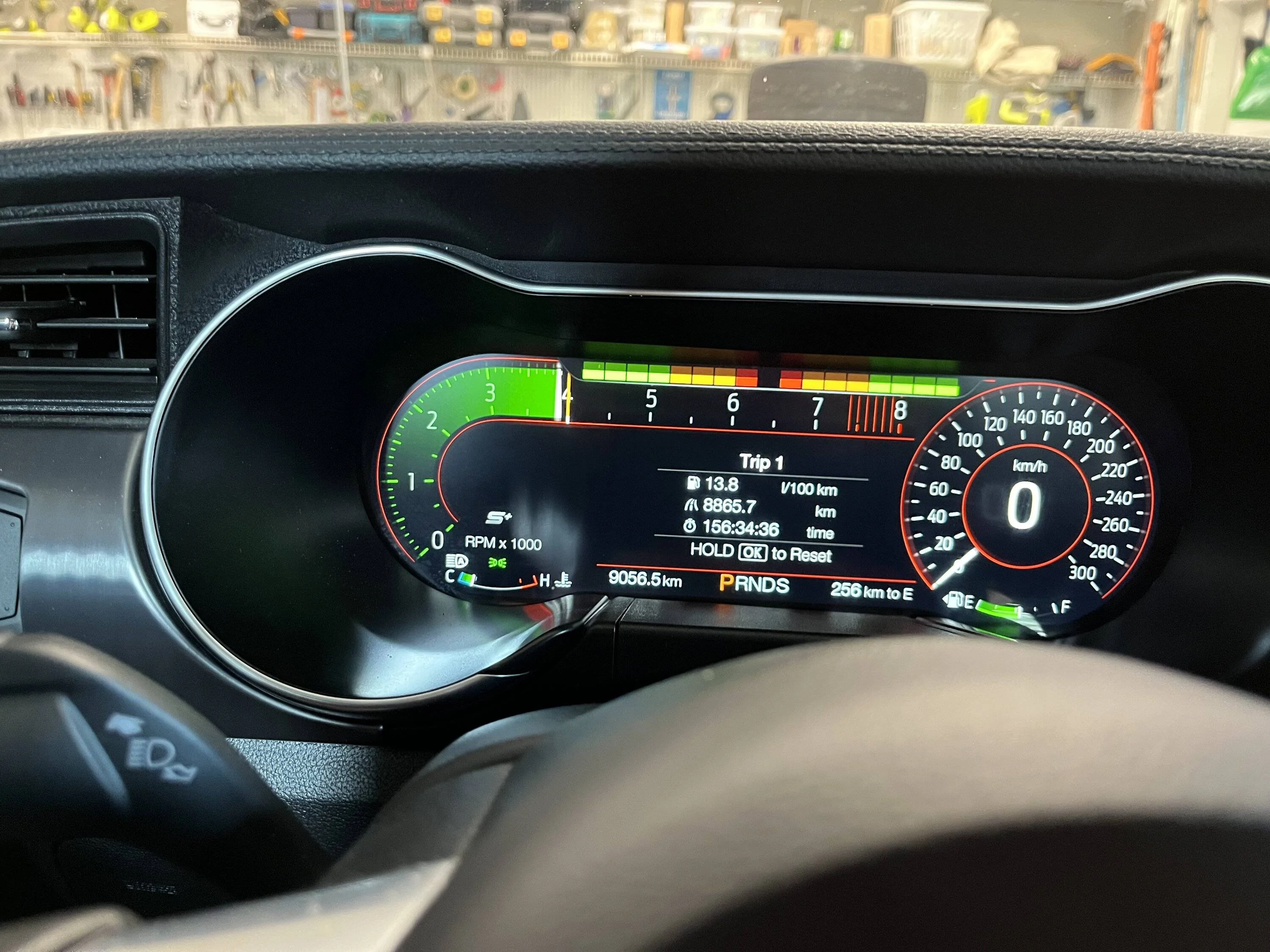
Location
Canada
First Name
Ian
Vehicle(s)
22 Ford Mustang Mach1 HP A10; 22 Shelby GT500 HP
How many modules show up whenever you connect? When I first connected with an old OBD adapter I had laying around, I could only connect to a couple of modules. When I connected to the vehicle with the adapter I mentioned earlier in the thread, I was able to see around 20 different modules.
Yes, I purchased that same module after you mentioned it yesterday. And it connects okay. I think it may be a setting I have to do under the Gear section. I found this on Google so will switch Auto to FTDI and Hs/MS Switch. maybe that will work. Getting there I hope. Appreciate all the help!
Sponsored


Rodpwnz

Well-Known Member
Joined
Oct 14, 2019
Threads
6
Messages
284
Reaction score
239
Location
SF Bay Area
First Name
Rod
Vehicle(s)
2018 A10 PP1 401A GT
Yes, I purchased that same module after you mentioned it yesterday. And it connects okay. I think it may be a setting I have to do under the Gear section. I found this on Google so will switch Auto to FTDI and Hs/MS Switch. maybe that will work. Getting there I hope. Appreciate all the help!
thanks for sharing your journey here for others to follow! This is very helpful
 
OP
OP
IanKar

IanKar

Well-Known Member
Joined
Oct 26, 2022
Threads
12
Messages
429
Reaction score
774
Location
Canada
First Name
Ian
Vehicle(s)
22 Ford Mustang Mach1 HP A10; 22 Shelby GT500 HP
Yes, I purchased that same module after you mentioned it yesterday. And it connects okay. I think it may be a setting I have to do under the Gear section. I found this on Google so will switch Auto to FTDI and Hs/MS Switch. maybe that will work. Getting there I hope. Appreciate all the help!
I also see that it says I need to select the IPC Module and press "Run". So will search for that and try it. Hope I find it in the correct section? 😬
 
OP
OP
IanKar

IanKar

Well-Known Member
Joined
Oct 26, 2022
Threads
12
Messages
429
Reaction score
774
Location
Canada
First Name
Ian
Vehicle(s)
22 Ford Mustang Mach1 HP A10; 22 Shelby GT500 HP
thanks for sharing your journey here for others to follow! This is very helpful
Most welcome. I'm getting help from others on this forum. So credit to them. Will keep you all posted.
 
OP
OP
IanKar

IanKar

Well-Known Member
Joined
Oct 26, 2022
Threads
12
Messages
429
Reaction score
774
Location
Canada
First Name
Ian
Vehicle(s)
22 Ford Mustang Mach1 HP A10; 22 Shelby GT500 HP
OK got it to work! I'm going to keep notes in case when I get vehicle serviced they reset codes etc.
1. Downloaded Forscan and also downloaded Extended License (free for 2 months). Purchased it for a year. Cheap enough. In case the factory setting gets restored.
2. Purcahsed OBDLink MX+
3. Connected OBDLink to OBD2 port and computer.
4. Switched ignition on (did not start car), opened Forscan and connected vehicle (small plug icon at bottom left of screen).
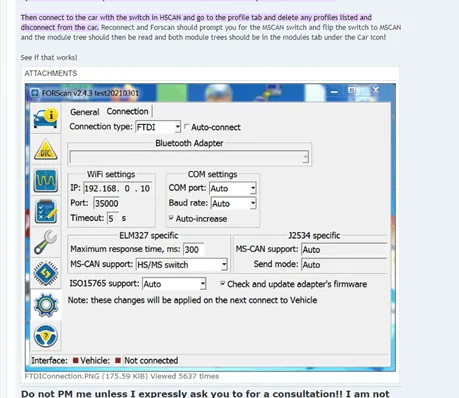
5. Went to 'Setting' on left margin - looks like a gear - selected "connection" tab. Then as per my earlier post and also below pic - shows the settings. (When opening Forscan it comes up with a window stating you have to be in 'HS/MS Switch')
6. Went to 'Configuration & Programming" icon on the left margin - looks like a micro chip.
7. In the 'Config & Prog' tab - look for IPC Module. Not any others that say IPC etc. Just 'IPC Module'.
8. Highlight 'IPC Module' and select "RUN" - Small forward looking button at the bottom left of screen.
9. The 3rd tab appears - "IPC Module Configuration". Select.
10. Scroll down the list and look for 'Performance Shift' & 'Performance Shift Indicator'. Double click and and 'enable' each one in turn.
11. Then save the settings - there are some small blue 'tick marks' to confirm. It runs and a window opens showing both and you confirm. Follow the prompts about your ignition.
12. It loads the update and then you can disconnect the OBD2.
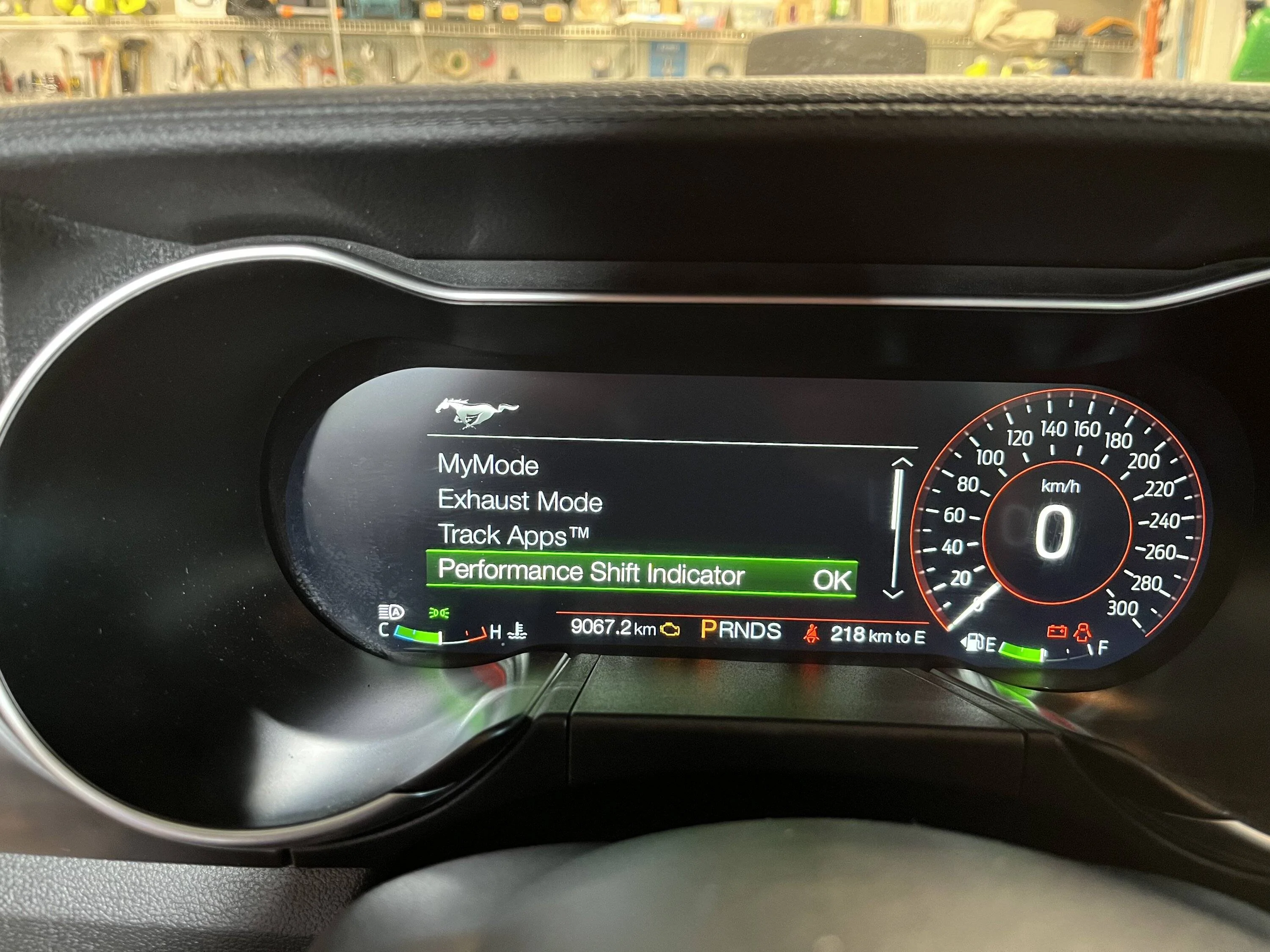
13. Go to your vehicle settings by selecting the horse by your steering wheel.
14. You'll see the 'Performance Shift Indicator' and then you can select and adjust the settings.
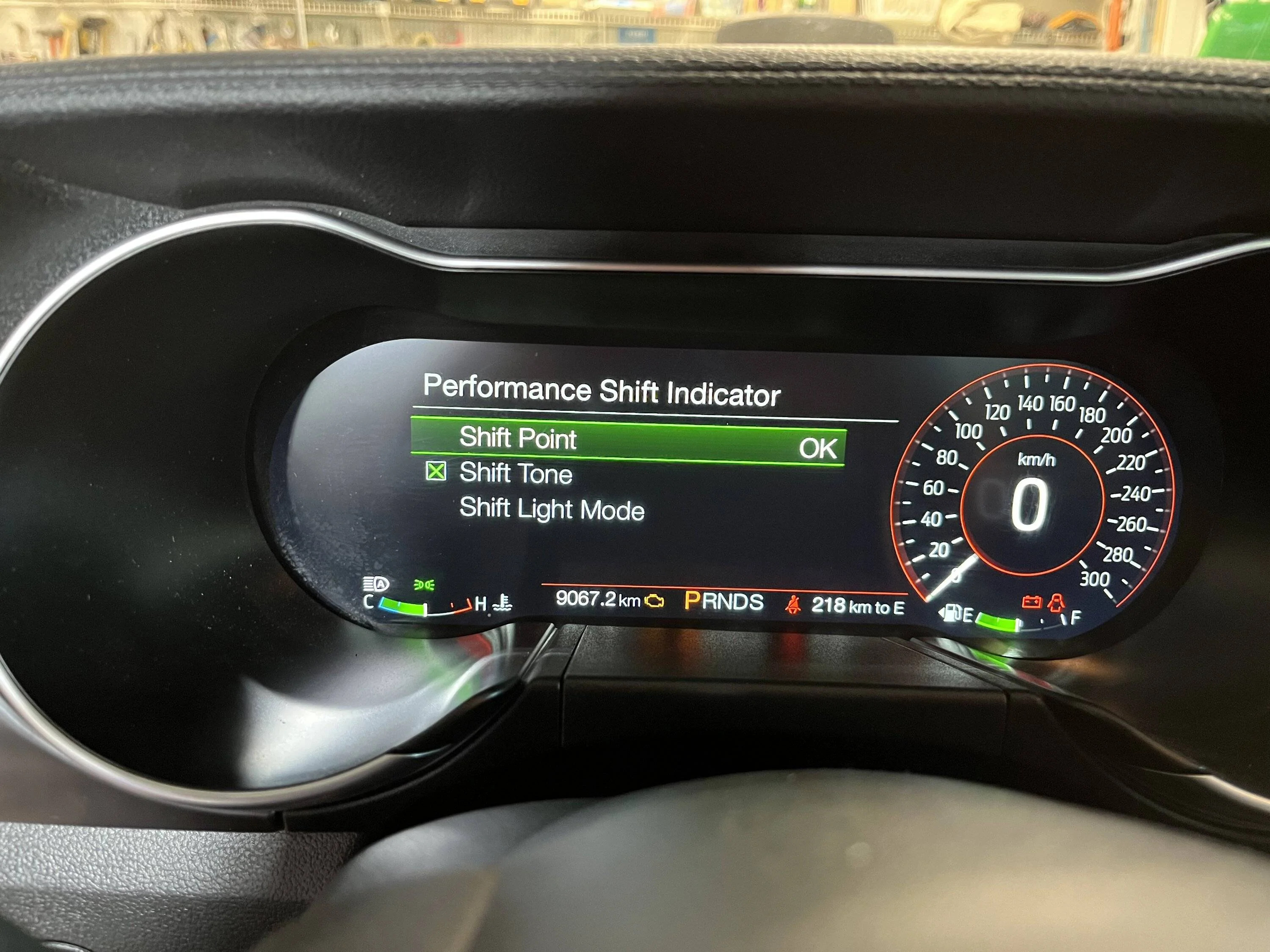
15. 'Shift Point' you can adjust the max up or down before it warns you to shift(when it goes red); 'Shift Tone' if you want it to beep when you hit your shift point; 'Shift Light' mode whether you want it to be on your 'Tachometer' or 'Track' if you want the lights to warn you like in F1 etc. See pic below. There is also 'Drag' mode and not sure how that displays yet. I set my shift point to 4000 so I could test it and then I'll probably set it higher at 6500 or more for the track.

Thanks to all who pitched in with help. So now hopefully this step by step process will help those who aren't so "savvy" like me.

Forscan2.png


IMG_5864.jpg


IMG_5865.jpg


IMG_5863.jpg
 
Last edited:

Sponsored

Coastal-Mach

Well-Known Member
Joined
Oct 21, 2021
Threads
22
Messages
2,053
Reaction score
4,101
Location
Wilmington, NC
First Name
Anthony
Vehicle(s)
2023 BMW M440i, 2026 GMC Denali, 2021 Jeep JK
OK got it to work! I'm going to keep notes in case when I get vehicle serviced they reset codes etc.
1. Downloaded Forscan and also downloaded Extended License (free for 2 months). Purchased it for a year. Cheap enough. In case the factory setting gets restored.
2. Purcahsed OBDLink MX+
3. Connected OBDLink to OBD2 port and computer.
4. Switched ignition on (did not start car), opened Forscan and connected vehicle (small plug icon at bottom left of screen).
5. Went to 'Setting' on left margin - looks like a gear - selected "connection" tab. Then as per my earlier post and also below pic - shows the settings. (When opening Forscan it comes up with a window stating you have to be in 'HS/MS Switch')
6. Went to 'Configuration & Programming" icon on the left margin - looks like a micro chip.
7. In the 'Config & Prog' tab - look for IPC Module. Not any others that say IPC etc. Just 'IPC Module'.
8. Highlight 'IPC Module' and select "RUN" - Small forward looking button at the bottom left of screen.
9. The 3rd tab appears - "IPC Module Configuration". Select.
10. Scroll down the list and look for 'Performance Shift' & 'Performance Shift Indicator'. Double click and and 'enable' each one in turn.
11. Then save the settings - there are some small blue 'tick marks' to confirm. It runs and a window opens showing both and you confirm. Follow the prompts about your ignition.
12. It loads the update and then you can disconnect the OBD2.
13. Go to your vehicle settings by selecting the horse by your steering wheel.
14. You'll see the 'Performance Shift Indicator' and then you can select and adjust the settings.
15. 'Shift Point' you can adjust the max up or down before it warns you to shift(when it goes red); 'Shift Tone' if you want it to beep when you hit your shift point; 'Shift Light' mode whether you want it to be on your 'Tachometer' or 'Track' if you want the lights to warn you like in F1 etc. See pic below. There is also 'Drag' mode and not sure how that displays yet. I set my shift point to 4000 so I could test it and then I'll probably set it higher at 6500 or more for the track.

Thanks to all who pitched in with help. So now hopefully this step by step process will help those who aren't so "savvy" like me.

Forscan2.png


IMG_5864.jpg


IMG_5865.jpg


IMG_5863.jpg
Glad it worked for you Ian! Now return that aftermarket shift light😂
 
Last edited:
OP
OP
IanKar

IanKar

Well-Known Member
Joined
Oct 26, 2022
Threads
12
Messages
429
Reaction score
774
Location
Canada
First Name
Ian
Vehicle(s)
22 Ford Mustang Mach1 HP A10; 22 Shelby GT500 HP

Cobra Jet

Well-Known Member
Joined
Feb 12, 2015
Threads
771
Messages
17,554
Reaction score
19,982
Location
NJ
Vehicle(s)
2018 EB Prem. w/PP and 94 Mustang Cobra
OK got it to work! I'm going to keep notes in case when I get vehicle serviced they reset codes etc.
1. Downloaded Forscan and also downloaded Extended License (free for 2 months). Purchased it for a year. Cheap enough. In case the factory setting gets restored.
2. Purcahsed OBDLink MX+
3. Connected OBDLink to OBD2 port and computer.
4. Switched ignition on (did not start car), opened Forscan and connected vehicle (small plug icon at bottom left of screen).
5. Went to 'Setting' on left margin - looks like a gear - selected "connection" tab. Then as per my earlier post and also below pic - shows the settings. (When opening Forscan it comes up with a window stating you have to be in 'HS/MS Switch')
6. Went to 'Configuration & Programming" icon on the left margin - looks like a micro chip.
7. In the 'Config & Prog' tab - look for IPC Module. Not any others that say IPC etc. Just 'IPC Module'.
8. Highlight 'IPC Module' and select "RUN" - Small forward looking button at the bottom left of screen.
9. The 3rd tab appears - "IPC Module Configuration". Select.
10. Scroll down the list and look for 'Performance Shift' & 'Performance Shift Indicator'. Double click and and 'enable' each one in turn.
11. Then save the settings - there are some small blue 'tick marks' to confirm. It runs and a window opens showing both and you confirm. Follow the prompts about your ignition.
12. It loads the update and then you can disconnect the OBD2.
13. Go to your vehicle settings by selecting the horse by your steering wheel.
14. You'll see the 'Performance Shift Indicator' and then you can select and adjust the settings.
15. 'Shift Point' you can adjust the max up or down before it warns you to shift(when it goes red); 'Shift Tone' if you want it to beep when you hit your shift point; 'Shift Light' mode whether you want it to be on your 'Tachometer' or 'Track' if you want the lights to warn you like in F1 etc. See pic below. There is also 'Drag' mode and not sure how that displays yet. I set my shift point to 4000 so I could test it and then I'll probably set it higher at 6500 or more for the track.

Thanks to all who pitched in with help. So now hopefully this step by step process will help those who aren't so "savvy" like me.

Forscan2.png


IMG_5864.jpg


IMG_5865.jpg


IMG_5863.jpg
Good info - thanks for sharing the step by step and images too!

I see you have the digital cluster, I think many of the 10R80 users who want to see the trans gear changes in the display are those with the Analog cluster. We see the displayed gears when the vehicle is in Trans Mode S(port) when manually paddle shifting, but if the vehicle is auto shifting in Trans Mode D or S, the gear display isn’t there…

I’m not sure if the Forscan trick will work on an Analog cluster 10R80, someone with that cluster would have to attempt the same (or similar) steps you have outlined.
 
OP
OP
IanKar

IanKar

Well-Known Member
Joined
Oct 26, 2022
Threads
12
Messages
429
Reaction score
774
Location
Canada
First Name
Ian
Vehicle(s)
22 Ford Mustang Mach1 HP A10; 22 Shelby GT500 HP

Sponsored

Weeee

Well-Known Member
Joined
Apr 15, 2021
Threads
24
Messages
265
Reaction score
201
Location
Utah
First Name
Tom
Vehicle(s)
Mach 1, Mach E GT
Thank you for the detailed write up. I don't suppose you spotted launch control settings in the menus?
 
OP
OP
IanKar

IanKar

Well-Known Member
Joined
Oct 26, 2022
Threads
12
Messages
429
Reaction score
774
Location
Canada
First Name
Ian
Vehicle(s)
22 Ford Mustang Mach1 HP A10; 22 Shelby GT500 HP
Thank you for the detailed write up. I don't suppose you spotted launch control settings in the menus?
Sorry there are hundreds of codes so didn't notice. I am sure there is. I'll be in again over this weekend and will look for it.
 
Last edited:
OP
OP
IanKar

IanKar

Well-Known Member
Joined
Oct 26, 2022
Threads
12
Messages
429
Reaction score
774
Location
Canada
First Name
Ian
Vehicle(s)
22 Ford Mustang Mach1 HP A10; 22 Shelby GT500 HP
Thank you for the detailed write up. I don't suppose you spotted launch control settings in the menus?
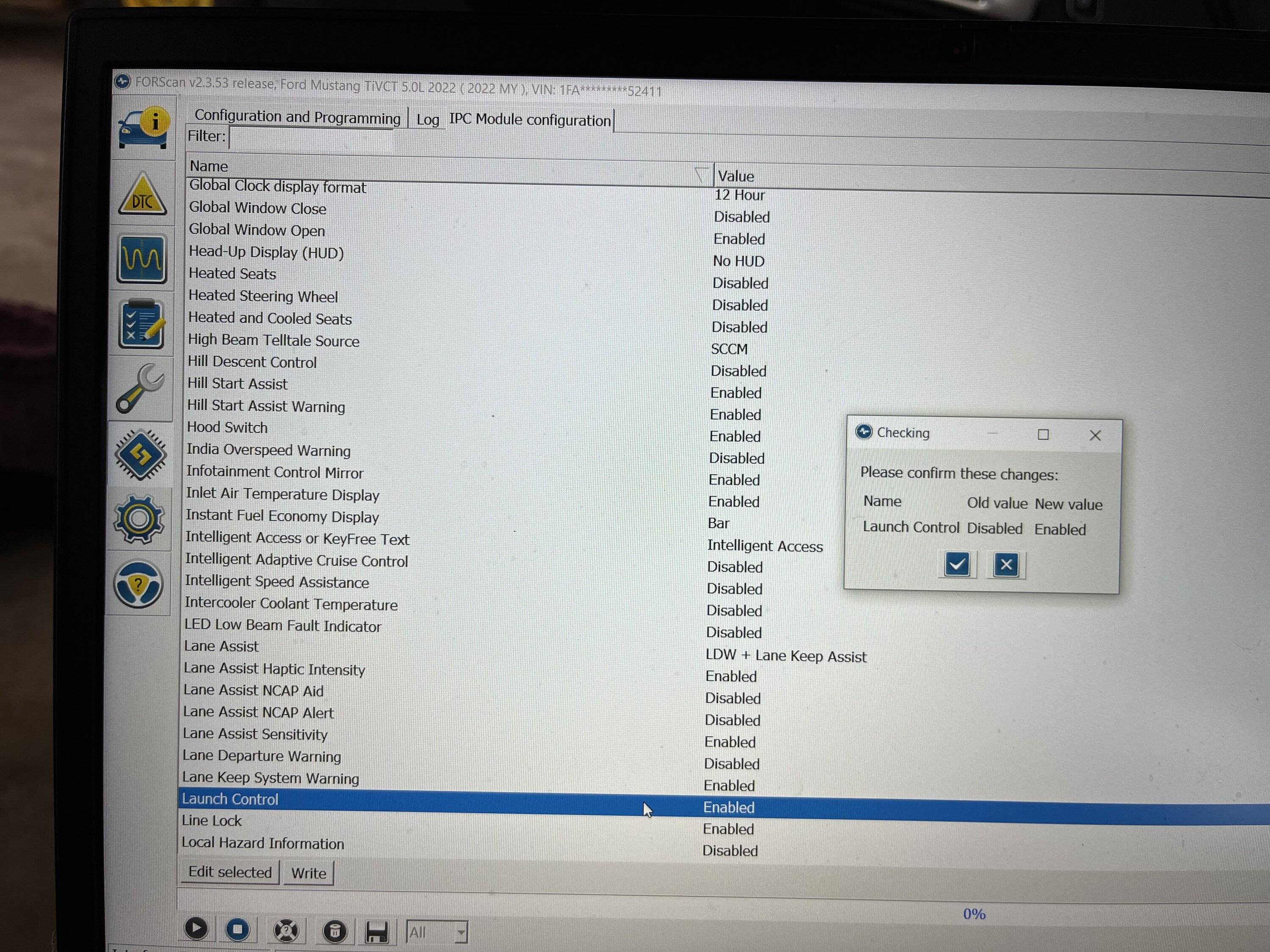
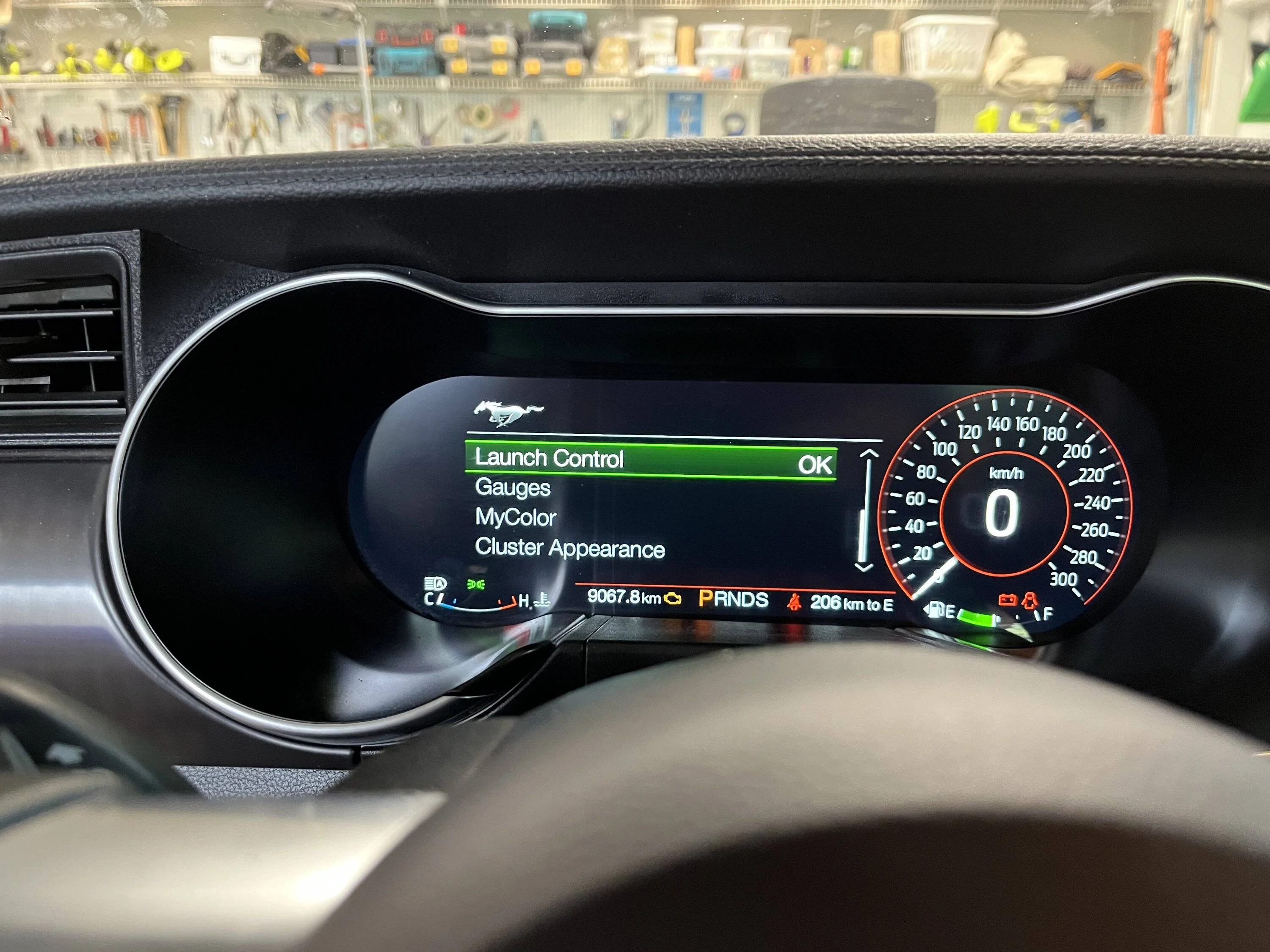
Hey Tom. Yes it does. I enabled mine.

IMG_5881.jpg


IMG_5884.webp
 
OP
OP
IanKar

IanKar

Well-Known Member
Joined
Oct 26, 2022
Threads
12
Messages
429
Reaction score
774
Location
Canada
First Name
Ian
Vehicle(s)
22 Ford Mustang Mach1 HP A10; 22 Shelby GT500 HP
Can auto’s even use launch control?
No idea. Maybe I'll try one day and see. Tom asked so I cehcked it out. :) :)
Sponsored


Top