Sponsored

New Navigation map update June 29th

Bikeman315

Well-Known Member
Joined
Apr 12, 2015
Threads
581
Messages
16,183
Reaction score
21,909
Location
Myrtle Beach, SC
First Name
Ira
Vehicle(s)
2019 Mustang GT/CS, 2021 Volvo XC60
I updated mine from 1-18 to 1-19 on my 2020 MKZ-Hybrid... so I know it works... but I also have the stock 3.4 19274 , so maybe it's having issues with the earlier versions?
For those that didn't know, the upgrade took about 1 hour to finish....for just the maps.
Yes, it seems to be the ones with 3.3.
Sponsored


Fasteddiec

Well-Known Member
Joined
Jun 6, 2019
Threads
4
Messages
162
Reaction score
77
Location
South Florida
First Name
Ed
Vehicle(s)
2019 Mustang GT Premium convertible
I updated mine from 1-18 to 1-19 on my 2020 MKZ-Hybrid... so I know it works... but I also have the stock 3.4 19274 , so maybe it's having issues with the earlier versions?
For those that didn't know, the upgrade took about 1 hour to finish....for just the maps.
I’m glad to hear a success story!
 

wade001

Well-Known Member
Joined
Mar 1, 2020
Threads
12
Messages
366
Reaction score
231
Location
Central Florida
First Name
Wade
Vehicle(s)
2019 GT Prem. 10r80, PP1, 401A, Active Exhaust
Someone on here received a file from Ford that erased maps from their system. Upon reloading they said everything was good. Do not remember if they had 3.0 or 3.3.
it was me.. have 3.3..

FWIW, my voice commands still work for nav as well..

maybe support can fix you up with a similar file they gave me that literally erased nav from the sync unit, then reinstalled it during the update..

:fingerscrossed::fingerscrossed:
 

dgc333

Well-Known Member
Joined
Dec 6, 2014
Threads
13
Messages
1,637
Reaction score
461
Location
MA
First Name
Dave
Vehicle(s)
15 Mustang Ecoboost Premium
FYI, I updated from 3.0 to 3.4.20021 with NA 1.19 maps from Cyan Labs several months ago. Everything went smoothly and works as it should but there is an issue with the NA 1.19 maps.

In my area at least there are a lot of mistakes with the displayed speed limits with the NA 1.19 maps. There is one streach of road on my commute that i go past 4 speed limit changes and the map screen never updates. The NA 1.15 that came on the car and the NA 1.18 maps i updated to displayed speed limits perfectly. If i could go back to NA 1.18 i would.

There are two new developments in my area that went in over 2 years ago. Neither are recognized by the NA 1.18 maps but one is recognized by NA 1.19 and will route you to it but it doesn't show on the map screen.

My recommendation would be to think twice about updating to the NA 1.19 maps.
 

Sponsored

ktp1598

Well-Known Member
Joined
Dec 23, 2014
Threads
23
Messages
571
Reaction score
136
Location
Mount Washington, Ky
First Name
Bobby
Vehicle(s)
2019 Kona Blue California Special
Unfortunately my second thought was AFTER I updated. What # do I call to get the program to erase what I have and start over Wade001?
 

Fasteddiec

Well-Known Member
Joined
Jun 6, 2019
Threads
4
Messages
162
Reaction score
77
Location
South Florida
First Name
Ed
Vehicle(s)
2019 Mustang GT Premium convertible
I have an appointment on Monday morning at the dealer. I’ll update after that hopefully successful service visit.
 

wade001

Well-Known Member
Joined
Mar 1, 2020
Threads
12
Messages
366
Reaction score
231
Location
Central Florida
First Name
Wade
Vehicle(s)
2019 GT Prem. 10r80, PP1, 401A, Active Exhaust
Unfortunately my second thought was AFTER I updated. What # do I call to get the program to erase what I have and start over Wade001?
support is who gave me that, ford support.

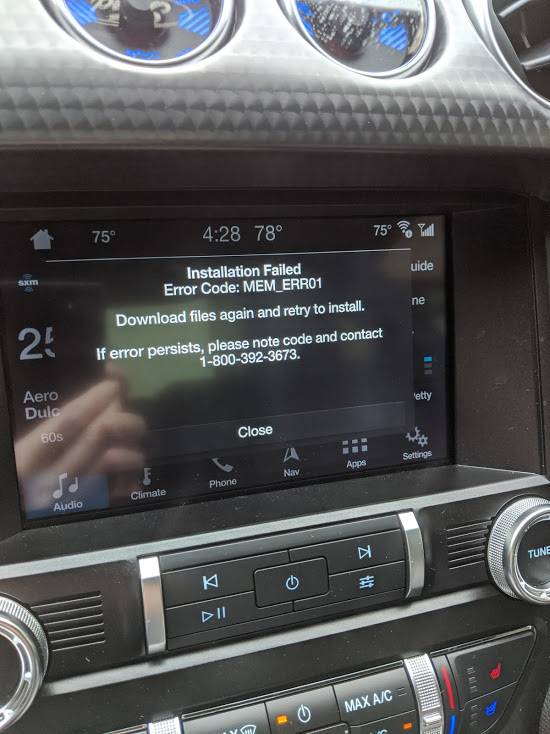
i called this number and gave them the error code i was getting, described the process i went through..

gJkO9SDHikdGw9gUEJYNjpqwlAWuZfXil1Do1bReVPzc2EJ89Hx6ury-ZV_h84wLugOUzMqA=w551-h734-no?authuser=0.jpg


upon calling, and talking with support, they gave me a case #, then i received email correspondence from a support tech that walked me through everything else making sure my navigation got updated and worked properly
 

Cobrakit

Well-Known Member
Joined
May 17, 2019
Threads
28
Messages
416
Reaction score
215
Location
Southern Maryland
First Name
Ken
Vehicle(s)
2019 Mustang GT PREMIUM PP1
So what's the answer, i have sync 3.3, 18201 with 1.17 map and Ford sent me a new map version 1.19. Do i install or not??? If so, what issues can i expect?

Also, received 1.19 map for my wifes Edge, sge has Sync 2.2. Anybody know, Ford said map same just set up for Edge.
 

Bikeman315

Well-Known Member
Joined
Apr 12, 2015
Threads
581
Messages
16,183
Reaction score
21,909
Location
Myrtle Beach, SC
First Name
Ira
Vehicle(s)
2019 Mustang GT/CS, 2021 Volvo XC60
So what's the answer, i have sync 3.3, 18201 with 1.17 map and Ford sent me a new map version 1.19. Do i install or not??? If so, what issues can i expect?

Also, received 1.19 map for my wifes Edge, sge has Sync 2.2. Anybody know, Ford said map same just set up for Edge.
Well, the consensus is that unless you absolutely have to have the latest, take a pass. I am. Not worth the hassle.

Now on your wife’s car why haven’t updated to v3.0? You don’t have to but it wouldn’t be a bad idea. Either way the doesn’t seem to be issues updating the older versions. Just follow the directions to a “t”.
 

Sponsored

DickR

Well-Known Member
Joined
Dec 10, 2014
Threads
3
Messages
1,400
Reaction score
512
Location
Raleigh
Vehicle(s)
2018 Ruby Red GTPP MagneRide 301A 10A and 1997 GT
I have a 2018 GT.

Downloaded the latest map file and license and copied per instructions to a USB 3.0. Absolutely nothing happened so I spent the $40 plus shipping for the USB.

Yesterday I got the email below which said the license they provided is wrong with instructions to download the new correct license or wait for a corrected usb to arrive.I just nstalled the downloaded version today with the correct license and it seemed to install fine. Version number is now 1-19.

FYI they will not refund the price of the usb version I ordered even though it hasn't shipped yet. I guess I should have called the support number before buying it.

Email from the Nav vendor

Dear Valued Customer,

Thank you for placing your recent SYNC® 3 Navigation Map Update order! We know you are excited to install the new 2020 Navigation Map Update and begin enjoying all the new features. Unfortunately, your order was identified as receiving the old license file as part of the new update. As a result we are providing a simple solution for you to receive the new license file:

1) If you placed an order on the website to Download the latest 2020 Navigation Map Update, please do the following:

  1. Close any old browser pages (Internet Explorer, Google, etc.) you may have open from the previous Download/Order Complete page
  2. Return to your Order Complete page (the link is available in the Order Confirmation email you received after you placed the order to download the 2020 Navigation Map Update)
  3. Once you are on your Order Complete page, you have two options:
  • OPTION 1 - Perform the original download again using the instructions in the #1 Orange box)
  1. Download the Map and License files from the #2 and #3 Orange boxes
  2. Follow the original instructions you used for your previous order
  • OPTION 2 – Download the new License file only and update your current USB
  1. Click on the #3 Orange Download License file box to download the 2020 Navigation Map Update file
  2. Insert your USB into the computer
  3. Find the SyncMyRide directory and double-click on the folder
  4. Find the old license file, which will be named either JR3T-14G424-CD or 4U5T-14G424-CB and delete it from the SyncMyRide folder
  5. Add the new downloaded license file, which will be named either JR3T-14G424-CE or 4U5T-14G424-CC, to the SyncMyRide folder

2) If you placed an order on the website for a Pre-loaded USB with the latest 2020 Navigation Map Update installed, you will receive a new USB in the mail soon. Once you receive the new USB, follow the instructions provided for installation.

We sincerely apologize for the inconvenience and thank you for being a loyal Ford or Lincoln customer.
Best Regards,
The Customer Service Team
 

Bikeman315

Well-Known Member
Joined
Apr 12, 2015
Threads
581
Messages
16,183
Reaction score
21,909
Location
Myrtle Beach, SC
First Name
Ira
Vehicle(s)
2019 Mustang GT/CS, 2021 Volvo XC60
I have a 2018 GT.

Downloaded the latest map file and license and copied per instructions to a USB 3.0. Absolutely nothing happened so I spent the $40 plus shipping for the USB.

Yesterday I got the email below which said the license they provided is wrong with instructions to download the new correct license or wait for a corrected usb to arrive.I just nstalled the downloaded version today with the correct license and it seemed to install fine. Version number is now 1-19.

FYI they will not refund the price of the usb version I ordered even though it hasn't shipped yet. I guess I should have called the support number before buying it.

Email from the Nav vendor

Dear Valued Customer,

Thank you for placing your recent SYNC® 3 Navigation Map Update order! We know you are excited to install the new 2020 Navigation Map Update and begin enjoying all the new features. Unfortunately, your order was identified as receiving the old license file as part of the new update. As a result we are providing a simple solution for you to receive the new license file:

1) If you placed an order on the website to Download the latest 2020 Navigation Map Update, please do the following:

  1. Close any old browser pages (Internet Explorer, Google, etc.) you may have open from the previous Download/Order Complete page
  2. Return to your Order Complete page (the link is available in the Order Confirmation email you received after you placed the order to download the 2020 Navigation Map Update)
  3. Once you are on your Order Complete page, you have two options:
  • OPTION 1 - Perform the original download again using the instructions in the #1 Orange box)
  1. Download the Map and License files from the #2 and #3 Orange boxes
  2. Follow the original instructions you used for your previous order
  • OPTION 2 – Download the new License file only and update your current USB
  1. Click on the #3 Orange Download License file box to download the 2020 Navigation Map Update file
  2. Insert your USB into the computer
  3. Find the SyncMyRide directory and double-click on the folder
  4. Find the old license file, which will be named either JR3T-14G424-CD or 4U5T-14G424-CB and delete it from the SyncMyRide folder
  5. Add the new downloaded license file, which will be named either JR3T-14G424-CE or 4U5T-14G424-CC, to the SyncMyRide folder
2) If you placed an order on the website for a Pre-loaded USB with the latest 2020 Navigation Map Update installed, you will receive a new USB in the mail soon. Once you receive the new USB, follow the instructions provided for installation.

We sincerely apologize for the inconvenience and thank you for being a loyal Ford or Lincoln customer.
Best Regards,
The Customer Service Team
Contact your credit card company and put in a dispute. That’s what I did with the 1.18 update. Ford cancelled the charge and let me keep the USB stick.
 

Cobrakit

Well-Known Member
Joined
May 17, 2019
Threads
28
Messages
416
Reaction score
215
Location
Southern Maryland
First Name
Ken
Vehicle(s)
2019 Mustang GT PREMIUM PP1
Well, the consensus is that unless you absolutely have to have the latest, take a pass. I am. Not worth the hassle.

Now on your wife’s car why haven’t updated to v3.0? You don’t have to but it wouldn’t be a bad idea. Either way the doesn’t seem to be issues updating the older versions. Just follow the directions to a “t”.
So other than the downloading problems and possible loss of voice commands, what other problems are there?

This thread is so long its hard to keep track. Also, never got notified that a Sync 3 update was available for Edge. Dealer evidently didn't put us in system.
 

Bikeman315

Well-Known Member
Joined
Apr 12, 2015
Threads
581
Messages
16,183
Reaction score
21,909
Location
Myrtle Beach, SC
First Name
Ira
Vehicle(s)
2019 Mustang GT/CS, 2021 Volvo XC60
So other than the downloading problems and possible loss of voice commands, what other problems are there?
I think that's more than enough for a simple map update. Seriously there could be other issues. We just do not know yet. It's back burner time until Ford and their vendor figure all this out.

Regarding your wife's car have you registered on FordOwner.com?
 

Cobrakit

Well-Known Member
Joined
May 17, 2019
Threads
28
Messages
416
Reaction score
215
Location
Southern Maryland
First Name
Ken
Vehicle(s)
2019 Mustang GT PREMIUM PP1
I think that's more than enough for a simple map update. Seriously there could be other issues. We just do not know yet. It's back burner time until Ford and their vendor figure all this out.

Regarding your wife's car have you registered on FordOwner.com?
Thanks! Just registered today and see the Sync 3 update. I thought they might have done concurrent when they sent out Sync 3 map update, but they didn't.
Sponsored


Top