Sponsored

New Navigation map update June 29th

m3incorp

Well-Known Member
Joined
Feb 6, 2020
Threads
22
Messages
4,602
Reaction score
3,125
Location
Georgia/Colorado
First Name
James
Vehicle(s)
2019 Mustang GT Premium with Roush Phase 2, 2023 Audi A5

Bikeman315

Well-Known Member
Joined
Apr 12, 2015
Threads
581
Messages
16,183
Reaction score
21,909
Location
Myrtle Beach, SC
First Name
Ira
Vehicle(s)
2019 Mustang GT/CS, 2021 Volvo XC60
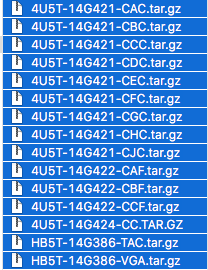
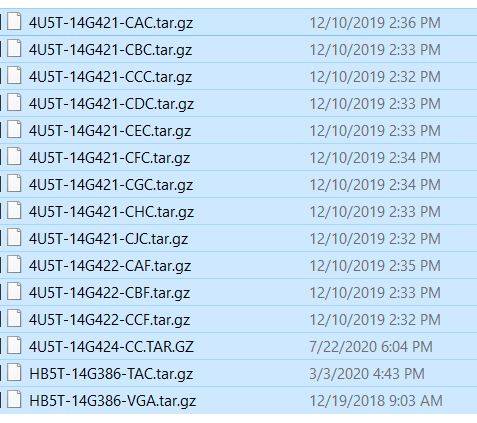
Thank you James. So all my files are correct including the latest license file. So I guess I'll try again.

Two questions please,

Did the header continue to say updating files or did it go back to the time?
When did you get the 1st "completed" screen?
 

el-guapin

Well-Known Member
Joined
Oct 30, 2018
Threads
33
Messages
913
Reaction score
381
Location
LSU - Geaux Tigers!
Website
www.tesla.com
Vehicle(s)
1949 UFO
Thank you James. So all my files are correct including the latest license file. So I guess I'll try again.

Two questions please,

Did the header continue to say updating files or did it go back to the time?
When did you get the 1st "completed" screen?
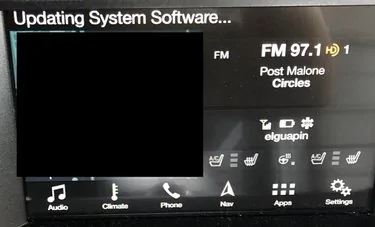
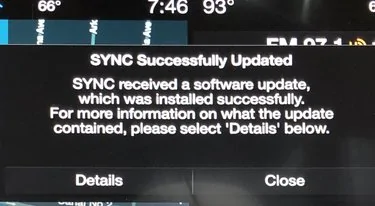
This should be on display throughout the process...
472034-fc1059ed9702bb07902f8b8bdcd740b7.webp


Gonna get a few of these...
472037-d06791465027d4a50114d213ec3553d3.webp


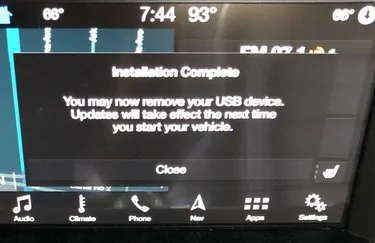
DO NOT REMOVE USB... Until this one
472038-e08cd2c33920689a8827f11c94d74836.webp
 

wade001

Well-Known Member
Joined
Mar 1, 2020
Threads
12
Messages
366
Reaction score
231
Location
Central Florida
First Name
Wade
Vehicle(s)
2019 GT Prem. 10r80, PP1, 401A, Active Exhaust
i got my first completed screen about 30 min in.. maybe a bit less. sat and waited for a few seconds and it went away on its own, then the infotainment system rebooted and install continued.

throughout my attempts at updating, i had the header do both, disappear, and stay there.

if i was messing with the infotainment system when it updated, it would disappear. however if i did not mess with the infotainment system then it would stay at the top.

EDIT: your times though, i would assume could vary depending on the speed of your USB stick..
 

Sponsored

Bikeman315

Well-Known Member
Joined
Apr 12, 2015
Threads
581
Messages
16,183
Reaction score
21,909
Location
Myrtle Beach, SC
First Name
Ira
Vehicle(s)
2019 Mustang GT/CS, 2021 Volvo XC60
Thanks guys. el, that's what I thought. My header changed back to the time immediately and I never got that 1st completed screen. Maybe attempt #2 will give better results.
 

m3incorp

Well-Known Member
Joined
Feb 6, 2020
Threads
22
Messages
4,602
Reaction score
3,125
Location
Georgia/Colorado
First Name
James
Vehicle(s)
2019 Mustang GT Premium with Roush Phase 2, 2023 Audi A5
It will show updating System the entire time.

1st completed screen was about 20-30 min in.

If you see my above post, there is supposedly a bad voice file on our sticks. That is the file that Ford plans to send me.

Thank you James. So all my files are correct including the latest license file. So I guess I'll try again.

Two questions please,

Did the header continue to say updating files or did it go back to the time?
When did you get the 1st "completed" screen?
 

Bikeman315

Well-Known Member
Joined
Apr 12, 2015
Threads
581
Messages
16,183
Reaction score
21,909
Location
Myrtle Beach, SC
First Name
Ira
Vehicle(s)
2019 Mustang GT/CS, 2021 Volvo XC60
It will show updating System the entire time.

1st completed screen was about 20-30 min in.
Thanks again James. I did not have either of these things happen. Oh well, maybe the second time will be the charm. At least I'm getting to drive my car. :)
 

Arcadia

Well-Known Member
Joined
Jun 5, 2019
Threads
3
Messages
61
Reaction score
43
Location
Tampa
First Name
Brian
Vehicle(s)
2019 GT Premium PP1 Velocity Blue
This should be on display throughout the process...
472034-fc1059ed9702bb07902f8b8bdcd740b7.webp


Gonna get a few of these...
472037-d06791465027d4a50114d213ec3553d3.webp


DO NOT REMOVE USB... Until this one
472038-e08cd2c33920689a8827f11c94d74836.webp
agreed - there will be times that you think you should pull the usb but don’t until it stops completely. For sure don’t remove if you still see the little usb light blinking. Took about and hour for everything to complete
 

Fasteddiec

Well-Known Member
Joined
Jun 6, 2019
Threads
4
Messages
162
Reaction score
77
Location
South Florida
First Name
Ed
Vehicle(s)
2019 Mustang GT Premium convertible
So......looks like Sync 3.4 has been released to the wild. I tried to do the WIFI update, but nothing happened. I have downloaded the files to a USB. Now I am waiting to build up the courage to try it....is it possible this update will be smooth compared to the 1.19 map update debacle?? :)
 

Sponsored

steve2150

Well-Known Member
Joined
Jan 20, 2018
Threads
44
Messages
182
Reaction score
20
Location
Punta Gorda, Florida
First Name
Stephen
Vehicle(s)
2019 Mustang Bullitt 2020 Mustang Ecoboost Premium
I had same problem on my 19, spoke with Ford Sync customer service, all excuses. I bought the USB from them. First time I tried it did nothing for 70 minutes, light did not blink. Tried next day it showed updating then removed usb when it said so on screen, still 1.18. I tried reinstalling the usb but the system did not recognize it, Ford says you only get 1 chance with it, I said maybe the usb was defective and could they send me a replacement, answer NO, they were totally useless.
 

Elp_jc

Well-Known Member
Joined
May 2, 2020
Threads
48
Messages
3,527
Reaction score
805
Location
USA
Vehicle(s)
None
Several folks already updated Sync to 3.4, and still shows 1.18 maps. Whoever at Ford said it'd update with 3.4. was full of crap. Not a surprise at all. At any rate, now El Guapin is saying that we'd have to reload 1.19 maps all over again... which I might refuse to do. But even if I wanted to do it, I already erased all files, since it updated successfully. Can they be downloaded again from Ford? I don't think so, but rather ask the experts :). Thx.
Sponsored


Top