
Sponsored
Mach 1 - Fog light install
- Thread starter Geofferstang
- Start date
- Watchers 24
Boyd
Well-Known Member
- Joined
- Sep 17, 2023
- Threads
- 24
- Messages
- 404
- Reaction score
- 1,044
- Location
- Southeast Tennessee
- First Name
- Boyd
- Vehicle(s)
- 17 F5 Cobra, 20 GT500, 23 F150, 21 Rocket 3
Thanks to @Geofferstang 's work, I have acquired the Ford wiring pigtails for the BCM and will be adding this to my fog light mod soon. I still have the Ford headlight switch with the foglight function, so its just wiring.
I love it when great minds work together.
I love it when great minds work together.
OP
OP

Geofferstang
Active Member
- Joined
- Sep 20, 2022
- Threads
- 1
- Messages
- 25
- Reaction score
- 80
- Location
- Surrey, United Kingdom
- First Name
- Geoff
- Vehicle(s)
- Mustang Mach1 FJG
- Thread starter
- #18
Let me know if you have any issues and I'll try what I can for remote troubleshooting. If all goes well, would be great to see your install too...Thanks to @Geofferstang 's work, I have acquired the Ford wiring pigtails for the BCM and will be adding this to my fog light mod soon. I still have the Ford headlight switch with the foglight function, so its just wiring.
I love it when great minds work together.
Boyd
Well-Known Member
- Joined
- Sep 17, 2023
- Threads
- 24
- Messages
- 404
- Reaction score
- 1,044
- Location
- Southeast Tennessee
- First Name
- Boyd
- Vehicle(s)
- 17 F5 Cobra, 20 GT500, 23 F150, 21 Rocket 3
Thanks Geoff. When I'm done, I think you and I will have the only 21-23 Mach 1's in the world with factory-like fog lights.Let me know if you have any issues and I'll try what I can for remote troubleshooting. If all goes well, would be great to see your install too...

Snakebyte
Well-Known Member
- Joined
- Jun 26, 2020
- Threads
- 6
- Messages
- 1,088
- Reaction score
- 1,257
- Location
- West Central Florida
- First Name
- Nathan
- Vehicle(s)
- 2019 Mustang GT Convertible
This is a totally awesome conversion that many have wanted to bring Ford's feeble attempt into reality. Good for you Geoff!
I like your choice of LED's, given the options available on the market. I miss the full-diameter reflectorized bulbs (incandescent/halogen) appearance. That said, I like your light choice over the other LED options on the market..and your attention to detail to get the horizontal LED orientation perfected.
I would probably closely follow your install, and then apply a translucent smoke film to hide the individual LED modules when the lights are off. (The fog lights are mainly for improved appearance for me, and not for significant illumination).
Anyway, kudos to you Geoff. I'm impressed.
I like your choice of LED's, given the options available on the market. I miss the full-diameter reflectorized bulbs (incandescent/halogen) appearance. That said, I like your light choice over the other LED options on the market..and your attention to detail to get the horizontal LED orientation perfected.
I would probably closely follow your install, and then apply a translucent smoke film to hide the individual LED modules when the lights are off. (The fog lights are mainly for improved appearance for me, and not for significant illumination).
Anyway, kudos to you Geoff. I'm impressed.
Sponsored
TrackMeisterWannabe
Well-Known Member
Truly an exceptional contribution on your part Geoff. I see the lights you are using are 42W. I am interested in more of a driving light as opposed to a fog light installation. Is there any chance that the circuit could handle 100W lights without doing damage or shutting down?
OP
OP
Geofferstang
Active Member
- Joined
- Sep 20, 2022
- Threads
- 1
- Messages
- 25
- Reaction score
- 80
- Location
- Surrey, United Kingdom
- First Name
- Geoff
- Vehicle(s)
- Mustang Mach1 FJG
- Thread starter
- #22
Thanks TrackMeisterWannabe,Truly an exceptional contribution on your part Geoff. I see the lights you are using are 42W. I am interested in more of a driving light as opposed to a fog light installation. Is there any chance that the circuit could handle 100W lights without doing damage or shutting down?
I am not sure on the maximum amperage on the BCM output despite spending several hours searching so I really cannot comment with any degree of certainty on whether it'll work for you. In the service manual the wires at the BCM on plug 2280G are quoted as 20 guage for each front fog so assuming multicore then about 2-3 amps each output?
During my investigations I did note that Diode Dynamics sold an upgrade / sequential light for the 18+ GT and they quoted 1.5 amp for the foglight portion which is about 19W per light. When I measured the actual current draw on my "42" watt lights I was getting 0.56 amps per light per colour so well within the 1.5 amp the DD ones are advertised at so I was happy to directly wire (no way was I getting 42 watts from those lights at that draw so maybe 42 watt incandescent equivalent at best).
I guess it depends on how close to actually drawing 100W your lights are. If they are truely 100W each then that's around 8 amps for a light and I would not wire that in directly to the BCM so would look to utilise a relay. If they are 50 W each then you are looking at about 4 amps which MAY be ok for the wiring but you are at the top end at 20 AWG I think but it depends on the BCM internals. Personally I think that for anything over 1.5 amp actual draw I would use a relay.
TrackMeisterWannabe
Well-Known Member
Your efforts are commendable and greatly appreciated. I was thinking the same thing as far as using the BCM circuit as a relay controller.Thanks TrackMeisterWannabe,
I am not sure on the maximum amperage on the BCM output despite spending several hours searching so I really cannot comment with any degree of certainty on whether it'll work for you. In the service manual the wires at the BCM on plug 2280G are quoted as 20 guage for each front fog so assuming multicore then about 2-3 amps each output?
During my investigations I did note that Diode Dynamics sold an upgrade / sequential light for the 18+ GT and they quoted 1.5 amp for the foglight portion which is about 19W per light. When I measured the actual current draw on my "42" watt lights I was getting 0.56 amps per light per colour so well within the 1.5 amp the DD ones are advertised at so I was happy to directly wire (no way was I getting 42 watts from those lights at that draw so maybe 42 watt incandescent equivalent at best).
I guess it depends on how close to actually drawing 100W your lights are. If they are truely 100W each then that's around 8 amps for a light and I would not wire that in directly to the BCM so would look to utilise a relay. If they are 50 W each then you are looking at about 4 amps which MAY be ok for the wiring but you are at the top end at 20 AWG I think but it depends on the BCM internals. Personally I think that for anything over 1.5 amp actual draw I would use a relay.
Thanks again for your assistance with this.
Boyd
Well-Known Member
- Joined
- Sep 17, 2023
- Threads
- 24
- Messages
- 404
- Reaction score
- 1,044
- Location
- Southeast Tennessee
- First Name
- Boyd
- Vehicle(s)
- 17 F5 Cobra, 20 GT500, 23 F150, 21 Rocket 3
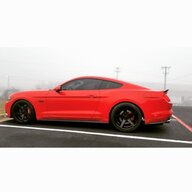
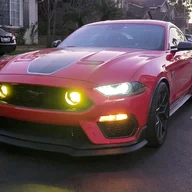
Finally got around to applying Geofferstangs additional mods to my fog light install. Namely the additional BCM wiring that's available from Ford and some of the ForScan mods. Took a while, but everything works and looks great.
He used a GT headlight switch that has both front and rear fog switches on it. In the UK, rear fog is standard. I used a standard US headlight switch that only has a front fog switch.
Being able to turn on the Fog Light icon for the dash in ForScan / IPC was a real pleasure. Love having it work and look as factory fogs in a Mach 1. Thanks for finding that, Geofferstang.
I changed a few more things in ForScan, had to in order to get things working, then changed a few to operate the way I want them to. Among them were allowing fog lights with DRL's, fogs with turn signals and keeping the fogs on with hi beams (Bambi Mode).
While the front end is off, also upgraded my front turn signals to Switchback LED's... white in park light mode, amber flashing on & off in turn signal mode. Outer front park lights to simple white LED's. Turned off outage notifications in ForScan.
Thanks, @Geofferstang. Outstanding work you've done and supplied for the rest of us.
He used a GT headlight switch that has both front and rear fog switches on it. In the UK, rear fog is standard. I used a standard US headlight switch that only has a front fog switch.
Being able to turn on the Fog Light icon for the dash in ForScan / IPC was a real pleasure. Love having it work and look as factory fogs in a Mach 1. Thanks for finding that, Geofferstang.
I changed a few more things in ForScan, had to in order to get things working, then changed a few to operate the way I want them to. Among them were allowing fog lights with DRL's, fogs with turn signals and keeping the fogs on with hi beams (Bambi Mode).
While the front end is off, also upgraded my front turn signals to Switchback LED's... white in park light mode, amber flashing on & off in turn signal mode. Outer front park lights to simple white LED's. Turned off outage notifications in ForScan.
Thanks, @Geofferstang. Outstanding work you've done and supplied for the rest of us.
djcodeman
Well-Known Member
- Joined
- Oct 10, 2021
- Threads
- 62
- Messages
- 655
- Reaction score
- 326
- Location
- Austin, Tx
- Vehicle(s)
- 2015 GT roush SC
Pretty cool!
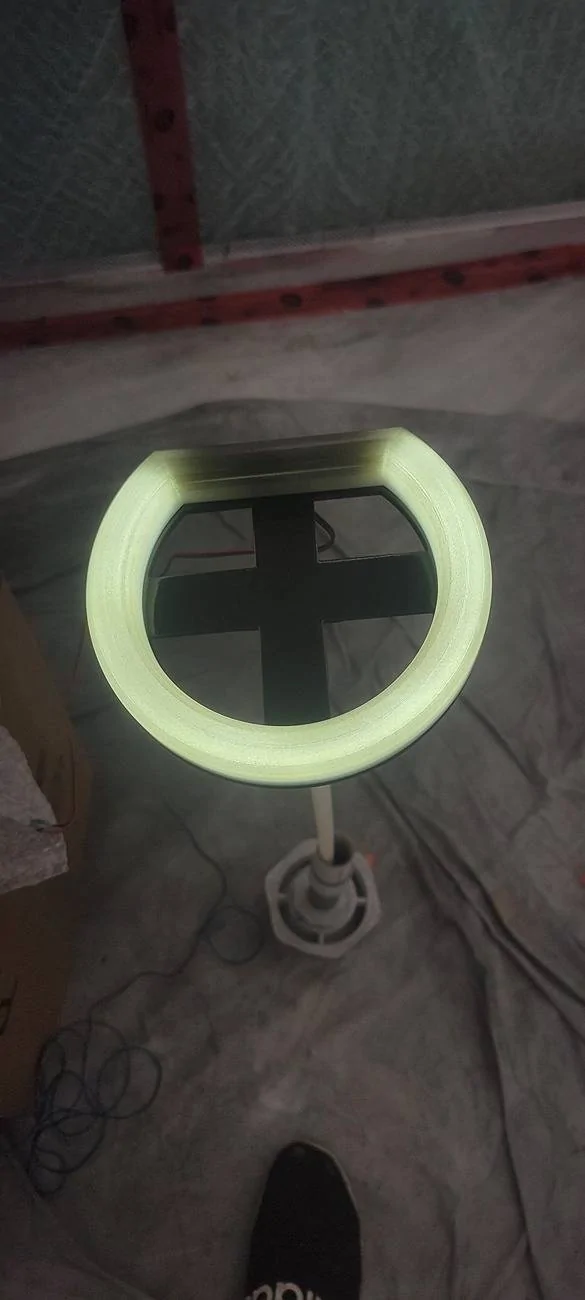
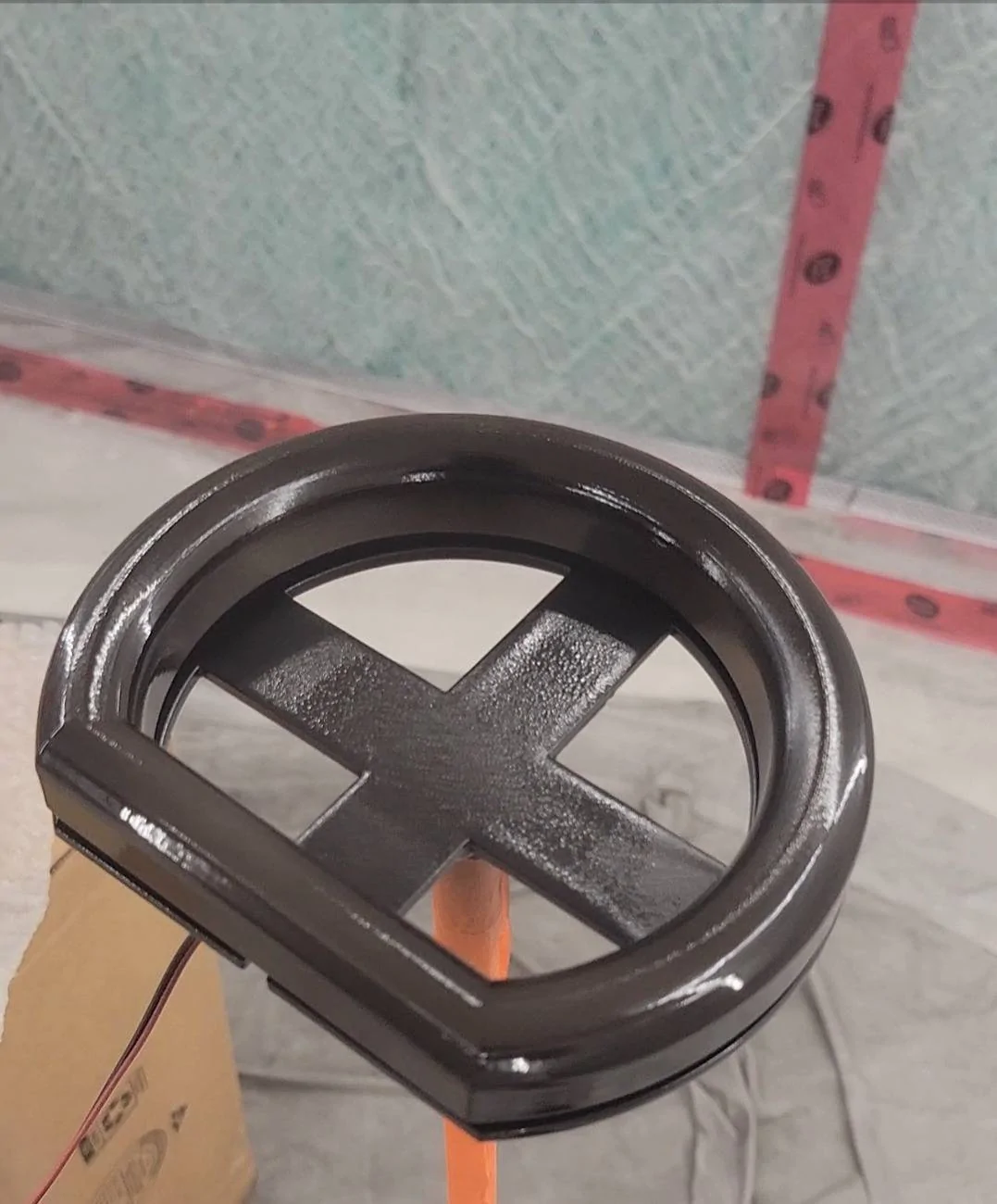
I'm doing some 3d printing and making my own smoked out style fogs that will work on any car, and lights will be able to change color as well!


I'm doing some 3d printing and making my own smoked out style fogs that will work on any car, and lights will be able to change color as well!
Sponsored
sakman84
Well-Known Member
There it is ladies and gentleman, the definitive guide on how to get fog lamps.
THANK YOU OP may the car gods shine upon thee for eternity!
THANK YOU OP may the car gods shine upon thee for eternity!
4 Barrel
Well-Known Member
- Joined
- Feb 18, 2025
- Threads
- 17
- Messages
- 55
- Reaction score
- 97
- Location
- Ontario Canada
- First Name
- Daniel
- Vehicle(s)
- 2013 Mustang Boss 302
Looks great! Warning alert here; I’m a retired police officer, my mechanical skills are limited to easy tuneups for my vintage muscle cars. Are these fog lights considered OEM? And, if my Ford dealership were to install these fog lights, any thoughts on parts and labour costs? I’m Canadian, hence I’ll just plug the total to USD conversion. Thank you in advanceFollowing on from my post in “What did you do to your Mach 1 today” I thought that I would do a standalone post for my fog light installation. It’s not a comprehensive walkthrough but I wanted to bring together what I have learnt recently around installing fogs to the Mach 1. This is based on a 2022 UK spec / RHD so other markets may vary. As ever, make sure you follow local regs / understand what you are doing / be careful - I am not responsible for what you do.
Key parameters for me were: -
To make it OEM, I wanted to utilise the factory (GT) light switch with fog light option, and I wanted to have an indicator (ideally the stock dash indicator).
- Make it look OEM if possible.
- Get some round fog lights in the grille aperture.
- Make it reversable as much as possible so I could revert to stock if needed.
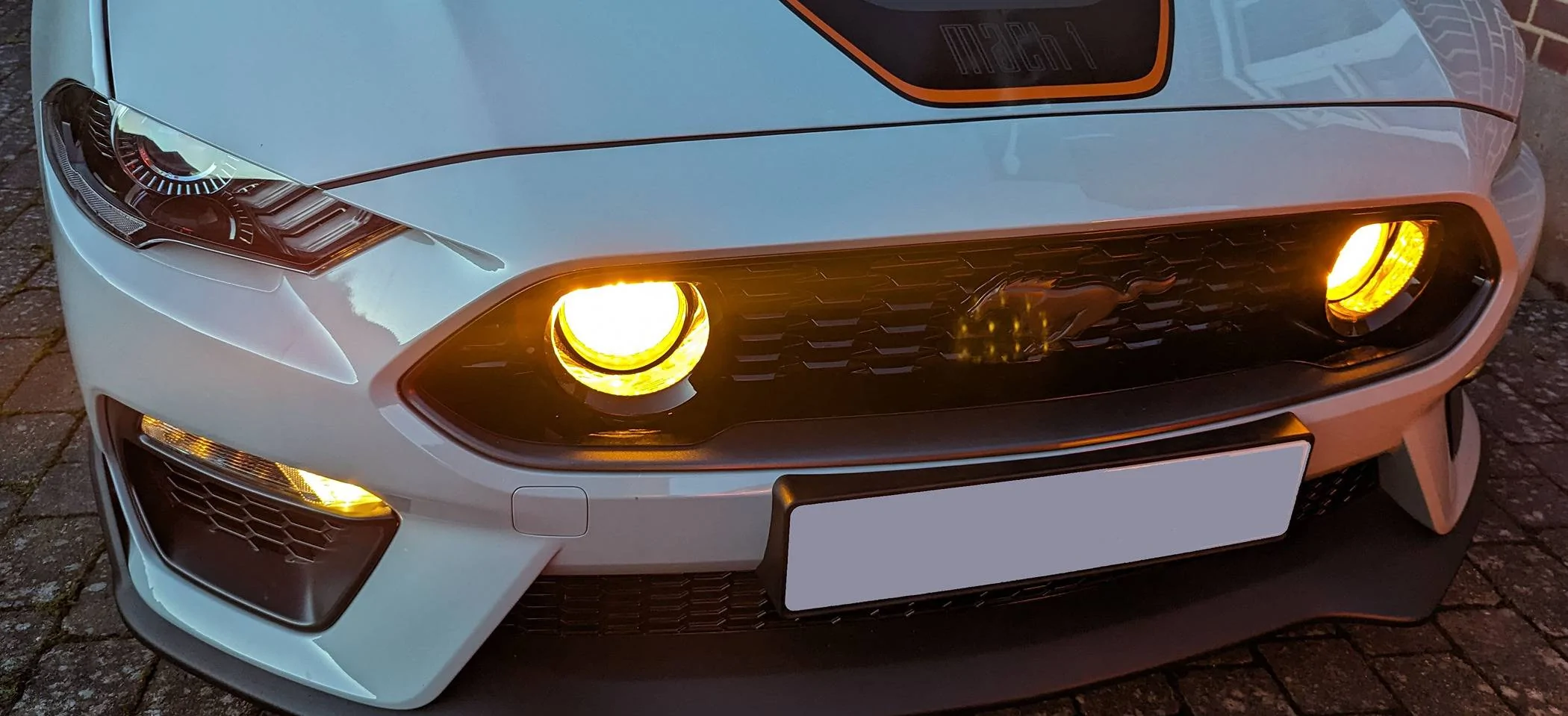
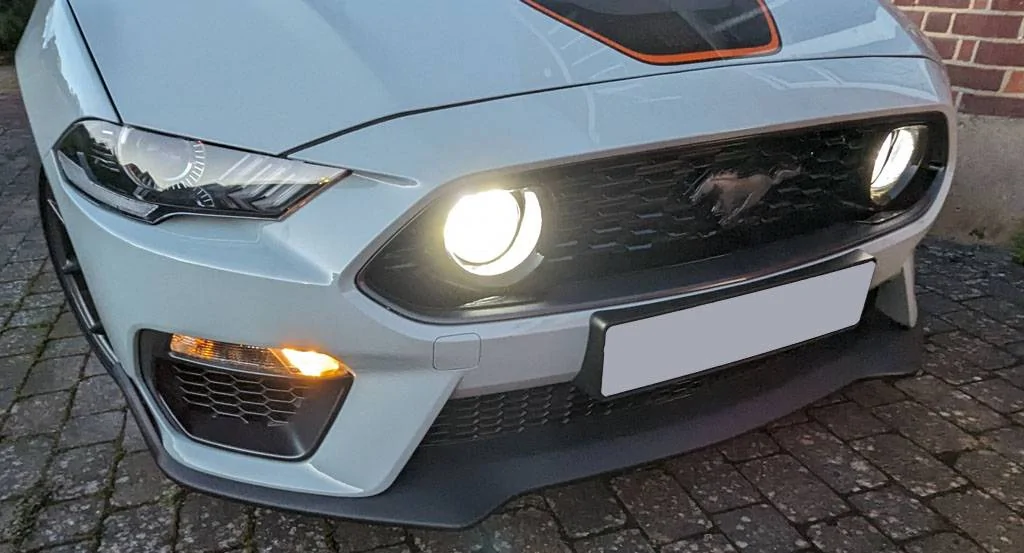
Firstly, a couple of pictures of the finished item.


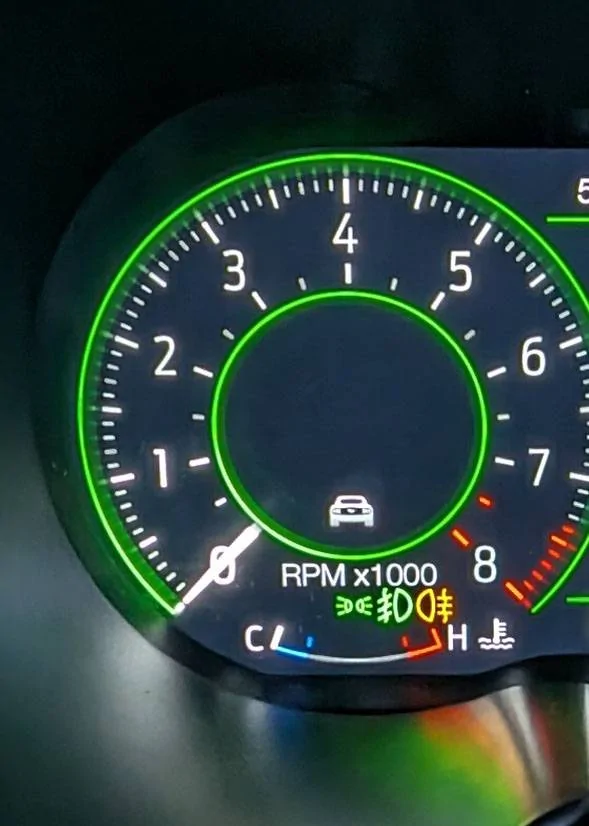
And dashboard showing indicators for lights, front fog and rear fog.

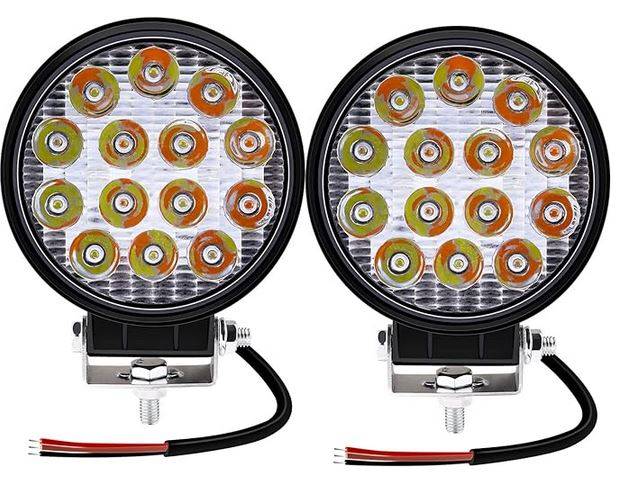
The fogs I used are these: -

Linked: -
Amazon Link to fogs
(Mods, no affiliation on this but remove if I have overstepped).
They can show White or Amber and as these are fogs, I have them mounted upside down so that the area with three straight LEDs lines up with the flat spot on the top of the grille aperture. These are not high power (consume about 0.56 amp per lamp per colour) so happy to wire to the BCM with a DPDT switch to either output white or amber.
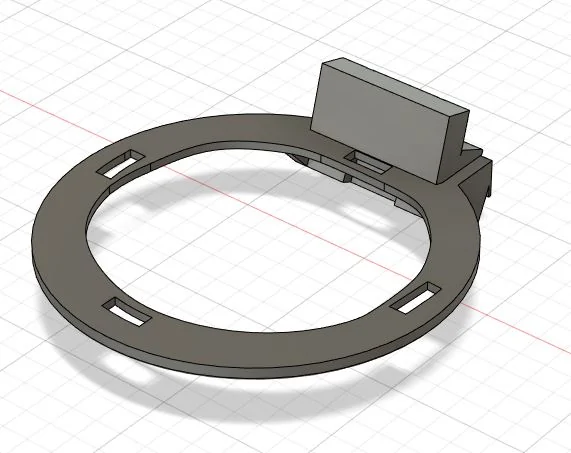
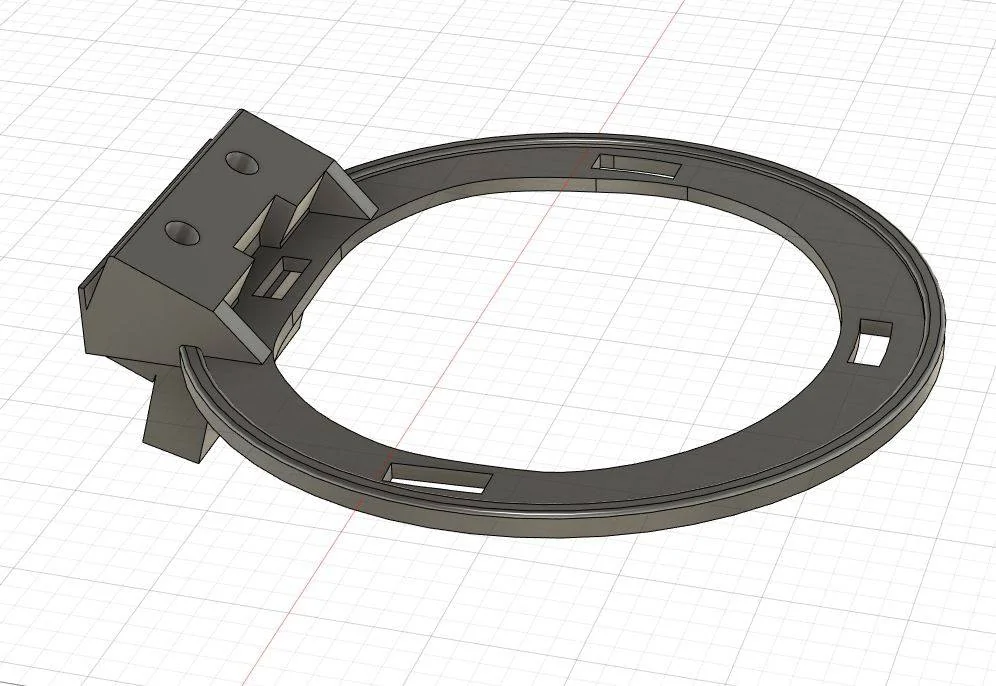
These are mounted in rings that I designed and printed in ABS.


These can be freely downloaded here: -
Thingiverse link
Positive cables from the fog lights are lead back too the footwell (where the BCM is) and the grounds are shared at an appropriate ground point in the engine bay.
Parts needed
- Fog lights (of course!) and appropriate wiring extensions / connectors etc.
- 2018+ GT headlight switch with front + rear fog light switches (DG9T-13D061-FE3JA6)
- 2 x BCM pigtail cables (BU5T-14474-UA). This cable can be found in Ford Kit Part number = DU2Z-14474-DA (this is what I ordered from my Ford parts dealer at £5.95 each). I believe that this is also in Motorcraft = WT-1003 / Ford Terminal PN = 7U5T-14474-UA. It is a 1.5mm2 silver connector. NOTE you will need 2 connectors and on ebay they are often shown as a pack of 5, however CHECK with the vendor as it’s often the case that these are individual cables.
- Forscan on a laptop
- Appropriate OBD11 cable
How it works.
NOTE BEFORE DOING ANY ELECTRICAL WORK, DISCONNECT THE BATTERY....
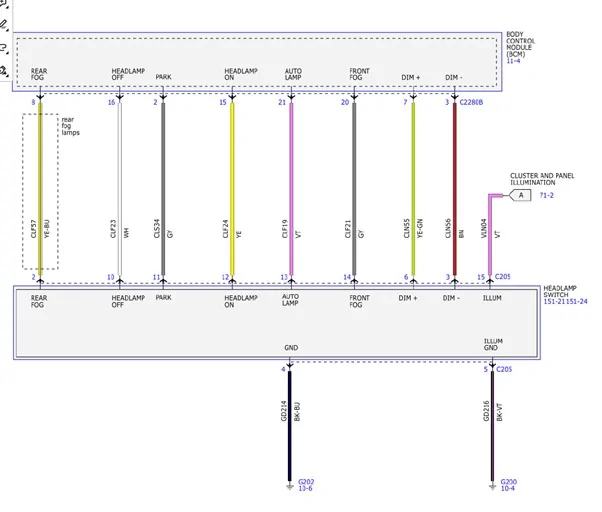
In the S550 Mustang, the fog light switch provides a momentary 3.3V or 3.5V signal to the BCM to toggle the fog lights. It’s not latching at the switch so looking to use the front fog wire from the switch via a TTL level relay starts to get complicated.
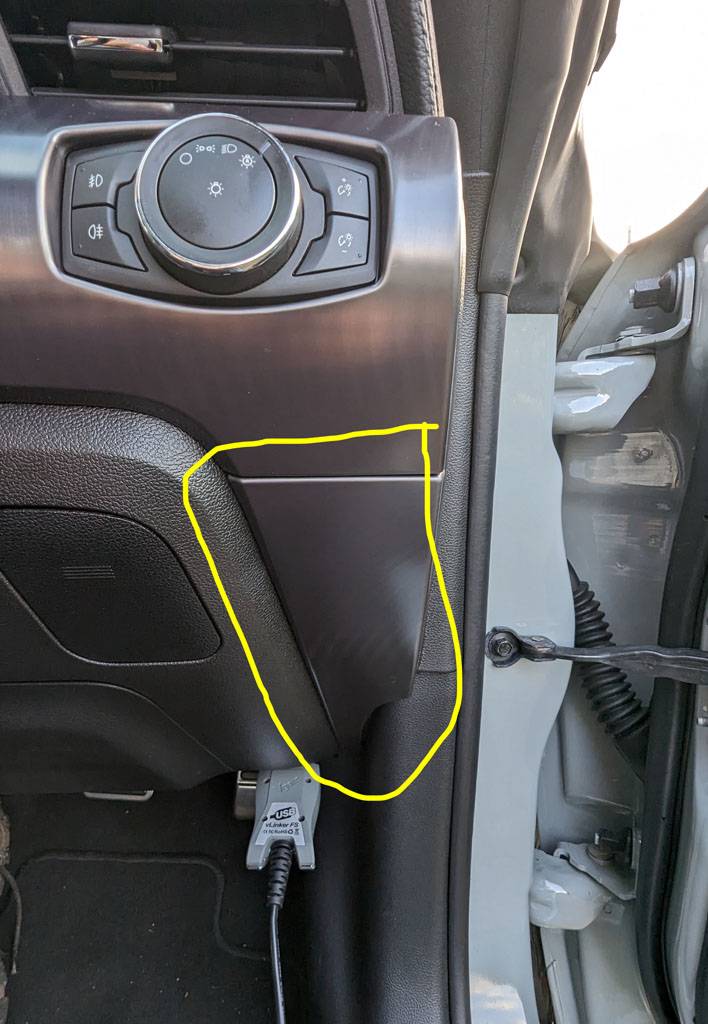
This signal is sent through the Grey wire from pin 14 on the light switch to pin 20 on plug C2280B on the BCM. As the Grey wire is present in the Mach 1 it’s just a simple case of removing the lower trim panel: -


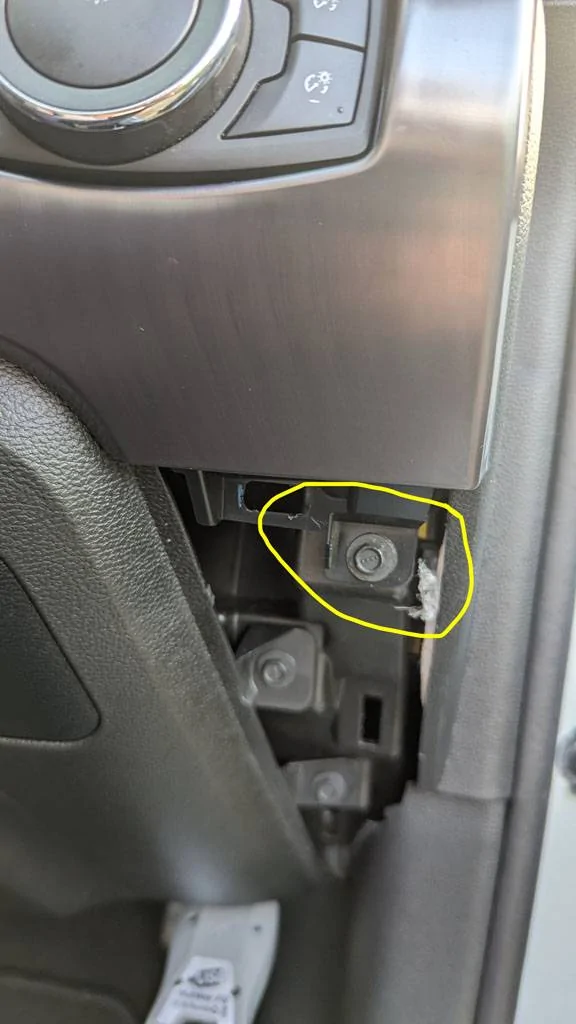
Then the bolt / upper trim panel with the light switch in and then swapping the light switches (my new one in place above). Your new light switch can now send a front fog signal to the BCM!

However, the cables from the BCM to the front fogs that exist in the GT are missing from the Mach 1 so we need to add these in (the pins in the socket on the BCM are present so its cabling that that needs sorting).
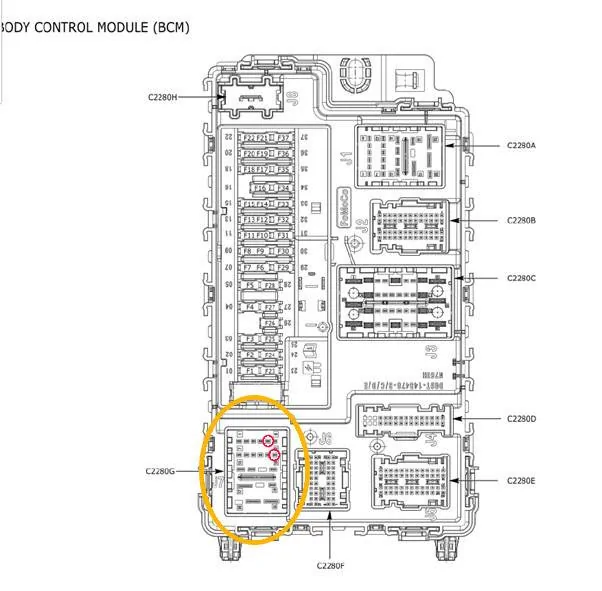
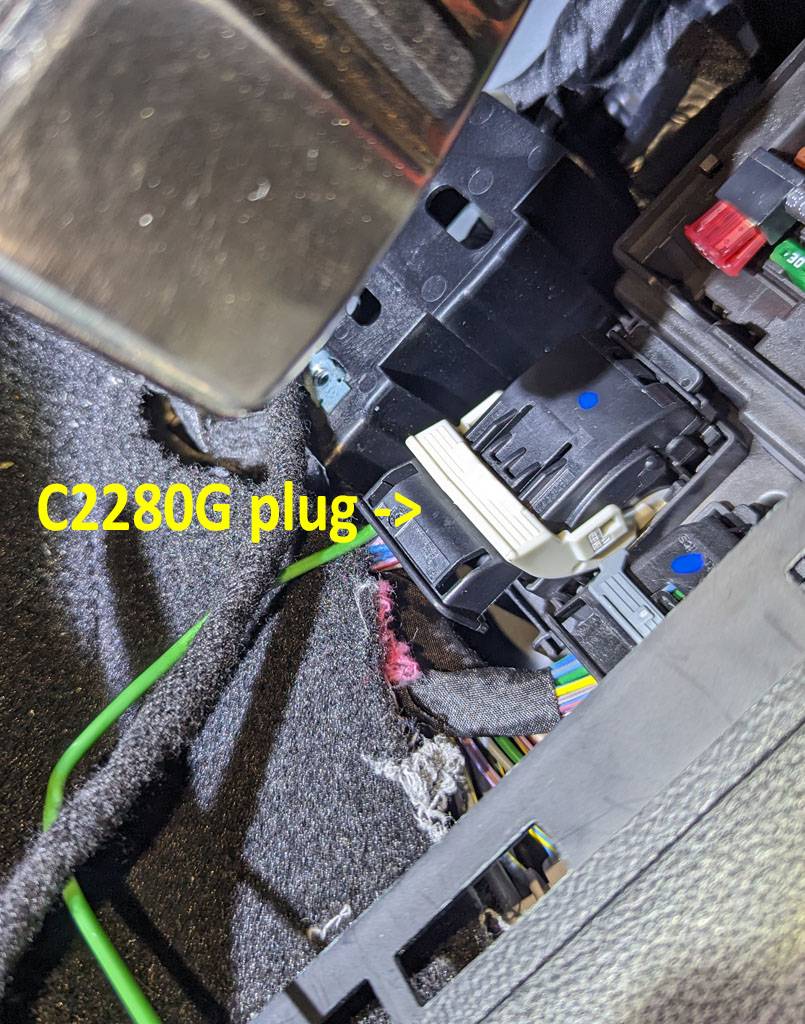
The front fog BCM 12V output is presented at socket J7 on the bottom of the BCM that plug C2280G plugs into.

Luckily this is the plug at the very bottom of the BCM, nearest to the firewall – so the easiest to access (which is great if you have a RHD mustang as it gets crowded down there with the pedals!). Probably easier on a LHD model...


IMPORTANT NOTE – Disconnect the battery before playing around with the BCM. As well as Fog lights the plug also carries CANBUS signals!
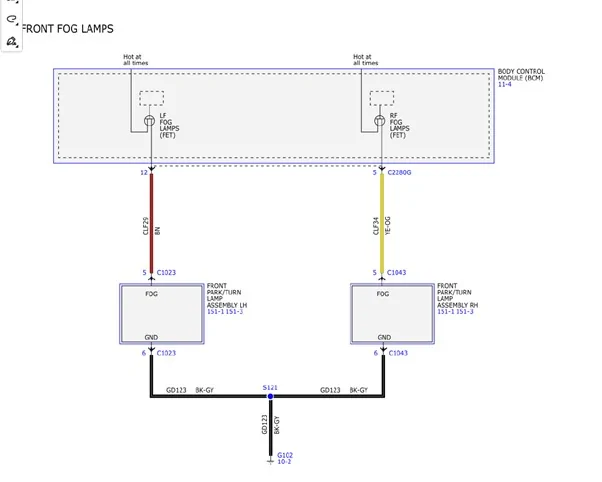
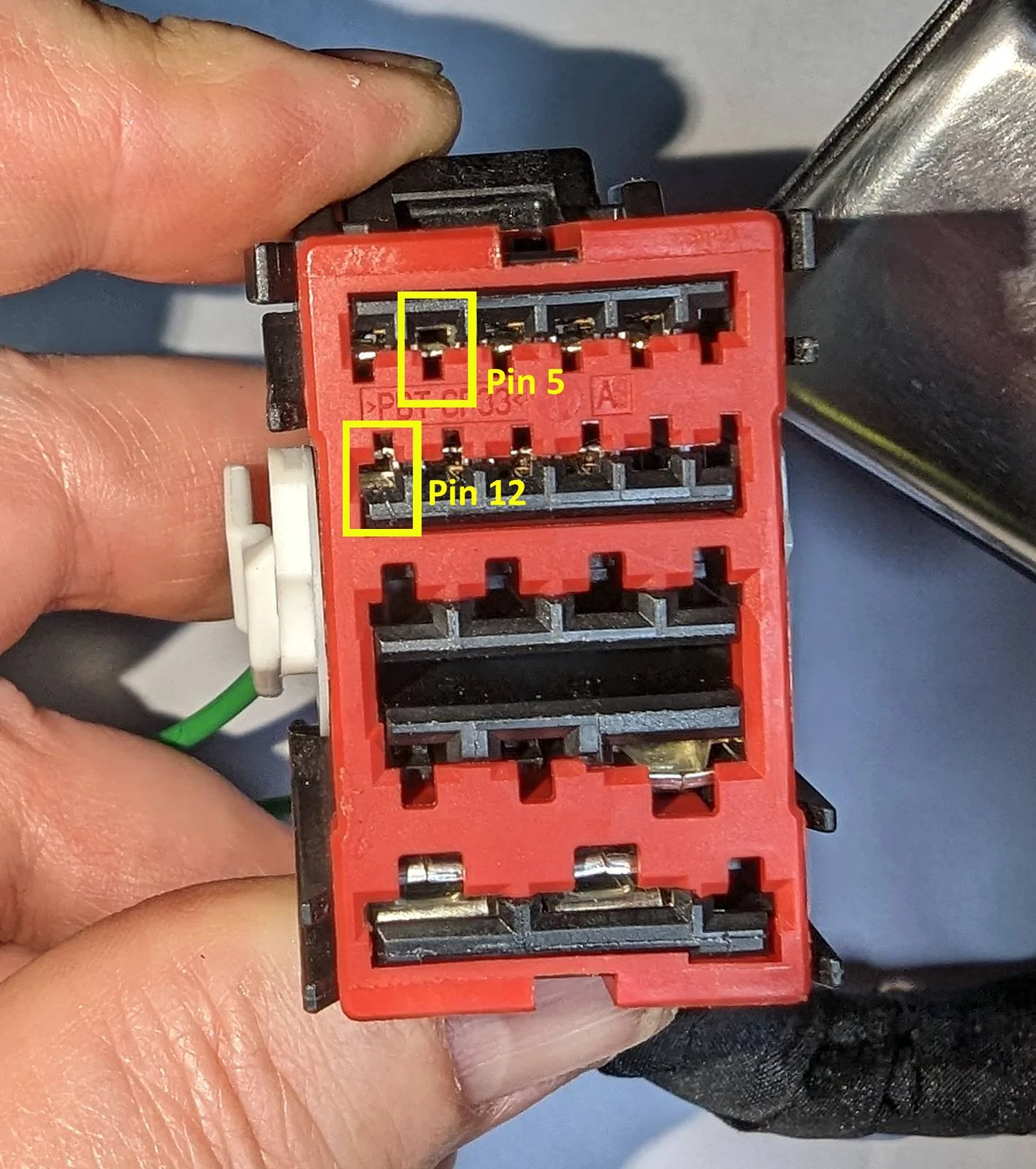
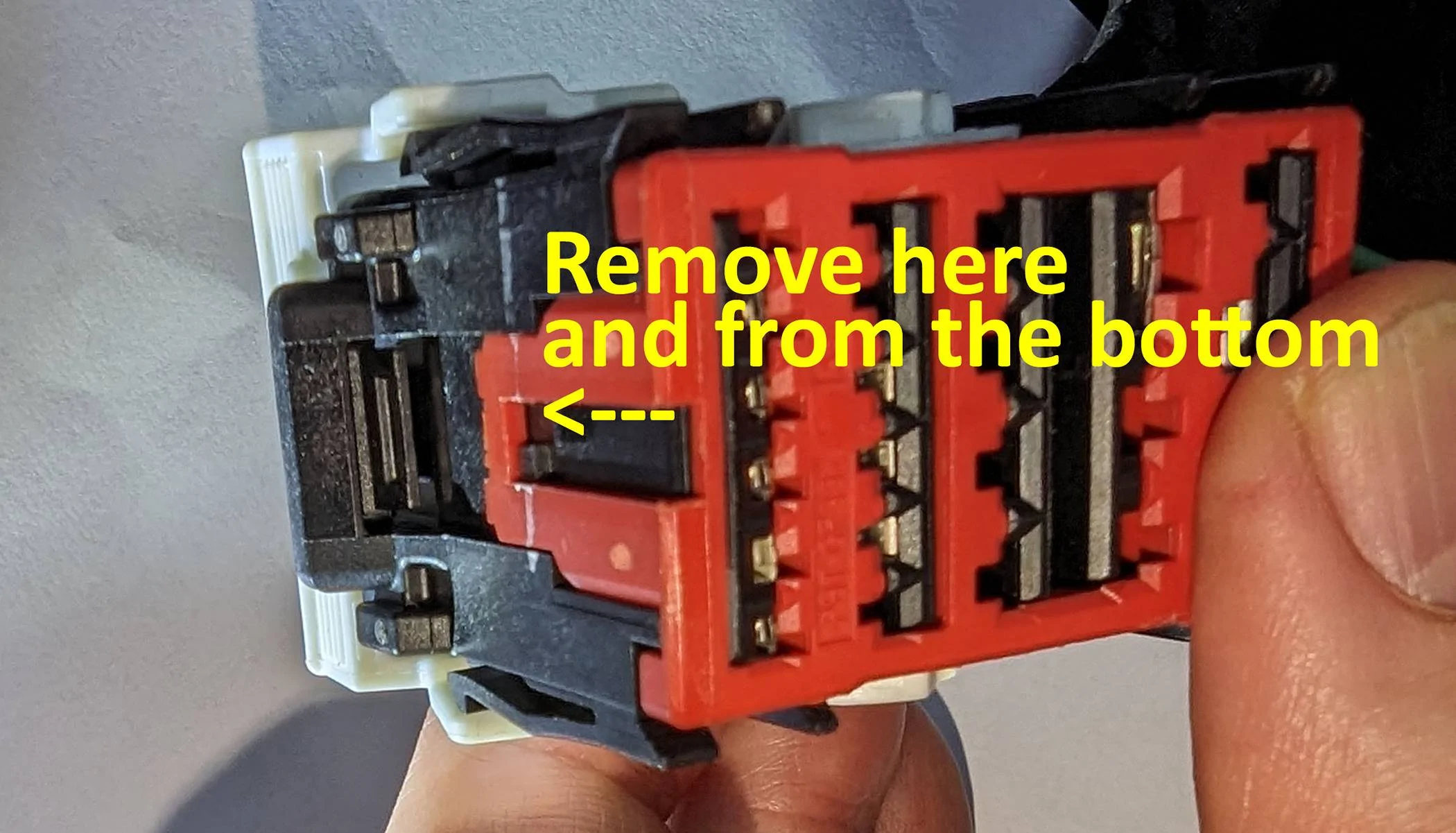
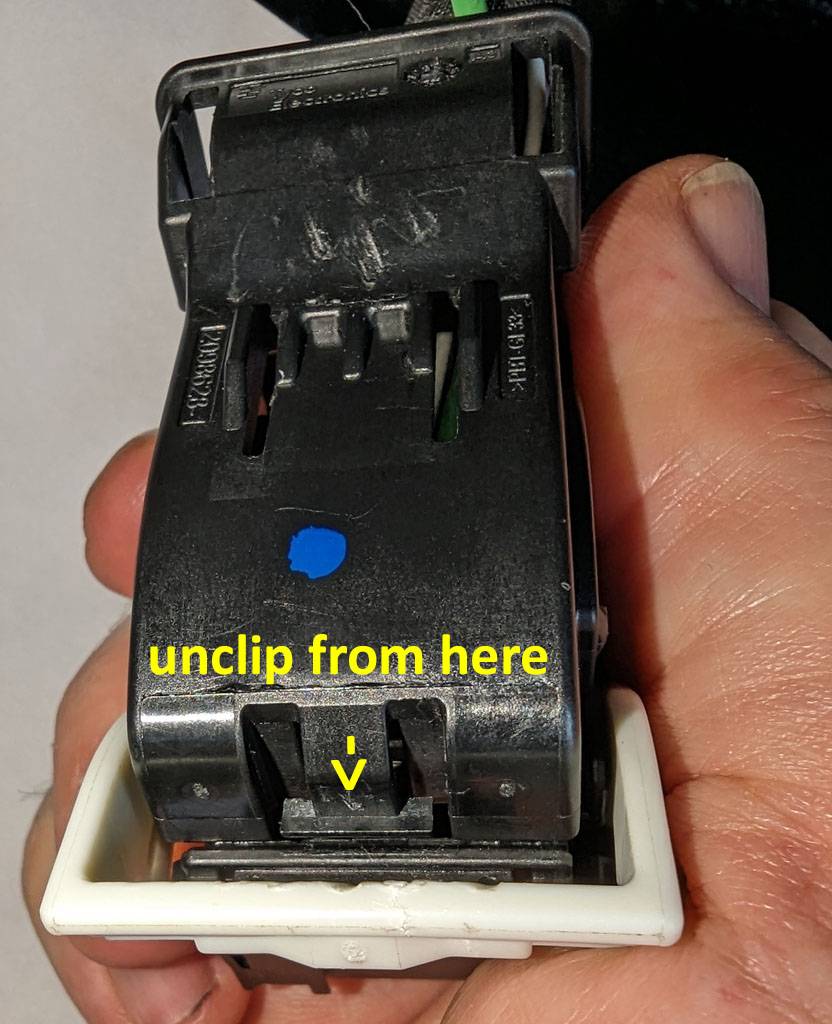
To get access to this power you need to insert the two pigtails into pin sockets 12 (left fog) and 5 (right fog) into the plug CC2280G.

Remove the plug from the BCM.
Unclip and remove the red alignment guide.

With the white latch upright, unclip the back of the plug and move out of the way.

Insert the two pigtails form the back in positions 12 and 5 and put the plug back together (assembly is reverse of disassembly). Plug back into the BCM.
There is a video here of re-pining the plug that also helps understand what's going on here (from 4:04 onwards): -
YouTube link
Once programmed these will give you 12V for front left and front right fogs on the appropriate pigtails. I am not sure of the maximum current the BCM can output for the fogs (I guess around 1- 1.5 amps?) so if you are installing some high wattage lights then you can probably use these to power a relay as appropriate.
Programming
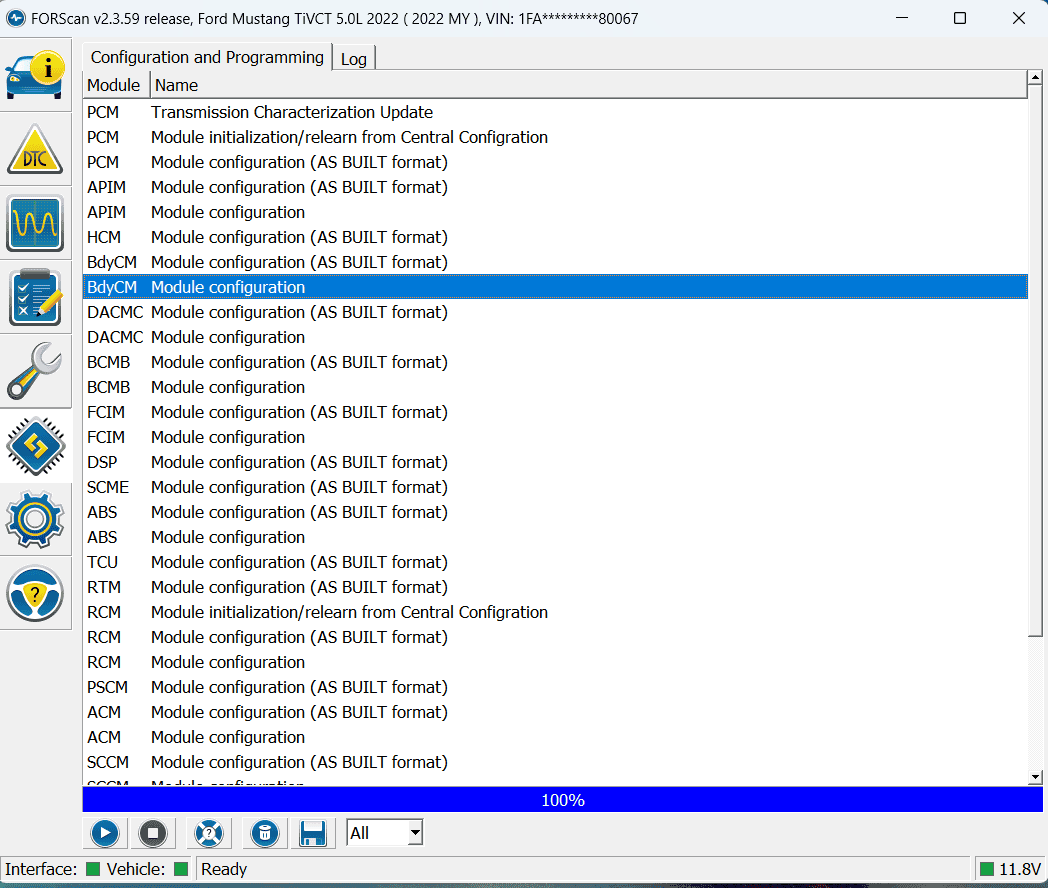
Once the wiring has been completed and you are happy that there are no shorts and that the connectors / crimps etc. are tight then its on to the programming. I’ll not cover details of Forscan as there a number of tutorials for this out there.
You will need a laptop, OBDII cable and a registered copy of Forscan (https://forscan.org/)
IMPORTANT
Reconnect the battery - Make sure your battery is fully charged in the car and the laptop (probably best to plug both into a charger whilst doing this). Writing data to a module when your car is at low voltage can risk damage / bricking the module!
Only write one parameter change at a time, even within the same module!
It's not difficult if you are methodical but readup / watch videos on this as mistakes can be expensive.
Connect your car to Forscan. You’ll need to make the following changes: -
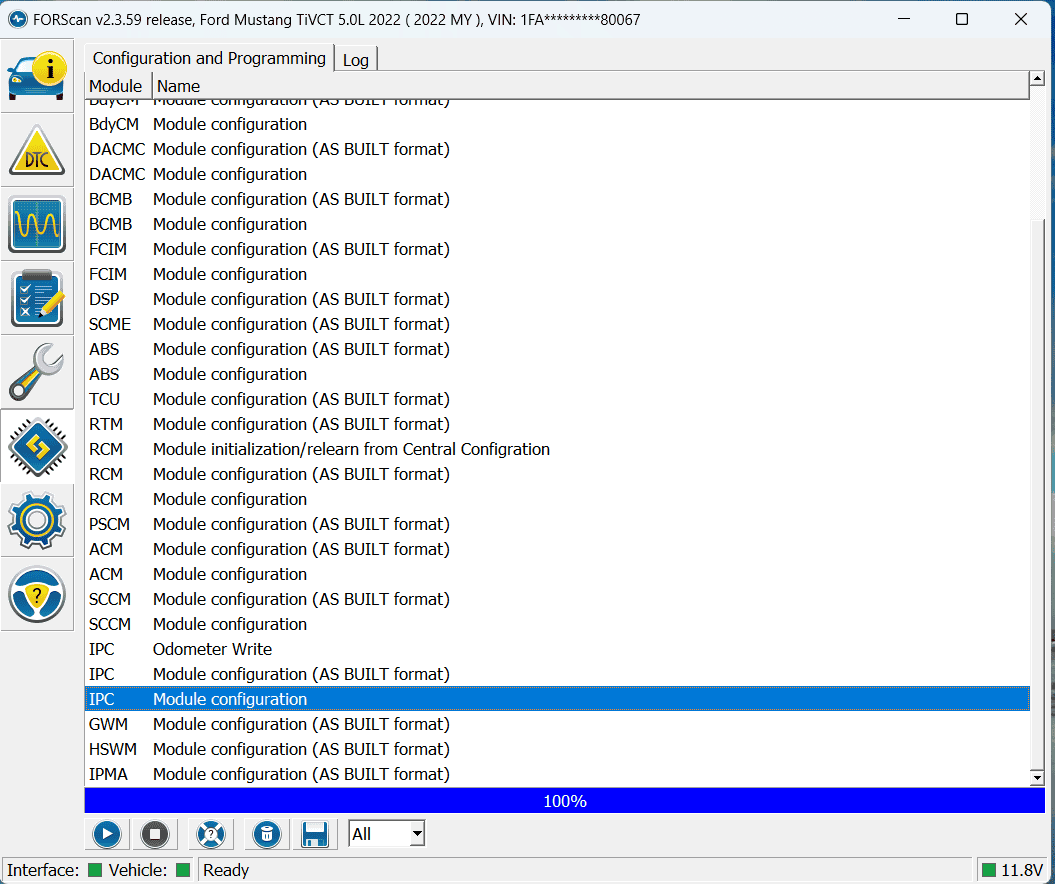
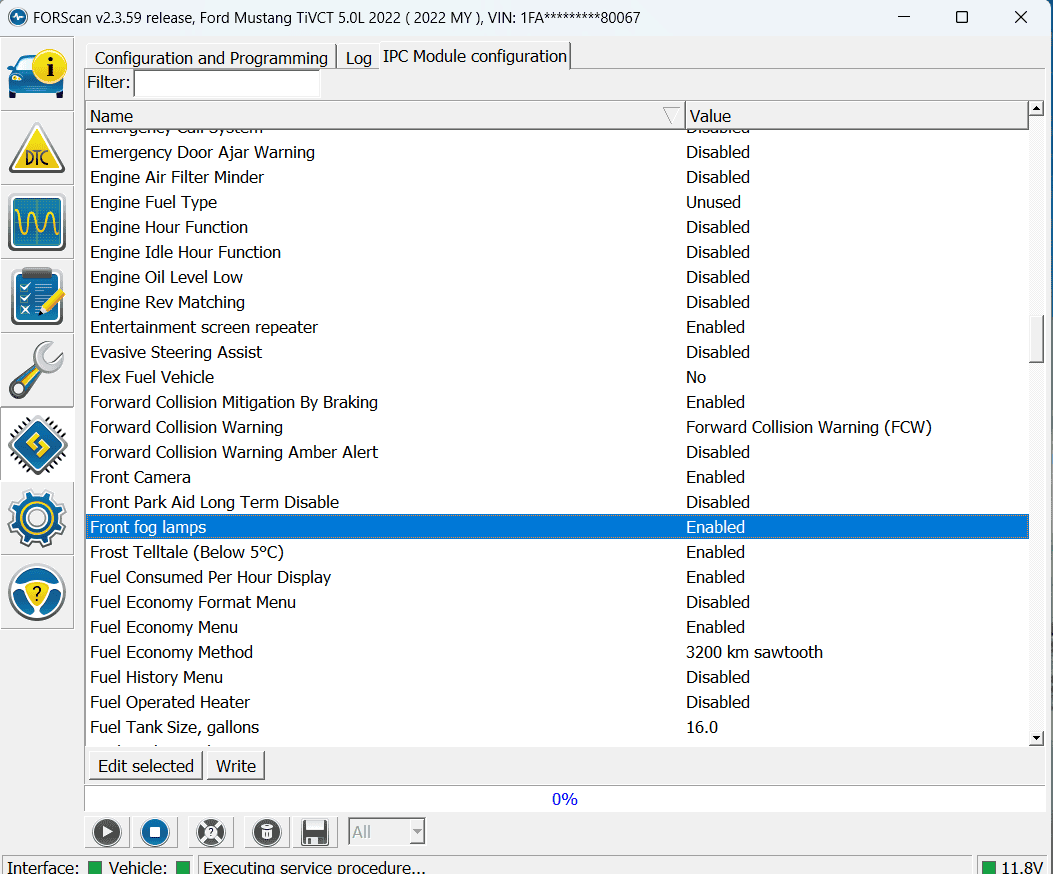
Select and "play" the IPC (Instrument Panel Cluster) and update the "Front fog lamps" parameter to "Enabled" – this will enable the display.


Once that is done and written "stop" the IPC module
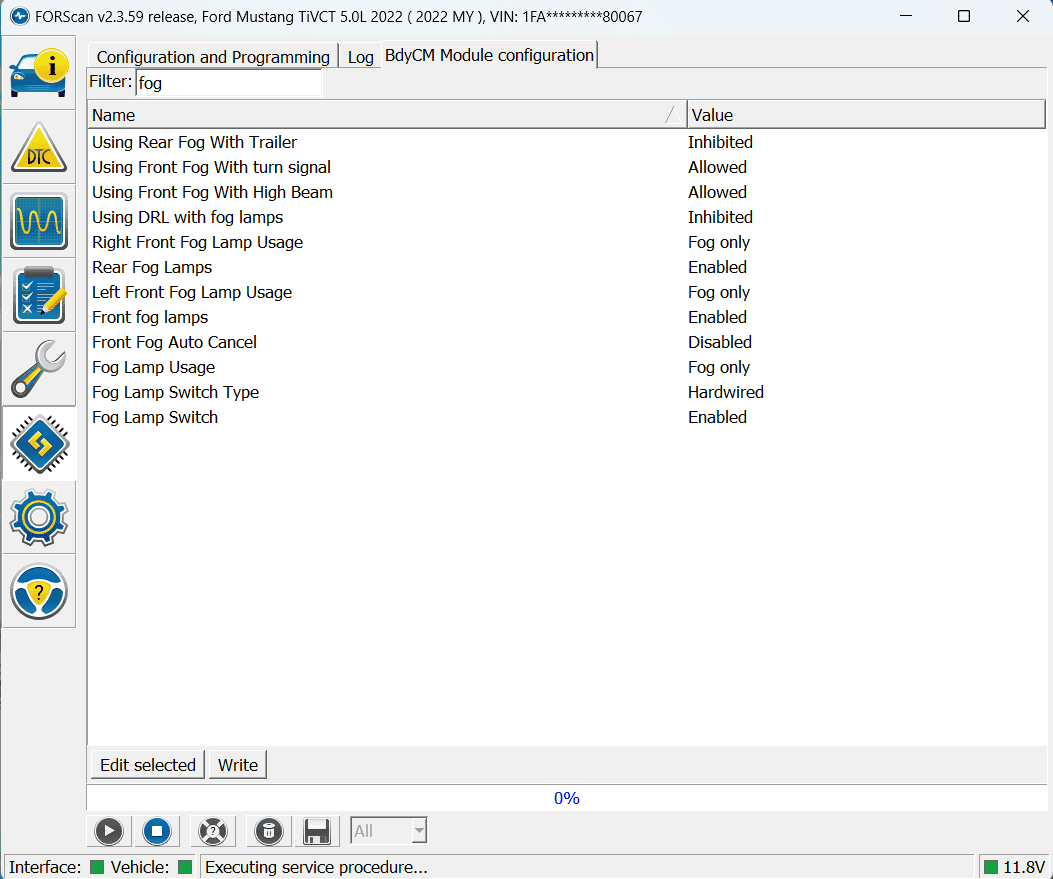
Select and "play" the BdyCM (Body Control Module)

Filter on fog
Write the following: -
Front fog lamps – update to Enable
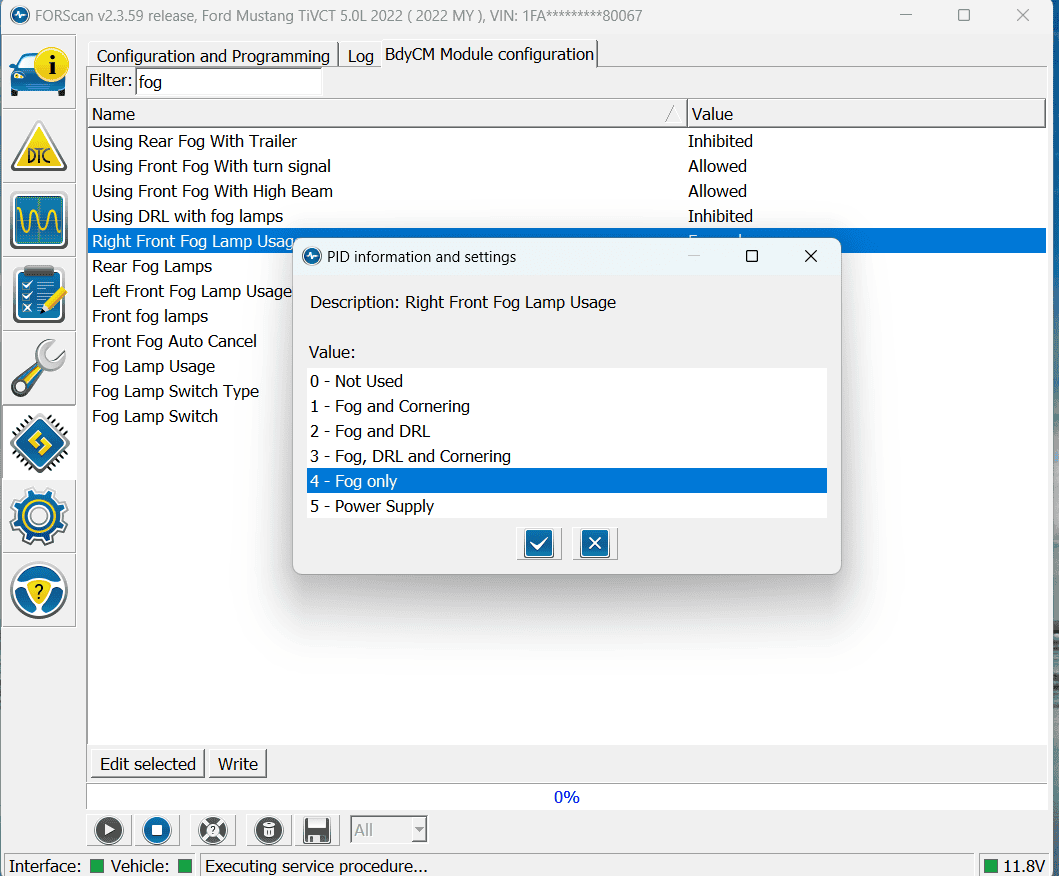
Right Front Fog Lamp Usage – set to Fog Only
Left Front Fog Lamp Usage - set to Fog Only

Note, you can probably tweak other options for the Left and right front fogs however you need to ensure that "Front fog lamps" is Enabled and Left and Right are not set to “Not Used” to get 12V from the BCM pigtails.

Once done and written, "stop" the BCM connection and disconnect Forscan from the car remove the OBDII cables etc...
Hope this helps someone on the journey to filling those blanking plates, let me know if this is useful at all....

OP
OP
Geofferstang
Active Member
- Joined
- Sep 20, 2022
- Threads
- 1
- Messages
- 25
- Reaction score
- 80
- Location
- Surrey, United Kingdom
- First Name
- Geoff
- Vehicle(s)
- Mustang Mach1 FJG
- Thread starter
- #28
Hi 4 Barrel,
Highly unlikely that you'd get a dealership to touch this as the fogs / rings / wiring are all non OEM. The only OEM parts I used were the headlight switch out of a GT with the fog light option and the pigtails for the BCM plug. As you also need to change the programming of the BCM and Instrument cluster from stock configuration I think you'd have difficulty getting support for that as well.
Cost wise it was pretty cheap for parts. IIRC cost was about £100 GBP, comprising: -
Headlight switch (ebay) - £40.00
Fog Lights (Amazon) - £17.00
Pigtails (Ford) - £5.99 x 2
ABS filament - probably about £5.00 as there were a couple of itterations I needed print (assumes access to a 3D printer that can print ABS)
Other associated parts (wire, connectors, fuses etc) - approx £30.00
Timing the job, the trickiest part was removing and reinstalling the front bumper. The rings click right in (once printed) and the fogs are a bolt on to that (after a little modification). Running the wires from the fogs to the BCM takes a while, depending on how neat you want it to be (I wrapped all my wiring in loom tape as I installed). Programming takes about 20 minutes or so (once I had figured out what to change ) and assumes you have a laptop / OBDII dongle / ForScan (free).
If you can't DIY this I think you'll need to find a mechanic that is not dealer affiliated for this.
Highly unlikely that you'd get a dealership to touch this as the fogs / rings / wiring are all non OEM. The only OEM parts I used were the headlight switch out of a GT with the fog light option and the pigtails for the BCM plug. As you also need to change the programming of the BCM and Instrument cluster from stock configuration I think you'd have difficulty getting support for that as well.
Cost wise it was pretty cheap for parts. IIRC cost was about £100 GBP, comprising: -
Headlight switch (ebay) - £40.00
Fog Lights (Amazon) - £17.00
Pigtails (Ford) - £5.99 x 2
ABS filament - probably about £5.00 as there were a couple of itterations I needed print (assumes access to a 3D printer that can print ABS)
Other associated parts (wire, connectors, fuses etc) - approx £30.00
Timing the job, the trickiest part was removing and reinstalling the front bumper. The rings click right in (once printed) and the fogs are a bolt on to that (after a little modification). Running the wires from the fogs to the BCM takes a while, depending on how neat you want it to be (I wrapped all my wiring in loom tape as I installed). Programming takes about 20 minutes or so (once I had figured out what to change
) and assumes you have a laptop / OBDII dongle / ForScan (free).If you can't DIY this I think you'll need to find a mechanic that is not dealer affiliated for this.
radar
Well-Known Member
- Joined
- Sep 28, 2016
- Threads
- 15
- Messages
- 566
- Reaction score
- 553
- Location
- Melbourne AUSTRALIA
- First Name
- Ray
- Vehicle(s)
- 2017 GT Convertible 5 Litre V8
Looks superb.
Ford should have offered this as an option.
Congrats to OP
Ford should have offered this as an option.
Congrats to OP
Mach1NA
Well-Known Member
Boyd, can you elaborate which setting you used to keep the fog lights on after the switch button is pressed? I'd also like them to stay on with high beams, DRL, and signals. Is it setting 5? (Power Supply). Thanks!Finally got around to applying Geofferstangs additional mods to my fog light install. Namely the additional BCM wiring that's available from Ford and some of the ForScan mods. Took a while, but everything works and looks great.
He used a GT headlight switch that has both front and rear fog switches on it. In the UK, rear fog is standard. I used a standard US headlight switch that only has a front fog switch.
Being able to turn on the Fog Light icon for the dash in ForScan / IPC was a real pleasure. Love having it work and look as factory fogs in a Mach 1. Thanks for finding that, Geofferstang.
I changed a few more things in ForScan, had to in order to get things working, then changed a few to operate the way I want them to. Among them were allowing fog lights with DRL's, fogs with turn signals and keeping the fogs on with hi beams (Bambi Mode).
While the front end is off, also upgraded my front turn signals to Switchback LED's... white in park light mode, amber flashing on & off in turn signal mode. Outer front park lights to simple white LED's. Turned off outage notifications in ForScan.
Thanks, @Geofferstang. Outstanding work you've done and supplied for the rest of us.
Sponsored


