Sponsored

How to tune Ghost Cam (Solved+WriteUp, PCMTec)

OP
OP
tdstuart

tdstuart

Well-Known Member
Joined
Apr 6, 2021
Threads
72
Messages
2,565
Reaction score
1,292
Location
Arizona
First Name
Triston
Vehicle(s)
2015 Mustang Gt Premium
What’s the advantage of locking out the cams?
You get to have a coyote that chops and if someone asks you if it’s a ghost cam tune you get to tell them no I have real cams 🤣

For really aggressive n/a setups it allows you to put in bigger cams but if you are doing a power adder there is really no reason. Even if you are making 2k hp you can keep your intake vct although most lock the exhaust at those high hp power levels. Why exactly they lock the exhaust I’m not sure.

Either way for the setup I was talking about it would purely be for sound and cool factor. No benefit to locking the cams when on a boosted setup that isn’t making crazy big power as far as I know.
 

K4fxd

Well-Known Member
Joined
Apr 2, 2020
Threads
121
Messages
13,455
Reaction score
12,262
Location
NKY
First Name
Dan
Vehicle(s)
2017 gt, 2002 FXDWG, 2008 C6,
What’s the advantage of locking out the cams?
Less complexity in a race car setting. Unless real small cams it would make driving on the street unpleasant.
 

engineermike

Well-Known Member
Joined
Jul 15, 2018
Threads
31
Messages
6,188
Reaction score
6,450
Location
La
Vehicle(s)
2018 GTPP A10
Less complexity in a race car setting. Unless real small cams it would make driving on the street unpleasant.
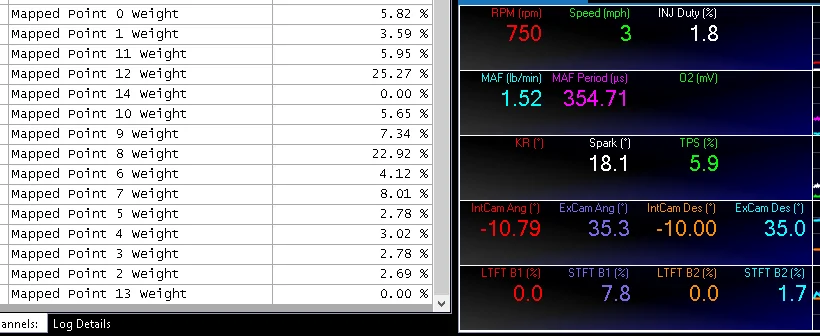
I understand why they might be needed in a race car where valvespring pressures and rpm might cause loss of control, or perhaps one less failure point, and also very narrow rpm range…..but that’s not what we’re talking about here.

I’ve considered locking my exhausts but that’s due to the exhaust cam torque needed to drive the xdi gdi pump. I was able to resolve by lowering gdi pressure and increasing oil viscosity.
 
OP
OP
tdstuart

tdstuart

Well-Known Member
Joined
Apr 6, 2021
Threads
72
Messages
2,565
Reaction score
1,292
Location
Arizona
First Name
Triston
Vehicle(s)
2015 Mustang Gt Premium
GHOST CAM TUNE COMPLETE!

So I finished making the ghost cam tune. Thank you to everyone who helped.

The basics of the ghost cam is that we want the car to have high cam overlap during idle. We achieve this by setting the cams to have high overlap, example cam angles: 0,40 ; -10, 30; -20,20; -20,35 (ivo, evo). I will be going over how we do this and some settings to play with.

My full tune file (RAW) and a compare file with the ghost cam settings ([COMPARE]) are attached (pcmtech only).

Mapped Point Explanation:
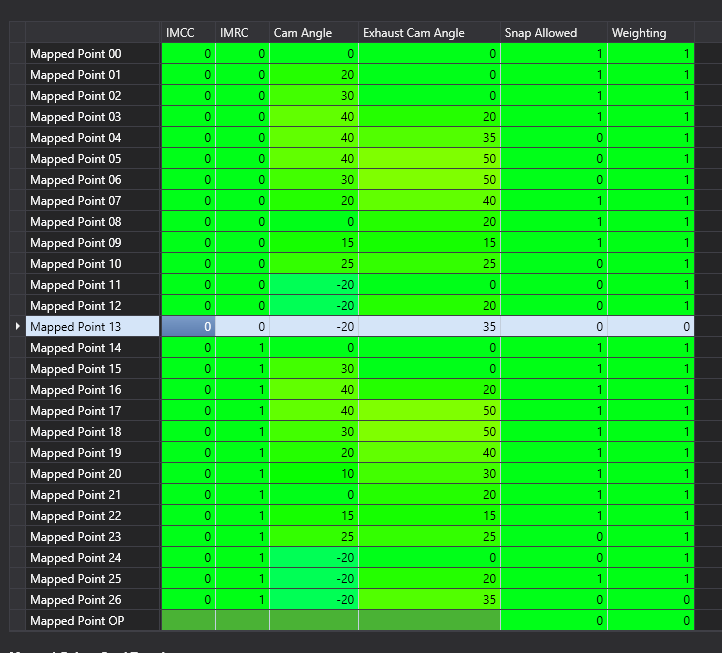
To do this we are going to use Mapped Point 13 to set our cam timing. For Gen2 cars this mapped point is unused so it works perfectly. Keep in mind MP 13 is also for imrc closed so if you have imrc deleted or have a supercharger you made need to make some tweaks.

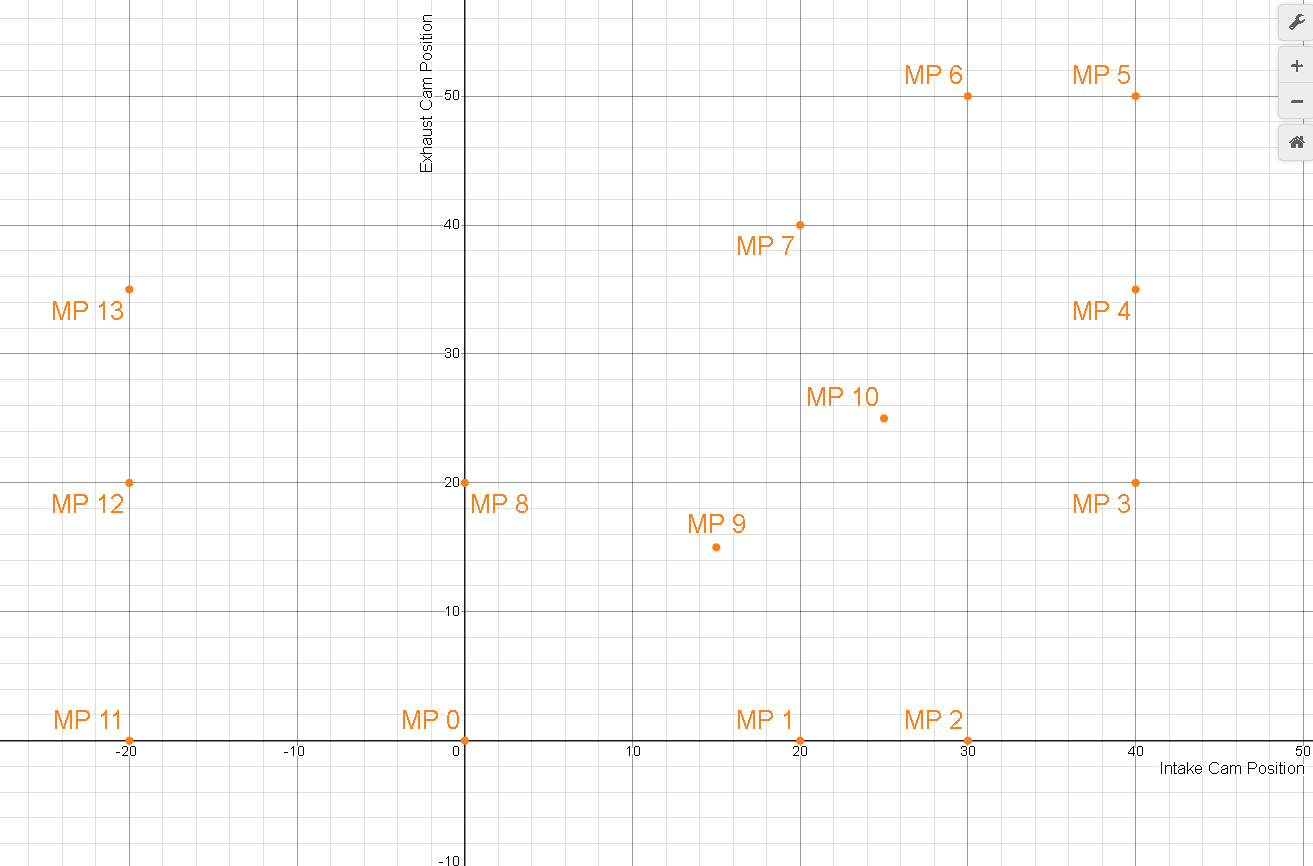
I want to make this understandable to beginners but also not super complex as I myself don't have a complete grasp on Mapped Points. Basically, if you think of your intake cam position as X on a graph and the exhaust cam position as Y on a graph, the Mapped points make up different cam x,y positions and they contain information about torque, speed density, and spark to be used at that cam position.

Here are the mapped points on a graph (0-13):
1718603364392-ul.png


So according to this graph if my current (actual) cam position was 0 intake and 0 exhaust I would be right at MP 0. Thus I would use MP 0 torque, spark, speed density, etc. tables.

If you are between points the car will look at another table that has snap points as well as other logic that I do not fully understand that will allow the car to blend different mapped points. For example if I am at 10 intake 0 exhaust, I would be in between MP 0 and MP 1, so the car might weigh MP 0 at 50% and MP 1 at 50%. The car would then use the assigned percentages to blend both tables from MP 0 and MP 1 for torque, spark, speed density, etc. The car can blend many tables at once. It isn't super important for us to fully understand how the car is blending each point, just for us to know it will blend each point.

For us we are going to use MP 13. It's actually disabled by default (gen2). That means even if your cam position is right with MP 13, it won't use any of the MP 13 tables, its weight will always be 0%. This means that no matter what the car won't use any of the tables associated with MP 13 (unless we enable it). This also means we can freely change the cam timing associated with MP 13 and not have to worry about throwing off torque, spark, or other calculations that the car might use.

In essence we are going to change the intake and exhaust position of MP 13 and point the car to try and reach those intake and exhaust positions at idle. The car, once at those cam positions, will actually use the other enabled mapped points and blend them to get the correct torque, spark, speed density, etc. tables. This way we can freely mess with MP 13 and its cam positions without affecting how to car drives elsewhere and the car will be able to blend other Mapped Points to get more accurate tables.

Look at how the ecu is blending MP 13. The cam timing is basically right on my set MP 13, but since MP 13 is disabled it will use other MP to blend the tables:
1718604250214-vf.png


Because we have it setup this way it means even if our car for some reason wanted to go to the cam angle of MP 13 outside of idle it wouldn't be using now incorrect table data (once you change a MP cam angle the data associated with that MP is now incorrect).

Setting Up MP 13 VCT:
Okay so now we talked about the concept of Mapped Points and how we want to modify the cam position of mapped point 13 and point to it for our idle cam timing. So now lets get into how we modify MP 13 and how we get the car to go to MP 13 during idle.

It's important to understand the car uses mapped points as a guide for what cam position to target. Then the actual cam position is used with the mapped points and weights to calculate the proper tables for torque, spark, speed density, etc. For example the car might say okay I want to be at MP 0, the cam position for MP 0 is (0, 0) so it will attempt to get the cams to (0,0) but if the cams deviate (lots of factors can affect this) it will start to blend in other Mapped Points along with the target MP 0. For MP 13 it will always blend other tables as we will keep MP 13 disabled so it can never blend it, but the car can still target the cam positions for MP 13.

So lets set the cam position for MP 13! There are multiple places to edit this in pcmtec but the easiest is to go to HDFX Mapped Point Layout and then look at the Mapped Points Function Views. You can also find it under Variable Camshaft -> Mapped Points for VCT.
1718608887334-ci.png

Once in this table look at MP 13.
1718609028158-56.png

You will see stock the cam position is (-20, 35). This is a lot of overlap and we are actually going to change it to (-10, 35) to start. For one this is a good example of how we can change the mapped point cam position and it gives us a little less aggressive cam angle to start with (although I have found -20,35 works well with my aftermarket cams).
Here is it when we change it to (-10,35):
1718609170199-61.png


Once we have it changed we can start working on pointing the car to actually point the cams to this position. First, we need to remove some of the cam position limits so the car will actually go to the commanded positions. These are mostly used to restrict the cam position at idle based on temperature and time. I do want to point out I do not have catalytic converts. If you do you may want to leave some of these protections in place and let the cats warm up before having it chop (research if ghost cam can damage cats because I'm pretty sure it can).

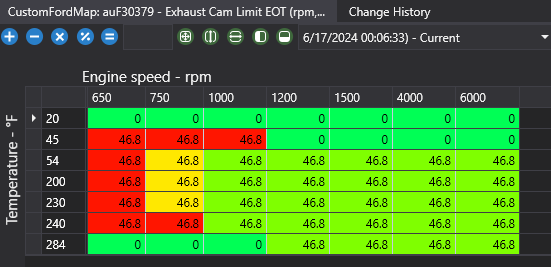
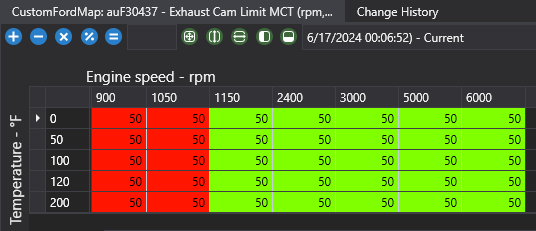
Here are the limit tables we need to adjust:
(Note: I did run into an intake cam advance limit of -17 or -18 and I'm not sure exactly why, might look into later)
Exhaust Cam Limit EOT
Exhaust Cam Limit MCT
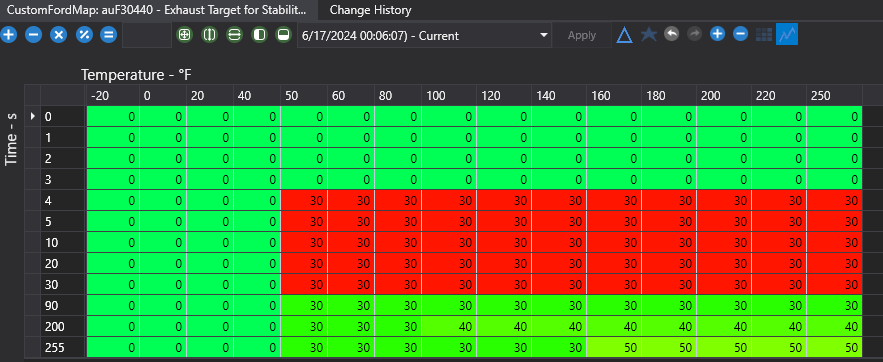
Exhaust Target for Stability


I am going to give screenshots for what I set them to. They are basically coded limits for the cams to not exceed based on temp/time/rpm. Intake has the same limit tables but you won't run into them (except for the weird thing I mentioned above).
1718610646059-1r.png

1718610661375-yi.png

1718610681848-r7.png

(I have this set to 30 but you can increase it to 35 so it fully goes to position, I set it to 30 for testing and forgot to raise it)

Once you have the limit tables set to what you like, we can start commanding the cams to move to MP 13. We have 3 "drive profiles" we need to modify. When the car first starts VCT will be disabled (we can edit this). After the VCT enables it will probably go into Emission Reduction mode. For those of you with cats, you may not want to edit this so the cats are able to warm up properly. After the car determines the cats are warm it will exit Emission Reduction mode and move to Optimal Stability mode. When light throttle or moving the car may move into Fuel Economy mode. We will also edit Fuel Economy mode to help drivability.

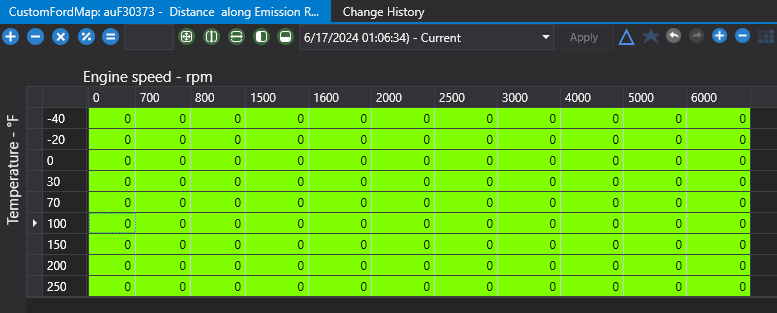
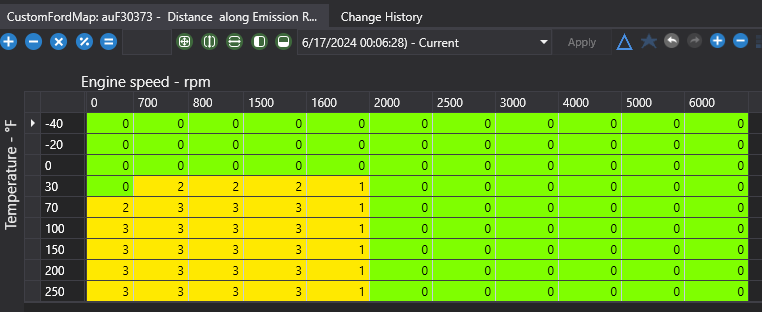
First lets edit Emission Reduction mode. We will go to Distance along Emission Reduction track of mapped ivo/evo points.
Stock:
1718614487482-kq.png
Modified:
1718614449377-8r.png


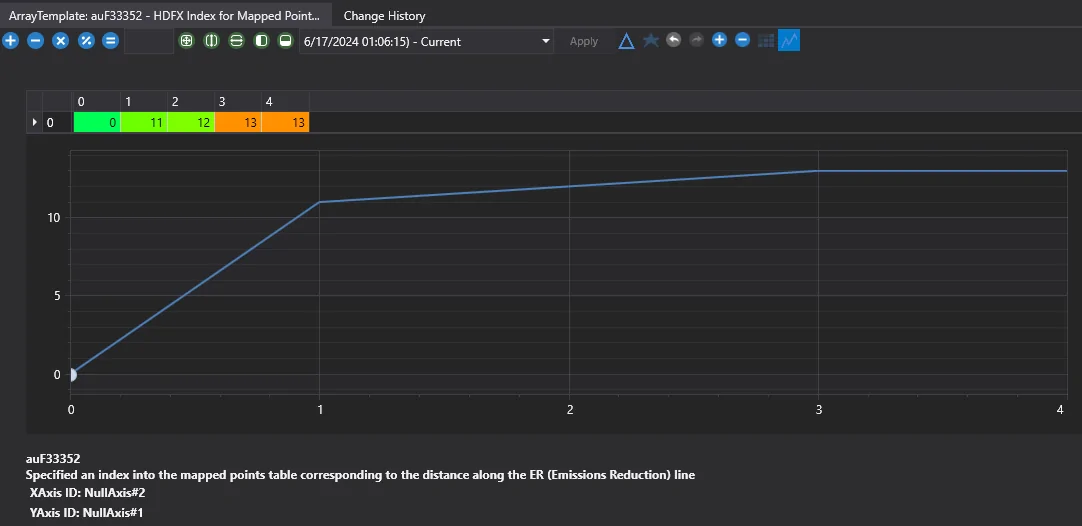
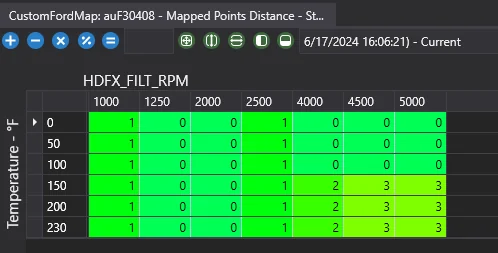
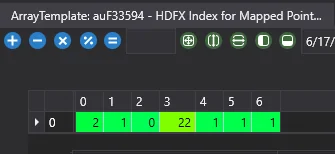
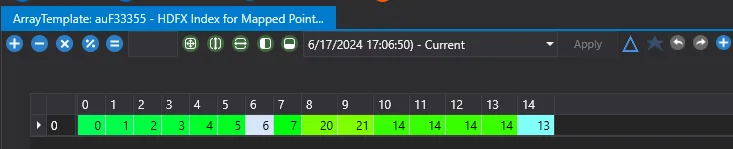
As we can see stock all points are set to 0. When I modify it I set where I idle to 3. I use 2 and 1 to help cam transitioning (we will talk about it later). So if I want mapped point 13, then why does the number say 3? Well these tables actually tell us to look at another table called the distance table. The distance table will tell the car what mapped point to have the vct commanded to. Lets look at the Emission Reduction Distance table (HDFX Index for Mapped Points - ER Line Distance)
1718614839823-u8.png

As we can see if we go to table x position 3, we are commanding mapped point 13. 2 and 1 are commanding MP 12 and MP 11 respectively. MP 12 and MP 11 are less aggressive than MP 13 so I thought it we be good for blending, but it probably won't do much or anything.

One thing to note before we continue is that I don't know how distance table blending works. You will see values in between the defined values in the distance table and from what I understand the car will blend the distance table mapped point values it is between. For us it really shouldn't matter as we will just command solid, defined values, but if you are having drivability issues you may want to research the distance tables more.

Lets continue onto Optimum Stability. This will be the next mode your car moves into after Emissions Reduction. Let's look at the stock table:
1718668420858-88.png

And here is what I am going to change it to:
1718668473463-yu.png


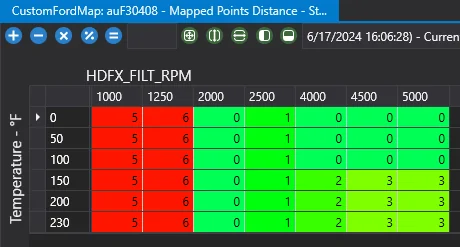
As you can see we are going to change the values for 1000rpm and 1250 rpm. We are setting 1000 rpm and 1250 rpm differently to help the car blend when the rpms start to get higher. This shouldn't be too needed but it is something to pay attention to if trying to sort drivability problems.

Let's look at the corresponding line distance table.
Stock:
1718668683986-61.png

Modified:
1718668706442-d7.png


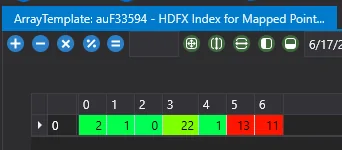
As you can see we set 5 to be MP 13 and 6 to MP 11. We are using 6 as our blending and so it's set to MP 11 which is less aggressive than MP 13.

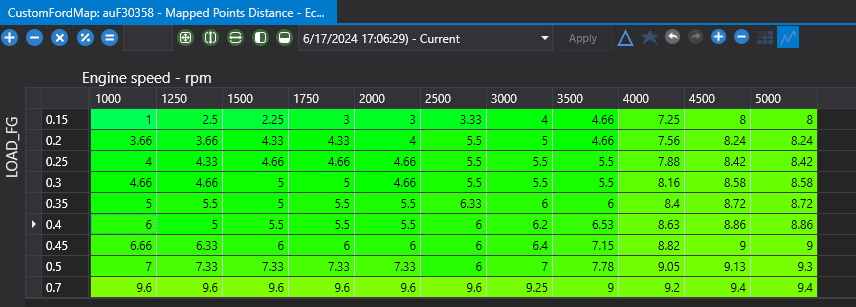
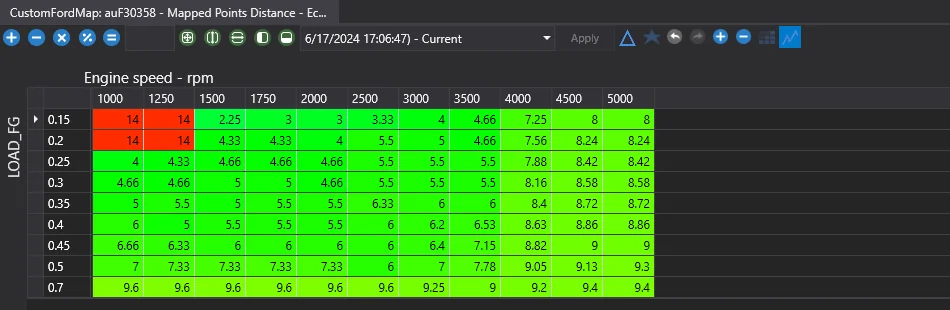
Once the car starts moving, especially with light throttle, it will start transitioning to Fuel Economy mode. This table uses load vs rpm instead of temp vs rpm. This is nice because it gives us more control over what engine load we can switch cam profiles. You can also do a lot of blending here to help with drivability. Lets look at the tables.
Stock:
1718669812588-u3.png

Modified:
1718669832021-e1.png


You can see I only change the 1000&1250 rpm at low load where our idle will be. There could probably be some more refinement here and if trying to get drivability dialed in at light throttle at the transition point from cam chop to normal I would log rpm and load to dial in this table a bit more. Let's look at the corresponding distance tables.
Stock:
1718669993558-9s.png

Modified:
1718670013432-5x.png


I modified point 14 to point to MP 13. What you also might want to look into is how distance table blending works for drivability. Im not sure if when the car is at 1250 rpm 0.2 load going to 0.25 load if its blending point 14 and point 4.33. Im also not sure if point 4.33 is blending point 4 and 5 or if it is rounding. If it is blending point 14 and point 4.33 as its transitioning is it just blending the Mapped Points desired cam angle or is it looking at the distance table to find a mapped point to blend to. This setup worked great for me so I didn't do a full deep dive into this aspect, but if having drivability issues you may want to look into this in detail.

Idle Settings
Now that we have are cam angles and mapped points setup properly we need to change a few idle settings to get the car to idle better.

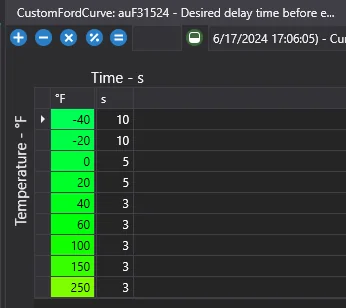
This first setting is actually a cam setting but this table defines when the vct will kick on based on temp and time since engine start. I set mine so it will enable vct sooner so the car will chop sooner. Its Desired delay time before enabling vct. See below:
1718670375762-eq.png


Next let's get into the actual idle settings.
First thing we will look at is the Adaptive Idle Control Settings. We will be changing Adaptive Idle Control Disable RPM Error (auF0015) and Adaptive Idle Control Enable range (auF0014). Changing these helps the car control the rpm while idling. Look at my changes below:
1718670548198-h9.png


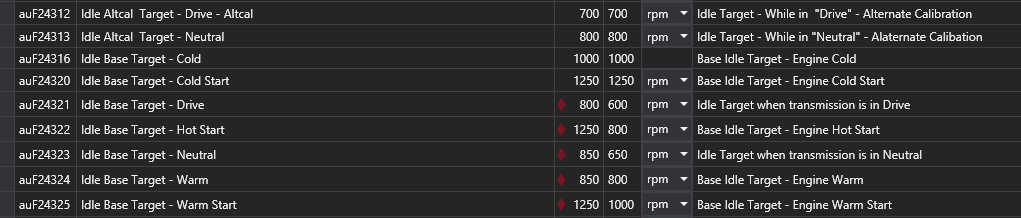
Now we just need to change the target rpms. When doing a ghost cam you want to raise the idle to around 850 or higher. We will be changing several of the idle rpm targets. Look below to see the changes I made. You can play with these as you like but keep in mind the mapped points tables and what rpm we set those to.
1718670686031-yf.png


Spark Changes
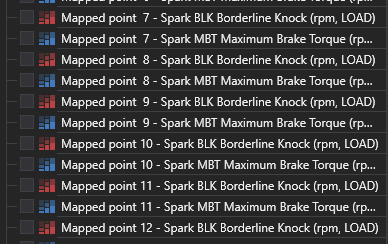
It can be helpful to lower the spark timing for idle when we do the ghost cam. Since we are commanding an overlap cam angle and its blending multiple mapped points you will notice the spark tends to be high 20s to low 30s. We want to lower this to at least high 10s or low 20s to start. You may even want to lower it to low 10s. Since we are blending multiple mapped points you will have to change multiple mapped point spark tables. It may be helpful to log mapped points 0-13 to see which mapped points the car is using the most and start by changing those. Here are the mapped point spark tables I changed:
1718670880104-v7.png


We will be changing the borderline spark tables for the mapped points. Feel free to change all the ones that are being used, I just chose to only change the ones that were most heavily weighted while in ghost cam.
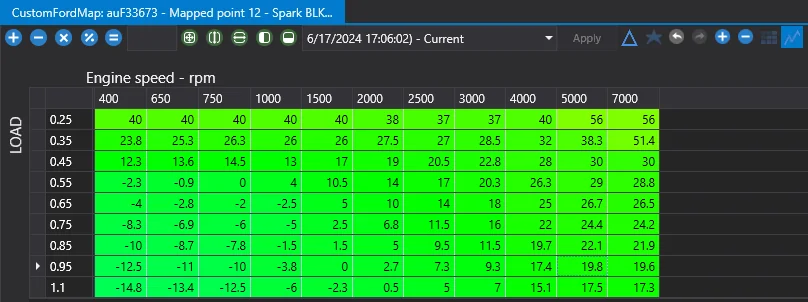
Here is the stock MP 12 Borderline Spark Table:
1718671217882-tx.png
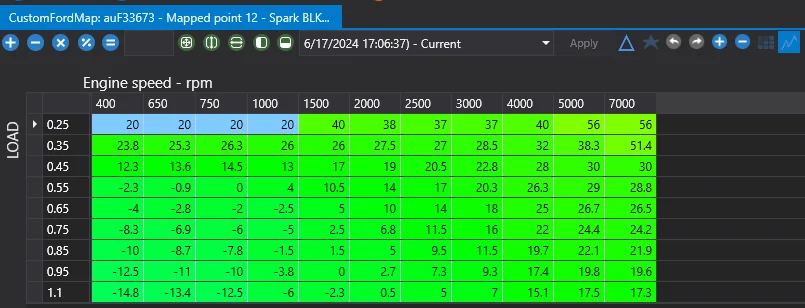
And here is the modified:
1718671007060-os.png


You can see I decreased the spark at low loads and low rpms. I did this same thing to the other mapped point spark tables shown above. This helped drop my spark at idle. Feel free to go lower.

Misfire Code Prevention
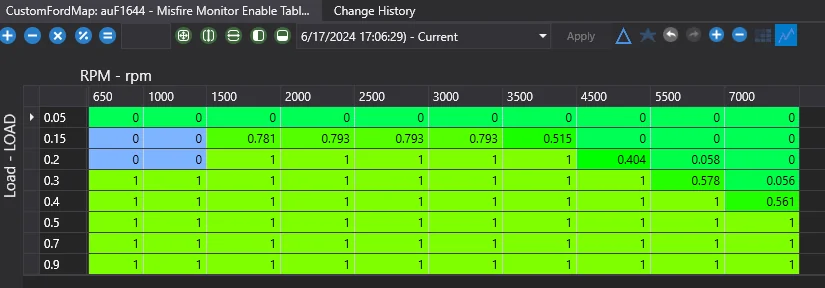
While running the ghost cam the car will occasionally misfire at idle (due to how cam overlap and chop works). It will throw a code after a while. To prevent this we are going to raise rpm the misfire monitor enables at. Change Misfire Monitor Enable Table to what you see below, this will disable the monitor at low load and low rpm where we will be idling.
1718671422021-63.png


Idle Fuel Correction
IT IS IMPORTANT TO HAVE YOUR IDLE FUEL CORRECTION DIALED IN BEFORE MESSING WITH THE CAMMED IDLE FUEL CORRECTION!

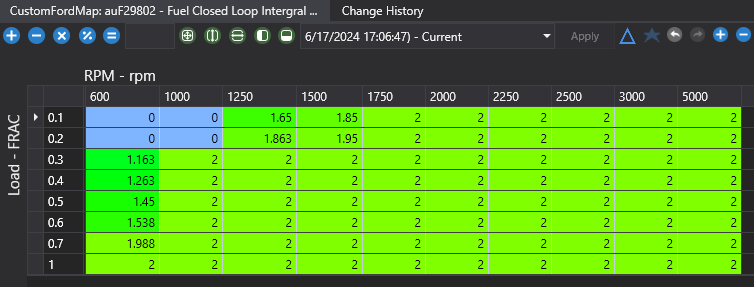
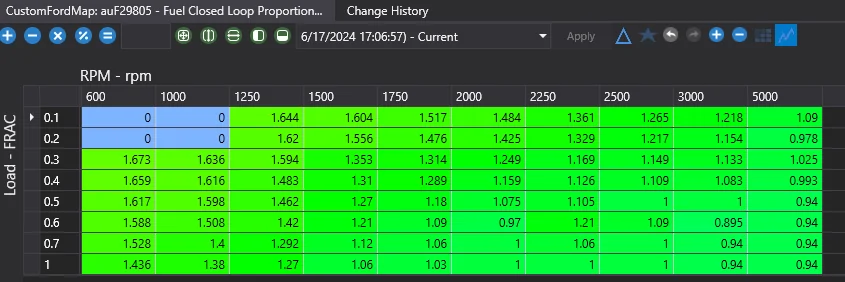
When running ghost cam mode extra oxygen will get into the exhaust causing the car to think it's running lean, adding more fuel. This can make the exhaust very rich and wastes fuel. To correct for this we can try to change a few settings. The first things we are going to look at are the Fuel Closed Loop Integral Term and Fuel Closed Loop Proportional Term (also known as PI Controllers). I am not 100% on what these do, but from what I have read from others modifying this will help the car not correct so much for the misfires. Here is what I did below:
Integral:
1718671668066-4m.png

Proportional:
1718671684923-w9.png


I just set them to 0 at low rpm and low load.

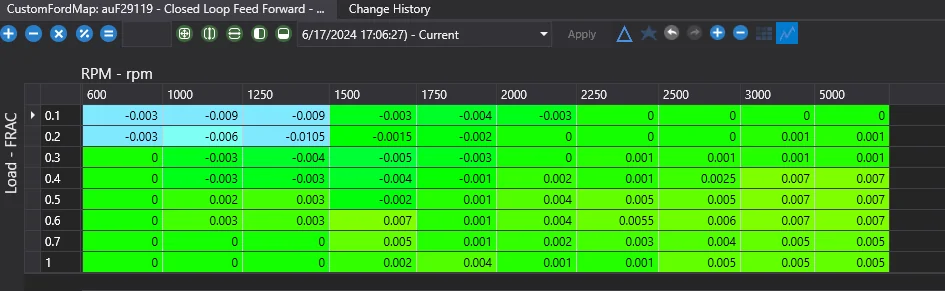
The next thing we are going to change is the o2 sensor feed forward bias. Please be careful and only change low load and low rpm values where we are idling. You really don't want your o2 sensors to be reading incorrectly anywhere else! Remember, this is not how you should make fuel correction adjustments. You should already have your maf calibration set and fuel trims within a few percent on non-ghost cam idle. Its only because the engine is misfiring at idle that the o2 readings are off, hence the need for us to manually correct them.

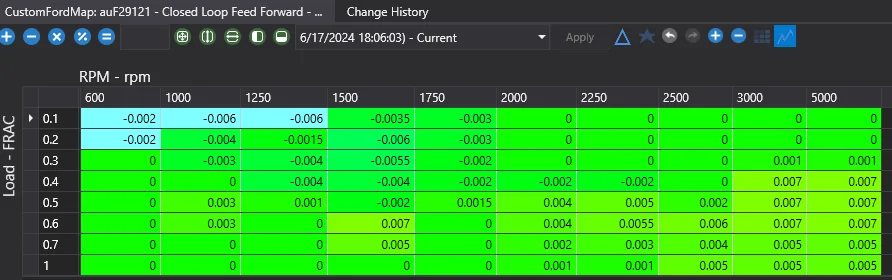
You want to change Closed Loop Feed Forward - Base Bank1 and Closed Loop Feed Forward - Base Bank2. You may notice my bank 1 and bank 2 are different. This is because I noticed bank 1 was more off than bank 2. You may not need to do this.
Here are the settings I used. I would start with stock values and adjust as needed.
Bank1:
1718672393697-vg.png

Bank2:
1718672411751-zh.png


Thats it!
I think that covers all of it. These files and settings talked about above should give you are very nice base for a ghost cam that will drive well. Hopefully, this helped some people!

Edit: I got some codes for misfire (P0300) and Engine misfire on startup (P0316). The P0316 may need to be manually disabled, depending on if the misfire monitor needs to be enabled for this code to throw. You may need to adjust the Misfire Enable RPM (auF1713). I think ill try raising that to like 1300 and see if the codes will come back. Codes took about a day to appear.
 

Attachments

Last edited:

Sponsored

OP
OP
tdstuart

tdstuart

Well-Known Member
Joined
Apr 6, 2021
Threads
72
Messages
2,565
Reaction score
1,292
Location
Arizona
First Name
Triston
Vehicle(s)
2015 Mustang Gt Premium
Ill be updating the info on how to do the ghost cam. Please let me know of any additional info I should add or any corrections I should make.

I want to keep it simple enough for beginner tuners to grasp what's going on and also be able to do the ghost cam. Basically a tutorial written for yesterday me :)
 
OP
OP
tdstuart

tdstuart

Well-Known Member
Joined
Apr 6, 2021
Threads
72
Messages
2,565
Reaction score
1,292
Location
Arizona
First Name
Triston
Vehicle(s)
2015 Mustang Gt Premium
Still having misfire code issues at high rpm even though I've set the misfire monitor to be disabled when in ghost cam mode.
 

WildHorse

N/A or GO HOME
Joined
Jun 28, 2017
Threads
270
Messages
10,297
Reaction score
8,350
Location
Home World: CLASSIFIED
First Name
Puddintane
Vehicle(s)
'17 S550
Vehicle Showcase
1
Still having misfire code issues at high rpm even though I've set the misfire monitor to be disabled when in ghost cam mode.
Set your spark plug gap at .040" and see if you still get misfire codes .
Anyways , any vids on it's 'ghost cam' idle ?
 
OP
OP
tdstuart

tdstuart

Well-Known Member
Joined
Apr 6, 2021
Threads
72
Messages
2,565
Reaction score
1,292
Location
Arizona
First Name
Triston
Vehicle(s)
2015 Mustang Gt Premium
Set your spark plug gap at .040" and see if you still get misfire codes .
Anyways , any vids on it's 'ghost cam' idle ?
Spark plugs are gapped way tighter than that. The misfire only happens on the ghost cam tune and it shows it detecting misfires at high rpm. I can’t figure out why as none of the things past 2k rpm are messed with.

I’ll have to get a vid and upload it
 

Sponsored
OP
OP
tdstuart

tdstuart

Well-Known Member
Joined
Apr 6, 2021
Threads
72
Messages
2,565
Reaction score
1,292
Location
Arizona
First Name
Triston
Vehicle(s)
2015 Mustang Gt Premium
@tdstuart would you mind if we put this on our forums for future reference?

It is a common question and you've explained it very concisely.

https://forum.pcmtec.com
Sure I still think I need a better understanding of the ford idle control to get it better dialed in and understand what parameters to change and what they all do.

Your tune you sent me a while ago works better than what I made but I haven’t looked into it other than using it to help my friend do a ghost cam on his manual car. My car still has issues especially at intial start where it has trouble idling and rpm’s jump.

I would like to dive into it more and learn more but if you want to use some or all of it on the pcm tec site feel free!
 

Kona5.0h

Active Member
Joined
Jun 18, 2021
Threads
1
Messages
26
Reaction score
41
Location
Illinois
First Name
Nicholas
Vehicle(s)
2020 Mustang Gt
Were you able to work out those misfire kinks? How is drivability? I am looking at being tuned by Lund and they don’t offer novelty tunes anymore. I didn’t want to have it on all the time just as a party trick and it would be idiotic to dish out several hundred more bucks to have a reputable tuner do it for me.
 
OP
OP
tdstuart

tdstuart

Well-Known Member
Joined
Apr 6, 2021
Threads
72
Messages
2,565
Reaction score
1,292
Location
Arizona
First Name
Triston
Vehicle(s)
2015 Mustang Gt Premium
Were you able to work out those misfire kinks? How is drivability? I am looking at being tuned by Lund and they don’t offer novelty tunes anymore. I didn’t want to have it on all the time just as a party trick and it would be idiotic to dish out several hundred more bucks to have a reputable tuner do it for me.
Someone sent me their tune and asked me not to share their exact tune. I haven’t been able to analyze the differences and why mine was throwing codes. It isn’t perfect and needs work, just haven’t had any time lately to dive into it. Are you using pcm tec?
 

Rolls

Well-Known Member
Gold Sponsor
Joined
Jan 29, 2020
Threads
2
Messages
355
Reaction score
457
Location
Australia
Website
www.pcmtec.com
Vehicle(s)
Mustang 18 GT


Top