Sponsored

How to quickly switch to next saved FM station?

Hooch180

Well-Known Member
Joined
Feb 13, 2019
Threads
10
Messages
102
Reaction score
44
Location
Europe, Poland, Silesian Agglomeration
First Name
Maciej
Vehicle(s)
Ford Mustang GT 2019 5.0 (EU)
Hi.
I have filled my radio memory with saved FM stations.

How to quickly switch to next saved station? When I'm using [>|] and [|<] buttons below screen or on steering wheel it searches for next station by scaccing FM spectrum, it doesn't jump to next saved station. How to do it?

UPDATE
SOLVED:
You need to press button for very short time. Shorter than you think.
Sponsored

 
Last edited:

Cobra Jet

Well-Known Member
Joined
Feb 12, 2015
Threads
771
Messages
17,567
Reaction score
19,997
Location
NJ
Vehicle(s)
2018 EB Prem. w/PP and 94 Mustang Cobra
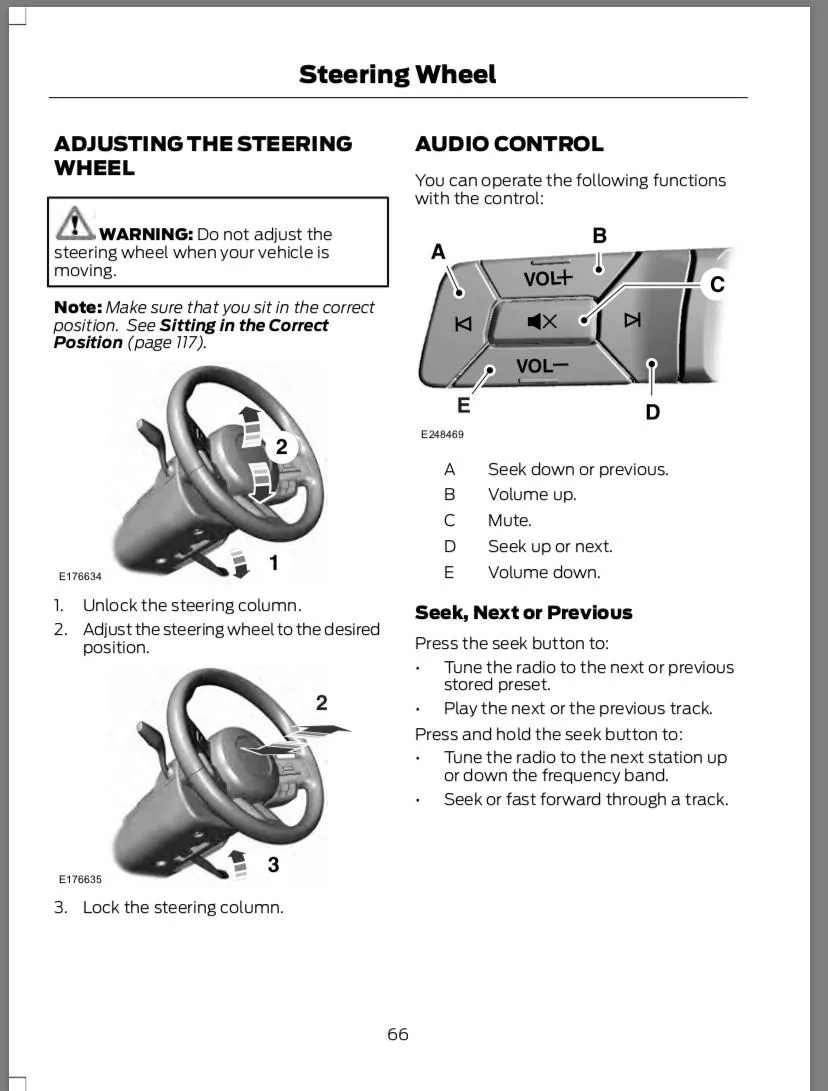
Here ya go, it’s from the 2019 Mustang Owner’s Manual for the steering wheel Radio controls.

You don’t want to hold the Steering Wheel button (or Radio buttons) in for any length of time, just press it 1x and it should go to the next Radio station you have programmed in (if listening to regular Radio, HD or Satellite).

If you hold the button down, it will want to “seek” and it won’t choose your saved station it will want to go and find the next strongest signal (station).
62C3645C-CD3F-4764-8286-8BDB540C32FF.webp


Be sure you actually have the Radio stations programmed in and not just “tuned” in. If they are not programmed in, the seek button will just cycle stations.
 
OP
OP

Hooch180

Well-Known Member
Joined
Feb 13, 2019
Threads
10
Messages
102
Reaction score
44
Location
Europe, Poland, Silesian Agglomeration
First Name
Maciej
Vehicle(s)
Ford Mustang GT 2019 5.0 (EU)
I tried pressing it quickly for short time. And it just seek next station. I'll try tomorrow again. Maybe I'm doing something wrong.
 
OP
OP

Hooch180

Well-Known Member
Joined
Feb 13, 2019
Threads
10
Messages
102
Reaction score
44
Location
Europe, Poland, Silesian Agglomeration
First Name
Maciej
Vehicle(s)
Ford Mustang GT 2019 5.0 (EU)
It works :) I have to press them even quicker than I thought. The ones below screen work too. But due to the button design you need to be very fast.
Sponsored


Top