Sponsored

Dash cam

swamp_gas

Member
Joined
May 20, 2017
Threads
4
Messages
19
Reaction score
12
Location
TN, USA
Vehicle(s)
'17 GT350
@swamp_gas What camera/app is that last pic with the telemetry? That's badass.
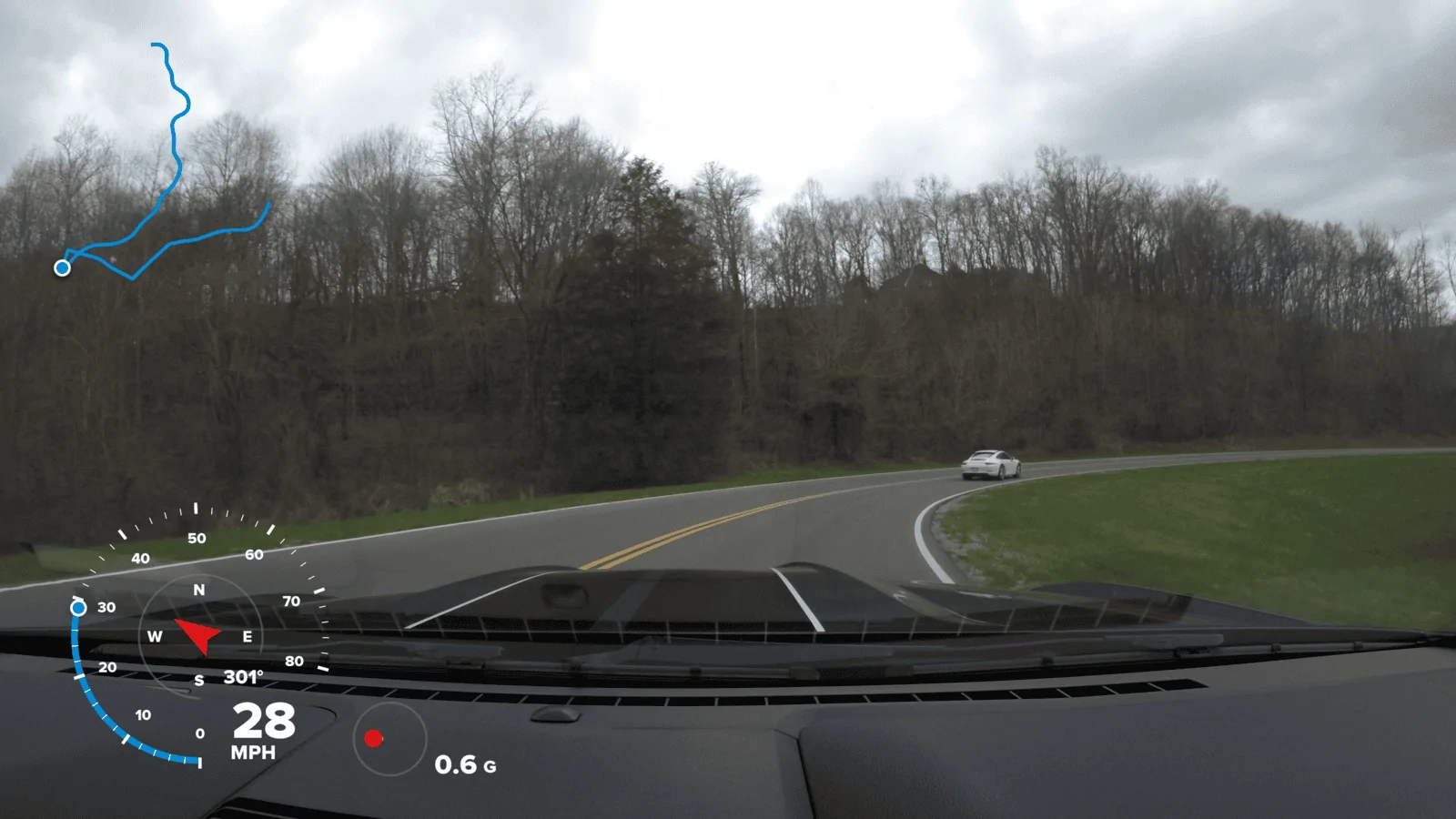
That particular screen is the GoPro Hero 5 Black. Today, it's a good bargain that never overheated on me as far as I can recall. 4K, 30FPS, external powered mic, RAW audio files enabled. If you enable GPS, then you can overlay that info in the GoPro Quik editing software. You can also change and select which info that you want to display. If you add an external mic, and enable the RAW audio, then you can add that RAW track in after you add the overlay. To do that, I usually use mkvmerge software after adding the overlay. It will both add/remove audio, and allow a quick cut on the file at specific time stamps or frames at the same time. Leaving the AAC default audio track in the file will also allow max compatibility if you transfer the file between devices or share the physical file with the haters in your life, but then you can set the PCM/WAV/RAW track as the default and listen to the car rumble at higher bitrate. I need to pick up an external audio recorder at some point. The Rode Mics I have are dual mono, but an external audio device would probably provide a better quality stereo audio, but at the expense of adding in editing time. If you add too much editing time, you won't be consistent with reviewing your clips and it won't be as enjoyable an experience. Prime example: waiting forever for the Fusion 360 to stitch. I know I have good stuff, but don't feel like waiting an eternity, so it sits there gathering dust.

TC2a.webp
Sponsored


Wilson44

Well-Known Member
Joined
Jul 29, 2016
Threads
0
Messages
100
Reaction score
62
Location
Manvel, TX
Vehicle(s)
2017 GT350 Avalanche Gray
That particular screen is the GoPro Hero 5 Black. Today, it's a good bargain that never overheated on me as far as I can recall. 4K, 30FPS, external powered mic, RAW audio files enabled. If you enable GPS, then you can overlay that info in the GoPro Quik editing software. You can also change and select which info that you want to display. If you add an external mic, and enable the RAW audio, then you can add that RAW track in after you add the overlay. To do that, I usually use mkvmerge software after adding the overlay. It will both add/remove audio, and allow a quick cut on the file at specific time stamps or frames at the same time. Leaving the AAC default audio track in the file will also allow max compatibility if you transfer the file between devices or share the physical file with the haters in your life, but then you can set the PCM/WAV/RAW track as the default and listen to the car rumble at higher bitrate. I need to pick up an external audio recorder at some point. The Rode Mics I have are dual mono, but an external audio device would probably provide a better quality stereo audio, but at the expense of adding in editing time. If you add too much editing time, you won't be consistent with reviewing your clips and it won't be as enjoyable an experience. Prime example: waiting forever for the Fusion 360 to stitch. I know I have good stuff, but don't feel like waiting an eternity, so it sits there gathering dust.

TC2a.webp
Great info! I'm very familiar with mkvmerge in managing audio tracks in h264 files, so I know what you mean in regards to additional processing time. Was looking at a plain old dash cam, but with the ability to add an external mic - in addition to gps and telemetry - I might have to try to see if I can score a GoPro 5 for cheap.
 

swamp_gas

Member
Joined
May 20, 2017
Threads
4
Messages
19
Reaction score
12
Location
TN, USA
Vehicle(s)
'17 GT350
Great info! I'm very familiar with mkvmerge in managing audio tracks in h264 files, so I know what you mean in regards to additional processing time. Was looking at a plain old dash cam, but with the ability to add an external mic - in addition to gps and telemetry - I might have to try to see if I can score a GoPro 5 for cheap.
The only real downside is that you will have to add an adapter from GoPro for an external mic. The adapter will also have an input for an external power cord when you run it on long rides. A Samsung EVO 256GB will allow for more storage space and I can confirm that it works in the camera. The GoPro adapter is controversial. It adds cost, and introduces the chance that the audio will be corrupted if the mic isn't mounted securely, and there is a 100% chance that rage will ensue if you capture great footage, only to have the audio ruined by an unnecessary audio adapter. I modified the standard GoPro plastic housing that came with the camera, by drilling a hole and adding in a shoe mount to the fastener, and then mount the camera upside down on the windshield via a GoPro suction mount. This allows the external mic to hang under the camera, and you can wrap some of the connecting wire around the mic to anchor it in and keep the adapter from bouncing around, which can cause static in the audio. I tried using metal cases, but they always seem to interfere with the GPS signal, so a modified plastic case was the best solution for me to date. GoPro has a phone app that will also connect to the camera and view the feed, or tweak settings, etc. A fluffy cat cover for the mic will remove wind noise.
 

S550VIN54

Well-Known Member
Joined
Dec 29, 2015
Threads
42
Messages
990
Reaction score
928
Location
Raleigh NC
First Name
Stephen
Vehicle(s)
2021 FJG Mach 1 HP
What should I see time wise out of a 32GB extreme sd card at 1080? 4k? With the gopro 7 a 32 GB SD card comes with it. I assume I probably need to pick up an additional sd card. Any recommendations?

?
 

swamp_gas

Member
Joined
May 20, 2017
Threads
4
Messages
19
Reaction score
12
Location
TN, USA
Vehicle(s)
'17 GT350
@S550VIN54

On a normal to an extended daily outing, my data use with external audio track ranges from 18-150GB. A 90GB Extreme card should have you covered most of the time at 4K if you empty it after each daily outing, and you could keep a spare in the center console for extended trips. If you shoot at 1080p, then you can probably get by with a 32GB I would think, but I don't use the 1080p resolution. Personally, I like the 256GB Samsung EVO cards. They've recently come down in price, and they have you covered for extended drives. If you do take an extended drive, I highly recommend that you restart the camera every couple of hours, take an extra battery for an external mic(if it is self powered and doesn't run from the camera power), wire in the power for the camera via usb, and have an extra SD card on hand.

Not sure what specs are involved in the newer GoPro 7s, but an 8 minute 4K file @ 30 FPS is ~3.4GB(Hero5). A 6:49 4K file @ 60 FPS is 3.73GB(Hero6). The extra RAW audio track is usually around 350MB if you enable that option(Having even a small external mic with RAW audio is recommended though). Those are the standard segment run times of a file before the camera will auto create a new file, when the stream is running continuously. In other words, it will chop the clip up into parts when you leave it recording. Sometimes you will need to cut and edit clips together for an ideal edit. Make sure that you acquire GPS signal before you start recording. It will tell you it's 'on' when the location icon on the screen illuminates white. If you go through a tunnel or lose GPS signal, your speed won't be accurate on the overlay, or GPS data could be corrupted.
 

Sponsored

S550VIN54

Well-Known Member
Joined
Dec 29, 2015
Threads
42
Messages
990
Reaction score
928
Location
Raleigh NC
First Name
Stephen
Vehicle(s)
2021 FJG Mach 1 HP
Gra
@S550VIN54

On a normal to an extended daily outing, my data use with external audio track ranges from 18-150GB. A 90GB Extreme card should have you covered most of the time at 4K if you empty it after each daily outing, and you could keep a spare in the center console for extended trips. If you shoot at 1080p, then you can probably get by with a 32GB I would think, but I don't use the 1080p resolution. Personally, I like the 256GB Samsung EVO cards. They've recently come down in price, and they have you covered for extended drives. If you do take an extended drive, I highly recommend that you restart the camera every couple of hours, take an extra battery for an external mic, wire in the power for the camera via usb, and have an extra SD card on hand.

Not sure what specs are involved in the newer GoPro 7s, but an 8 minute 4K file @ 30 FPS is ~3.4GB(Hero5). A 6:49 4K file @ 60 FPS is 3.73GB(Hero6). The extra RAW audio track is usually around 350MB if you enable that option(Having even a small external mic with RAW audio is recommended though). Those are the standard segment run times of a file before the camera will auto create a new file, when the stream is running continuously. In other words, it will chop the clip up into parts when you leave it recording. Sometimes you will need to cut and edit clips together for an ideal edit. Make sure that you acquire GPS signal before you start recording. It will tell you it's 'on' when the location icon on the screen illuminates white. If you go through a tunnel or lose GPS signal, your speed won't be accurate on the overlay, or GPS data could be corrupted.
Great information! I found a 256GB Samsung Evo for $19 on ebay. I will definitely look for a backup battery as well. Thanks! Planning a trip with some other gt350 owners to the "tail of the dragon" and wanted to capture the best footage possible.
 
Last edited:

fkscreennames

Well-Known Member
Joined
Oct 7, 2017
Threads
1
Messages
50
Reaction score
20
Location
Denver
Vehicle(s)
2017 GT Magnetic Metallic
I like the Vantrue T2. You can power it via ODBII port. That allows you to use the parking mode when the car is off as the ODBII port is always powered. So no need to deal with hard wires or fuses. For an extra $20 you can get the mount that has built in GPS that will enable you to also record your speed and location. Works as advertised so far but have not had it that long yet.
I actually got the Vantrue N2 Pro Dash Cam on Amazon about a month ago on a ridiculous Prime sale. It’s $200, but I grabbed it for $90. So so so good. Was using a Z-Edge Z3 before and it did the job okay.
Sponsored


Top