Sponsored

How do I the use Helm inc service info CD

seely

Well-Known Member
Joined
Jun 27, 2021
Threads
28
Messages
159
Reaction score
25
Location
California
First Name
seedy
Vehicle(s)
none
I bought a Helm inc service info CD for my 18-20 mustang gt. I can't find a installation tutorial online. I want to know which computer , windows version and softwre i need to get it to work.

Is there anyone that has experience that could give me tips?
Sponsored
 

br_an

Well-Known Member
Joined
Jun 28, 2019
Threads
23
Messages
1,314
Reaction score
1,750
Location
Boise, Idaho
First Name
Bran
Vehicle(s)
2016 Shelby GT350, 2020 Ford F150
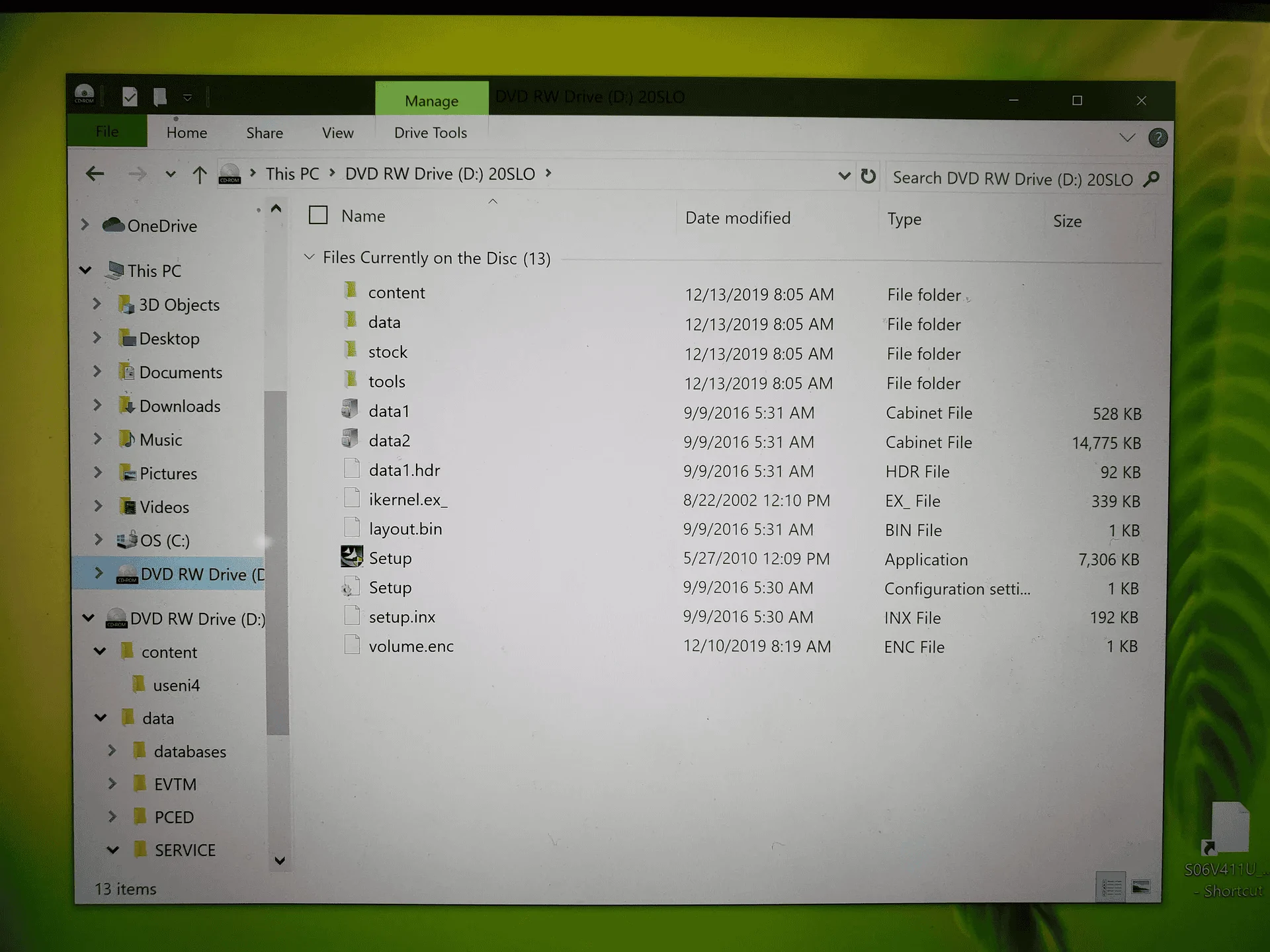
I found this on a different website, but basically the same question: How to load the Helm CD. When you load the CD in your DVD/CD drive, can you see it "mounted" in the File Explorer window (like the image below)? If you can, are you able to run the Setup.exe?

1658359573883.png


Helm lists the system requirements on their site

Ford CD System Requirements:
Windows 3.1 or later
Windows NT4.0 (with service pack 4 or higher)
486-based PC or above
8 MB or memory or better
40 MB of free disk space
CD ROM drive (minimum 2x speed)
VGA monitor 1024 x 768 capable is recommended
 
Last edited:
OP
OP
seely

seely

Well-Known Member
Joined
Jun 27, 2021
Threads
28
Messages
159
Reaction score
25
Location
California
First Name
seedy
Vehicle(s)
none
I found this on a different website, but basically the same question: How to load the Helm CD. When you load the CD in your DVD/CD drive, can you see it "mounted" in the File Explorer window (like the image below)? If you can, are you able to run the Setup.exe?

1658359573883.webp


Helm lists the system requirements on their site

Ford CD System Requirements:
Windows 3.1 or later
Windows NT4.0 (with service pack 4 or higher)
486-based PC or above
8 MB or memory or better
40 MB of free disk space
CD ROM drive (minimum 2x speed)
VGA monitor 1024 x 768 capable is recommended
saw those requirements but wanted to verify before buying a windows laptop for this.

i have not tried yet.

not sure what "Windows NT4.0" is
 

Highvolts

Well-Known Member
Joined
May 13, 2022
Threads
11
Messages
332
Reaction score
537
Location
Ohio
First Name
Jason
Vehicle(s)
2022 Mustang GT, 1965 Mustang 289
I found this on a different website, but basically the same question: How to load the Helm CD. When you load the CD in your DVD/CD drive, can you see it "mounted" in the File Explorer window (like the image below)? If you can, are you able to run the Setup.exe?

1658359573883.png


Helm lists the system requirements on their site

Ford CD System Requirements:
Windows 3.1 or later
Windows NT4.0 (with service pack 4 or higher)
486-based PC or above
8 MB or memory or better
40 MB of free disk space
CD ROM drive (minimum 2x speed)
VGA monitor 1024 x 768 capable is recommended

Those system requirements are from the 1990s (not kidding). Hopefully, any modern Windows PC will be covered by the "or later, or above, or better, etc". I hope that they wouldn't require windows 3.1 or NT 3.1.
 

br_an

Well-Known Member
Joined
Jun 28, 2019
Threads
23
Messages
1,314
Reaction score
1,750
Location
Boise, Idaho
First Name
Bran
Vehicle(s)
2016 Shelby GT350, 2020 Ford F150
Those system requirements are from the 1990s

Totally, buuuut I wouldn't be surprised if some of the more "seasoned" gents around here still had a machine from this era 😜


saw those requirements but wanted to verify before buying a windows laptop for this.

i have not tried yet.

not sure what "Windows NT4.0" is
Are you a mac user? If so, rather than buying a whole new Windows-based laptop, you could use Bootcamp to run Windows in a partition, or perhaps a virtual machine running Windows... Depending on your comfort level with that sort of thing.
 

Sponsored

Highvolts

Well-Known Member
Joined
May 13, 2022
Threads
11
Messages
332
Reaction score
537
Location
Ohio
First Name
Jason
Vehicle(s)
2022 Mustang GT, 1965 Mustang 289
Totally, buuuut I wouldn't be surprised if some of the more "seasoned" gents around here still had a machine from this era 😜
I did. Lol. But I've been futzing around with computers since I was like 8. I'm "only" 40.
 

Highvolts

Well-Known Member
Joined
May 13, 2022
Threads
11
Messages
332
Reaction score
537
Location
Ohio
First Name
Jason
Vehicle(s)
2022 Mustang GT, 1965 Mustang 289
I did. Lol. But I've been futzing around with computers since I was like 8. I'm "only" 40.
I guess I'm seasoned. Hopefully well seasoned! Nothing worse than under seasoning :)
 

br_an

Well-Known Member
Joined
Jun 28, 2019
Threads
23
Messages
1,314
Reaction score
1,750
Location
Boise, Idaho
First Name
Bran
Vehicle(s)
2016 Shelby GT350, 2020 Ford F150
I did. Lol. But I've been futzing around with computers since I was like 8. I'm "only" 40.
That's awesome! My first computer was an Apple II GS in the 80s, I've been around computers my whole life. 40 is the new 20 🤣
 

Highvolts

Well-Known Member
Joined
May 13, 2022
Threads
11
Messages
332
Reaction score
537
Location
Ohio
First Name
Jason
Vehicle(s)
2022 Mustang GT, 1965 Mustang 289
That's awesome! My first computer was an Apple II GS in the 80s, I've been around computers my whole life. 40 is the new 20 🤣
Atari 1200XL here :) in the 80s
 
OP
OP
seely

seely

Well-Known Member
Joined
Jun 27, 2021
Threads
28
Messages
159
Reaction score
25
Location
California
First Name
seedy
Vehicle(s)
none
Totally, buuuut I wouldn't be surprised if some of the more "seasoned" gents around here still had a machine from this era 😜


Are you a mac user? If so, rather than buying a whole new Windows-based laptop, you could use Bootcamp to run Windows in a partition, or perhaps a virtual machine running Windows... Depending on your comfort level with that sort of thing.
yeah im aware of that or using a virtual machine but i prefer to have a separate computer if i can.

the reason is because i will use it while working on the car in the garage and my mac is old and slow.

+ the computer doesnt have a CD drive
 

Sponsored
OP
OP
seely

seely

Well-Known Member
Joined
Jun 27, 2021
Threads
28
Messages
159
Reaction score
25
Location
California
First Name
seedy
Vehicle(s)
none
Those system requirements are from the 1990s (not kidding). Hopefully, any modern Windows PC will be covered by the "or later, or above, or better, etc". I hope that they wouldn't require windows 3.1 or NT 3.1.

that still doesnt answer the question what windows NT is exactly or why its required for this service manual CD
 

Highvolts

Well-Known Member
Joined
May 13, 2022
Threads
11
Messages
332
Reaction score
537
Location
Ohio
First Name
Jason
Vehicle(s)
2022 Mustang GT, 1965 Mustang 289
that still doesnt answer the question what windows NT is exactly or why its required for this service manual CD
An ancient windows based operating system released in 1996.

it shouldn't be required as is says or later

Here is a whole wiki on it for your education.
 
OP
OP
seely

seely

Well-Known Member
Joined
Jun 27, 2021
Threads
28
Messages
159
Reaction score
25
Location
California
First Name
seedy
Vehicle(s)
none
An ancient windows based operating system released in 1996.

it shouldn't be required as is says or later

Here is a whole wiki on it for your education.

i see. it seemed like an additional requirement to "windows 3.1 or later" the way they listed it.

so it seems like all i need is:
windows 3.1 or later
486-based PC or above
8 MB or memory or better
40 MB of free disk space
CD ROM drive (minimum 2x speed)

and then just run the exe and be fine. that seems to easy... but ill try it out
 

Highvolts

Well-Known Member
Joined
May 13, 2022
Threads
11
Messages
332
Reaction score
537
Location
Ohio
First Name
Jason
Vehicle(s)
2022 Mustang GT, 1965 Mustang 289
i see. it seemed like an additional requirement to "windows 3.1 or later" the way they listed it.

so it seems like all i need is:
windows 3.1 or later
486-based PC or above
8 MB or memory or better
40 MB of free disk space
CD ROM drive (minimum 2x speed)

and then just run the exe and be fine. that seems to easy... but ill try it out
it should be that easy. Setup.exe does all the hard work for you and copies supporting files to all the right places on your computer.

If you have any doubts, it might be worth a call to helms to validate everything before you purchase as most software is not returnable.
 

br_an

Well-Known Member
Joined
Jun 28, 2019
Threads
23
Messages
1,314
Reaction score
1,750
Location
Boise, Idaho
First Name
Bran
Vehicle(s)
2016 Shelby GT350, 2020 Ford F150
+ the computer doesnt have a CD drive

Yeah, not many do these days, for better or worse. External DVD drives are available, or perhaps you could copy the CD to a USB thumbdrive from a machine with a DVD drive (if you have access to one). Anyway, you have some options there. Good luck!
Sponsored


Top