
AngelsofVerdun
Active Member
- Joined
- Feb 21, 2021
- Threads
- 7
- Messages
- 33
- Reaction score
- 19
- Location
- Huntsville, AL
- First Name
- Cody
- Vehicle(s)
- 2015 Mustang GT Base w/ PP1 & 6 SPD
- Thread starter
- #1
UPDATE: I am going to order a usb 3.0 extension hub that replaces the 12v connector and see if it works. I am a bit worried about voltage sag due to excessive length on the cable(3ft for the extension + 3-5ft for the Phoenix Audio USB), especially when you factor in the length of the cable that plugs into the device. Who knows, maybe I will get lucky? I am going to test a REALLY long USB C cable that I have laying around to see if Android Auto still functions properly over that length.
This is going to be a long-winded post, so buckle in if you care for an adventure, at least. I recently purchased one of the Phoenix Audio PX6 10.4" units for my '15 Base Mustang GT w/ Sync 1 4" infotainment. Obviously, the infotainment was one of the first things I wanted to change on the vehicle; however, I did not want to spend a fortune on the "OEM-like" SYNC3 conversion systems($1500+ is just too much). I stumbled on the Phoenix systems, and I was satisfied enough with the testimonials out there. With that said, I embarked on this financial odyssey knowing there could/would be complications. I will spare the details on the unit, but I will say that it works REALLY well. With the exclusion of the USB issues(topic of this post), I've thoroughly enjoyed the unit's quality of life improvement.
So, the USB hub? Right..... I was told by the folks at PA that the unit would retain--in-fact use--my factory USB ports, including or Android Auto functionality. Imagine my lack of astonishment when I found out that, after plugging the unit in, the USB ports did not engage the Z-Link provided Android Auto system. Unfortunately, only the two dangling USB ports provided by PA will work for AA. Both of these ports are currently routed to the glove box, as their documentation recommends this. This implies that I have to put my phone in the damn glove box while driving in order to use Android Auto, an exasperating circumstance certainly. I did some digging and found out that you can upgrade the USB module in the center console to a newer OEM hub that works with AA/ACP on the Sync3 units. Obviously, I purchased it here: https://www.amazon.com/gp/product/B07JVRBNC2/ref=ppx_yo_dt_b_asin_title_o00_s00?ie=UTF8&psc=1
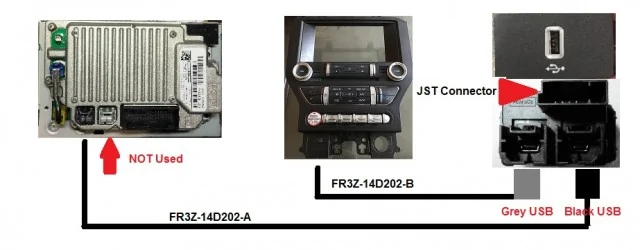
To my dismay, it is not plug-n-play. The Base Sync unit module is a physical USB clipped to the module and a media cable for, I suspect, the AUX port. Once I popped it out, I knew it would not work. After digging, I realized I MIGHT be able to scavenge my mistake. Here's what I am thinking:
Technically, I can get my hands on the two cables that are supposed to work with the Hub I purchased; I think I MIGHT be able to plug those into the Sync1 APIM to transfer the data that way.
OR
I do the following:
My other alternative would be buying the OEM cables that go to the new hub and trying to hook them up to the Sync 1 module behind the radio. However, I believe that I have read it is not plug-n-play--requiring modification of the APIM adapter for the base Sync system. Feel free to leave a post telling me how crazy I am below. For now, I will try this and post an update later. NO PHONES IN GLOVE BOXES! This was the one HUGE oversight by PA; in my opinion.
Acronym Dictionary:
AA = Android Auto
ACL = Apple Car Play
APIM = Accessory Protocol Interface Module
Here's an image for the Module and APIM:

This is going to be a long-winded post, so buckle in if you care for an adventure, at least. I recently purchased one of the Phoenix Audio PX6 10.4" units for my '15 Base Mustang GT w/ Sync 1 4" infotainment. Obviously, the infotainment was one of the first things I wanted to change on the vehicle; however, I did not want to spend a fortune on the "OEM-like" SYNC3 conversion systems($1500+ is just too much). I stumbled on the Phoenix systems, and I was satisfied enough with the testimonials out there. With that said, I embarked on this financial odyssey knowing there could/would be complications. I will spare the details on the unit, but I will say that it works REALLY well. With the exclusion of the USB issues(topic of this post), I've thoroughly enjoyed the unit's quality of life improvement.
So, the USB hub? Right..... I was told by the folks at PA that the unit would retain--in-fact use--my factory USB ports, including or Android Auto functionality. Imagine my lack of astonishment when I found out that, after plugging the unit in, the USB ports did not engage the Z-Link provided Android Auto system. Unfortunately, only the two dangling USB ports provided by PA will work for AA. Both of these ports are currently routed to the glove box, as their documentation recommends this. This implies that I have to put my phone in the damn glove box while driving in order to use Android Auto, an exasperating circumstance certainly. I did some digging and found out that you can upgrade the USB module in the center console to a newer OEM hub that works with AA/ACP on the Sync3 units. Obviously, I purchased it here: https://www.amazon.com/gp/product/B07JVRBNC2/ref=ppx_yo_dt_b_asin_title_o00_s00?ie=UTF8&psc=1
To my dismay, it is not plug-n-play. The Base Sync unit module is a physical USB clipped to the module and a media cable for, I suspect, the AUX port. Once I popped it out, I knew it would not work. After digging, I realized I MIGHT be able to scavenge my mistake. Here's what I am thinking:
Technically, I can get my hands on the two cables that are supposed to work with the Hub I purchased; I think I MIGHT be able to plug those into the Sync1 APIM to transfer the data that way.
OR
I do the following:
- Buy this cable: https://www.amazon.com/gp/product/B00P0GI696/ref=ox_sc_act_title_2?smid=AKXVBT49GGF3B&psc=1
- Plug that cable into one of the ports on the back of the new hub(the one that carries data FROM the source) and plug it directly into one of the Phoenix Audio ports they provide in-behind the PX6 unit.
My other alternative would be buying the OEM cables that go to the new hub and trying to hook them up to the Sync 1 module behind the radio. However, I believe that I have read it is not plug-n-play--requiring modification of the APIM adapter for the base Sync system. Feel free to leave a post telling me how crazy I am below. For now, I will try this and post an update later. NO PHONES IN GLOVE BOXES! This was the one HUGE oversight by PA; in my opinion.
Acronym Dictionary:
AA = Android Auto
ACL = Apple Car Play
APIM = Accessory Protocol Interface Module
Here's an image for the Module and APIM:
Sponsored
Last edited:


