Arrio
Ecoboost
Sure. I'd be happy to help you out on that.Sweet, thanks! I'll update the wiki. I'll get more pics of the other labels too if you don't mind translating them

Sponsored

Sure. I'd be happy to help you out on that.Sweet, thanks! I'll update the wiki. I'll get more pics of the other labels too if you don't mind translating them

Just ordered the same cable, it'll be here tomorrow with my camera, thanks Amazon Prime!Here are the WiFi networks that my unit can detect while sitting in my garage, with the antenna screwed in the back. All connections have poor reception.
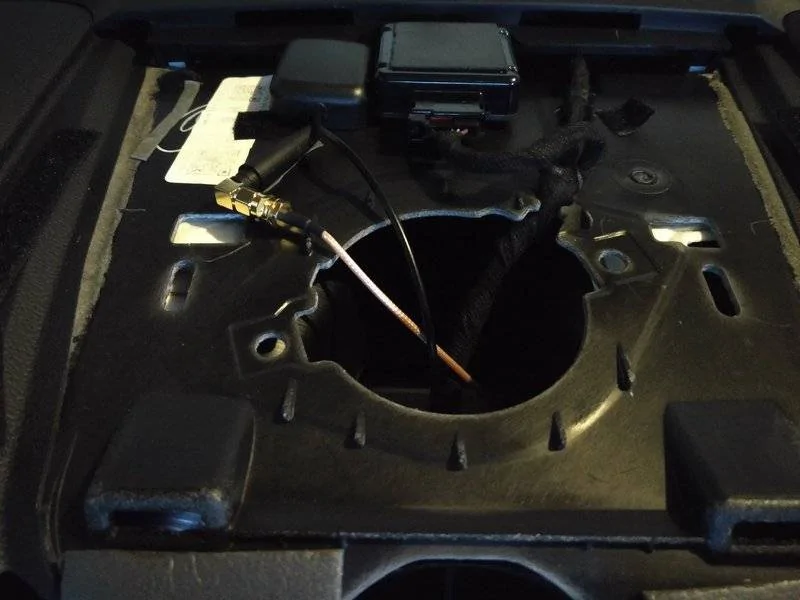
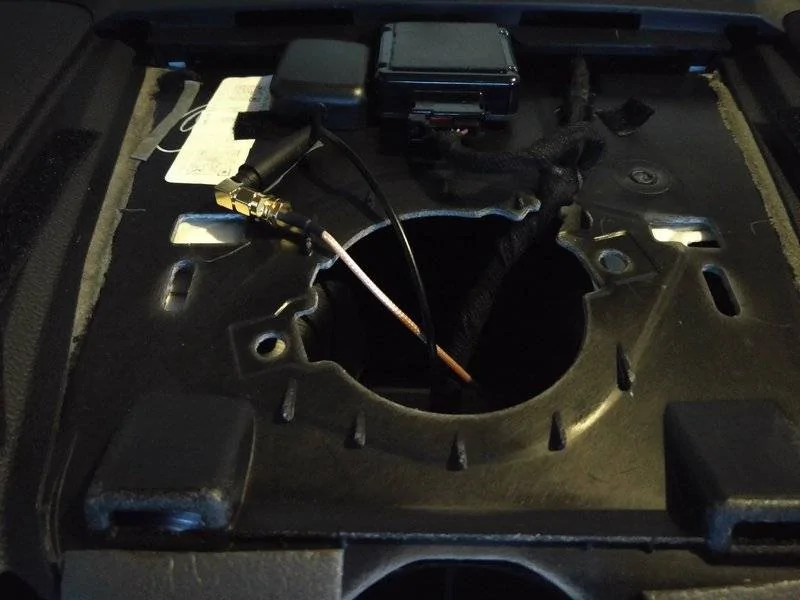
Here's where i mounted the antenna. The cable is pretty difficult to work with, I tried the antenna in numerous spots and it made no difference where it was placed.

Here are the networks available after the WiFi antenna was installed. My car is in the same spot and you can obviously see how many new networks are discovered. Reception is much better, it connects to my WiFi instantly and is quick. Rather than having a "poor" connection, its rated at "excellent". Using the speedtest.net app, I was getting around 4x1Mbps on my 60x5Mbps connection. That wasn't very good, but my router is at the complete other end of my house and my GF was watching Netflix. Nonetheless, I came from 30kbps to this. I also hijacked my routers 8" antenna and that didnt make any difference in connectivity/speeds. I would say this is a major victory!

So I ordered a new antenna with a male pin, are you saying that the antenna won't work without the cable? If so, can you post the information for the parts you bought?Here are the WiFi networks that my unit can detect while sitting in my garage, with the antenna screwed in the back. All connections have poor reception.
Here's where i mounted the antenna. The cable is pretty difficult to work with, I tried the antenna in numerous spots and it made no difference where it was placed.
Here are the networks available after the WiFi antenna was installed. My car is in the same spot and you can obviously see how many new networks are discovered. Reception is much better, it connects to my WiFi instantly and is quick. Rather than having a "poor" connection, its rated at "excellent". Using the speedtest.net app, I was getting around 4x1Mbps on my 60x5Mbps connection. That wasn't very good, but my router is at the complete other end of my house and my GF was watching Netflix. Nonetheless, I came from 30kbps to this. I also hijacked my routers 8" antenna and that didnt make any difference in connectivity/speeds. I would say this is a major victory!
This cable.So I ordered a new antenna with a male pin, are you saying that the antenna won't work without the cable? If so, can you post the information for the parts you bought?
Ordered, thank you Patrick. Since we have "The Translator," maybe we should call you the Godfather...This cable.
DHT Electronics RF coaxial coax assembly SMA male to RP-SMA female 20 inches https://www.amazon.com/dp/B00MAY8O1Q/ref=cm_sw_r_cp_apa_VnP0ybG25WRKB
I think [MENTION=24567]Pablotheartist[/MENTION] is the Godfather, I'm just a Goodfella.Ordered, thank you Patrick. Since we have "The Translator," maybe we should call you the Godfather...
No way, he's Capone.I think @Pablotheartist is the Godfather, I'm just a Goodfella.
Does that mean @StangATX is Joe Pesci? :lol:

I posted what cable I ordered on post #1719, but I see Patrick got you taken care of. You may want to give the antenna you bought a try and see what kind of reception you get with it screwed in directly. I imagine the unit itself emits some EMP, which isn't good for WiFi, so running it up on top of the dash is a pretty good idea.So I ordered a new antenna with a male pin, are you saying that the antenna won't work without the cable? If so, can you post the information for the parts you bought?
I keep meaning to post about this! If you have Pandora or Spotify installed on the unit it's unaffected completely by the EQ of the head unit, in fact, I think it's only coming from the front speakers. If you stream from Spot/Pan on your phone via Bluetooth, it sounds WAY better, except for the weird clipping that has been mentioned. I thought it was related to accelerating too hard/bumps/etc but it would make sense that it's a BT/WiFi cross-talk issue, because I believe they are both using 2.4Ghz, which would explain the noise. My home router has 2.4 and 5Ghz networks, but it doesn't see the 5Ghz network. You can try changing the channel that your WiFi is using (it's usually 6 by default on a lot of routers) bump it to 1 or 11, since they're less "crowded" and it might help with the cross talk issue.Oh, and before killing my cars battery last night, I found the unit doesn't like multi tasking much. I was downloading some offline google maps and playing some BT music, and the audio was all kinds of choppy.
Additionally, playing music through Spotify and using spotify's EQ sounds terrible when compared to Spotify through BT audio. I relate the difference in sound to the loudness feature built into the unit. The loudness function does not alter audio from Spotify. In fact, I was able to play the radio app ON TOP of Spotify.
I'd be willing to bet the poor connection to a real antenna is part of the issue. it doesn't help matters that the WiFi chip is unshielded, and so close to the BT module inside the host.I imagine the unit itself emits some EMP, which isn't good for WiFi, so running it up on top of the dash is a pretty good idea.
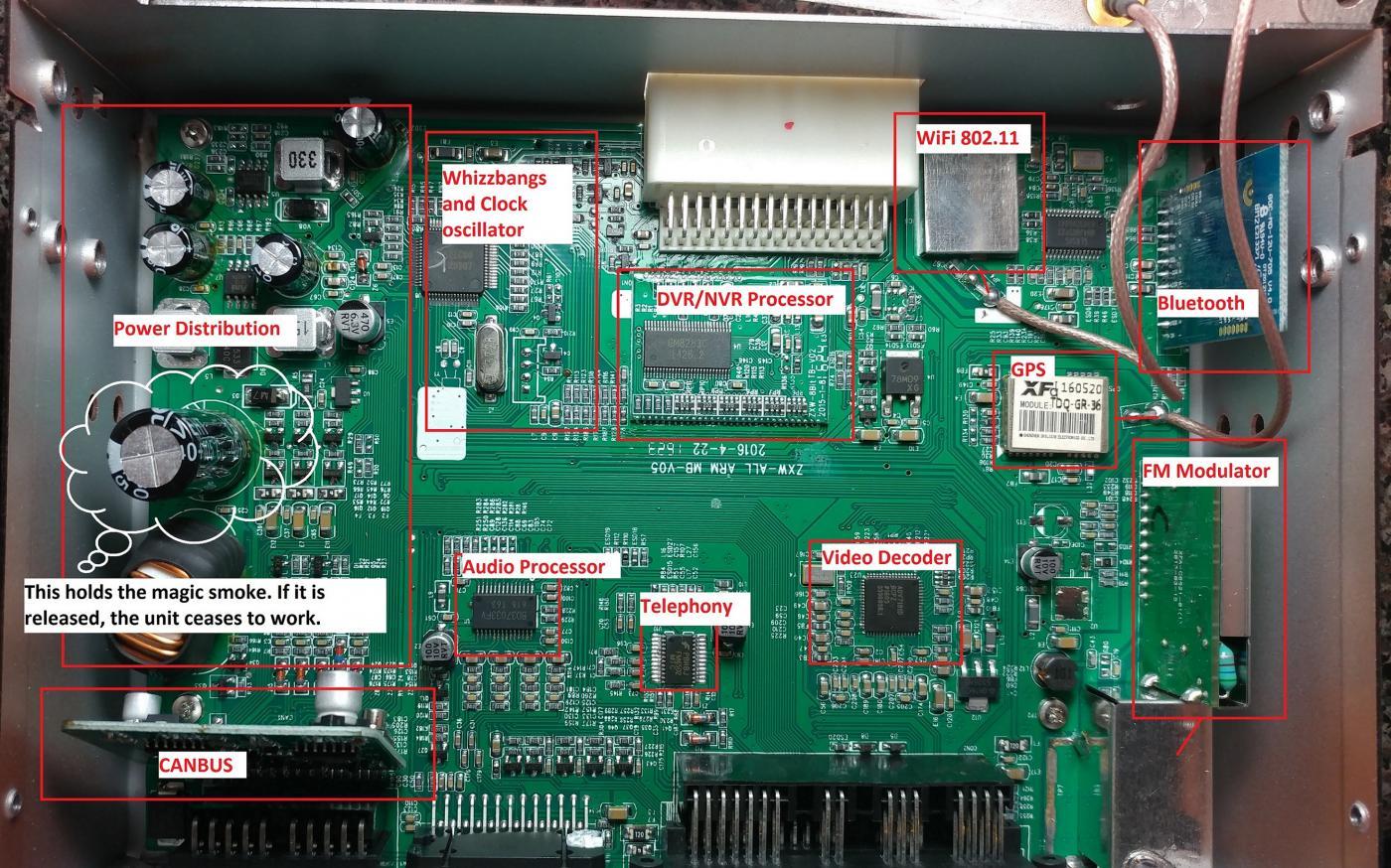
I also thought that audio was only going through the front speakers (I'm not crazy afterall).
Has anyone else noticed the volume up and down buttons used on their steering wheel sticking (I dont mean I spilled some shit on the physical buttons and they're sticking) and causing volume to continue going down or up, all on its own? Its happened like 5 times to me. I'll tap volume up or down a couple times, and volume will just keep climbing or dropping without me touching anything. Its like the unit receives the command and hangs on it.