Sponsored

Modifying As-Built Data Guide

BULL1TT

Well-Known Member
Joined
Sep 7, 2014
Threads
23
Messages
414
Reaction score
87
Location
culpeper, va
Vehicle(s)
2015 mustang GT, 2001 Bullitt
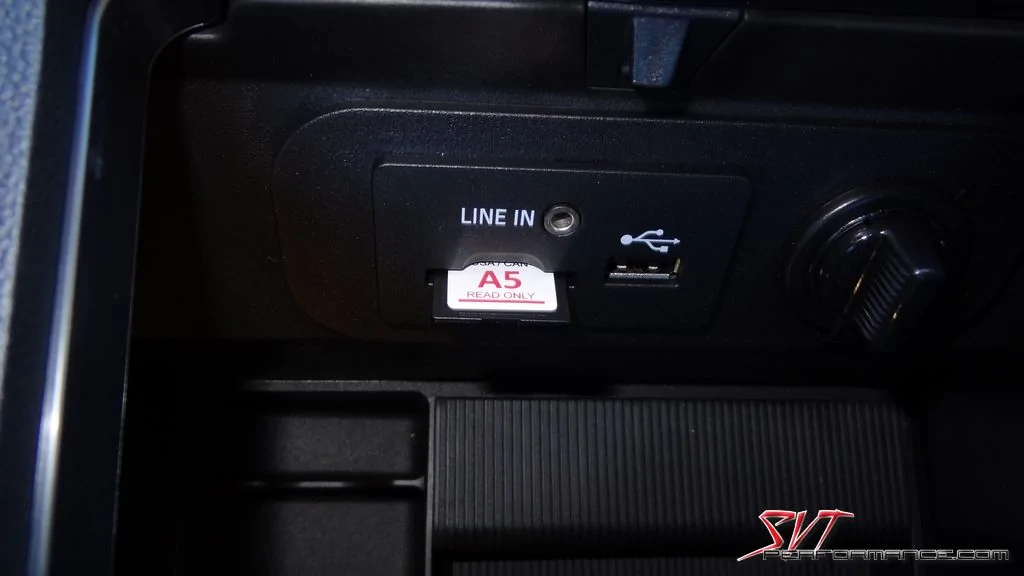
If this thing is anything like it is in the f150... that whole piece just pops out... so if you just have USB in your arm rest, you can order a usb/card hub from a premium GT from the dealer. Couldn't cost more than $50 bucks.

N6UXA8U.webp
The multimedia module is around $100 and the pigtail plug is about $45. Add another $55 for the maps card and you're looking at $200. It really isn't worth it to me at that price.
Sponsored


BBB

Banned
Banned
Banned
Joined
Apr 19, 2015
Threads
50
Messages
1,568
Reaction score
1,020
Location
Potatoville
Vehicle(s)
Premium GT Poverty Snack
The multimedia module is around $100 and the pigtail plug is about $45. Add another $55 for the maps card and you're looking at $200. It really isn't worth it to me at that price.
nav from factory is a $1000 option... I used my phone for nav for years but with forscan I just turned it on for the cost of the OBD II reader and the map pack... pretty nifty if you ask me.
 

Sponsored

metalhead79

That thang got a Hemi?
Joined
Sep 17, 2016
Threads
14
Messages
525
Reaction score
151
Location
Colorado Springs, Co
Vehicle(s)
2022 Mustang GT
You are correct!

I read through about 25 pages of this thread and didn't see what I was looking for. What is the recommended method for getting the map pack? Any cheap or free way?

If I do need to contact my dealer, what do I tell them? "Hey, I need a map pack for a 2015 MyFord Touch navigation system?" Any idea what the cost is from a dealer?
 

kenbidwell

Well-Known Member
Joined
Jul 26, 2015
Threads
13
Messages
195
Reaction score
45
Location
Tampa
First Name
Ken
Vehicle(s)
2015 Mustang GT, 2020 F250 Tremor, 2008 Pontiac Solstice GXP(wifes car)
I got my maps from e-bay, cheap and fast.
 

klineka

Well-Known Member
Joined
Jul 26, 2016
Threads
6
Messages
146
Reaction score
41
Location
Columbus, OH
Vehicle(s)
2015 Ecoboost Premium
I read through about 25 pages of this thread and didn't see what I was looking for. What is the recommended method for getting the map pack? Any cheap or free way?

If I do need to contact my dealer, what do I tell them? "Hey, I need a map pack for a 2015 MyFord Touch navigation system?" Any idea what the cost is from a dealer?
Reread page 70, I had a similar question and was answered there. Any maps from A4-A7 will work, seem to be like $50-$100 from ebay
 

jstump2490

Well-Known Member
Joined
Feb 29, 2016
Threads
31
Messages
368
Reaction score
71
Location
Ohio
Vehicle(s)
2015 Mustang GT Premium
Someone might want to add the instructions from the F-150 spreadsheet to our S550 master spreadsheet to make it easier to find since it is going to get buried in new posts. I just requested access if someone wants to let me do it.
 

Sponsored

metalhead79

That thang got a Hemi?
Joined
Sep 17, 2016
Threads
14
Messages
525
Reaction score
151
Location
Colorado Springs, Co
Vehicle(s)
2022 Mustang GT
I"m a little confused on step 1b and step 2.

Step 1b says "Download NAV update at link to the right and extract contents to a blank FAT-32 formatted usb drive and install."
I extracted it to my thumb drive but it's just some .cab files. What am I installing this to?

Step 2 says "In FORScan, go to programming screen for APIM and change 7D0-01-02 to: x4xx xxxx xxxx to enable NAV (just write the "4" in the appropriate spot and ignore any message about incorrect checksum and click continue)"
So I'm connecting to my car's APIM with the OBD II sensor here, correct?

Sorry for the questions, I'm an IT guy but I'm not familiar with messing with my car like this and don't want to break something.
 

solodogg

Well-Known Member
Joined
Sep 13, 2016
Threads
13
Messages
442
Reaction score
167
Location
Orlando
Vehicle(s)
2015 Mustang Ecoboost
Step 1b says "Download NAV update at link to the right and extract contents to a blank FAT-32 formatted usb drive and install."
I extracted it to my thumb drive but it's just some .cab files. What am I installing this to?
Just put those .cab files on a USB, and plug it into your USB port in the car. The system will read them, and start updating the files.

Step 2 says "In FORScan, go to programming screen for APIM and change 7D0-01-02 to: x4xx xxxx xxxx to enable NAV (just write the "4" in the appropriate spot and ignore any message about incorrect checksum and click continue)"
So I'm connecting to my car's APIM with the OBD II sensor here, correct?
That's correct. You're just changing the code in the APIM module that tells it what features are currently installed. By changing that bit to a 4, you are telling it that navigation is installed.
 

jstump2490

Well-Known Member
Joined
Feb 29, 2016
Threads
31
Messages
368
Reaction score
71
Location
Ohio
Vehicle(s)
2015 Mustang GT Premium
I"m a little confused on step 1b and step 2.

Step 1b says "Download NAV update at link to the right and extract contents to a blank FAT-32 formatted usb drive and install."
I extracted it to my thumb drive but it's just some .cab files. What am I installing this to?

Step 2 says "In FORScan, go to programming screen for APIM and change 7D0-01-02 to: x4xx xxxx xxxx to enable NAV (just write the "4" in the appropriate spot and ignore any message about incorrect checksum and click continue)"
So I'm connecting to my car's APIM with the OBD II sensor here, correct?

Sorry for the questions, I'm an IT guy but I'm not familiar with messing with my car like this and don't want to break something.
You need to leave those CAB files in the SyncMyRide folder and place the SyncMyRide folder and the autoinstall.lst file on a flash drive. Do not just put the cab files on the drive or Sync will not know what to do with them. You need to put the whole file structure that was unzipped onto the drive. Once you stick it into the car, it will auto install just like the 3.8 update.
 

metalhead79

That thang got a Hemi?
Joined
Sep 17, 2016
Threads
14
Messages
525
Reaction score
151
Location
Colorado Springs, Co
Vehicle(s)
2022 Mustang GT
Thanks for the replies. They helped clarify a few things. I'm waiting on a friend of mine who is letting me borrow his OBD II sensor and then I'll be all set.
 

Scott Wilson

s550 is life
Joined
Feb 1, 2016
Threads
24
Messages
313
Reaction score
99
Location
Central TX
Vehicle(s)
2016 Mustang GT
Anyone know how to activate the rear proximity sensors? I just replaced my base bumper with a premium and want to activate the sensors. Yes I did swap over all of the hardware needed.
Sponsored


Top