sleepless
Well-Known Member
Best Dash Cam's Available right now
Via TheWireCutter:
Our pick for the Best Dash Cam - G1W Car Dash Cam

The $70 G1W does everything you need a dash cam to do just as well as much more expensive models. Simply put, it captures video at the quality that you’d need (1080 pixels) and it has an interface that’s simple enough for anyone to use. For a vast majority of drivers looking to protect themselves against insurance fraud, this is the cam to buy. The fact that it performs this well for this little money is astounding.
It records at 1080p at 30 frames per second, which is standard for most dash cams. Once uploaded to a computer, however, it’s clear that its chipset and sensor work together to produce exceptional video quality. This, coupled with the cam’s price and simplicity of use, is what makes it the best dash cam for most drivers.
If you’ve ever used a digital camera, you can navigate the G1W. You make all the tweaks on its 2.7-inch screen, which lets you format the card quickly, set the frame rate, and turn off the motion sensor. A lot of the options in there are features you’ll never use, but after testing many cams, we learned that the usability improvements of having a display far outweigh the bulk it adds. For example, there’s no ambiguity as to what’s happening when it’s happening: a blinking red dot tells you it’s recording and a microphone logo tells you that it’s capturing audio.
The simple UI made setup a breeze. I opened the box in the test car, mounted the G1W on the included suction cup, connected the 12-volt cigarette lighter adapter to the camera, inserted the microSD card I bought, and turned on the car. The G1W fired up with its welcome screen and began a live feed from the lens to the rear LCD. Two presses of the top-right “M” button opened up the second menu.
I then hit the arrows to scroll down to “Format,” then pressed the hard “Record” button (which works as the selector in the menus) to confirm. The G1W formatted the card in seconds. From there, I set the screen lockout to three minutes so it would go black after starting driving. I hit record and a flashing red dot indicated it was rolling.
After stopping for gas then starting up again, the G1W fired up, showed it was recording both video and audio (as shown by the microphone on the screen), then blacked out after three minutes. It remained completely autonomous through several more cycles of turning the car on and off.
Being easy to use is important, but it’s really the G1W’s exceptional resolution and image quality that make it a winner. This time last year, 1080p was a luxury that wasn’t worth paying for, but it’s hard to say no when you can have it at the same price as a 720p camera. While testing, we used it under intense sunshine and overcast gray skies as well as at night, and every time, the G1W managed to capture the scenes with such clarity that you could always see the relevant details like street signs and license plates. During the daytime, the G1W is every bit as good as cameras twice as expensive.
The G1W at night time isn’t outstanding, but it’s as good as much more expensive competitors, and its resolution is good enough to capture a collision sufficiently.
Besides the hardware performance, the G1W’s build quality is solid for something this cheap. Don’t get me wrong — when held next to other, more expensive cameras, the G1W feels about as cheap as it is, but in our testing, it proved plenty capable.
According to other reviewers, some dash cams simply can’t withstand the sun and will develop a blurry picture, but the G1W never failed. We ran it in the hot Hawaiian sun for a full day, which included upwards of four hours spent in an unshaded parking lot with the windows up, and the G1W remained fixed to the windshield and continued to function normally without overheating. For comparison, the much more expensive BlackVue DR500-GW, when fired up after sitting in the sun, was so hot that it felt like it would melt its own plastic–something Dash Cam Talk found in their testing of a slightly different BlackVue.
Via TheWireCutter:
Our pick for the Best Dash Cam - G1W Car Dash Cam
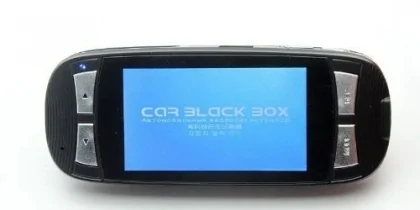
The $70 G1W does everything you need a dash cam to do just as well as much more expensive models. Simply put, it captures video at the quality that you’d need (1080 pixels) and it has an interface that’s simple enough for anyone to use. For a vast majority of drivers looking to protect themselves against insurance fraud, this is the cam to buy. The fact that it performs this well for this little money is astounding.
It records at 1080p at 30 frames per second, which is standard for most dash cams. Once uploaded to a computer, however, it’s clear that its chipset and sensor work together to produce exceptional video quality. This, coupled with the cam’s price and simplicity of use, is what makes it the best dash cam for most drivers.
If you’ve ever used a digital camera, you can navigate the G1W. You make all the tweaks on its 2.7-inch screen, which lets you format the card quickly, set the frame rate, and turn off the motion sensor. A lot of the options in there are features you’ll never use, but after testing many cams, we learned that the usability improvements of having a display far outweigh the bulk it adds. For example, there’s no ambiguity as to what’s happening when it’s happening: a blinking red dot tells you it’s recording and a microphone logo tells you that it’s capturing audio.
The simple UI made setup a breeze. I opened the box in the test car, mounted the G1W on the included suction cup, connected the 12-volt cigarette lighter adapter to the camera, inserted the microSD card I bought, and turned on the car. The G1W fired up with its welcome screen and began a live feed from the lens to the rear LCD. Two presses of the top-right “M” button opened up the second menu.
I then hit the arrows to scroll down to “Format,” then pressed the hard “Record” button (which works as the selector in the menus) to confirm. The G1W formatted the card in seconds. From there, I set the screen lockout to three minutes so it would go black after starting driving. I hit record and a flashing red dot indicated it was rolling.
After stopping for gas then starting up again, the G1W fired up, showed it was recording both video and audio (as shown by the microphone on the screen), then blacked out after three minutes. It remained completely autonomous through several more cycles of turning the car on and off.
Being easy to use is important, but it’s really the G1W’s exceptional resolution and image quality that make it a winner. This time last year, 1080p was a luxury that wasn’t worth paying for, but it’s hard to say no when you can have it at the same price as a 720p camera. While testing, we used it under intense sunshine and overcast gray skies as well as at night, and every time, the G1W managed to capture the scenes with such clarity that you could always see the relevant details like street signs and license plates. During the daytime, the G1W is every bit as good as cameras twice as expensive.
The G1W at night time isn’t outstanding, but it’s as good as much more expensive competitors, and its resolution is good enough to capture a collision sufficiently.
Besides the hardware performance, the G1W’s build quality is solid for something this cheap. Don’t get me wrong — when held next to other, more expensive cameras, the G1W feels about as cheap as it is, but in our testing, it proved plenty capable.
According to other reviewers, some dash cams simply can’t withstand the sun and will develop a blurry picture, but the G1W never failed. We ran it in the hot Hawaiian sun for a full day, which included upwards of four hours spent in an unshaded parking lot with the windows up, and the G1W remained fixed to the windshield and continued to function normally without overheating. For comparison, the much more expensive BlackVue DR500-GW, when fired up after sitting in the sun, was so hot that it felt like it would melt its own plastic–something Dash Cam Talk found in their testing of a slightly different BlackVue.
Sponsored