Sponsored

wireless android auto

blankman

Well-Known Member
Joined
Apr 30, 2024
Threads
34
Messages
372
Reaction score
237
Location
CNY
Vehicle(s)
2023 GT
So when I first got my car last year, I used android auto navigation to get back home from florida. I really hate having a cord running from in front of the shifter to my phone. Also not a fan of running a cord from inside the center console to my phone.

I have seen some Bluetooth adapters that you can plug in any USB and are able to BT to it and android auto works. I am curious if anyone has had luck with these and a good experience? Ive used BT receivers with a 3.5mm input before for my winter car , but they usually die within a year.
Sponsored

 

Crew4991

Well-Known Member
Joined
Sep 11, 2020
Threads
14
Messages
1,240
Reaction score
2,573
Location
Phoenix Arizona / Denver Colorado
First Name
Crew
Vehicle(s)
Ford Mustang GT/CS, Dodge Viper SRT10
I have the CarPlay version of this one since March and haven’t had any issues thus far

https://a.co/d/92M2M3D
Nice, look at that they also have the wireless apple carplay cheaper than the android auto.
I personally prefer the older carplay module that is corded so that it charges my phone.
 

jd_cobra

Well-Known Member
Joined
Jul 4, 2015
Threads
82
Messages
685
Reaction score
481
Location
Texas
First Name
Josh
Vehicle(s)
2022 Mustang GT Dark Matter Gray
Nice, look at that they also have the wireless apple carplay cheaper than the android auto.
I personally prefer the older carplay module that is corded so that it charges my phone.
I had a dedicated anker charger I use if I need to charge it that does the job better than the built in USB port. I rarely need to use it though and the phone mainly stays in my pocket which is nice because I’m lazy lol.
 

MathematicsDP

Well-Known Member
Joined
May 15, 2024
Threads
2
Messages
50
Reaction score
37
Location
Middleburg, Florida
First Name
Darryl
Vehicle(s)
2017 Ford Mustang GT
I have gone through a list of adapters to use wireless carplay and wireless android auto. Out of all of them, Carlinkit Tbox was the best option for me and my personal preference.

https://a.co/d/0ohz6kG

It allows for you to use it as a standalone device as long as you have wifi. If you have wifi in your car, you can connect it to that or you can use your wifi Hotspot to use a full standalone device. You also have the option of using wireless Carplay and Wireless Android auto that connects via Bluetooth.

I use it as a standalone and my phone is connected to it via Bluetooth. I'm able to watch movies and TV shows in my car while on lunch or if I'm just sitting in the car parked. Netflix, Amazon Prime, HBO Max, YouTube, Hulu, Tiktok, and the list goes on and on.

If you go this route so not get anything lower than the 8GB + 128 GB version. I've tried the 4+64 and it had some lag when booting up. But I'm completely happy with the 8+128 version. But the benefits of it is a game changer for me to allow me options on how I want to use it.
 

Sponsored

Ferrcad

Well-Known Member
Joined
Sep 13, 2015
Threads
2
Messages
202
Reaction score
102
Location
Western PA
First Name
Brian
Vehicle(s)
2015 Mustang GT Convertible
OP
OP
blankman

blankman

Well-Known Member
Joined
Apr 30, 2024
Threads
34
Messages
372
Reaction score
237
Location
CNY
Vehicle(s)
2023 GT
I think this might be exactly what I'm looking for. I'll have to order it next week. As you own a couple maybe you can answer a question for me. Does it connect to the phone via Bluetooth or create its own wifi Hotspot to access it via phone. I guess I'm just not sure why they specify you need a 5ghz wifi and Bluetooth. The o structures aren't clear on why you need wifi for it.
 

Ferrcad

Well-Known Member
Joined
Sep 13, 2015
Threads
2
Messages
202
Reaction score
102
Location
Western PA
First Name
Brian
Vehicle(s)
2015 Mustang GT Convertible
I think this might be exactly what I'm looking for. I'll have to order it next week. As you own a couple maybe you can answer a question for me. Does it connect to the phone via Bluetooth or create its own wifi Hotspot to access it via phone. I guess I'm just not sure why they specify you need a 5ghz wifi and Bluetooth. The o structures aren't clear on why you need wifi for it.
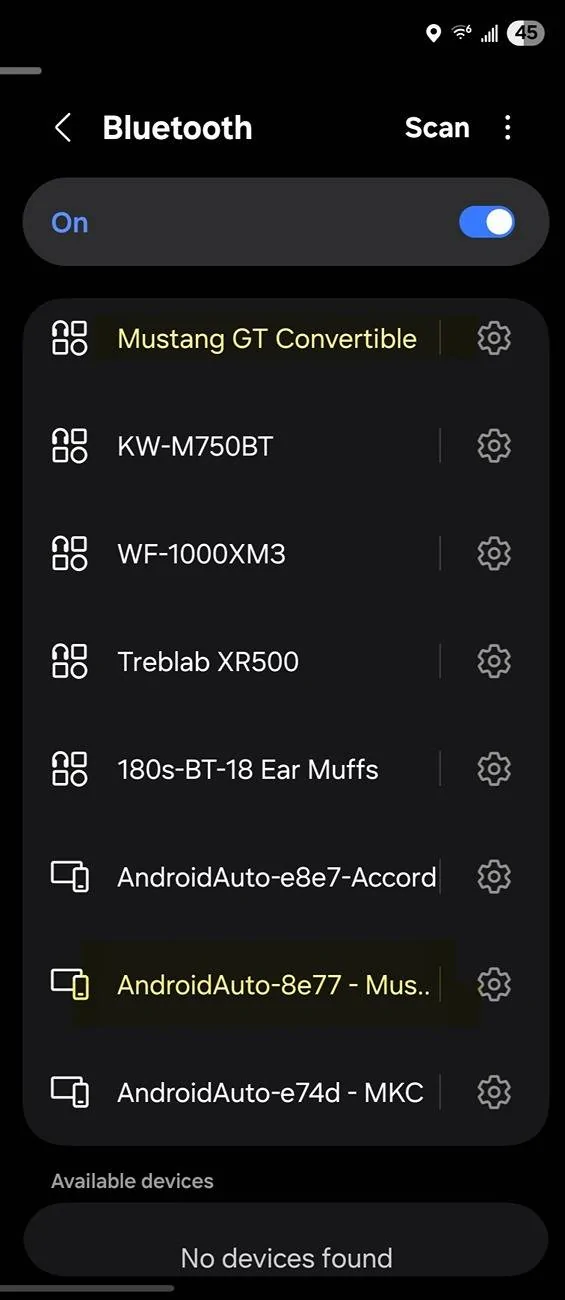
It is a two step process, first connect phone to radio via Bluetooth then you do the same to Motorola device. Once the radio sees the connection via Motorola for the first time it will prompt you to allow for Android Auto. Do so and then your pretty much done. I will say, it takes about a minute upon start up to connect wireless via AA but works well after. I use it primarily for Waze police alerts along with streaming xmradio from my main account. I also renamed all my Motorola device after setup to keep clear. If you only have one then really no big deal. See screen shot attached of my Bluetooth settings... GL

Screenshot_20250628_064839_Settings.jpg
 
OP
OP
blankman

blankman

Well-Known Member
Joined
Apr 30, 2024
Threads
34
Messages
372
Reaction score
237
Location
CNY
Vehicle(s)
2023 GT
I appreciate that. I just wasn't sure why the item page and their instructions require you to have a BT 5 ghz wifi connection, as it doesn't make any sense as they are two different actual protocols. From what I read it needs to switch to BT to the car for hands free? I am absolutely fine with that as i don't use my phone in the car. I will definitely be ordering one tomorrow. Thanks for the info.
 

Bob Lob Law

Well-Known Member
Joined
Apr 18, 2023
Threads
8
Messages
808
Reaction score
1,255
Location
417
First Name
Jeff
Vehicle(s)
'22 GT 401A ESS A10
I appreciate that. I just wasn't sure why the item page and their instructions require you to have a BT 5 ghz wifi connection, as it doesn't make any sense as they are two different actual protocols. From what I read it needs to switch to BT to the car for hands free? I am absolutely fine with that as i don't use my phone in the car. I will definitely be ordering one tomorrow. Thanks for the info.
Because wireless AA uses wifi for the data transfer. It starts with BT for the initial connection, then once AA boots up it establishes a connection using wifi signal(you don't need wifi data) between the radio and the phone for the much faster data transfer than BT. It treats wifi like it's Bluetooth basically, not needing an external wifi signal. I had Sync4 in my last truck. If your phone is connected to your home wifi it will take breaking that signal before AA will take over. I found disconnecting from any other wifi source before starting AA and it'll connect a lot faster and more consistently.
Sponsored

 
Last edited:


Top