xVolaft
Well-Known Member
- Thread starter
- #1
I recently upgraded my '17 base Mustang from a 4" screen to an 8" screen by following 4Dtech youtube video, everything work but..
However, the start button does not respond at all. Pressing the button does not activate any accessory power, nor does it initiate the engine start-up.
Interestingly, I observed that when I press the power button on the radio bezel to turn on the screen, it powers up (The screen works great) and when pressing it again it shuts off.
In an attempt to resolve the issue, I carefully inspected and ensured that all connections to the harness were securely in place. Additionally, I disassembled and reassembled the components, but unfortunately, this did not resolve the problem.
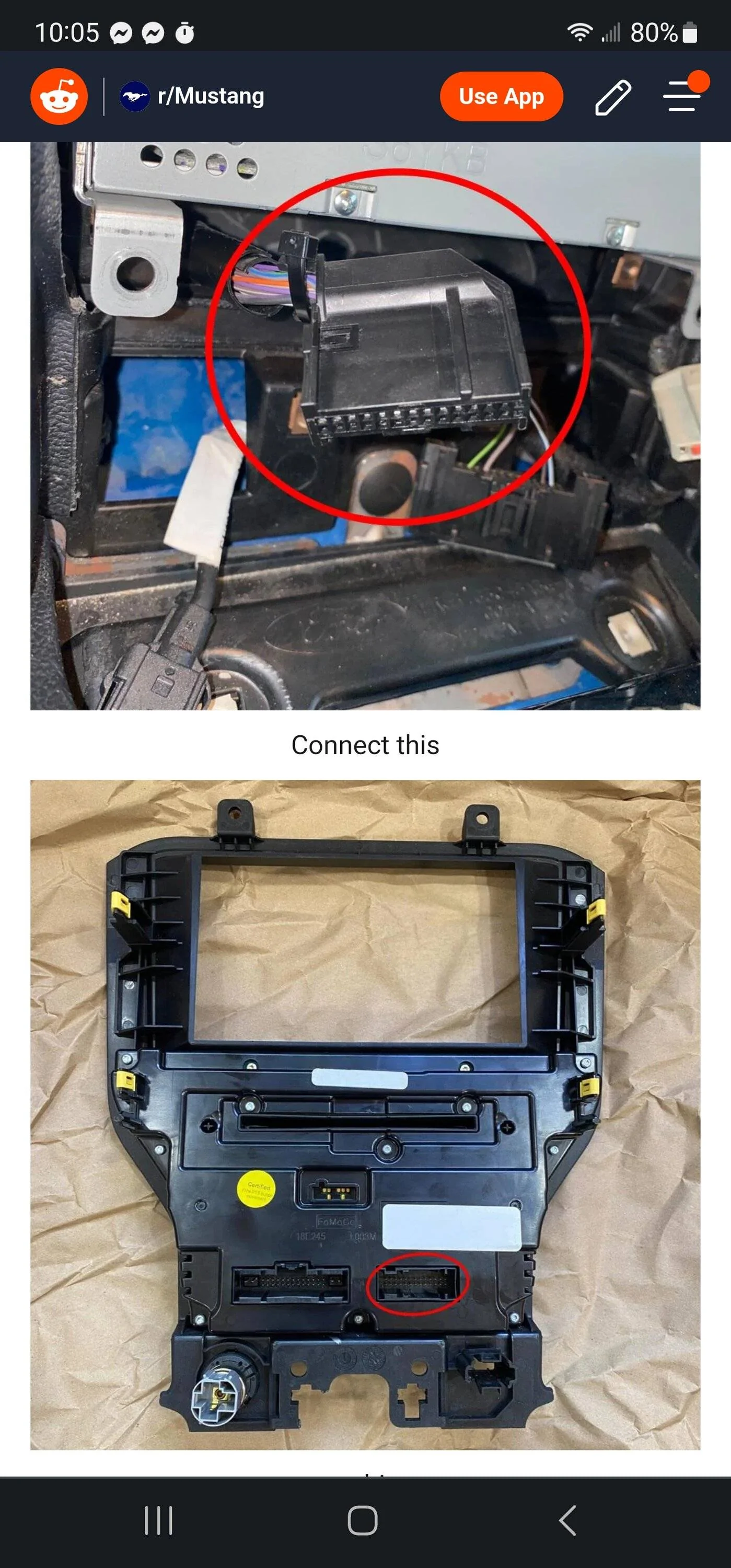
Furthermore, I noticed that when I used the bezel without the conversion, the start button worked perfectly fine. However, I guess that the buttons of the bezel won't sync with the screen or function properly since it is not directly connected to it using the harness. (Temporary solution shown below)
I even attempted to clean the harness using WD-40, but regrettably, the issue persists, suggesting that the harness itself may be defective.
It's puzzling because the car can be started using the remote, but the starter button doesn't work as it should.
Temporary solution: posted in reddit (with pictures).
LINK: CLICK HERE
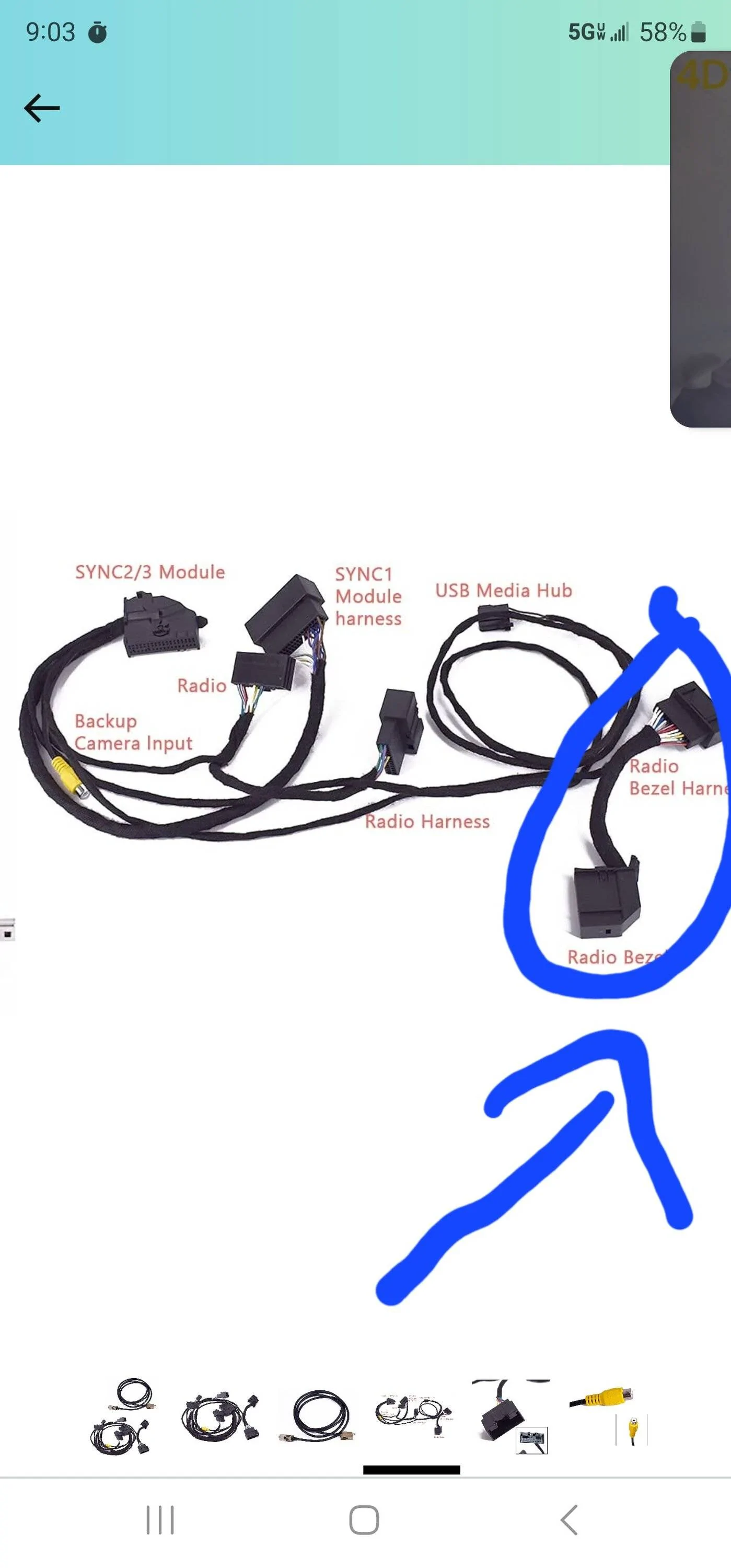
After doing these, I dont know what you will lose from funtions by disconnecting the radio bezel harness from the original radio bezel wire, I still did not figure it out, but I guess they won't sync/work together proparly as they should.
Everything works, start button, bezel buttons, camera, etc... But as I said, I don't know what will Radio Bezel Harness to Radio Bezel do as shown in the picture in step 1, and disconnecting it I dont know what you will lose.
So do these steps till you find a new harness wire or any solution for this problem.
I ordered a new harness wire and I will try it once it is delivered.
If anyone had this problem before, please provide the solution that you did.
________________________
UPDATE!!!
Sorry for the late update...
It appeared that the temporary soloution is the actual soloution, I saw the video from Infotainment, their wire same as mine was not connected.
So please follow the above solution and everything will work great!
However, the start button does not respond at all. Pressing the button does not activate any accessory power, nor does it initiate the engine start-up.
Interestingly, I observed that when I press the power button on the radio bezel to turn on the screen, it powers up (The screen works great) and when pressing it again it shuts off.
In an attempt to resolve the issue, I carefully inspected and ensured that all connections to the harness were securely in place. Additionally, I disassembled and reassembled the components, but unfortunately, this did not resolve the problem.
Furthermore, I noticed that when I used the bezel without the conversion, the start button worked perfectly fine. However, I guess that the buttons of the bezel won't sync with the screen or function properly since it is not directly connected to it using the harness. (Temporary solution shown below)
I even attempted to clean the harness using WD-40, but regrettably, the issue persists, suggesting that the harness itself may be defective.
It's puzzling because the car can be started using the remote, but the starter button doesn't work as it should.
Temporary solution: posted in reddit (with pictures).
LINK: CLICK HERE
After doing these, I dont know what you will lose from funtions by disconnecting the radio bezel harness from the original radio bezel wire, I still did not figure it out, but I guess they won't sync/work together proparly as they should.
Everything works, start button, bezel buttons, camera, etc... But as I said, I don't know what will Radio Bezel Harness to Radio Bezel do as shown in the picture in step 1, and disconnecting it I dont know what you will lose.
So do these steps till you find a new harness wire or any solution for this problem.
I ordered a new harness wire and I will try it once it is delivered.
If anyone had this problem before, please provide the solution that you did.
________________________
UPDATE!!!
Sorry for the late update...
It appeared that the temporary soloution is the actual soloution, I saw the video from Infotainment, their wire same as mine was not connected.
So please follow the above solution and everything will work great!
Sponsored
Last edited: