Sponsored

NEW SYNC 3.0 Build 20204 Nav Android Auto/Apple Carplay

OP
OP
HizliBullet

HizliBullet

GT350
Joined
Nov 16, 2015
Threads
76
Messages
2,491
Reaction score
874
Location
Canada
First Name
Mustang
Vehicle(s)
16 GT350, 17 Edge Sport
Vehicle Showcase
1
need feedback, chime in plz: which set of files is more "complete" or "fuller"

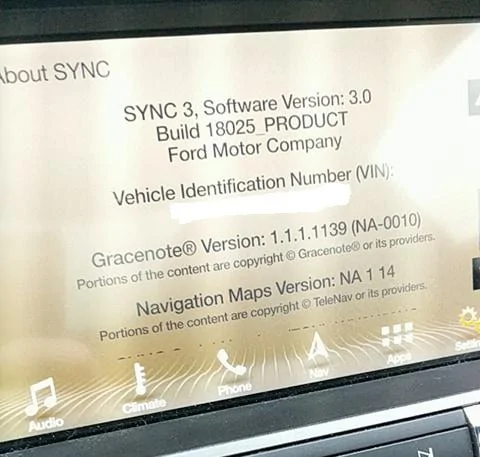
For Sync Sync3 v3.0.18025:
JR3T-14G381-AL - Sync3 v3.0.18025 - system
JR3T-14G391-CD - Sync3 v3.0.17137 - language ENU,FRC,SPM
JR3T-14G423-CA - Sync3 v3.0.17024 - GraceNotes (NA-0010) ENU,FRC,SPM

or


HB5T-14G386-TCB --- create XML to upload
JR3T-14G381-AL --- App OS
GB5T-14G386-AA -- Logging utility
Sponsored

 

Freedom

Well-Known Member
Joined
Feb 18, 2016
Threads
29
Messages
1,065
Reaction score
320
Location
California
Vehicle(s)
'16 GT, '22 Tesla Model 3, '22 F-150 Lightning
need feedback, chime in plz: which set of files is more "complete" or "fuller"

For Sync Sync3 v3.0.18025:
JR3T-14G381-AL - Sync3 v3.0.18025 - system
JR3T-14G391-CD - Sync3 v3.0.17137 - language ENU,FRC,SPM
JR3T-14G423-CA - Sync3 v3.0.17024 - GraceNotes (NA-0010) ENU,FRC,SPM

or


HB5T-14G386-TCB --- create XML to upload
JR3T-14G381-AL --- App OS
GB5T-14G386-AA -- Logging utility
Top set of course. AA/TCB don’t affect us, the end users.
 

melwff

Well-Known Member
Joined
Oct 4, 2016
Threads
6
Messages
916
Reaction score
326
Location
Danbury,CT
Vehicle(s)
2021 Mach 1 M2486
I'm trying to follow this thread and I'm not as technical as some others. I loaded the Sync 3 version 2.3 with no problems with a prior release of Sync 3 version 2.0 . Is the issue that people are having that they are trying to load Sync 3 version 3.0 from some unsupported version?
 
Joined
Mar 24, 2016
Threads
21
Messages
1,078
Reaction score
395
Location
GA
Vehicle(s)
2016 Mustang GT
You can try deleting everything and only installing JR3T-14G381-AL.tar.gz with the only option being auto install. Did you rename your files? JR3T-14G381-AL.tar.gz Has some numbers after AL
I got it to work. Want to guess how? By using the usual 8GB USB stick I've used in the past. For this upgrade I initially wanted to use the 64GB Sandisk stick I had and it kept shutting off during the upgrade.

This no name 8GB USB 2.0 stick I got from a tech conference several years ago for free works so much better. I was done in 15 minutes.

Best part? WIFI PROBLEMS ARE GONE!!!
 

Freedom

Well-Known Member
Joined
Feb 18, 2016
Threads
29
Messages
1,065
Reaction score
320
Location
California
Vehicle(s)
'16 GT, '22 Tesla Model 3, '22 F-150 Lightning
I got it to work. Want to guess how? By using the usual 8GB USB stick I've used in the past. For this upgrade I initially wanted to use the 64GB Sandisk stick I had and it kept shutting off during the upgrade.

This no name 8GB USB 2.0 stick I got from a tech conference several years ago for free works so much better. I was done in 15 minutes.

Best part? WIFI PROBLEMS ARE GONE!!!
:headbang: if it works it works
 

Sponsored

OP
OP
HizliBullet

HizliBullet

GT350
Joined
Nov 16, 2015
Threads
76
Messages
2,491
Reaction score
874
Location
Canada
First Name
Mustang
Vehicle(s)
16 GT350, 17 Edge Sport
Vehicle Showcase
1
so today I saw the new ecosport,its a 2018 vehicle and you guys know what version it came with? 2.3 17109!! maps were 1.15, this sync is totally 2017 configuration!
 

TorqueMan

Well-Known Member
Joined
Aug 24, 2017
Threads
7
Messages
692
Reaction score
218
Location
St. Jacob, IL
Vehicle(s)
2017 EcoBoost Premium
so today I saw the new ecosport,its a 2018 vehicle and you guys know what version it came with? 2.3 17109!! maps were 1.15, this sync is totally 2017 configuration!
That's the current config for factory cars, right? I don't believe 3.0 is officially available yet. At least it doesn't show as avialable when I look at my account at owner.ford.com. Am I wrong?
 

Freedom

Well-Known Member
Joined
Feb 18, 2016
Threads
29
Messages
1,065
Reaction score
320
Location
California
Vehicle(s)
'16 GT, '22 Tesla Model 3, '22 F-150 Lightning
That's the current config for factory cars, right? I don't believe 3.0 is officially available yet. At least it doesn't show as avialable when I look at my account at owner.ford.com. Am I wrong?
3.0 17276 was shipped on 2018 mustangs.
 

tza888

Well-Known Member
Joined
Jun 7, 2016
Threads
3
Messages
149
Reaction score
105
Location
NoVA
First Name
Tony
Vehicle(s)
'16 Ruby Red GT
Wanted to start off by saying a big thanks to [MENTION=19817]HizliBullet[/MENTION] and [MENTION=21767]Freedom[/MENTION] for helping me get to v3 18025. Works like a champ

Second thing and I can only assume I may have missed where this was posted but how do you get the different background theme like in this picture? That is honestly my biggest complaint about Sync3, the blue background is horrendous.


attachment.webp
 

leszek

Well-Known Member
Joined
Oct 30, 2014
Threads
11
Messages
456
Reaction score
148
Location
Kirkland, WA
Vehicle(s)
S550 CO GT PP vert

Sponsored

tza888

Well-Known Member
Joined
Jun 7, 2016
Threads
3
Messages
149
Reaction score
105
Location
NoVA
First Name
Tony
Vehicle(s)
'16 Ruby Red GT
Joined
Mar 24, 2016
Threads
21
Messages
1,078
Reaction score
395
Location
GA
Vehicle(s)
2016 Mustang GT
I was afraid of that. Sucks that you have to buy a obd2 adapter and mess with forscan just to change the damn theme.
Agreed. I think you can force it to use night time theme if you want though.
 

Freedom

Well-Known Member
Joined
Feb 18, 2016
Threads
29
Messages
1,065
Reaction score
320
Location
California
Vehicle(s)
'16 GT, '22 Tesla Model 3, '22 F-150 Lightning
Agreed. I think you can force it to use night time theme if you want though.
The GT OR vigilance? W/e it was are pretty nice themes. Makes the screen look 10x better. If you hold back and eject you can force it into debug mode and it’ll let you change themes temporarily.
 

MustangDaily

Well-Known Member
Joined
Jan 20, 2017
Threads
6
Messages
137
Reaction score
37
Location
Northern Virginia
Vehicle(s)
2016 Mustang GT, Auto
Hey all, I just updated my Sync 3 from 2.2 to 2.3 via USB and i'm having some concerns as I may have updated improperly. I plugged the USB under the toggle switches and Sync 3 stated that it was updating. After 9 minutes, the screen said installation complete and went off for 30 seconds before coming back on.

Then it said updating Sync software for about 30+ minutes and I was wondering why is it taking this long to update. I waited an additional 5 minutes once I parked and I thought it was bugged so I just shut the vehicle off while the USB was plugged in (probably a bad idea). After returning an hour later, surprisingly the system said it was updated and it said 2.3. I'm trying to send the .xml file that Ford states that would be generated in the Syncmyride folder but it is not there, only a bunch of .tar files.

Is it possible that I have not allowed Sync 3 to acquire all the files from the 2.3 update? I'm just worried that I may have damaged the software. I personally don't notice any difference between 2.2 and 2.3, actually the bugs I mentioned before with 2.2 are still there such as the volume lag when turning the knob and the removed closing splash screen.
 

Freedom

Well-Known Member
Joined
Feb 18, 2016
Threads
29
Messages
1,065
Reaction score
320
Location
California
Vehicle(s)
'16 GT, '22 Tesla Model 3, '22 F-150 Lightning
Hey all, I just updated my Sync 3 from 2.2 to 2.3 via USB and i'm having some concerns as I may have updated improperly. I plugged the USB under the toggle switches and Sync 3 stated that it was updating. After 9 minutes, the screen said installation complete and went off for 30 seconds before coming back on.

Then it said updating Sync software for about 30+ minutes and I was wondering why is it taking this long to update. I waited an additional 5 minutes once I parked and I thought it was bugged so I just shut the vehicle off while the USB was plugged in (probably a bad idea). After returning an hour later, surprisingly the system said it was updated and it said 2.3. I'm trying to send the .xml file that Ford states that would be generated in the Syncmyride folder but it is not there, only a bunch of .tar files.

Is it possible that I have not allowed Sync 3 to acquire all the files from the 2.3 update? I'm just worried that I may have damaged the software. I personally don't notice any difference between 2.2 and 2.3, actually the bugs I mentioned before with 2.2 are still there such as the volume lag when turning the knob and the removed closing splash screen.
You can plug the usb back in and see if does update again. Highly unlikely the Os is damaged if everything is functioning. In the system info, do u see a version number for grace notes and everything else?
Sponsored


Top