mustangtaxman
Well-Known Member
- Thread starter
- #1
I have updated my sync before with the same USB drive that i am using today but it keeps saying that the file cannot be found in the root directory. anybody else having issues updating ?
Sponsored


I actually just tried downloading the update today and the download is fine but this is what the inside of the folder looks like and I can't seem to get it to look like the way it's supposed to look like from the Sync Software instructions on Ford's site. They say to unzip the folder but the folder I'm downloading isn't even zipped.I have updated my sync before with the same USB drive that i am using today but it keeps saying that the file cannot be found in the root directory. anybody else having issues updating ?

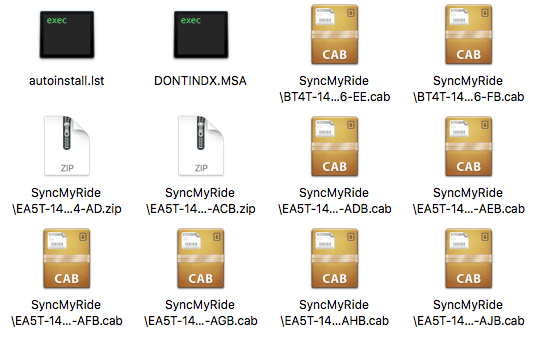
Hey DanielIvan,I actually just tried downloading the update today and the download is fine but this is what the inside of the folder looks like and I can't seem to get it to look like the way it's supposed to look like from the Sync Software instructions on Ford's site. They say to unzip the folder but the folder I'm downloading isn't even zipped.
And when I copy everything and put it on the root of the freshly FAT32 formatted USB drive, the car says it's a bad software update.

Hey Cobra Jet,Just curious too about SYNC updates -
When logging into the ford.owner site - one can check their SYNC software status and when I checked mine, it stated that my software was up to date (as of last night). However since I have purchased my vehicle (12/26/15), I personally have not attempted any updates to SYNC at all. I have SYNC3 in my 2016 EcoBoost Premium w/Perf Pack.
Is my software really up to date as ford.owner eludes to - or do I have to check something else within the vehicle to determine most current version?
I do recall the system blipping up a message asking if I wanted auto SYNC updates when I would start the car - and I always declined (until I could read up more) - but on my initial service visit to a local Ford Dealer back in Jan (unrelated to this topic), that message no longer appeared. My guess is that it popped up and a Tech pressed something, which stopped the pop up that I used to see on the screen.
Maybe the issue some are having is OS or browser related.Dear FordIVTeam,
This is obviously caused by the poorly software engineering team. The cab files should be inside a folder called "SyncMyRide", but instead they named the file name as a folder path string. I can't believe they made such ridiculous mistake. Don't they at least test it on one vehicle before releasing?
Hi geeti,Dear FordIVTeam,
This is obviously caused by the poorly software engineering team. The cab files should be inside a folder called "SyncMyRide", but instead they named the file name as a folder path string. I can't believe they made such ridiculous mistake. Don't they at least test it on one vehicle before releasing?


At the bare minimum you should confirm operation with the last couple of builds with the following:Hi geeti,
Yes, we test the process prior to release. It appears the issue occurs with MAC users. Switching browsers seems to be the fix. Thanks for the feedback.
Whitney

At the bare minimum you should confirm operation with the last couple of builds with the following:
OSX Safari
OSX Chrome
Winders© IE11
Winders© Chrome
Winders© Firefox
Not only are you not a Ford employee, but you're also a bit confused ... that was not directed at you (see the 'Originally Posted by ...' label in the quote for clarification).The thing is I'm not ford employee, why should I do these tests...
Not only are you not a Ford employee, but you're also a bit confused ... that was not directed at you (see the 'Originally Posted by ...' label in the quote for clarification).
No sweatOoops....


