Sponsored

TOMTOP 8" Touchscreen Upgrade: Post-Install Issues & Help Thread

SULSIDE

Well-Known Member
Joined
Mar 2, 2016
Threads
0
Messages
61
Reaction score
16
Location
San Diego, CA
Vehicle(s)
2015 Ecoboost
Thank you for those of you that message me. I got over 40 messages just on this form and another 50 on facebook asking to be a part of this. I selected a few that are going to be in the testing on these maps since I am not that sure if it will work 10% for all builds. I know it works good on mine since I have the NOV build. I am currently extracting the files and will be uploading them soon. Once again thank you.
Sponsored


 

SULSIDE

Well-Known Member
Joined
Mar 2, 2016
Threads
0
Messages
61
Reaction score
16
Location
San Diego, CA
Vehicle(s)
2015 Ecoboost
Here is a video upload on the Navi update if you guys want to watch it. So that you can hear the TTS and other features it does. [ame]
 

psoff

Well-Known Member
Joined
Apr 15, 2015
Threads
8
Messages
129
Reaction score
33
Location
Detroit
Vehicle(s)
2015 GT pp
My unit use to do the same with the sound. I changed something in the main settings for it to work. Not in the navi settings.
If you would send me the file I will see if it does the same on my unit.
 

SULSIDE

Well-Known Member
Joined
Mar 2, 2016
Threads
0
Messages
61
Reaction score
16
Location
San Diego, CA
Vehicle(s)
2015 Ecoboost
My unit use to do the same with the sound. I changed something in the main settings for it to work. Not in the navi settings.
If you would send me the file I will see if it does the same on my unit.
I know how to fix that problem. but when you activate the voice it will do it regardless if you change the setting.
 

Sponsored

thewoodscrew

Well-Known Member
Joined
Jun 29, 2015
Threads
3
Messages
72
Reaction score
12
Location
Harlingen, TX
Vehicle(s)
15 GT Base
My front left speakers stopped working completely. It started as an intermittent crackle, then progressed to an occasional fadeout, but only happened when I push the upper right part of the screen/bezel. No it stopped working completely, also the start up and power off squeak doesn't happen anymore. Anyone else have a problem with their speakers?
 

TricarboNate

Well-Known Member
Joined
Mar 31, 2015
Threads
7
Messages
258
Reaction score
79
Location
MN
Vehicle(s)
2016 Orange GT
Is there a way to disable the on/off beep that the TomTop does?
 

RoadRage

Member
Joined
Mar 10, 2016
Threads
0
Messages
10
Reaction score
0
Location
Yulee, FL
Vehicle(s)
16 GT PP, 01 GT, 08 GSXR, 13 Fusion
My front left speakers stopped working completely. It started as an intermittent crackle, then progressed to an occasional fadeout, but only happened when I push the upper right part of the screen/bezel. No it stopped working completely, also the start up and power off squeak doesn't happen anymore. Anyone else have a problem with their speakers?
had something like that happen on mine, system restore fixed it
 

psoff

Well-Known Member
Joined
Apr 15, 2015
Threads
8
Messages
129
Reaction score
33
Location
Detroit
Vehicle(s)
2015 GT pp
Thank you for those of you that message me. I got over 40 messages just on this form and another 50 on facebook asking to be a part of this. I selected a few that are going to be in the testing on these maps since I am not that sure if it will work 10% for all builds. I know it works good on mine since I have the NOV build. I am currently extracting the files and will be uploading them soon. Once again thank you.
So are you ever going to post the updated navi files for all of us? Or are you waiting for us to pay for it?
 

Sponsored

ProfessorKel

Well-Known Member
Joined
Mar 26, 2016
Threads
1
Messages
110
Reaction score
40
Location
Northern California
Vehicle(s)
Black Mustang GT - California Special
It was just a hiccup. Next time she put it in reverse it worked. Been ok since.


Sent from my iPhone using Tapatalk
I know how to fix that problem. but when you activate the voice it will do it regardless if you change the setting.

Greetings, guys! I've been following this thread and finally pulled the trigger. I installed the device (from ebay) on my 2016 V6 yesterday and I absolutely love it! (November 2015 Tom Top Model)

BUT, the picture above is exactly what I'm dealing with. Whenever I go in reverse, I see a light blue/greyish screen.

Everything else (e.g., sync, navigation, display, radio, etc.) works fine. Any suggestions?

Is there a cable I missed? You mentioned RCA? I do recall NOT using any of the red, white, yellow, or multiple colored wires in the new harness. Was I supposed to use one of those wires for the backup camera? Any help is greatly appreciated!! :headbang:

- ProfessorKel
 

Mulestang

Well-Known Member
Joined
Oct 26, 2015
Threads
8
Messages
191
Reaction score
18
Location
Jacksonville, FL
Vehicle(s)
2015 Mustang
Greetings, guys! I've been following this thread and finally pulled the trigger. I installed the device (from ebay) on my 2016 V6 yesterday and I absolutely love it! (November 2015 Tom Top Model)


BUT, the picture above is exactly what I'm dealing with. Whenever I go in reverse, I see a light blue/greyish screen.


Everything else (e.g., sync, navigation, display, radio, etc.) works fine. Any suggestions?


Is there a cable I missed? You mentioned RCA? I do recall NOT using any of the red, white, yellow, or multiple colored wires in the new harness. Was I supposed to use one of those wires for the backup camera? Any help is greatly appreciated!! :headbang:


- ProfessorKel
I think there are settings for both front and rear cameras. The front is turned off, unless you have a front cam installed. With that in mind, ensure rear cam is on. If it is on, recycle the selection (off, back on).
 

psoff

Well-Known Member
Joined
Apr 15, 2015
Threads
8
Messages
129
Reaction score
33
Location
Detroit
Vehicle(s)
2015 GT pp
Greetings, guys! I've been following this thread and finally pulled the trigger. I installed the device (from ebay) on my 2016 V6 yesterday and I absolutely love it! (November 2015 Tom Top Model)

BUT, the picture above is exactly what I'm dealing with. Whenever I go in reverse, I see a light blue/greyish screen.

Everything else (e.g., sync, navigation, display, radio, etc.) works fine. Any suggestions?

Is there a cable I missed? You mentioned RCA? I do recall NOT using any of the red, white, yellow, or multiple colored wires in the new harness. Was I supposed to use one of those wires for the backup camera? Any help is greatly appreciated!! :headbang:

- ProfessorKel
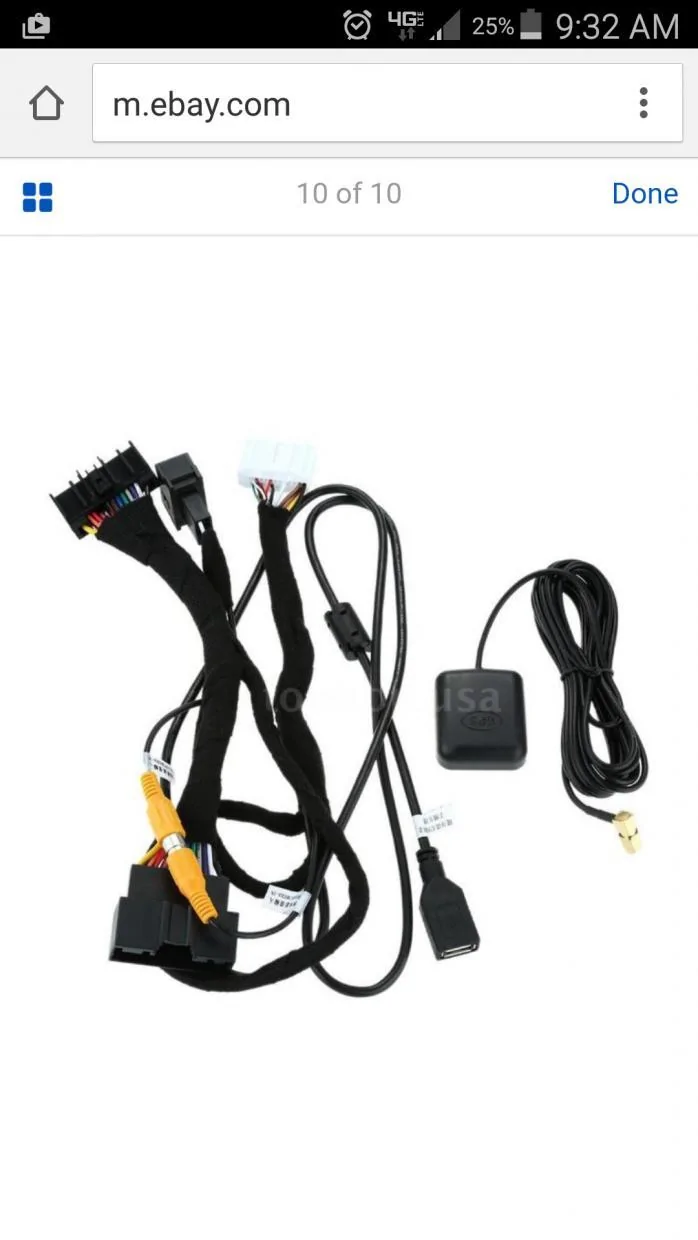
If I'm remembering correctly there is a yellow RCA cable you should have connected for the Rear camera. Double check that. There are a 2 extra female yellow RCA and then there is a male & female for the rear that typically is reconnected. See pic below. The pic don't show the extra RCA or the loose wires, but shows the rear camera that should be connected.
 
Last edited:

ProfessorKel

Well-Known Member
Joined
Mar 26, 2016
Threads
1
Messages
110
Reaction score
40
Location
Northern California
Vehicle(s)
Black Mustang GT - California Special
If I'm remembering correctly there is a yellow RCA cable you should have connected for the Rear camera. Double check that. There are a 2 extra female yellow RCA and then there is a male & female for the rear that typically is reconnected. See pic below. The pic don't show the extra RCA or the loose wires, but shows the rear camera that should be connected.
Okay, now we're on to something! I stereotyped the yellow RCA cable with the other colored cables (see kids, this is why we shouldn't stereotype!). :doh:

Where exactly do I connect that? I don't recall seeing a slot for rear view camera. Is it on the new head unit?

Also, I believer there are two yellow RCAs, which one should I use?

Thanks im advance for any help!
Sponsored


Top