
Sponsored

TOMTOP 8" Touchscreen Upgrade: Post-Install Issues & Help Thread

Edwin

Well-Known Member
Joined
Feb 22, 2015
Threads
9
Messages
361
Reaction score
150
Location
Butler, PA
First Name
Edwin
Vehicle(s)
2015 Ecoboost Mustang - Triple Yellow
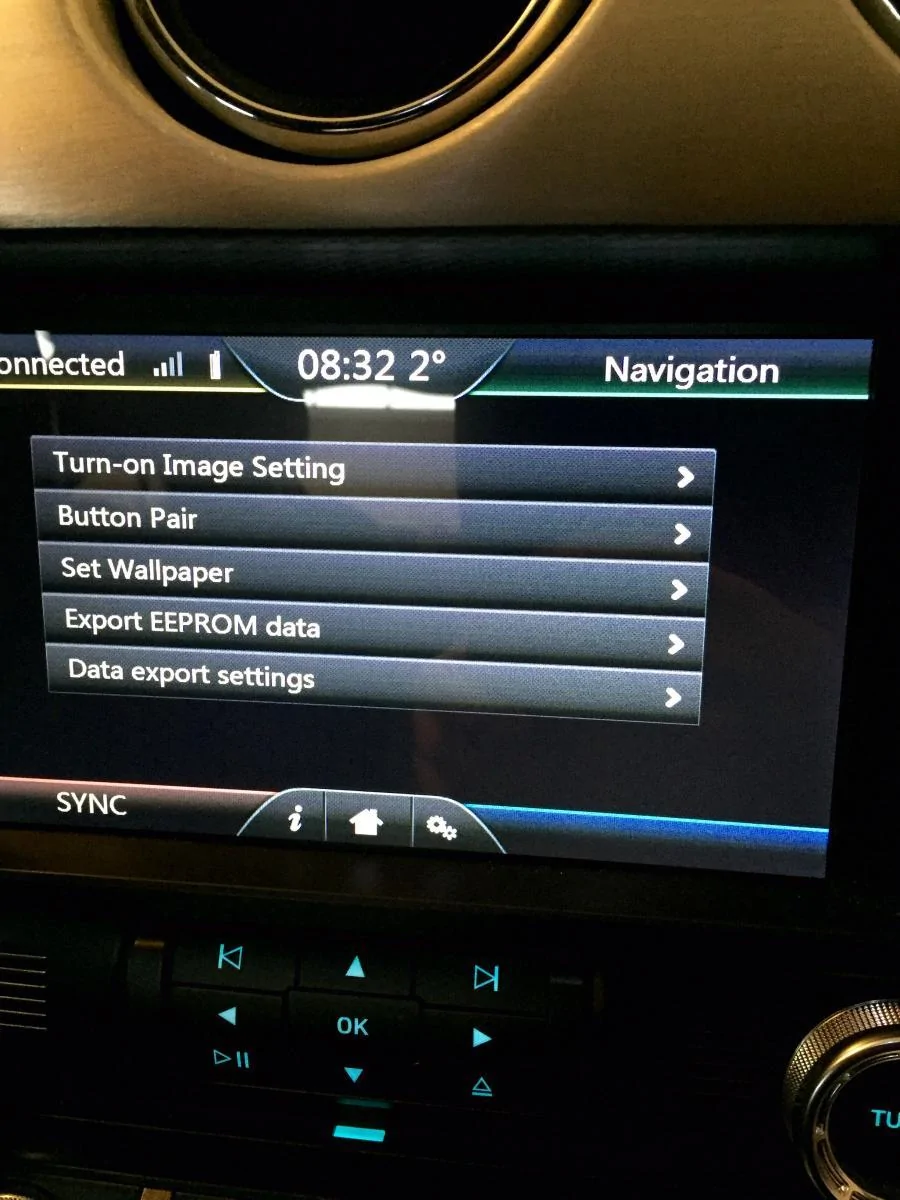
I emailed tomtop on eBay last night for a password and they told me it was 888999. It works. But once I get into engineering mode the only option that works for me is turn-on image setting and button pair. Set wallpaper, export eeprom data, and data export settings don't work for me.
Sponsored

 

Edwin

Well-Known Member
Joined
Feb 22, 2015
Threads
9
Messages
361
Reaction score
150
Location
Butler, PA
First Name
Edwin
Vehicle(s)
2015 Ecoboost Mustang - Triple Yellow
Here's where engineering mode takes me. But again, I can only get into those first two options.
image.webp
 

psoff

Well-Known Member
Joined
Apr 15, 2015
Threads
8
Messages
129
Reaction score
33
Location
Detroit
Vehicle(s)
2015 GT pp
I emailed tomtop on eBay last night for a password and they told me it was 888999. It works. But once I get into engineering mode the only option that works for me is turn-on image setting and button pair. Set wallpaper, export eeprom data, and data export settings don't work for me.
Can you email them again and ask them what is there most current software and firmware versions and how can you update. There are a few members here that have much older versions that would love to update the software.

I got my code from them yesterday because I gave them bad feedback on ebay and they wanted me to change it to a positive one. I told them to give me the code and I will think about changing it.
 

Edwin

Well-Known Member
Joined
Feb 22, 2015
Threads
9
Messages
361
Reaction score
150
Location
Butler, PA
First Name
Edwin
Vehicle(s)
2015 Ecoboost Mustang - Triple Yellow
It will come up if I change something with the controls down below but I haven't tried using anything that pops up on the screen for climate control.
 

Sponsored

Ultimateone

Yes is that's guy /\
Joined
Jun 18, 2015
Threads
26
Messages
833
Reaction score
178
Location
Boston, MA
Vehicle(s)
F32 435i Xdrive
So after reading all these crazy posts would you guys recommend this unit or not?
 

Mulestang

Well-Known Member
Joined
Oct 26, 2015
Threads
8
Messages
191
Reaction score
18
Location
Jacksonville, FL
Vehicle(s)
2015 Mustang
For those that have installed the unit, after installation was complete, did you have to re-connect your phone again to Sync? Just wondering since you aren't messing with the Sync system itself. Thanks
 

Edwin

Well-Known Member
Joined
Feb 22, 2015
Threads
9
Messages
361
Reaction score
150
Location
Butler, PA
First Name
Edwin
Vehicle(s)
2015 Ecoboost Mustang - Triple Yellow
For those that have installed the unit, after installation was complete, did you have to re-connect your phone again to Sync? Just wondering since you aren't messing with the Sync system itself. Thanks
I didn't have to reconnect but I did have to actually turn the car on to get sync to connect for the first time. For some reason it didn't reconnect in acc mode at first.
 

sarcean

Active Member
Joined
Sep 2, 2015
Threads
0
Messages
36
Reaction score
2
Location
High Point, NC
Vehicle(s)
2016 Mustang ecoboost
So after reading all these crazy posts would you guys recommend this unit or not?
The upsides are much better then the downsides. Its a heck of an upgrade for $300 and works well minus an occasional complaint.

I am sure the few complaints will be ironed out with software updates, etc.
 

Sponsored

schenoy1

Well-Known Member
Joined
Nov 3, 2015
Threads
6
Messages
112
Reaction score
24
Location
Waxhaw (Charlotte area)
First Name
Steve
Vehicle(s)
Mustang GT 2015. Ruby Red
Anyone have suggestions on how to remove the rear plug to the CD player? I can't :(
 

brandonsmash

SMASH!
Joined
Aug 19, 2015
Threads
58
Messages
1,304
Reaction score
341
Location
Phoenix, AZ, USA
Vehicle(s)
2015 GT - PP
Anyone have suggestions on how to remove the rear plug to the CD player? I can't :(
This one is a real pain in the butt. There are 3 plugs IIRC. Remove everything you can around the unit and pull out the E-taped wire. . . T? thing? Words are failing me; it's the nylon unit to which the wiring harness is taped. Pull off the tape. This will give you just enough clearance to get back there and work the final plug out of the CD deck.
 

Edwin

Well-Known Member
Joined
Feb 22, 2015
Threads
9
Messages
361
Reaction score
150
Location
Butler, PA
First Name
Edwin
Vehicle(s)
2015 Ecoboost Mustang - Triple Yellow
Anyone have suggestions on how to remove the rear plug to the CD player? I can't :(
I removed the sync box just to give me more room to get back there.
 

JStang091

Well-Known Member
Joined
Dec 3, 2015
Threads
1
Messages
88
Reaction score
23
Location
Pittsburgh, PA
Vehicle(s)
2015 Mustang Ecoboost PP
Same here. Take out and disconnect the entire sync box (the black box behind the old display) to give yourself more room, pull out the CD player / tuner as far as you can. It's still a pain unless you have really little hands but it's doable. I didn't use a screw driver and was able to unclip it with my fingers. Best I can explain it is still feel the plug and feel the connector and the clip. I really wasn't able to see what I was doing, kind of just have to feel it out. Sliced my hands up but it can be done :p
Sponsored


Top