Sponsored

Sintegrate Unit Discussion (Tips/Tools/Apps) - NEXTGEN Navigation added

OP
OP

X0AYHAM0X

Banned
Banned
Banned
Joined
Mar 29, 2016
Threads
43
Messages
556
Reaction score
118
Location
United Arab Emirates
Vehicle(s)
Mustang 2015 V6
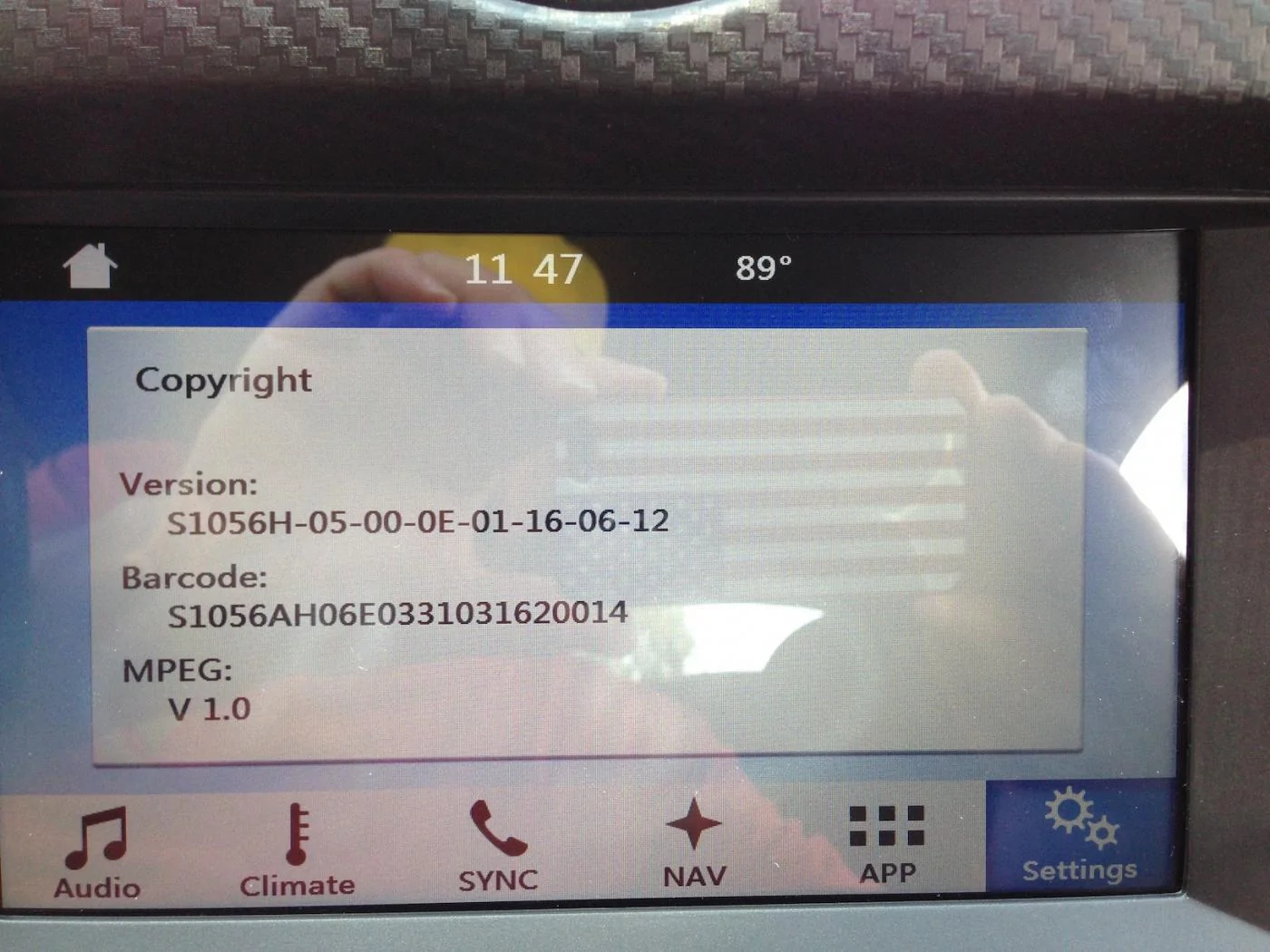
Same here, not working on my unit either. Pretty much same as EddieGT, it looks like it accepts the code but it doesn't change how the app acts.
This feature has always been there even on the Sync 2 software which is really weird, what's your software version?

Sponsored


Redraven571

Well-Known Member
Joined
Apr 21, 2016
Threads
9
Messages
583
Reaction score
135
Location
South East PA
First Name
Joe
Vehicle(s)
2015 Mustang V6 Convertible Triple Yellow

zackmd1

Well-Known Member
Joined
Oct 1, 2013
Threads
139
Messages
5,234
Reaction score
3,265
Location
Maryland
First Name
Zack
Vehicle(s)
1970 Mustang, 1965 AC Cobra, 2023 Ford Bronco 2Dr
So I tried the copyright trick... I does not allow the map to minimize when tapping the top left corner. However, it does remove an annoying bug that I was dealing with.... I have the nextgen nav with a dedicated "exit map" button on the middle right of the screen. Whenever I was moving, if that button was tapped it would take 10-20 sec in order for the maps to close. It was almost like the system would hang for those few seconds. Now that I entered the password this no longer happens. Closing the map is instant now. So it did do something, just not exactly what was shown in the video.
 
OP
OP

X0AYHAM0X

Banned
Banned
Banned
Joined
Mar 29, 2016
Threads
43
Messages
556
Reaction score
118
Location
United Arab Emirates
Vehicle(s)
Mustang 2015 V6
So I tried the copyright trick... I does not allow the map to minimize when tapping the top left corner. However, it does remove an annoying bug that I was dealing with.... I have the nextgen nav with a dedicated "exit map" button on the middle right of the screen. Whenever I was moving, if that button was tapped it would take 10-20 sec in order for the maps to close. It was almost like the system would hang for those few seconds. Now that I entered the password this no longer happens. Closing the map is instant now. So it did do something, just not exactly what was shown in the video.
Literally putting together a unit to update it, will update you soon guys.
 

Sponsored

isoto

Well-Known Member
Joined
Jan 10, 2016
Threads
6
Messages
159
Reaction score
11
Location
Kansas City
Vehicle(s)
2015 Mustang V6
So I tried the copyright trick... I does not allow the map to minimize when tapping the top left corner. However, it does remove an annoying bug that I was dealing with.... I have the nextgen nav with a dedicated "exit map" button on the middle right of the screen. Whenever I was moving, if that button was tapped it would take 10-20 sec in order for the maps to close. It was almost like the system would hang for those few seconds. Now that I entered the password this no longer happens. Closing the map is instant now. So it did do something, just not exactly what was shown in the video.
How do you like the nextgen nav?
 

zackmd1

Well-Known Member
Joined
Oct 1, 2013
Threads
139
Messages
5,234
Reaction score
3,265
Location
Maryland
First Name
Zack
Vehicle(s)
1970 Mustang, 1965 AC Cobra, 2023 Ford Bronco 2Dr
How do you like the nextgen nav?
I personally love it. 10x better then OEM MFT nav and from what experience I do have with primo it is much better then at as well. Fast and easy UI with very good info on POI's. The one thing I have noticed is that the maps seem to be about a year or two old as some more recent roads and POI's in my area do not show up. Only thing I have discovered so far.
 

Sponsored

Redraven571

Well-Known Member
Joined
Apr 21, 2016
Threads
9
Messages
583
Reaction score
135
Location
South East PA
First Name
Joe
Vehicle(s)
2015 Mustang V6 Convertible Triple Yellow
So now you can minimize the nav?
Yeah! Can you minimize it if actively following a map? When you are following a map, there is a symbol in the upper left corner, indicating whether the next turn is right/left.
 
OP
OP

X0AYHAM0X

Banned
Banned
Banned
Joined
Mar 29, 2016
Threads
43
Messages
556
Reaction score
118
Location
United Arab Emirates
Vehicle(s)
Mustang 2015 V6
Yeah! Can you minimize it if actively following a map? When you are following a map, there is a symbol in the upper left corner, indicating whether the next turn is right/left.
I told you guys it should work! I'm glad.

Yeah you basically activated an invisible minimize button!
 

Redraven571

Well-Known Member
Joined
Apr 21, 2016
Threads
9
Messages
583
Reaction score
135
Location
South East PA
First Name
Joe
Vehicle(s)
2015 Mustang V6 Convertible Triple Yellow
I told you guys it should work! I'm glad.

Yeah you basically activated an invisible minimize button!
Maybe a dumb question, but, when minimized, will the Nav continue to provide verbal directions?


Top