Sponsored

IN STOCK!!! New Sync3 theme navigation from Moddiction!

Status
Not open for further replies.

Redraven571

Well-Known Member
Joined
Apr 21, 2016
Threads
9
Messages
583
Reaction score
135
Location
South East PA
First Name
Joe
Vehicle(s)
2015 Mustang V6 Convertible Triple Yellow
I don't know any setting to keep unit off when turning on the car.
Ugh! Although not a game changer, not so great. That was how I kept Sync from switching to radio when starting the car, regardless of what you were listening to last ride.

Also, I noticed that, when playing radio on this unit, if you turn off the unit by pushing the volume button, it blacks out the screen but the radio is actually still on but at a very low volume (I can still hear it); when you push volume again, screen comes on and returns to previous volume. I don't hear anything, however, if I do the same thing while playing music from USB or phone.

Lastly, the volume drops sometimes (randomly?) and it sounds like the unit is speaking, however, the volume is so low I have no idea what it is saying. I have notifications turned on in my phone, but this also happened when the phone was not in the car, any ideas?

Also, I stopped for gas this morning and, when I restarted the car, it was in night mode (at 8:45AM)?

I'm not trying to be difficult, I think this unit is about 90% of the way there but some stuff like these things and the time issue need to be addressed.
Sponsored

 

thet33

Well-Known Member
Joined
Nov 19, 2015
Threads
10
Messages
665
Reaction score
117
Location
Dallas, TX
Vehicle(s)
2016 Magnetic GT/6MT/3.55
Lastly, the volume drops sometimes (randomly?) and it sounds like the unit is speaking, however, the volume is so low I have no idea what it is saying. I have notifications turned on in my phone, but this also happened when the phone was not in the car, any ideas?
Do you have voice enabled for GPS? Maybe you have the mixer/voice volume on low? I turned GPS voice off completely on all menus (in Nav and unit's home/main menu)
 

Redraven571

Well-Known Member
Joined
Apr 21, 2016
Threads
9
Messages
583
Reaction score
135
Location
South East PA
First Name
Joe
Vehicle(s)
2015 Mustang V6 Convertible Triple Yellow
I haven't tried with my playlists yet. I only copied over some music to test last night when the idea struck me. I'll have to play with it some more this wknd.
In order for Sync to recognize playlists, they need to be in .m3u format (i.e. - ones from iTunes do not work), so I created some on the flash drive I had in USB2; when I move the flash drive to this unit's USB port, I don't see the playlists.
 
OP
OP
Moddiction

Moddiction

Well-Known Member
Joined
Oct 20, 2015
Threads
82
Messages
1,806
Reaction score
341
Location
Mooresville, NC
Vehicle(s)
2016 Mustang GT PP
If in night mode there was probably something blocking light to sensor on car. That's only way it changes unless you change in settings.

Was nav on when volume lowered for voice? If so you need to change voice volume settings to hear it better.

Most of the "issues" it seems are just setting options in the unit that can be adjusted.
 

Redraven571

Well-Known Member
Joined
Apr 21, 2016
Threads
9
Messages
583
Reaction score
135
Location
South East PA
First Name
Joe
Vehicle(s)
2015 Mustang V6 Convertible Triple Yellow
Do you have voice enabled for GPS? Maybe you have the mixer/voice volume on low? I turned GPS voice off completely on all menus (in Nav and unit's home/main menu)
Interesting thought, I didn't notice it happening until after I loaded the GPS file, although I hear it when the Nav unit is not active. Maybe it's just those voices in my head..... ;)
 

Sponsored

Redraven571

Well-Known Member
Joined
Apr 21, 2016
Threads
9
Messages
583
Reaction score
135
Location
South East PA
First Name
Joe
Vehicle(s)
2015 Mustang V6 Convertible Triple Yellow
If in night mode there was probably something blocking light to sensor on car. That's only way it changes unless you change in settings.
I didn't change anything in settings. Although I was in shade at the gas pump; once I went out into sunlight, wouldn't it switch back? I'll see if it continues to happen.

Was nav on when volume lowered for voice? If so you need to change voice volume settings to hear it better.
Nav was not active, unless it runs in the background somehow.

Most of the "issues" it seems are just setting options in the unit that can be adjusted.
Hopefully, which is a nice segue into saying that it would be great if there were more documentation with the unit. :thumbsup:
 

thet33

Well-Known Member
Joined
Nov 19, 2015
Threads
10
Messages
665
Reaction score
117
Location
Dallas, TX
Vehicle(s)
2016 Magnetic GT/6MT/3.55
Interesting thought, I didn't notice it happening until after I loaded the GPS file, although I hear it when the Nav unit is not active. Maybe it's just those voices in my head..... ;)
"Voices" hahaha

"not active" as in minimized or exited/quit completely? If you are on the main screen (hit the home in the top left corner) there is an option for GPS voice when you are on other screens i.e. Sync, radio etc.

The gas station thing... you might've been shaded by the covering over fuel pumps and sensor thought it was night?

I'm just spit balling.


*edit* You can also turn off GPS voice mixer in settings I believe. I turned it off in like 3 menus just to be sure.
 
Last edited:

Redraven571

Well-Known Member
Joined
Apr 21, 2016
Threads
9
Messages
583
Reaction score
135
Location
South East PA
First Name
Joe
Vehicle(s)
2015 Mustang V6 Convertible Triple Yellow
"not active" as in minimized or exited/quit completely. If you are on the main screen (hit the home in the top left corner) there is an option for GPS voice when you are on other screens i.e. Sync, radio etc.
I'll have to look into it and see when I get the car back; it's at the dealership today, trying to get my convertible top issues squared away. :frusty:

The gas station thing... you might've been shaded by the covering over fuel pumps and sensor thought it was night?
Hopefully.....

*edit* You can also turn off GPS voice mixer in settings I believe. I turned it off in like 3 menus just to be sure.
THIS is good info!
 

tcman54

Stanghead
Joined
Apr 11, 2016
Threads
167
Messages
1,520
Reaction score
787
Location
Palm Coast, FL
First Name
Terry
Vehicle(s)
2016 Ecoboost
Vehicle Showcase
1
Ugh! Although not a game changer, not so great. That was how I kept Sync from switching to radio when starting the car, regardless of what you were listening to last ride.

Also, I noticed that, when playing radio on this unit, if you turn off the unit by pushing the volume button, it blacks out the screen but the radio is actually still on but at a very low volume (I can still hear it); when you push volume again, screen comes on and returns to previous volume. I don't hear anything, however, if I do the same thing while playing music from USB or phone.

Lastly, the volume drops sometimes (randomly?) and it sounds like the unit is speaking, however, the volume is so low I have no idea what it is saying. I have notifications turned on in my phone, but this also happened when the phone was not in the car, any ideas?

Also, I stopped for gas this morning and, when I restarted the car, it was in night mode (at 8:45AM)?

I'm not trying to be difficult, I think this unit is about 90% of the way there but some stuff like these things and the time issue need to be addressed.
Same problems here, it's all in setting menu:

1. go to nav and turn off the various voice alerts for speeding and stuff like that, it will fix the volume lowering and faint volume voice alerts.

2. go to settings and turn auto background off for night/day switching.

Terry
 

tcman54

Stanghead
Joined
Apr 11, 2016
Threads
167
Messages
1,520
Reaction score
787
Location
Palm Coast, FL
First Name
Terry
Vehicle(s)
2016 Ecoboost
Vehicle Showcase
1
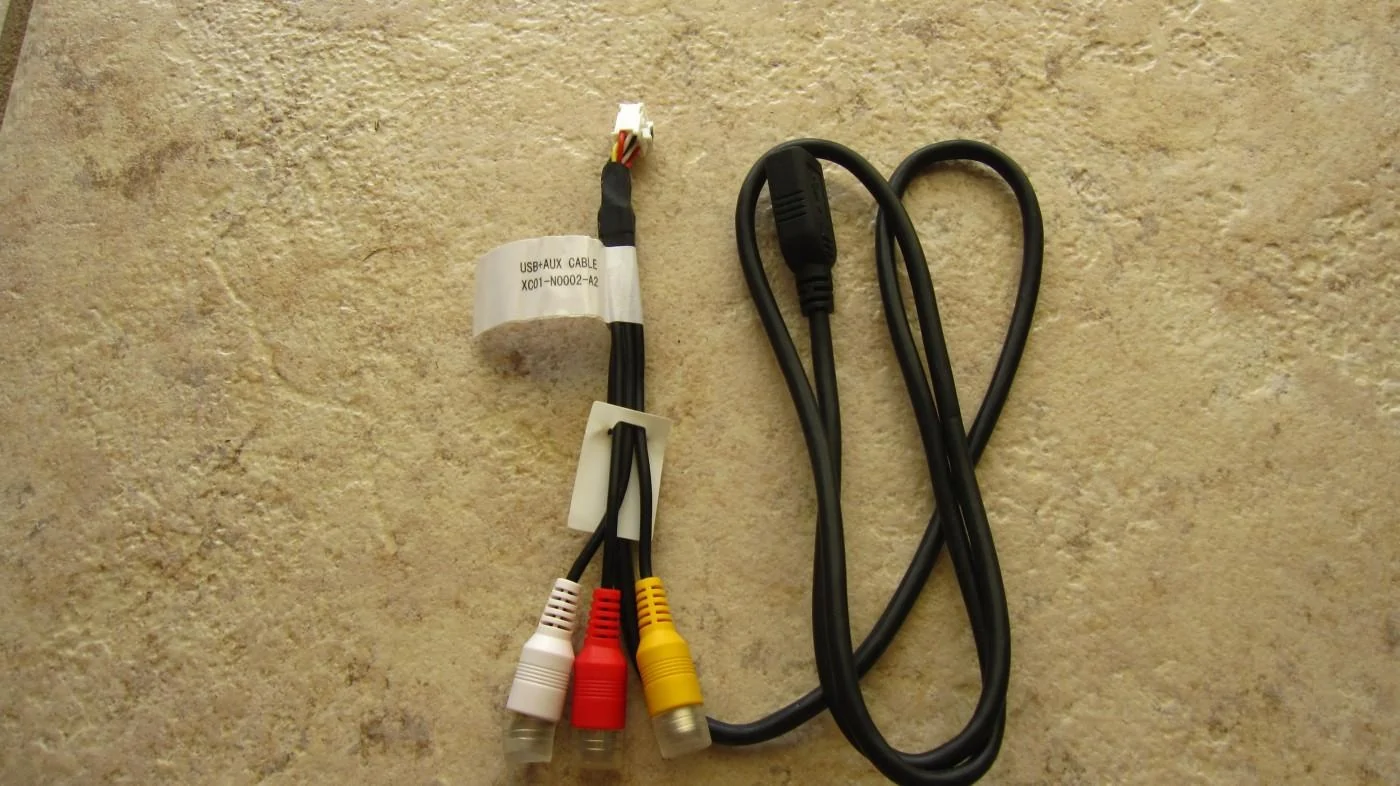
As for getting the album artwork to work via the units usb cable, please tell me it's not the cable as shown below. I don't believe the instructions said anything about hooking this cable up expect for the composite video which I wasn't going to use so I didn't hook it up.

If it is this cable,.. before I rip apart my whole car again, is there there going to be a software update in the near future to have album artwork work from any usb input source?, why it doesn't work that way right now is just plain weird.
IMG_8261.webp
 

Sponsored

SheStang

Well-Known Member
Joined
Apr 9, 2015
Threads
2
Messages
331
Reaction score
188
Location
AL
Vehicle(s)
'16 GT Oxford White
That's the cable...
 
OP
OP
Moddiction

Moddiction

Well-Known Member
Joined
Oct 20, 2015
Threads
82
Messages
1,806
Reaction score
341
Location
Mooresville, NC
Vehicle(s)
2016 Mustang GT PP
Yup that's the USB cable used for MP3 files and video etc.
 

Redraven571

Well-Known Member
Joined
Apr 21, 2016
Threads
9
Messages
583
Reaction score
135
Location
South East PA
First Name
Joe
Vehicle(s)
2015 Mustang V6 Convertible Triple Yellow
As for getting the album artwork to work via the units usb cable, please tell me it's not the cable as shown below. I don't believe the instructions said anything about hooking this cable up expect for the composite video which I wasn't going to use so I didn't hook it up.

If it is this cable,.. before I rip apart my whole car again, is there there going to be a software update in the near future to have album artwork work from any usb input source?, why it doesn't work that way right now is just plain weird.
I feel your pain, that is exactly what I did. I didn't see it expressly called out in the directions, so I didn't attach it. I thought it was something extra, just like the Android HDMI connector that I don't need because I have an iPhone. :frusty:

My ONLY saving grace was that I didn't replace the big dash piece yet, I wanted to be sure everything was working. Then I was rereading through this forum, looking for a piece of information, and saw it mentioned that system updates would be applied through that USB port..... :headbonk:

If it was JUST the album artwork, I'd have said f**k it but updates are something else.

I think artwork doesn't display through the other USBs because they are linked to Sync and Sync never did display album art. This USB dongle is plugged directly into new unit so it has additional functionality.
 

scott_0

Well-Known Member
Joined
Apr 15, 2016
Threads
19
Messages
1,115
Reaction score
278
Location
Oxford, Pennsylvania
Vehicle(s)
2016 Mustang GT
what a buggy system, makes me feel good I put out the extra money I did when I bought my car, god bless you guys lol, you keep being told an update will fix issues, theyll always be bugs, it will be a fact of life
 
OP
OP
Moddiction

Moddiction

Well-Known Member
Joined
Oct 20, 2015
Threads
82
Messages
1,806
Reaction score
341
Location
Mooresville, NC
Vehicle(s)
2016 Mustang GT PP
What bugs are you talking about? This system should perform better than the stock ford one. Many are asking me to change from factory 8" screen to this unit.
Sponsored

 
Status
Not open for further replies.


Top