Sponsored

High Capacity MP3 Player

TURTL3

Well-Known Member
Joined
Jul 6, 2016
Threads
4
Messages
311
Reaction score
95
Location
SoMD-DMV
Vehicle(s)
2016 LB Mustang 3.7 6MT
Big news, Fiio just released a new X1 lossless player with Bluetooth. This is huge, considering the only decently priced player with BT on the market was the Sony Walkman at over $200. It can take up to 256GB micro sd and is drag and drop, no need for iTunes or any other media manager. BT 4.0, which is cool because some of the transmitter adapters for none BT devices are only 3.0. Remote turn on feature as well. I've already purchased from Amazon and it is en route. I will update this thread with my thoughts.


Link to Amazon page for Fiio X1 II
Sponsored
 
OP
OP
5starr0

5starr0

Well-Known Member
Joined
Apr 27, 2015
Threads
47
Messages
1,133
Reaction score
244
Location
Charlotte, NC
Vehicle(s)
2015 Mustang GT Premium
Big news, Fiio just released a new X1 lossless player with Bluetooth. This is huge, considering the only decently priced player with BT on the market was the Sony Walkman at over $200. It can take up to 256GB micro sd and is drag and drop, no need for iTunes or any other media manager. BT 4.0, which is cool because some of the transmitter adapters for none BT devices are only 3.0. Remote turn on feature as well. I've already purchased from Amazon and it is en route. I will update this thread with my thoughts.


Link to Amazon page for Fiio X1 II
That is pretty cool and affordable unlike some of the other stuff i've seen out there
 

TURTL3

Well-Known Member
Joined
Jul 6, 2016
Threads
4
Messages
311
Reaction score
95
Location
SoMD-DMV
Vehicle(s)
2016 LB Mustang 3.7 6MT
So, I tired the Fiio X1 II I linked above and the Bluetooth will not accept the PIN Sync is trying to throw to the device. More than likely there will need to be a firmware update for the device. This is quite the bummer. I can't believe they removed the Aux jack or else I wouldn't be going through this :mad:

Anyway, the device is not a viable option at the moment unless you have a car equipped with Aux. (Outside of the BT it performs as expected.)
 

Xantom

Well-Known Member
Joined
Nov 11, 2014
Threads
18
Messages
401
Reaction score
80
Location
SE MN
Vehicle(s)
2017 Honda Accord Touring
Lot's of possibilities listed already. I use a 32GB flash drive, copy songs and playlists over from iTunes and that's it. It's a bit more involved than that, if you want more details I can provide them. I think 160GB of music is too much. I have about 5GB of music on my drive and it takes long too long to index that. I would hate to go through that every time I added songs or playlists. Just my opinion.
 

Rock&Roll

Well-Known Member
Joined
Aug 25, 2016
Threads
33
Messages
1,266
Reaction score
1,041
Location
New York
Vehicle(s)
2016 GT Stick- 2022 VW GTI Stick -2011 HD Fatboy
Lot's of possibilities listed already. I use a 32GB flash drive, copy songs and playlists over from iTunes and that's it. It's a bit more involved than that, if you want more details I can provide them. I think 160GB of music is too much. I have about 5GB of music on my drive and it takes long too long to index that. I would hate to go through that every time I added songs or playlists. Just my opinion.
More details if you don't mind.

Just bought a 64GB flash drive and I use ITunes with Mac computers
 
Last edited:

Sponsored

Souldriver

Well-Known Member
Joined
Jun 4, 2015
Threads
34
Messages
771
Reaction score
94
Location
NY
Vehicle(s)
2016 - Guard GT Prem. PP
I have a cowon J3 and previously the S9. I used to use this on aux with my old mustang and the aftermarket headunit and tweaked with the eq

This car i just use a USB and have all my flac on there. The cowons bluetooth never sounded good when i used it, i just dont trust bluetooth for good audio quality.
 

Xantom

Well-Known Member
Joined
Nov 11, 2014
Threads
18
Messages
401
Reaction score
80
Location
SE MN
Vehicle(s)
2017 Honda Accord Touring
More details if you don't mind.

Just bought a 64GB flash drive and I use ITunes with Mac computers
I am a PC guy, but this is what I do.

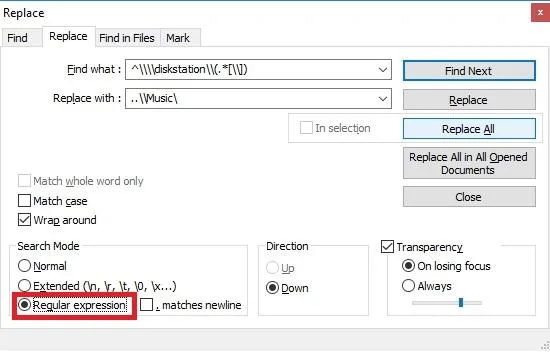
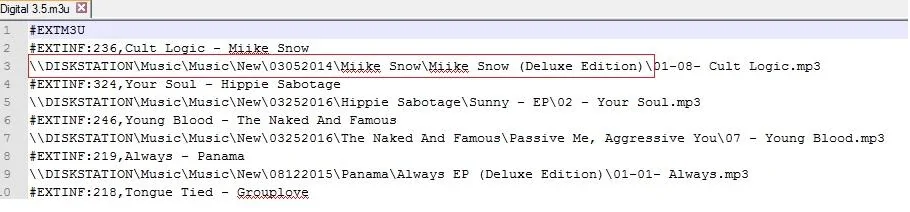
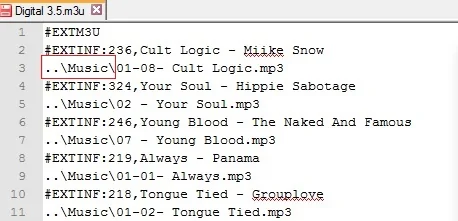
I create my playlist and a folder on my desktop. I select all songs in the playlist then drag them into the folder. Wait for them to copy over... I export the playlist in .m3u format to my desktop. I make a copy, just in case, of that into the folder where the music sits. I use notepad++ to modify the .m3u so my head unit will know where to look for my music. I am not sure what you would use on a MAC, but regular expressions are universal so you will just need to find a text editor that uses it. I use find and replace with "Regular Expression"(regex) search mode selected. I find and replace every instance of the old folder structure and replace with the new. I then copy everything in that folder on my desktop, music and playlists only, to a folder called music on my flash drive. Plug it into my car and I have all my music and playlists ready to go.

Regular expressions works better in this case because I have all my music sorted into different folders. You might have a different scenario. I store all my music on a NAS appliance. So you should replace "disksation" with the root folder of your music. If you have music all over the place and not all in a root directory this will not work. You will have to adjust the find and replace accordingly.

Find:
^\\\\diskstation\\(.*[\\])
Replace:
..\\Music\

Use Regular expression search mode:
picture.webp


Before:
picture.webp


After:
picture.webp


Hope this helps...
 
Last edited:

mumbles

Well-Known Member
Joined
Dec 22, 2015
Threads
16
Messages
933
Reaction score
266
Location
ATL
First Name
Eric
Vehicle(s)
'16 GT Prem OW
I am a PC guy, but this is what I do.
Xantom, curious if you are also a Unix guy? That screen shots look just like SED... sorry for the hijack!
 

Xantom

Well-Known Member
Joined
Nov 11, 2014
Threads
18
Messages
401
Reaction score
80
Location
SE MN
Vehicle(s)
2017 Honda Accord Touring
Xantom, curious if you are also a Unix guy? That screen shots look just like SED... sorry for the hijack!
I am not that cool:D
 

Sponsored

Souldriver

Well-Known Member
Joined
Jun 4, 2015
Threads
34
Messages
771
Reaction score
94
Location
NY
Vehicle(s)
2016 - Guard GT Prem. PP
On my usb drive i just have everything as artist>album>songs and i never hsd an issue. I do have some songs that are b sides that are just dropped under the artist folder but i dont think i ever had an issue with those either.
 

Rock&Roll

Well-Known Member
Joined
Aug 25, 2016
Threads
33
Messages
1,266
Reaction score
1,041
Location
New York
Vehicle(s)
2016 GT Stick- 2022 VW GTI Stick -2011 HD Fatboy
After a bunch of trial error this is how I got a USB drive to work if anyone is interested.


I had a old SanDisk USB Flash 16GB that didn't work for some reason. I tried a bunch of programs and stuff but it wouldn't be recognized with Sync3 when I hit "Source" and when I used Voice command "USB" :headbonk:


So I bought new San Disk Ultra Fit 64GB USB 3.0 Flash Drive from Amazon for $16.81


Then I went to the APP store on my iMac and bought a APP called "Export for iTunes" for $7.99.

Installed it and took the SanDisk Ultra USB and loaded up all my playlists from my iTunes account.
It will also do "Albums" but I just wanted to load my playlists for now.
I left all the standard Sandisk files that came on the USB drive there cause I didn't want to mess with it ( for now )

Stuck the Sandisk 3.0 Drive in the USB port and fired her up. Went to Audio > Sources and it showed a file called "UNKNOWN" Thats the USB drive with all my iTunes playlists.

Works perfect. :headbang:


Took about 30 seconds or less to read all the files.:cool:


Hope that helps if anyone is interested :clap2:
 

Redraven571

Well-Known Member
Joined
Apr 21, 2016
Threads
9
Messages
583
Reaction score
135
Location
South East PA
First Name
Joe
Vehicle(s)
2015 Mustang V6 Convertible Triple Yellow
[MENTION=26153]Rock&Roll[/MENTION] Do the playlists work? And we're talking about SYNC USB ports, right (center console and under the start button)?
 

Rock&Roll

Well-Known Member
Joined
Aug 25, 2016
Threads
33
Messages
1,266
Reaction score
1,041
Location
New York
Vehicle(s)
2016 GT Stick- 2022 VW GTI Stick -2011 HD Fatboy
[MENTION=26153]Rock&Roll[/MENTION] Do the playlists work? And we're talking about SYNC USB ports, right (center console and under the start button)?
Yes the Sandisk USB 3.0 is in the USB port under the start button
Yes the all the playlists work with all the Album Artwork that was on iTunes.
 

Xantom

Well-Known Member
Joined
Nov 11, 2014
Threads
18
Messages
401
Reaction score
80
Location
SE MN
Vehicle(s)
2017 Honda Accord Touring
Just wanted to add I have a 2015 S550 with SYNC 2. Your results may vary with the newer Sync 3 head units. I tried numerous things to just directly export my iTunes Playlists to the USB drive and could not get it to work until I modified the playlist as I pointed out above.
Sponsored


Top