Sponsored

FordPass app

Bikeman315

Well-Known Member
Joined
Apr 12, 2015
Threads
581
Messages
16,183
Reaction score
21,909
Location
Myrtle Beach, SC
First Name
Ira
Vehicle(s)
2019 Mustang GT/CS, 2021 Volvo XC60
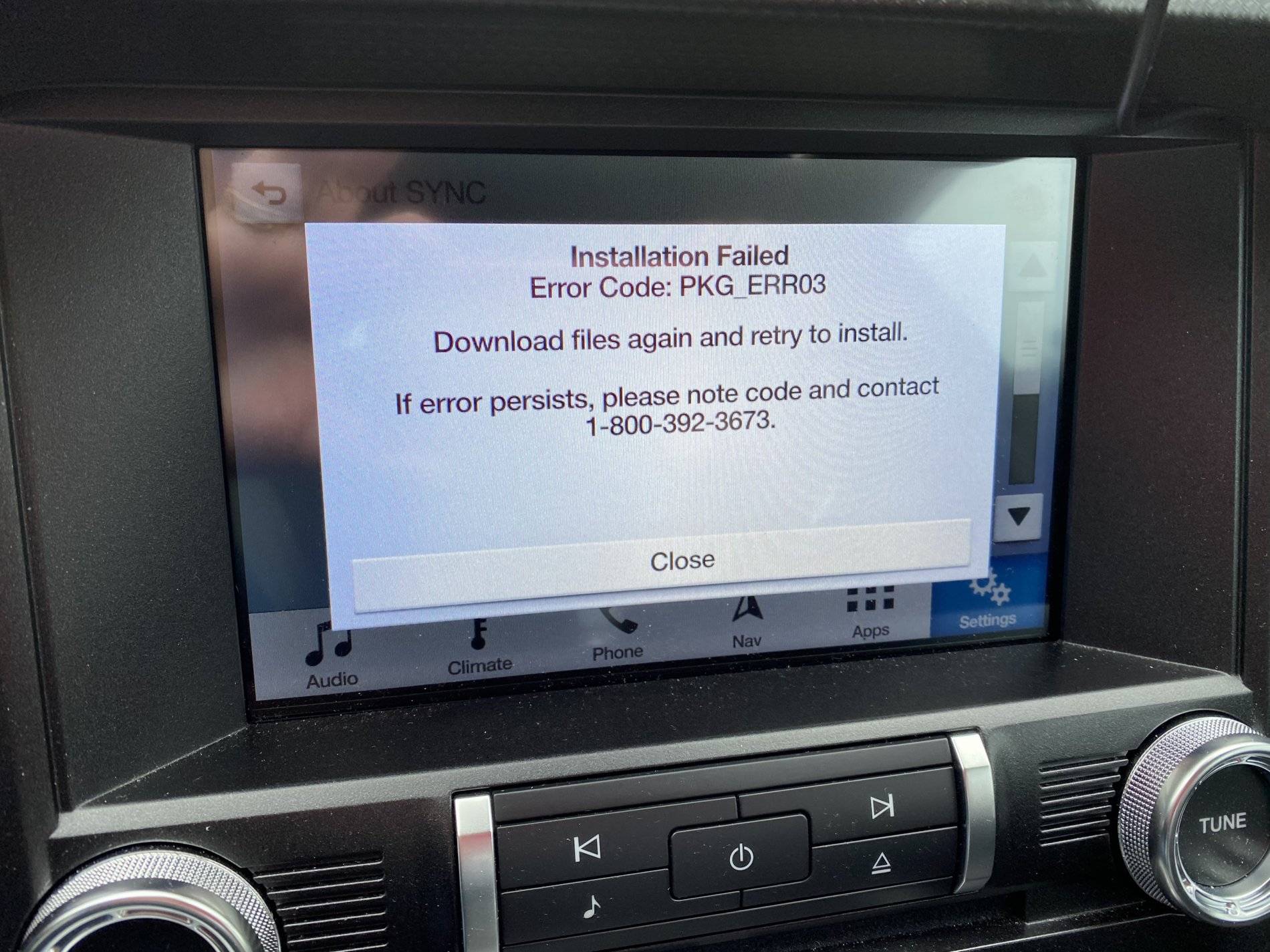
Got complete screen at 20 minute mark. Knew it was too good to be true.
38AE2468-753B-4975-B674-7AE8BA27D768.jpeg
OK so I pulled the stick before shutting off the car but that should have meant nothing. Restarted the car, no issues and put the stick back in. The screen when right to Uploading System Files. After another 15 minutes got a complete screen. Wash rinse, repeat. I'm reformatting and reloading the stick and will try again.
 

Zooks527

Well-Known Member
Joined
Aug 24, 2018
Threads
67
Messages
1,727
Reaction score
1,395
Location
02048
Vehicle(s)
2019 KB GT, 401A, 6MT, PP1, S&S, MR, AE, B&O / 2018 Jeep Grand Cherokee Summit
Well I ended up doing some more research and if you have wifi hotspot built into the car, which I have the 4G wifi antenna, then you can make a couple settings changes and it will automatically do these map updates and other updates without needing to download anything. Also if it I'd say partially done with the update next time the car is within range of a wifi then it will start download where it left off
Nope, at least not on mine. 4G with an active subscription, and the auto updates are a roll of the dice. Supposedly it will do some maintenance updates, but the maps require a hard load into the system via USB.


Did you time it? I know it depends on the read/write speed of the USB drive but just curious
20 minutes for mine start to finish from the time I put the USB stick in. No muss, no fuss, and it's running fine.
 

lacanteen

Well-Known Member
Joined
Apr 18, 2019
Threads
37
Messages
3,476
Reaction score
24,310
Location
Louisiana: Cajun Country
First Name
George
Vehicle(s)
2022 EB premium vert, 2013 Escape, 2017 F150 SC5.0
OK so I pulled the stick before shutting off the car but that should have meant nothing. Restarted the car, no issues and put the stick back in. The screen when right to Uploading System Files. After another 15 minutes got a complete screen. Wash rinse, repeat. I'm reformatting and reloading the stick and will try again.
I'm with you. I downloaded to the flash drive and there was no room to extract the files. Sooooooooo, Moved the zip file to the desk top, and am extracting to the stick. DOH!:computerrage:
 
OP
OP
13razorbackfan

13razorbackfan

Well-Known Member
Joined
Nov 22, 2019
Threads
8
Messages
232
Reaction score
94
Location
Arkansas
Vehicle(s)
2018 Mustang GT Premium
Nope, at least not on mine. 4G with an active subscription, and the auto updates are a roll of the dice. Supposedly it will do some maintenance updates, but the maps require a hard load into the system via USB.


20 minutes for mine start to finish from the time I put the USB stick in. No muss, no fuss, and it's running fine.
That's really good to know. I guess it just does minor updates. Oh well
 

Sponsored

OP
OP
13razorbackfan

13razorbackfan

Well-Known Member
Joined
Nov 22, 2019
Threads
8
Messages
232
Reaction score
94
Location
Arkansas
Vehicle(s)
2018 Mustang GT Premium
Well that sucks. I'm wondering how important these map updates are anyways lol? It's around 48° outside so gonna turn on the heaters and put a cost of TW Ice seal and shine then top it off with Meguiars Ultimate liquid wax. The Ice seal and shine I can apply to literally every surface of the car so that's cool. While doing all that I will probably run the map update so i can keep an eye on it
OK so I pulled the stick before shutting off the car but that should have meant nothing. Restarted the car, no issues and put the stick back in. The screen when right to Uploading System Files. After another 15 minutes got a complete screen. Wash rinse, repeat. I'm reformatting and reloading the stick and will try again.
 

Bikeman315

Well-Known Member
Joined
Apr 12, 2015
Threads
581
Messages
16,183
Reaction score
21,909
Location
Myrtle Beach, SC
First Name
Ira
Vehicle(s)
2019 Mustang GT/CS, 2021 Volvo XC60
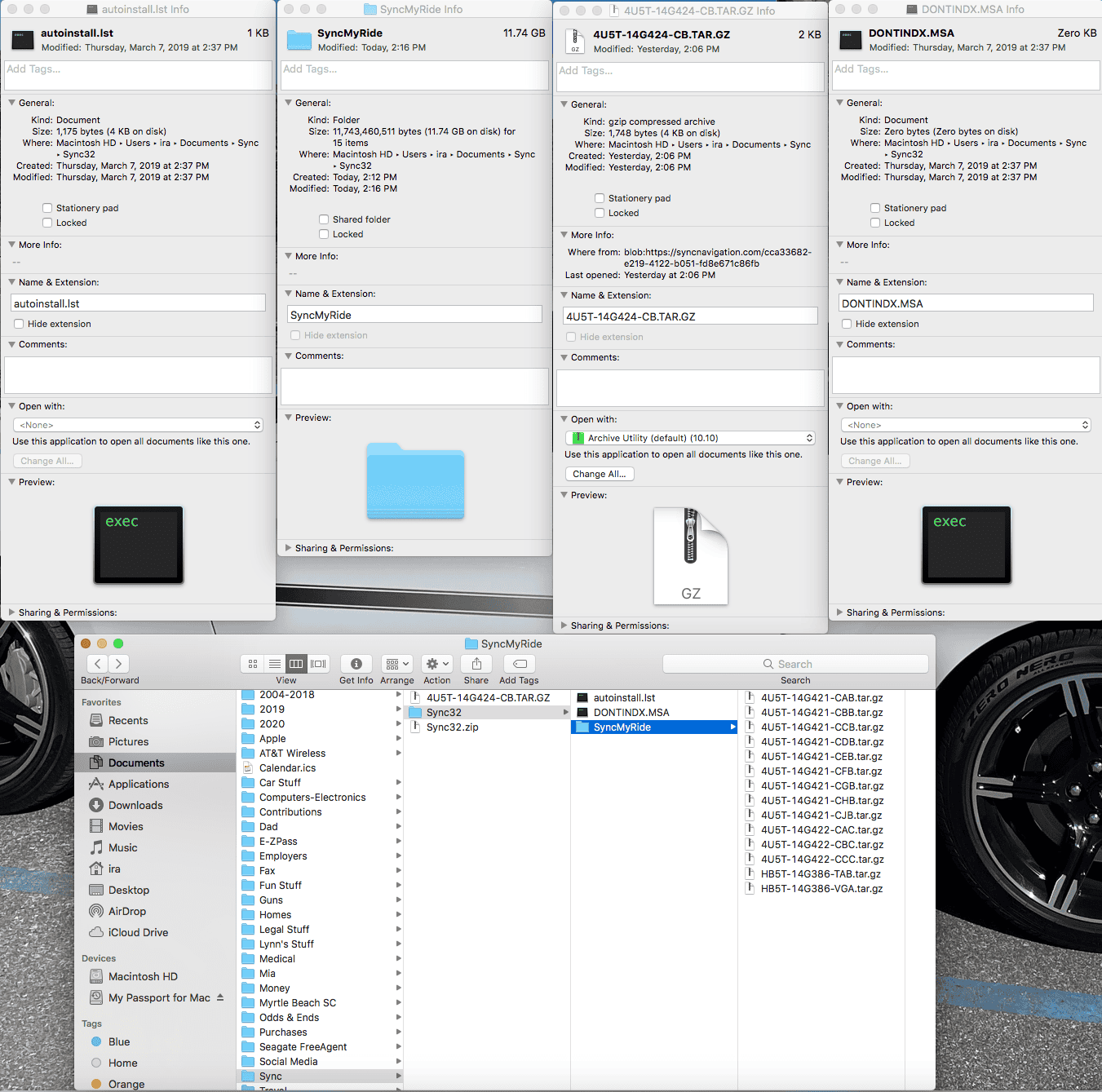
OK, so reformated my drive, unzipped the Map file and reloaded. Here is what I have. Can someone please look at this and see if the files match or are even close? Thanks.
Screen Shot 2020-01-12 at 9.24.10 PM.png
 
OP
OP
13razorbackfan

13razorbackfan

Well-Known Member
Joined
Nov 22, 2019
Threads
8
Messages
232
Reaction score
94
Location
Arkansas
Vehicle(s)
2018 Mustang GT Premium
I loaded all 3 files, one is the license and extracted everything into the primary folder meaning if you were to click on the USB drive on a pc ALL the files would be right there not divided into different subfolders. I haven't done the install yet, have no experience doing this in a vehicle but just assumed the very basic nature of these on board computers wouldn't have the ability to drive into or search around inside a variety of different folders. I could be WAY off though.

Hope that makes sense? Sometimes it's easier to explain things via the phone than to try and type all this out
 

Zooks527

Well-Known Member
Joined
Aug 24, 2018
Threads
67
Messages
1,727
Reaction score
1,395
Location
02048
Vehicle(s)
2019 KB GT, 401A, 6MT, PP1, S&S, MR, AE, B&O / 2018 Jeep Grand Cherokee Summit
OK, so reformated my drive, unzipped the Map file and reloaded. Here is what I have. Can someone please look at this and see if the files match or are even close? Thanks.
Screen Shot 2020-01-12 at 9.24.10 PM.png
At a glance (the USB is out in my car at the moment), I think it may be that the license file needs to go in the SyncMyRide folder on the SyncMyDrive flash drive, not in the flash drive's root.
 

lacanteen

Well-Known Member
Joined
Apr 18, 2019
Threads
37
Messages
3,476
Reaction score
24,310
Location
Louisiana: Cajun Country
First Name
George
Vehicle(s)
2022 EB premium vert, 2013 Escape, 2017 F150 SC5.0
My update crashed right away error05. So, I'm going to try making a FAT32 USB drive. Will be watching here to see if anyone else was successful. The zip file is on my desktop. I'm going to extract everything to the stick then drag the license file there. Would appreciate knowing if it needs to be done differently.

Edited to add: To use a term I recently learned, I finally RTFM and error05 is simply the fact that the license file needs to be in the sync my ride folder. Since the USB is in the car, and the car is at home, I'm making a new stick now from work and will attempt to install some evening this week.
 

Sponsored

Bikeman315

Well-Known Member
Joined
Apr 12, 2015
Threads
581
Messages
16,183
Reaction score
21,909
Location
Myrtle Beach, SC
First Name
Ira
Vehicle(s)
2019 Mustang GT/CS, 2021 Volvo XC60
At a glance (the USB is out in my car at the moment), I think it may be that the license file needs to go in the SyncMyRide folder on the SyncMyDrive flash drive, not in the flash drive's root.
Yes, sorry I did the screen print before I copied it over.
 

Mustang5ohMan

Well-Known Member
Joined
Feb 24, 2020
Threads
57
Messages
1,103
Reaction score
209
Location
Florida
First Name
A
Vehicle(s)
2019 Mustang GT PP1
So I just downloaded the app... my salesman called and expressed I should but I wasn’t going to do it... read about it here & said let me try it...

so far it seems ok however I realize mine doesn’t show the 42 reward points which would be great for an oil change. Why don’t I have them?
also I see some people have an oil life monitor display mine doesn’t any reason?
 

Bikeman315

Well-Known Member
Joined
Apr 12, 2015
Threads
581
Messages
16,183
Reaction score
21,909
Location
Myrtle Beach, SC
First Name
Ira
Vehicle(s)
2019 Mustang GT/CS, 2021 Volvo XC60
So I just downloaded the app... my salesman called and expressed I should but I wasn’t going to do it... read about it here & said let me try it...

so far it seems ok however I realize mine doesn’t show the 42 reward points which would be great for an oil change. Why don’t I have them?
also I see some people have an oil life monitor display mine doesn’t any reason?
First off do you have Fordpass Connect. Can you open/close the doors and stop/start (A10 only)?
When you go to the Vehicle screen did you hit the little refresh button under the picture of your car?
 

Mustang5ohMan

Well-Known Member
Joined
Feb 24, 2020
Threads
57
Messages
1,103
Reaction score
209
Location
Florida
First Name
A
Vehicle(s)
2019 Mustang GT PP1
First off do you have Fordpass Connect. Can you open/close the doors and stop/start (A10 only)?
When you go to the Vehicle screen did you hit the little refresh button under the picture of your car?
yes to all of those. Ford Pass app, lock and unlock and start. Shows my fuel tank and tire pressure. No oil life though....
 

Bikeman315

Well-Known Member
Joined
Apr 12, 2015
Threads
581
Messages
16,183
Reaction score
21,909
Location
Myrtle Beach, SC
First Name
Ira
Vehicle(s)
2019 Mustang GT/CS, 2021 Volvo XC60
yes to all of those. Ford Pass app, lock and unlock and start. Shows my fuel tank and tire pressure. No oil life though....
OK, you should see
Fuel level
Vehicle location
Tire Pressure
Oil life
Vehicle hotspot
Scheduled starts
Glove Box

Is the only thing your missing is Oil life? Did you reset the oil life monitor on the dashboard?

Also how do you know you have 42 points? If you are sure you do check to see if your dealer posted them. That's the only way it will show up.
Sponsored


Top