Sponsored

Can't Connect FordPass

akoster

Well-Known Member
Joined
Mar 24, 2025
Threads
14
Messages
67
Reaction score
85
Location
Atlanta, GA
First Name
Andrew
Vehicle(s)
2020 Mustang GT Premium w/ Performance Pack
I have been trying to connect my 2020 Mustang GT Connected to FordPass on my phone, but the prompt is not showing up on my screen.

I have made sure Sync is updated to its latest verison and also done a Master Reset. That not helped.

Anybody have any recommendations on what else to do?
Sponsored

 

Paddles

Well-Known Member
Joined
May 3, 2024
Threads
5
Messages
734
Reaction score
1,331
Location
TX
First Name
Richie
Vehicle(s)
2023 Mustang GT
Well since you asked for other recommendations... I recommend removing the telematics fuse from the car and uninstalling the pass app so Ford can no longer collect your data.

But I know that's not for everyone.

Have you already installed the app on your phone and created an account and added your vehicle to that account? Now you're trying to activate from the vehicle side but not seeing the prompt on your in-car display?

Do you have the vehicle connectivity settings and location sharing settings enabled? If they are disabled the app won't find the car.
 

The Demon

Well-Known Member
Joined
Mar 3, 2021
Threads
167
Messages
3,528
Reaction score
5,946
Location
FL
First Name
Brett
Vehicle(s)
2022 Mach 1 N5809
Vehicle Showcase
1
I said the same thing @Paddles does. My 2019 couldn’t connect either and it was the best thing that ever happened to me. The dealer was so pissed that they couldn’t get it to connect and I laughed.
 
OP
OP
akoster

akoster

Well-Known Member
Joined
Mar 24, 2025
Threads
14
Messages
67
Reaction score
85
Location
Atlanta, GA
First Name
Andrew
Vehicle(s)
2020 Mustang GT Premium w/ Performance Pack
Well since you asked for other recommendations... I recommend removing the telematics fuse from the car and uninstalling the pass app so Ford can no longer collect your data.

But I know that's not for everyone.

Have you already installed the app on your phone and created an account and added your vehicle to that account? Now you're trying to activate from the vehicle side but not seeing the prompt on your in-car display?

Do you have the vehicle connectivity settings and location sharing settings enabled? If they are disabled the app won't find the car.
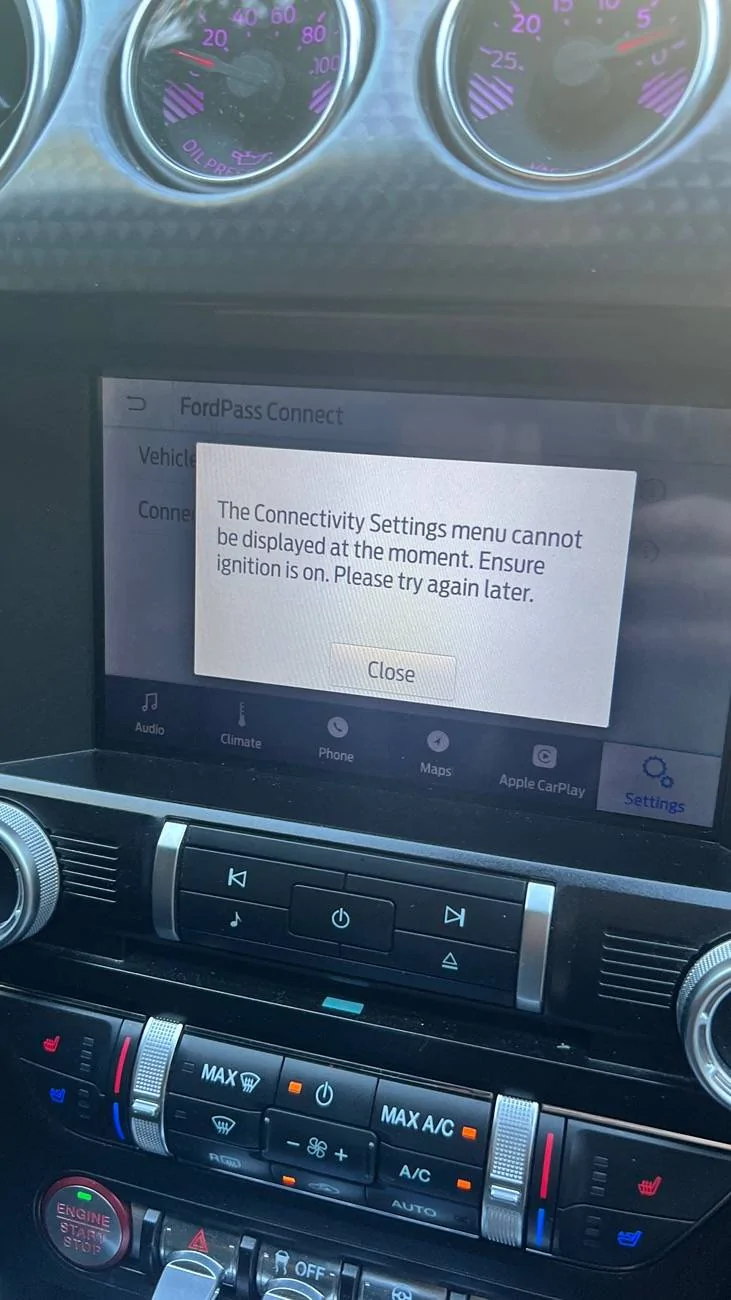
It won’t let me access the Connectivity Settings. This is what pops up when I try to do that.
IMG_9751.webp
 

Johnny Rockit

Well-Known Member
Joined
Jan 12, 2023
Threads
24
Messages
1,166
Reaction score
1,606
Location
Massachusetts
First Name
Johnny
Vehicle(s)
2022 Mustang GT 6-speed. 2015 F-250XLT,73 Torino
It took me an hour to read the new user agreement to get in the app again. I may be pulling that fuse myself soon.
 

Sponsored

Paddles

Well-Known Member
Joined
May 3, 2024
Threads
5
Messages
734
Reaction score
1,331
Location
TX
First Name
Richie
Vehicle(s)
2023 Mustang GT
It won’t let me access the Connectivity Settings. This is what pops up when I try to do that.
IMG_9751.jpeg
If restarts and master resets haven't worked then it could be a hardware problem. Maybe the fuse is burnt or has already been pulled?
 

Skye

Well-Known Member
Joined
Jan 18, 2022
Threads
13
Messages
2,907
Reaction score
4,079
Location
ā‰ˆ39N
Vehicle(s)
"Skye" Mach1 N2144
New (to the OP) car, with connectivity issues. I'm going to attach a few links of things to check.

The first two cover a topic that is becoming more and more common in the industry: GPS vehicle trackers. Many people, especially when buying a used car, later discover :curse::angry:a tracker. These are installed to recover the car in-case of theft. Or from a driver delinquent in payments. The nature of these devices on the car's internal network is enough to interfere :crazy:with systems or features.

https://www.mustang6g.com/forums/threads/unidentified-module-added-to-car.202674/

https://www.mustang7g.com/forums/threads/hidden-tracking-device-plugged-into-obd2-port.162356/

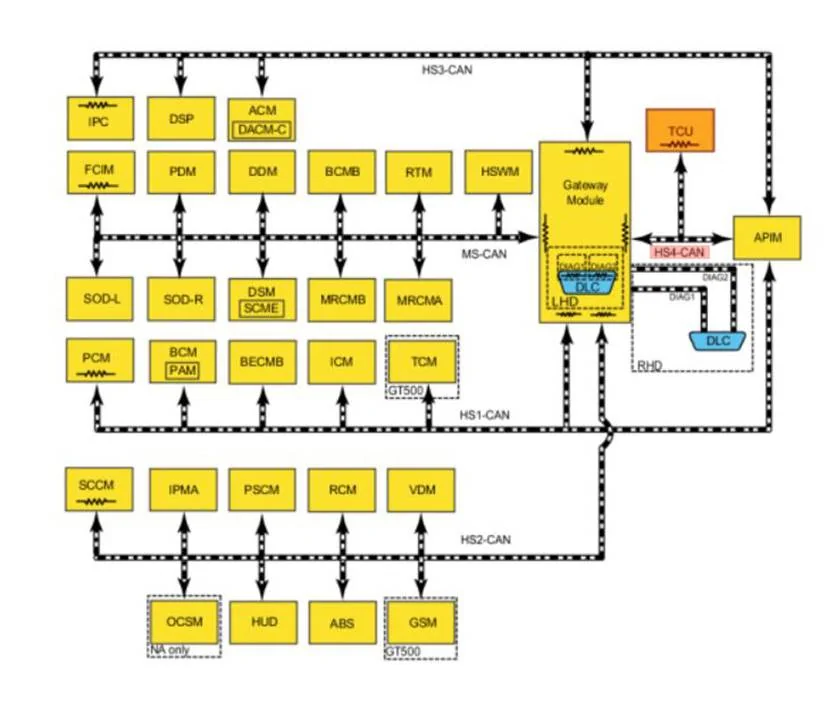
There's no one common device. But they're connected in the vicinity of the On Board Diagnostics (OBD) port, inserted in-line or attached with vampire taps. I've included a pic of the car's network. On the back end of the OBD port is the hub/switch for the Controller Area Network (CAN) bus: the Gateway Module.

https://www.mustang6g.com/forums/threads/s550-electronic-modules-and-their-networks-a-primer.195769/

The next thread covers the topic of Ford's Telematics system; it describes how to disable the service. Some opt to remove the fuse. Others, separate the antenna connections in the trunk.

https://www.mustang6g.com/forums/threads/the-how-to-disable-the-data-link-to-ford-thread.146863/

Sync is now a legacy system. I think the last update, a maintenance update, was in 2024. If the OP chooses to disable connectivity, it can easily be regained for map or service updates.

https://www.mustang6g.com/forums/threads/official-ford-sync3-3-4-release.145436/

If the OP continues to be interested in adding the car to the Pass App, one thing that might facilitate that is a Ford Customer account (if not already created). It can be established, here.

https://login.ford.com/4566605f-43a7-400a-946e-89cc9fdb0bd7/B2C_1A_SignInSignUp_en-US/oauth2/v2.0/authorize?redirect_uri=https://www.ford.com/support/&response_type=code&state={"policy":"email_susi_policy","lang":"en_us","state":"L3ZlaGljbGUtZGFzaGJvYXJk","queryHash":"","forwardUrl":""}&client_id=77d5d23f-7d9a-4850-aaee-ddb496bb27dd&scope=77d5d23f-7d9a-4850-aaee-ddb496bb27dd openid&code_challenge=fbv9LuCB9c3eWPwaHpX9JuQrqPTxIijwvK-6IM52LZo&code_challenge_method=S256&ui_locales=en-US&template_id=Ford-MFA-Authentication&ford_application_id=4f5eebbd-97ba-4ca6-a2d3-1d2d7bfe5a1a&country_code=USA&language_code=en-US&bypass=signup

But ya: fix vehicle connectivity first, then delve into Pass App.

If a tracker is found, be sure to do a drive-by and chuck it at the dealer. :bandit:

Edit,

If a tracker is found, but it's installed in such a way removing it is a question mark :question:, return to dealer and wait until it is removed. Afterwards, while still there, inspect the area to ensure the car is tracker-free and there's no damage. Connectivity could be fixed just by doing that.

Good Luck OP. :please:

Edit (again) :giggle:,

Being an electronics issue, there could be several things. Spitballing...

- Check for a tracker. Locate the OBD port and just give things a good visual

- Check the fuse panel supporting the Body Control Module (right, floor, behind passenger kick panel)

- Factory default the Sync system. This will remove any previous settings

https://www.ford.com/support/how-to.../how-do-i-perform-a-sync-masterfactory-reset/

- If you have an OBD scan tool, check for any codes. I understand there's currently no wrench light

- Disconnect the battery, let the car sit overnight, then reconnect

Any of those checks or tests could give you tells as to what the problem is. If those, Member posts here and your own thoughts don't clarify what the problem could be, check back with the dealer and discuss.

If you have time, let us know what comes about. :like:
can logical 001.JPG
Sponsored

 
Last edited:


Top