Sponsored

Mustang 4" to 8" Sync 3 Upgrade (2015-2018)

xVolaft

Well-Known Member
Joined
Jun 1, 2023
Threads
10
Messages
53
Reaction score
35
Location
Space
Vehicle(s)
Mustang S550
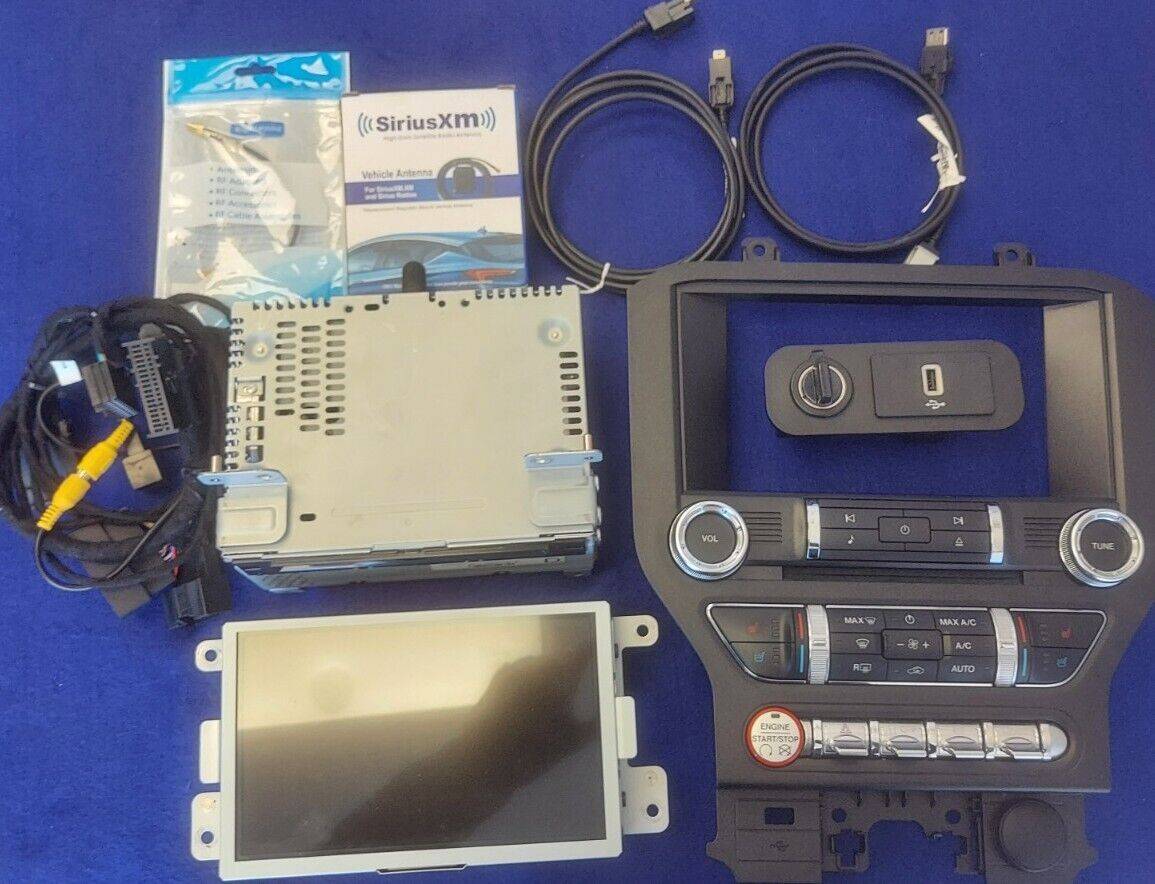
Mustang 4 inch screen to the 8 inch screen. Bought it from ebay (ThePartsFarm), the parts were from a wrecked mustang.

The following parts were used to upgrade:
1.jpg


The Upgrade is NON-GPS, the GPS Antenna was not included. So, I bought from amazon GPS Antenna (Eightwood company, working great). I followed a step by step video from Infotainment on youtube to upgrade my screen. I did not upgrade the ACM (Radio/CD), I left the original one.

Programming codes using forscan and [OBD EX - optional] (Thanks to Hellhorse Performance):

1- Hazards operation in the BdyCM (BCM):
  • a. (2015-2020) BCM 726-29-02 xxxx xxx0
  • b. (2021+) BCM 726-41-01 - x0xx
2- Drive modes enable in ABS:
  • a. GT Performance Package: ABS 760-02-02 xxxx 7x
  • b. GT without PP: ABS 760-02-02 xxxx 3x
  • c. (2015-2017) EcoBoost or V6: ABS 760-02-02 xxxx 1x
  • d. (2018+) EcoBoost: ABS 760-02-02 xxxx 3x
3- Drive modes enable in IPC:
  • a. IPC 720-06-01 xxxx xxxx x8
  • b. (If the step above doesn’t work try this) IPC 720-06-01 xxxx xxxx 98
4- ACM Audio Fixes (Call audio fix):
  • a. ACM 727-01-01 9xxx xxxx xx (ONLY For base ACM, no SXM/HD)
  • b. ACM 727-01-01 xx0x xxxx xx (ONLY If upgrading to SXM/HD - amp audio fix)
5- Enable HD Radio (only if adding HD Radio Receiver):
  • a. APIM 7D0-01-01 xxxx xxx3 xx
Optional Programming:
  • If you have an issue with low volume make this change in the ACM if not already made:
    • ACM 727-01-01 xx0x xxxx xx
  • Factory NAV owners - if the compass is backwards check this in the APIM:
    • Manual Transmission: APIM 7D0-01-02 xx9x xxxx xxxx
    • Automatic Transmission: APIM 7D0-01-02 xx0x xxxx xxxx
Programming a mustang ecoboost 2017 base using these codes:
  • 1, A.
  • 2, C.
  • 3, A.
  • 4, A.
  • Turned off double horn/honk: BCM 726-41-02 xxx0 xxxx xxxx
  • Turned off seatbelt reminder: IPC: Using the tables on FORSCAN.
READ!!!
After changing the ACM codes in forscan, you will notice a different sound of the chime (it will sound like the old mustang), the sound will come out from the dashboard instead of coming out from the speakers. Its fine, you just need to turn off the car for 1-6 hours and the sound will come back same as before, nothing to worry about.

When I installed it the APIM, it appeared to be not functioning properly and had it replaced by thepartsfarm for free of charge, here are the problems that I encountered:

  1. Upon restarting the vehicle, the previous owner's Bluetooth devices are re-added, even after I have deleted them.
  2. Although the Bluetooth connection functions properly when I connect my device to the car, it gets deleted when I turn off and then turn on the car.
  3. Both master reset and soft reset attempts have been unsuccessful, as the previously deleted devices and settings are restored.
  4. When attempting to update the Sync to latest version 3.4 using various USB, I encounter an error: INSTL_ERR12.
  5. The auto-update to 3.4 feature also fails to rectify the issue.
I also encounted a problem regarding the harness wire (start button not working). However, it appeared it was not an issue, please read my other article (You will need to bypass the wire to let the start button work): Click Here
But is suggested to add the missing wires, not adding them will still work perfectly, nothing to worry about.


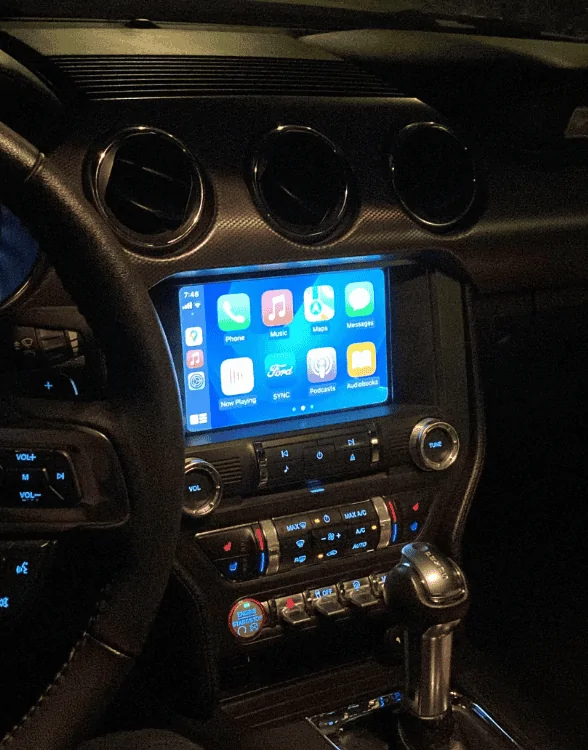
All in all, here is the final look:
Screenshot 2024-05-11 030333.png


Definitely worth the upgrade! Go ahead and do it.
Sponsored

 
Last edited:

SnowTyres

Member
Joined
Aug 11, 2019
Threads
1
Messages
12
Reaction score
3
Location
Los Angeles
First Name
Steve
Vehicle(s)
2016 Mustang Ecoboost PP+
Looks great! I definitely want to do this and it seems pretty easy for reasonably mechanical hands…

thanks for any help/answers you can provide for the questions below!

Questions:
1. Did everything you need (other than the GPS antenna) come from your eBay purchase? Or did you have to buy additional cables/wiring harness parts? It seems like the more expensive upgrade kits have more/different cables to make the connections.

2. I don’t really care about GPS/nav. Is there a difference in the part numbers I should look out for?

3. Does Apple CarPlay work properly over Bluetooth? (This should be #1. It’s the main reason I want to upgrade.)

4. I have a 2016. How much does it matter that I get a 2015-17/18 vs 2019+ unit? There were some minor changes from what I have read that make this upgrade easier in the newer cars but is it easier to just stick with the matching mode years?

5. Was there any specific reason you chose not to swap out the CD player for the matching one from the kit? Would a matching pair help alleviate some of the troubleshooting? Or all of it gets overwritten with Forscan anyway?
 
OP
OP
xVolaft

xVolaft

Well-Known Member
Joined
Jun 1, 2023
Threads
10
Messages
53
Reaction score
35
Location
Space
Vehicle(s)
Mustang S550
Looks great! I definitely want to do this and it seems pretty easy for reasonably mechanical hands…

thanks for any help/answers you can provide for the questions below!

Questions:
1. Did everything you need (other than the GPS antenna) come from your eBay purchase? Or did you have to buy additional cables/wiring harness parts? It seems like the more expensive upgrade kits have more/different cables to make the connections.

2. I don’t really care about GPS/nav. Is there a difference in the part numbers I should look out for?

3. Does Apple CarPlay work properly over Bluetooth? (This should be #1. It’s the main reason I want to upgrade.)

4. I have a 2016. How much does it matter that I get a 2015-17/18 vs 2019+ unit? There were some minor changes from what I have read that make this upgrade easier in the newer cars but is it easier to just stick with the matching mode years?

5. Was there any specific reason you chose not to swap out the CD player for the matching one from the kit? Would a matching pair help alleviate some of the troubleshooting? Or all of it gets overwritten with Forscan anyway?
Sorry for the late reply.
1- Everything I need came from what I purchased except the GPS antenna. However, it depends on the seller, some of the sellers will only sell you the APIM (Sets behind the screen), the screen itself, and the trim, with no wires or anything.

2- Mostly sellers will tell if it is NAV or NON-NAV.

3- Just to let you know, most of the cars does not support applecar play over bluetooth, it must be wire. If you saw a screen with applecar play over bluetooth, it mostly will be an chinese screen (android), not the original sync.
If you want it over bluetooth, you will need to buy a wireless carplay adapter. I dont recommend it at all, it keeps disconnecting, the framerate wont be smooth as it is wired, it will keep glitching.
Be carful, you need to buy sync 3, not sync 2. Sync 2 does not support apple car play.

4- If your car is 2016, then you will have to buy 2015-2017 trim kit (the bezel), the start/stop button will be white (2018+ start/stop button will be grey).
APIM, Screen, and any other thing will be okay, it can be from any model 2015-2023. But I recommend buying a gen3 or gen4 (manufactered 2018+).

5- I did not change the cd slot because I am already having a cd slot. Also, I dont want the SiriusXM or HD radio.
Change it only if you want to have SiriusXM/HD radio, or having a CD slot. Because it is so so so annoying, please look at my other forum on how to change it (It is called ACM), Click here.

Notes:
- APIM: This is the module sitting behind the screen. Look for GEN3/GEN4. NAV or NON-NAV.

- Screen: Look for SYNC 3.

- ACM: This is the radio kit, audio. Features that can be added based on ACM: CD, SiriusXM/HD Radio. There are many ACM, choose one carefully if you want to upgrade. Forexample, some of them will have CD slot but no SiriusXM/HD Radio, or some of them will have SiriusXM but no HD radio, and many...

- FCIM: Is the trim, there are 4 options: 15-17 or 18+ model CD, or no CD. So, you need to choose based on your model and acm, if your car is 2016 with CD slot, then you need to buy a bezel that has a cd inlet, otherwise you will need to buy a bezel with no CD inlet.

- Maybe, you will face an issue with the harness that you buy. If you face an issue where the start button does not work, use this solution: Click here

- You will need to upgrade the usb hub located in the storage, and the usb wires.

- Please look at the parts in the picture, you will need to buy them, except for the radio and the SiriusXM antenna (if you dont want to upgrade the radio).
 
Last edited:

SnowTyres

Member
Joined
Aug 11, 2019
Threads
1
Messages
12
Reaction score
3
Location
Los Angeles
First Name
Steve
Vehicle(s)
2016 Mustang Ecoboost PP+
Awesome! Thank you for the detailed and thoughtful reply. This will help a lot!
Sponsored


Top