
Sponsored

hinch
Well-Known Member
seems to take about 5 minutes on mine but it needs a good wifi connection a barely there 1 or 2 bar connection seems to fail all the time. also doesn't like using the phone hotspot even though it says its connected.
kapiteinlangzaam
Well-Known Member
- Joined
- Jan 26, 2016
- Threads
- 125
- Messages
- 1,871
- Reaction score
- 718
- Location
- Netherlands
- Vehicle(s)
- 5.0 GT Coupe 6MT PP1
As far as I know, there are no 'updates', so that might well be your issue 
simonp83
Well-Known Member
- Joined
- Jul 2, 2014
- Threads
- 15
- Messages
- 444
- Reaction score
- 65
- Location
- Grantham, UK
- First Name
- Simon
- Vehicle(s)
- Mustang GT S550
Where are the options to connect to wifi, in the Sync options?
hinch
Well-Known Member
[ame]Where are the options to connect to wifi, in the Sync options?
Sponsored
PeterE
Well-Known Member
- Joined
- Sep 28, 2016
- Threads
- 9
- Messages
- 125
- Reaction score
- 50
- Location
- Surrey, England
- First Name
- Peter
- Vehicle(s)
- 2017 S550 GT; 2022 Z4 M40i; 1978 Stag
Mine takes around 5 mins to complete the update check but I've not seen any applied so its on the same version it was delivered with.
It's parked only a few feet away from the WiFi access point - 5 bars on my phone from inside the car but only 2 on the Sync3 screen so the car does not seem to have a very sensitive antenna.
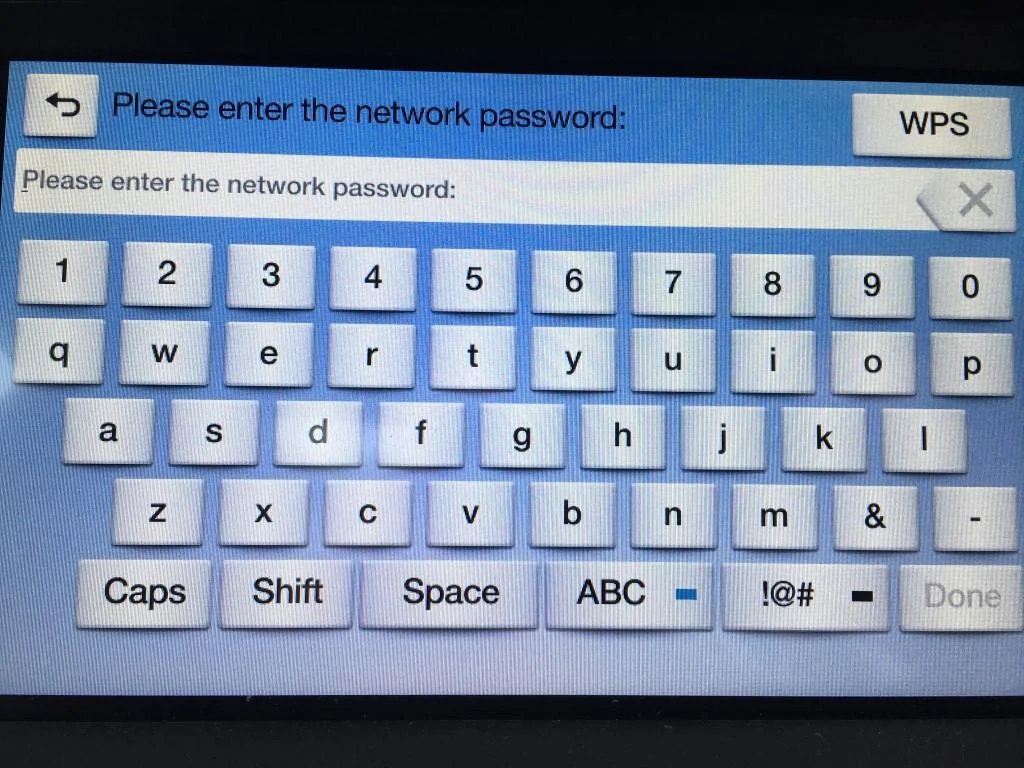
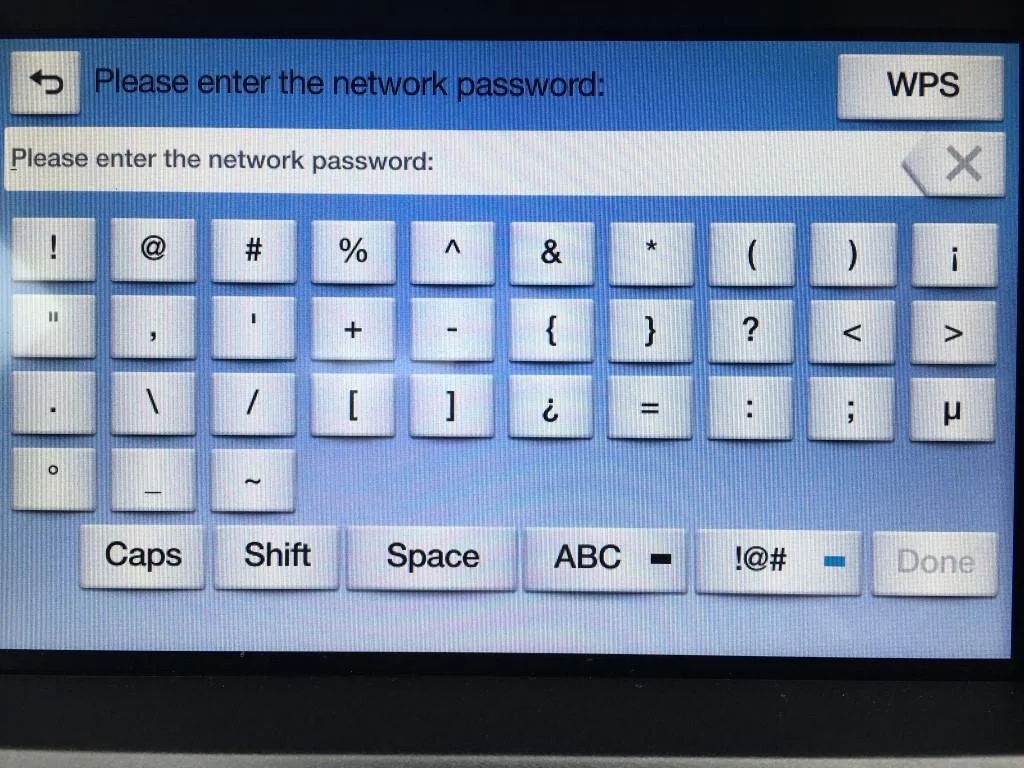
What is irritating for me is that the WiFi setup keyboard does not appear to have a '$' character anywhere (unless I'm being dumb); why not - this is a US car after all :doh:? My WiFi SSID has a '$' in it and the obvious option would be to change that, however, I have over 15 WiFi enabled devices that connect to the network so don't really want to change every one of them. Wi-Fi Protected Setup (WPS) doesn't work either.
So I just set up a separate WiFi access point with a $-free SSID...
Keyboard layouts:

It's parked only a few feet away from the WiFi access point - 5 bars on my phone from inside the car but only 2 on the Sync3 screen so the car does not seem to have a very sensitive antenna.
What is irritating for me is that the WiFi setup keyboard does not appear to have a '$' character anywhere (unless I'm being dumb); why not - this is a US car after all :doh:? My WiFi SSID has a '$' in it and the obvious option would be to change that, however, I have over 15 WiFi enabled devices that connect to the network so don't really want to change every one of them. Wi-Fi Protected Setup (WPS) doesn't work either.
So I just set up a separate WiFi access point with a $-free SSID...
Keyboard layouts:

- Joined
- Jun 5, 2015
- Threads
- 46
- Messages
- 2,251
- Reaction score
- 760
- Location
- Glasgow, Scotland
- Vehicle(s)
- Priscilla McMustang GT Ruby Team DS
- Banned
- #7
Sync 2 randomly updated itself today :shrug:
No idea what it was updating, could've been using the Mrs iPhone wifi as we had been listening to Spotify :shrug:
No idea what it was updating, could've been using the Mrs iPhone wifi as we had been listening to Spotify :shrug:

Manders Mustang
The Boss
- Joined
- Dec 3, 2015
- Threads
- 96
- Messages
- 12,999
- Reaction score
- 2,441
- Location
- Birmingham - United Kingdom
- First Name
- Steve
- Vehicle(s)
- 2016 Race Red Ecoboost
- Vehicle Showcase
- 1
^ Gonna have to put mine on the drive to test this, it doesn't quite reach the wifi on sync 2 in the garage.
As for the $ sign [MENTION=26630]PeterE[/MENTION] try hitting Shift when on the !@# menu or tap that button again. Sync hides things in multiple places by hitting the same button, counter intuitive as fk. Like on Sync 2 when entering a postcode you can hit ABC 3/4 times and get different menues on each one (not that anyone uses the other one in the UK)
As for the $ sign [MENTION=26630]PeterE[/MENTION] try hitting Shift when on the !@# menu or tap that button again. Sync hides things in multiple places by hitting the same button, counter intuitive as fk. Like on Sync 2 when entering a postcode you can hit ABC 3/4 times and get different menues on each one (not that anyone uses the other one in the UK)
PeterE
Well-Known Member
- Joined
- Sep 28, 2016
- Threads
- 9
- Messages
- 125
- Reaction score
- 50
- Location
- Surrey, England
- First Name
- Peter
- Vehicle(s)
- 2017 S550 GT; 2022 Z4 M40i; 1978 Stag
Just tried this again - the WiFi keyboard is a subset of the navigation one so does not have the dual extended character set with extras including the '$'.As for the $ sign [MENTION=26630]PeterE[/MENTION] try hitting Shift when on the !@# menu or tap that button again. Sync hides things in multiple places by hitting the same button, counter intuitive as fk. Like on Sync 2 when entering a postcode you can hit ABC 3/4 times and get different menus on each one (not that anyone uses the other one in the UK)
I even tried setting the system to alternate languages (only European ones available) and the WiFi keyboard is the same for all; I assume that a US keyboard would have the '$'?
Also, if your WiFi network name is hidden, Sync3 won't find it:frusty:
Manders Mustang
The Boss
- Joined
- Dec 3, 2015
- Threads
- 96
- Messages
- 12,999
- Reaction score
- 2,441
- Location
- Birmingham - United Kingdom
- First Name
- Steve
- Vehicle(s)
- 2016 Race Red Ecoboost
- Vehicle Showcase
- 1
Smart... Not... if you want, put your phone on the wifi, plug phone in via the lower USB (Under the air con controls by the ciggy lighter), and it should ask to connect to the network, hopefully that'll work (Can't promise)Just tried this again - the WiFi keyboard is a subset of the navigation one so does not have the dual extended character set with extras including the '$'.
I even tried setting the system to alternate languages (only European ones available) and the WiFi keyboard is the same for all; I assume that a US keyboard would have the '$'?
Also, if your WiFi network name is hidden, Sync3 won't find it:frusty:
Sponsored
kapiteinlangzaam
Well-Known Member
- Joined
- Jan 26, 2016
- Threads
- 125
- Messages
- 1,871
- Reaction score
- 718
- Location
- Netherlands
- Vehicle(s)
- 5.0 GT Coupe 6MT PP1
Reading around, it seems WiFI OTA updates are for SYNC3 only.
Therefore all us poor sods with old cars cant do it ;)
Therefore all us poor sods with old cars cant do it ;)
Manders Mustang
The Boss
- Joined
- Dec 3, 2015
- Threads
- 96
- Messages
- 12,999
- Reaction score
- 2,441
- Location
- Birmingham - United Kingdom
- First Name
- Steve
- Vehicle(s)
- 2016 Race Red Ecoboost
- Vehicle Showcase
- 1
How come @Lone_Survivor has his Sync 2 update then? :shrug:Reading around, it seems WiFI OTA updates are for SYNC3 only.
Therefore all us poor sods with old cars cant do it ;)
kapiteinlangzaam
Well-Known Member
- Joined
- Jan 26, 2016
- Threads
- 125
- Messages
- 1,871
- Reaction score
- 718
- Location
- Netherlands
- Vehicle(s)
- 5.0 GT Coupe 6MT PP1
Maybe he was mistaken, I dont know.
I cant find any reference to the Sync2 (myFord Touch) being OTA update-able anywhere on the web, and its mentioned as a 'new' feature specifically for Sync3.
I cant find any reference to the Sync2 (myFord Touch) being OTA update-able anywhere on the web, and its mentioned as a 'new' feature specifically for Sync3.
Manders Mustang
The Boss
- Joined
- Dec 3, 2015
- Threads
- 96
- Messages
- 12,999
- Reaction score
- 2,441
- Location
- Birmingham - United Kingdom
- First Name
- Steve
- Vehicle(s)
- 2016 Race Red Ecoboost
- Vehicle Showcase
- 1
I thought the same, but I could have sworn I also saw a "Check for updates" button on my sync 2 somewhere... maybe mistaken :lol:Maybe he was mistaken, I dont know.
I cant find any reference to the Sync2 (myFord Touch) being OTA update-able anywhere on the web, and its mentioned as a 'new' feature specifically for Sync3.
kapiteinlangzaam
Well-Known Member
- Joined
- Jan 26, 2016
- Threads
- 125
- Messages
- 1,871
- Reaction score
- 718
- Location
- Netherlands
- Vehicle(s)
- 5.0 GT Coupe 6MT PP1
There is such a button, but its for local files on a SD card, downloaded from the web.I thought the same, but I could have sworn I also saw a "Check for updates" button on my sync 2 somewhere... maybe mistaken :lol:
Its not for WiFi OTA.
Sponsored


